| Author |
 Replies: 83 / Views: 12,461 Replies: 83 / Views: 12,461 |
|
|
|
Pillar Of The Community
Canada
5821 Posts |
|
|
I thought the idea was for everyone to scan one common stamp that we all had in order to compare the different types. O well. Mine is a stand alone Epson Perfection 4490 Photo I bought about 4 years ago. At the time the primary reason for the purchase was to turn a whole bunch of negatives I had ( from the forties to sixties) into photos. I normally scan stamps at 1200dpi and the only Image Adjustments I've ever used is the contrast up to about a 6+ . Plus if the pic is really crooked I use the Picas straightening tool which IMO causes a slight blur to the end product. Here are a couple of US I just scanned. I'm sure some of the All in One people have these and we can compare apples to apples.    |
Send note to Staff 
|
|
|
Pillar Of The Community
United States
6664 Posts |
|
|
Quote:
I thought the idea was for everyone to scan one common stamp that we all had in order to compare the different types.
O well. I tried, but it took off, and as you stated...oh well... Litho, I have always thought that the scans you post are stunning. Your scanner has great color depth.  |
|
Send note to Staff
|
| Edited by stallzer - 02/07/2013 7:02 pm |
|
|
Pillar Of The Community
1448 Posts |
|
|
 1937 Scott 187 3c purple "Generals Sherman, Grant and Sheridan" 1937 Scott 187 3c purple "Generals Sherman, Grant and Sheridan" Scanned with HP Officejet 4500 G510n-z "All-in-One" @ 1200dpi,and uploaded to Picasaweb albums, where an 800px image was used for SCF. No sharpening or contrast enhancement.  The color of my particular stamp reflects (to my eyes) the color I see displayed. As I collect the classical era, I do not have the Chief Joseph stamp. |
|
Send note to Staff
|
|
|
|
Pillar Of The Community
United States
1614 Posts |
|
|
I'll play - 4 different scans from my 2 scanners: 1st is an Epson NX420 All In One with auto exposure set to "photo"  2nd is same All in one but with the auto exposure set to "document"  3rd is Epson V30 CCD Standalone with auto exposure set to "photo"  4th is the V30 with auto exposure set to "document" (By far my favorite setting and gives the most accurate scan to what I see in real life)  |
|
Send note to Staff
|
|
|
Pillar Of The Community
Canada
5821 Posts |
|
|
From what has been shown so far I think that the difference in quality between the All in Ones and the Standalones is not that great. Definitely not Quote:
all-in-ones tend to be pretty abysmal. as been mentioned before. But still I believe it's obvious that scans from the Standalones are sharper and more true to colour. If one looks at the examples that Mike33 produced I doubt of any one would disagree that the 4th is the best. BTW Mike, I only use the photo setting when I scan negatives, never for stamps. I have a Canon MX340 All in One and I have never scanned anything on that. Maybe I'll give it a try, just for fun. |
|
Send note to Staff
|
|
|
Pillar Of The Community
United States
898 Posts |
|
|
Does anyone know what kind of adjustments a scanner makes between "photo" and "document"? Which settings would it be tweaking? |
|
Send note to Staff
|
|
|
Pillar Of The Community
Canada
5821 Posts |
|
|
Stallzer Lithograving Jkjblue |
|
Send note to Staff
|
| Edited by lithograving - 02/07/2013 7:45 pm |
|
|
Pillar Of The Community
United States
1614 Posts |
|
|
Here's a more extreme example of photo vs document. For some reason, since I was always scanning baseball cards, I always had it set to "photo" - that was my default. So when I started scanning all my album pages for my website ( http://home.comcast.net/~zeppelin33...s/index.html ), I scanned from page one into the 1970s using the "photo" setting without giving a second thought or even noticing there was a different option. Here's a page scanned with "photo" that I was quite happy with at the time :  Notice the page itself - you can see the texture of it Now here's a page scanned as document - the page is much purer and the stamps pop out a lot more  Also, if I closed the lid with the setting on "photo", the text on the back would bleed through so all my "photo" scans, have the lid open and the "document" scans have the lid closed to give a perfectly flat scan |
|
Send note to Staff
|
|
|
Pillar Of The Community
1448 Posts |
|
|
Quote:
From what has been shown so far I think that the difference in quality
between the All in Ones and the Standalones is not that great.
Agree I would also concede that the standalones have more upside. But some All-in Ones actually give little away. I think we can all agree on that.  |
|
Send note to Staff
|
|
|
|
Pillar Of The Community
United States
6664 Posts |
|
|
But here's the kicker. The US Army stamp I scanned is faded and that is exactly how it looks off the scanner. I thought of this last night that the only true test can be to scan the exact same stamp on different scanners. Yes we can all scan the same scott numbered stamp, but are all the stamps being scanned have the exact same color ? |
|
Send note to Staff
|
|
|
Pillar Of The Community
United States
1179 Posts |
|
|
Scans Epson V600 - two scans- both 600dpi/compression 13 - one as a "photograph" - one at "document" setting for comparison. Scan on "Document" setting 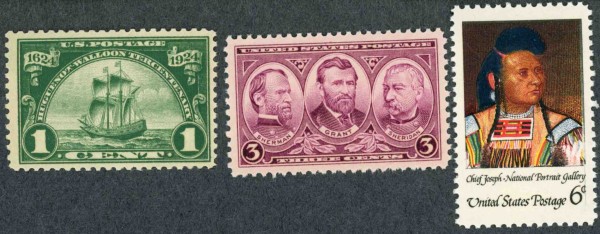 Scan on "Photograph" setting 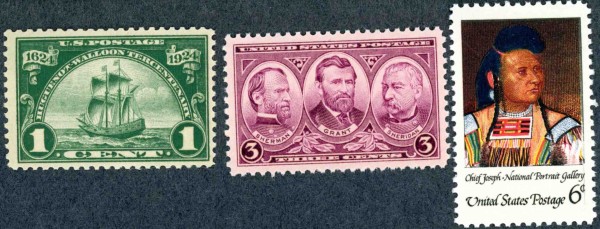 I normally scan at 300dpi unless I am trying graphically enlarge and portray an element within a stamp or cover. Otherwise, you are going to chew-up GB or TB of memory devices. I got tired of having to burn CD's and erase memory devices for something I only access occasionally. I'd rather invest the $$$.$$ in postal history versus accessories. However, it's your call. Hal PS Setting is "Professional Mode" |
|
Send note to Staff
|
| Edited by Hal - 02/07/2013 9:27 pm |
|
|
Pillar Of The Community
United Kingdom
1361 Posts |
|
|
Epson 3490 @1200dpi Pro mode - scan type - document Slight unsharp mask no other adjustments during scan or image editing Win7 + PaintShopPro 8  |
|
Send note to Staff
|
|
|
Pillar Of The Community
1545 Posts |
|
|
I did post stalzer's Scott #614. https://goscf.com/t/30390&whichpage=2#259697Here is Scott #787 (HP Office Jet 5610 All-In-One scanned as "picture" at 300 PPI) 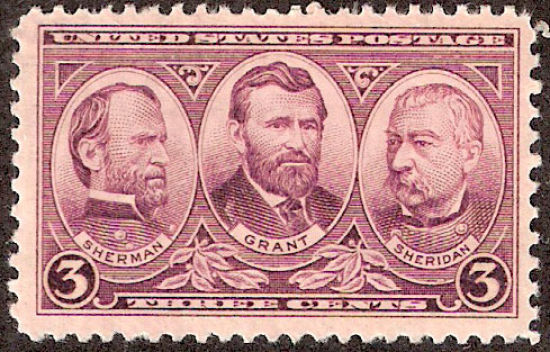 The optimizer lightens the color a bit, so the uploaded file should be darker than the scan to match color. I will play around with contrast in Photoshop. (Being an obsessive compulsive perfectionist I can do no else!) -IBFS I was wrong...the Optimizer does not lighten the scan. I put the optimized download next to the original scan in Photoshop and they matched perfectly. But it is lightened somehow once uploaded. Hmmm... -IBFS |
|
Send note to Staff
|
| Edited by I Brake For Stamps - 02/08/2013 1:50 pm |
|
|
Pillar Of The Community
1545 Posts |
|
|
Same scanner with Litho's idea of scanning at 1200 and adding contrast. I also used "enhance color" which does nothing to the color at all, but makes the image look much, much, sharper. After thought, I think my lightening issue may have something to do, at least in part, with the enlarged view. the engraved lines are farther apart allowing the white paper lines to show through more creating the illusion of a lighter image. This is by far my best yet, tho a bit too dark. Less Photoshop contrast next time. 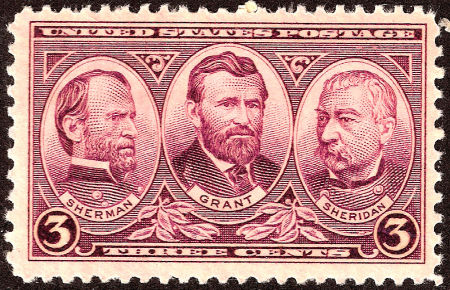 -IBFS |
|
Send note to Staff
|
| Edited by I Brake For Stamps - 02/08/2013 2:45 pm |
|
|
Pillar Of The Community
1448 Posts |
|
|
Quote:
Same scanner with Litho's idea of scanning at 1200 and adding contrast. I also used "enhance color" which does nothing to the color at all, but makes the image look much, much, sharper. After thought, I think my lightening issue may have something to do, at least in part, with the enlarged view. the engraved lines are farther apart allowing the white paper lines to show through more creating the illusion of a lighter image. This is by far my best yet, tho a bit too dark. Less Photoshop contrast next time.
You have made remarkable progress.  |
|
Send note to Staff
|
|
|
|
Replies: 83 / Views: 12,461 |
|




 Posted 02/07/2013 5:10 pm


