| Author |
 Replies: 33 / Views: 5,268 Replies: 33 / Views: 5,268 |
|
|
|
Pillar Of The Community
United States
1756 Posts |
|
|
Thank you all for chiming in on the scanner... It is the Brother HL-L2380DW (combo) http://www.brother-usa.com/Printer/....VSF8RPAoHKQIn B&W it goes all the way up to 19200x19200 (interpolated) however, when set to color, it defaults to 600x600 and cannot be changed... Perhaps the reason might be that it's 24-bit and not 32 or higher... It doesn't come with any photo software, so I continue to use my old software iPhoto Plus 4 from my old Scanport SQ4836... The Scanport was also 24-bit, but the Brother optics appear to perform better... |
Send note to Staff 
|
| Edited by disi123 - 04/05/2015 1:57 pm |
|
|
Pillar Of The Community
United States
937 Posts |
|
|
http://support.brother.com/g/b/down..._us_as&os=92If that link doesn't work, then click "Support" on the left side of the page you linked to. They have downloads of the latest driver and software. The last release was less than a month ago which is probably newer than what was on the CD it shipped with. They also provide a download to update the firmware. The last update came out on 11/30/2014 so there is a chance that yours has the older version. If you don't want the bloated software, its driver does support TWAIN. Windows 7 and up (maybe Vista) has built in support for it. This allows you to acquire a scan from inside of many photo editing programs. Usually it's in the "file" drop down list. This is how you're able to use the scanner through iPhoto Plus 4. Paint.net is a good freeware program that should allow you to access the higher resolutions. 24 bit (8 per channel) is perfectly fine for most applications and wouldn't limit the resolution. The optical resolution is limited to a maximum of 600x2400. The additional vertical resolution is useful and would be available using Brother's software and programs such as Paint.net and Photoshop. |
|
Send note to Staff
|
Ryan = HDNAC = DNA = HDC = Hysterical DNA Collector = Historical DNA Collector = me who just loves stamps :) |
|
|
Pillar Of The Community
United States
1756 Posts |
|
|
Pillar Of The Community
2013 Posts |
|
|
Disi, with Brother you should have 2 scanner driver installed, when you scan from your software you should be able to choose witch one . Look at the first pic from Qimp, I have 2 choice of the same scanner 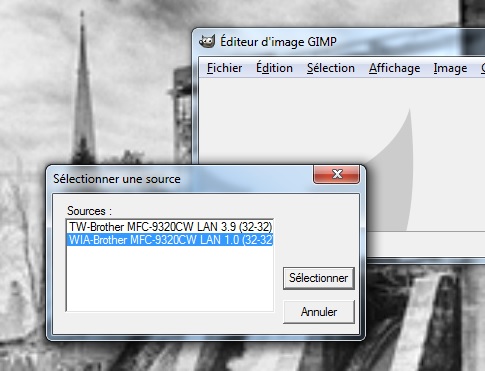 now sorry for the french, but if you take the option without the TW it will give you 600 or 1200 maximum like this 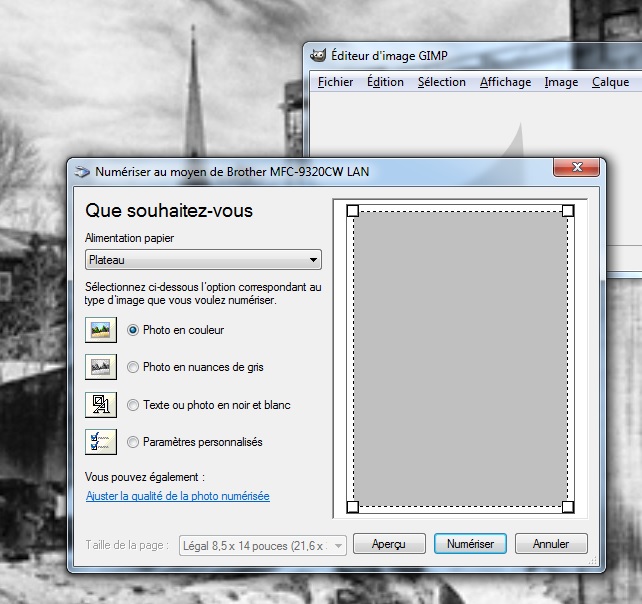 But if you get the option with the TW, you will have full resolution like in this photo ( notice the difference betwen the 2 windows 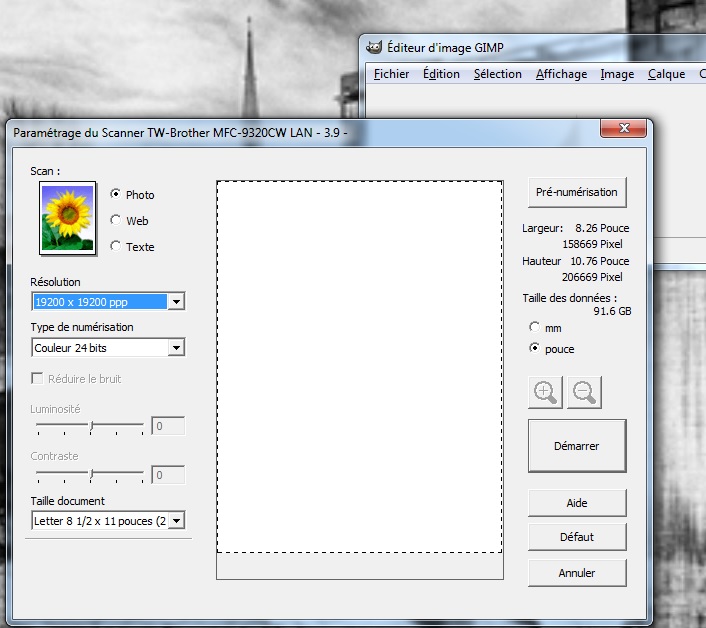 Now if you don't have 2 option and you get a windows like the first one, you can increase at 1200 with the Brother utility, it'S in the program folder brother, scanner utility, ( again in french but you should figure wiht the picture, also my scanner is not the same model ) 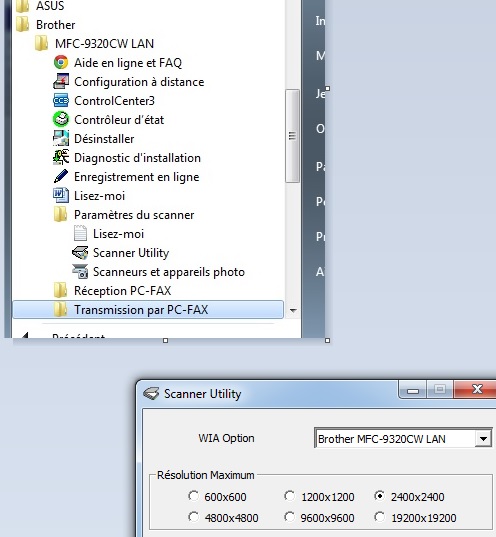 |
|
Send note to Staff
|
| Edited by area66 - 04/05/2015 2:37 pm |
|
|
Pillar Of The Community
United States
1414 Posts |
|
|
Unfortunately, the new TWAIN interface is quite limiting. The older WIA interface, supported only by 32 bit versions of Photoshop provide a much better experience. For that reason, I am forced to use Photoshop 97 for Scanning because it interfaces more or less properly with the CanoScan ScanGear software. Unfortunately, none of that works with WIA and manual file import must be used.
Clark |
|
Send note to Staff
|
|
|
Pillar Of The Community
United States
1756 Posts |
|
|
Well, I've completely downloaded the entire software package...
Brother does not have any graphics software included... all it
does is create a new button in the Control Center to open a saved
file, and work with it using either Microsoft Office Picture Monitor
orr Paint as the only choices, neither of which have the capabilities
of my Scanport iPhoto Plus 4 software, so I'll just have to continue
using what I have been for the last 18 years (short of purchasing
PhotoShop or the like)...
area 66 : your software for your MFC-9320CW is not available for
the model I have : HL-L2380DW |
|
Send note to Staff
|
| Edited by disi123 - 04/05/2015 3:13 pm |
|
|
Pillar Of The Community
2013 Posts |
|
|
Pillar Of The Community
United States
1756 Posts |
|
|
Quote:
GIMP is free ... Downloaded GIMP... wow, that is one complex program... not sure if I can get used to it or even like it, but I'll give it a trial run... Thanks... |
|
Send note to Staff
|
|
|
Pillar Of The Community
United States
937 Posts |
|
|
http://download.brother.com/welcome...001-01_a.pdfPage 27 (42 of 82 as pdfs go) details how to access Brother's scan utility that you now have installed on your computer. The only reason you would not have it would be if you elected to exclude it from the installation. No, it is not a photo editing program, but it does allow you to access higher scanning resolutions. You can then open the resulting file in any image editing software that you want. |
|
Send note to Staff
|
Ryan = HDNAC = DNA = HDC = Hysterical DNA Collector = Historical DNA Collector = me who just loves stamps :) |
|
|
Pillar Of The Community
2013 Posts |
|
|
Yes it's very complex, I do have also Photoshop CC, I pay $ 59.99 for the full Adobe CC products every month, but it's a business expanse. Will be very expensive for house usage only. Rent a software is more beneficial than purchase for a business. |
|
Send note to Staff
|
|
|
Pillar Of The Community
United States
937 Posts |
|
|
Paint.net is another free image editing program that I frequently use. It is a lot more intuitive than GIMP. It is also a lot less powerful, but meets the needs of many. |
|
Send note to Staff
|
Ryan = HDNAC = DNA = HDC = Hysterical DNA Collector = Historical DNA Collector = me who just loves stamps :) |
|
|
Pillar Of The Community
United States
1756 Posts |
|
|
Pillar Of The Community
United States
1756 Posts |
|
|
Pillar Of The Community
United States
898 Posts |
|
|
Also, Irfanview may do the trick for you: http://www.irfanview.com/ It's free. I find it's much easier to use than GIMP, although not quite as powerful, I understand. (I haven't invested too much time in GIMP.) I also use Photoshop Elements (not free, but relatively affordable -- also has a free trial through Adobe) and the full Photoshop. Note that if you're only interested in Photoshop itself, and not the full suite of creative products, and if you don't need to use their cloud storage, you can lease it as a standalone for $10/month (with a 12-month commitment). In fact, as far as I know, you can no longer make an outright purchase of Photoshop or the CS products, you have to lease it from Adobe these days. That 30-day free trial offer is also available for Photoshop. |
|
Send note to Staff
|
|
|
|
Pillar Of The Community
United States
937 Posts |
|
|
http://www.getpaint.net/download.htmlThe name is not a url. It's quite deceiving when one highlights and is given the option to open the url. Philatarium, irfanview is a great suggestion. It doesn't have any painting tools but will handle many needs such as cropping, resizing, adjusting contrast, etc.. It's what I use to process images before opening them in other image editing programs. It is also great for doing so in bulk with groups of images. I use it to optimize all of my images for posting on this site. Set it to 195kB (this forum's limit is 200kB) and it works perfectly for all except the largest images that I also use irfanview to first reduce the size. http://www.irfanview.com/and you'll need the plugins: http://www.irfanview.info/files/irf...38_setup.exe |
|
Send note to Staff
|
Ryan = HDNAC = DNA = HDC = Hysterical DNA Collector = Historical DNA Collector = me who just loves stamps :) |
|
|
Replies: 33 / Views: 5,268 |
|




 Posted 04/05/2015 1:30 pm


