| Author |
 Replies: 21 / Views: 4,783 Replies: 21 / Views: 4,783 |
|
Pillar Of The Community
United States
937 Posts |
|
|
Not all Internet browsers and image programs are correctly color managed. Download this image and then open it in your image program, such as Photoshop. If you don't know what your program is, just open the image from wherever you saved it to. Do the colors you see match what they are named? 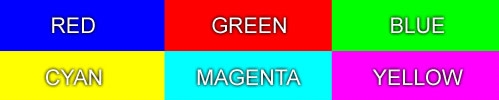 |
|
Send note to Staff
|
|
|
|
|
Moderator
1589 Posts |
|
|
Interesting. Check this out: 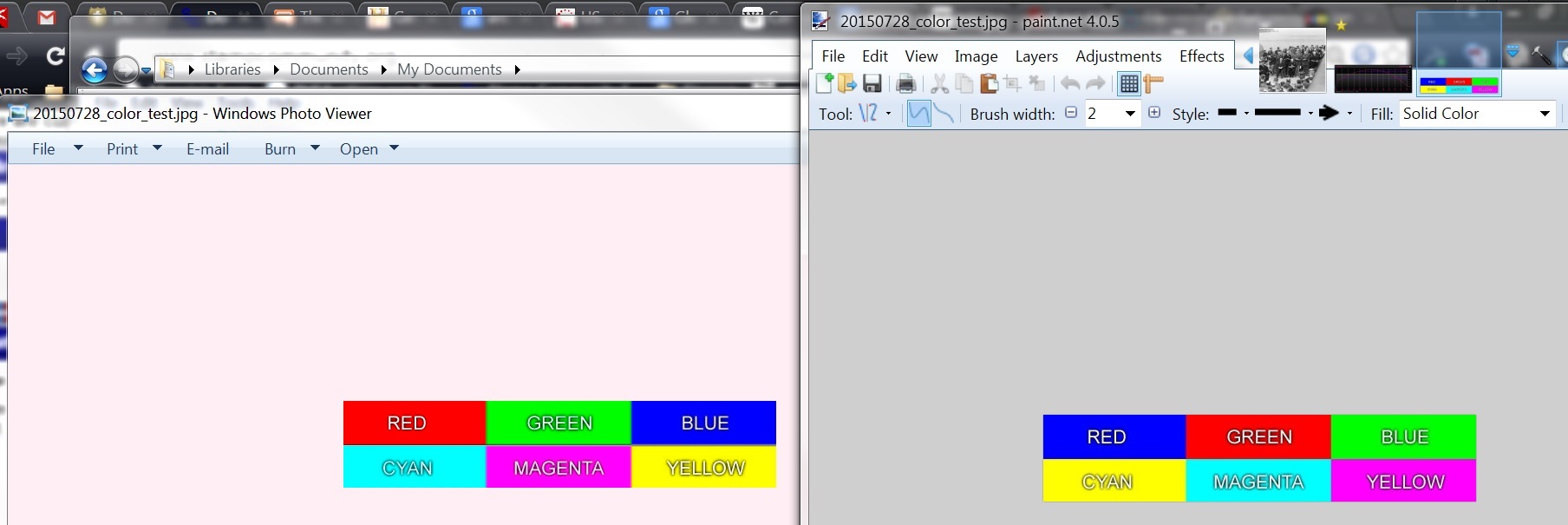 The left is using Windows Photo Viewer, the right is with Paint.NET. So what is going on? |
Send note to Staff 
|
|
|
Moderator

United States
12330 Posts |
|
|
The poll is using simple color names as opposed to RGB, CMYK, or some other registration color. Ideally we would be comparing the exact shade (since computers often are using 64 million colors).
Not sure if this helps you; but on my computer using RGB,after I save the image to my desktop as a .jpg, using PaintShopPro 9.0, and selecting the main color away from the verbiage (which has many shades in it due to some shading):
Red - 255,0,0
Green - 0,255,0
Blue - 0,0,255
Cyan - 0,255,255
Magenta - 255,0,255
Yellow - 254,255,0
While we can probably come to some consensus on simple color shades (like just the primary colors) we (humans) would struggle with trying to all agree on the 64 million shades that most computers use.
And ambient light is also a factor when moving to a hard copy of a paper or a stamp. While our monitors are backlit and less susceptible to ambient light this is not as true when determining colors of a hard copy. Hard copy color is a function of ambient light (which explains why the socks you put on this morning look like a different color when you notice them sitting in a meeting in the afternoon).
Don |
|
Send note to Staff
|
|
|
Pillar Of The Community
United States
2423 Posts |
|
|
Pillar Of The Community
United States
937 Posts |
|
|
blcjr, Windows Photo Viewer is using the image's embedded color profile. Paint.NET ignored it and is just reading the image blindly. The test image was created so that it makes it obvious if a program is using color profiles or not. Understanding nor explaining the concept of color profiles is difficult. Essentially they describe to a computer how to read an image. So why does it matter to us? Some devices don't assign a profile when an image is created. Some programs don't use it correctly or at all (like Paint.NET). Some devices assign an uncommon profile. These factors and others can result in an image that doesn't display correctly. If an image is created with the sRGB profile, then it will display correctly under most situations. Not necessarily accurately, but correctly. So if you want to work with color images across the Internet, then make sure that your scanners are set to output in sRGB. How can one tell? This online tool makes it easy to test one of your scans: http://regex.info/exif.cgiPrograms like Paint.NET, despite not handling profiles correctly, will work with sRGB images correctly. Photoshop, GIMP, Krita, and other programs allow for full color management. However, the default settings might change your sRGB image to another one. Making sure that your images are sRGB will eliminate many unintended errors and will allow for all of our posts to be much more color accurate. It isn't always needed, but it is a quick one time settings change that can do a lot of good. |
|
Send note to Staff
|
Ryan = HDNAC = DNA = HDC = Hysterical DNA Collector = Historical DNA Collector = me who just loves stamps :) |
|
|
Pillar Of The Community
United States
937 Posts |
|
|
KGB, I wish that the test image depicted Kim leaving the public arena. Alas, it is just geeky computer stuff.
Don, check out bcljr's image. |
|
Send note to Staff
|
Ryan = HDNAC = DNA = HDC = Hysterical DNA Collector = Historical DNA Collector = me who just loves stamps :) |
| Edited by Historical DNA Collector - 07/28/2015 3:48 pm |
|
|
Pillar Of The Community
United States
2423 Posts |
|
|
Moderator
United States
12330 Posts |
|
|
Ryan,
Yes, it depends if the image contains its own 'color profile' and whether or not the application chooses to use it or supply one itself. Apparently Paint.net ignores the color profile embedded in the image and adapts its own, and gets it wrong.
Don
|
|
Send note to Staff
|
|
|
Pillar Of The Community
United States
4182 Posts |
|
|
I don't understand the point of this poll. The 6 colors shown are so very different from each other that I can't imagine anyone who isn't colorblind would not be able to tell them apart. As to whether the colors look exactly like they should is another question, but if we were all shown a range of say blue shades on the exact same monitor, we would all likely point to a slightly different shade of where we would say "true" blue was (for me, I would say the green shown is somewhat yellow green, and the magenta somewhat pinkish compared to stamps that Scott calls magenta).
On top of that, my monitor displays different shades dependng on whether I am looking at it straight on, of at and angle - if I look down at it, it looks darker, if I look up at it , it looks brighter. Left or right not much different. |
|
Send note to Staff
|
|
|
Pillar Of The Community
United States
937 Posts |
|
|
Don, The pertinent issue is that mishandling and incorrect utilization of color profiles often occurs for most users. I propose that we all adhere to scanning images with the sRGB color profile. It is easy to do and eliminates the vast majority of issues that plague us when comparing the color of scanned stamps. eyeonwall, Take a look at blcjr's image. It highlights the reason for my poll. There are "unseen" factors to computer color reproduction between users. It isn't about shades of a color, it's about setting a standard that produces reliable results amongst all users. It's an "unseen" background computer issue that I am highlighting with this poll. As of me writing this, nearly half of the poll respondents are experiencing the issue that I wish to eliminate through a very simple and easy method. I am trying to establish a standard, a sort of computer lingua franca ( https://en.wikipedia.org/wiki/Lingua_franca) that will eliminate the need for a poll such as mine and will result in vastly increased color accuracy of posted stamp images. Minimizing variances of input sources (scanners) requires color calibration. A more frequently encountered and very easily resolvable issue, especially with scanners, is that many are not configured/set to produce images with the standard color profile known as sRGB. If everyone took a few minutes to make sure that their scanner outputs sRGB images, then the color accuracy of images posted here would be greatly improved. So much so, that scanner calibration is nearly a minor issue. |
|
Send note to Staff
|
Ryan = HDNAC = DNA = HDC = Hysterical DNA Collector = Historical DNA Collector = me who just loves stamps :) |
|
|
Pillar Of The Community
Australia
554 Posts |
|
|
Wish this was posted earlier. I first came across color profiling several months ago when I was creating a virtual PDF album of the Hawaiian Missionaries & the colors in the PDF were not the same as on my browser. Took a lot of googling to fix the problem |
|
Send note to Staff
|
|
|
Pillar Of The Community
United States
937 Posts |
|
|
YeaPolska,
I am not an expert color scientist nor knowledgeable enough to be a paid consultant, but you and everyone else are welcome to email me for help. I don't know everything about color management, but I know enough that I can solve most issues. For the more difficult issues, I am willing to do the research or at least refer you to those that are experts. I thank you for pointing out a non-forum example of how color profile handling can be an issue. |
|
Send note to Staff
|
Ryan = HDNAC = DNA = HDC = Hysterical DNA Collector = Historical DNA Collector = me who just loves stamps :) |
|
|
Pillar Of The Community
United Kingdom
1361 Posts |
|
|
I calibrate my displays using a friends Spyder device and software.
It is really easy to use and works brilliantly. |
|
Send note to Staff
|
|
|
Moderator
United States
12330 Posts |
|
|
I agree that Spyder would be helpful for monitors, but it does nothing for scanners, graphics applications that may or may not support image maps, printers, or the stamp itself. For example, you have a stamp in hand you wish to determine the color shade. First, you have to scan it. Then you have to save the scanned image to your PC (very process dependant as each of us has different scanner drivers, scanner software, or even third party graphics applications). Then you whip out your Spyder to ensure that monitor is properly calibrated. But does this imply what is displayed on the monitor will exactly match the stamp itself? Did the scanner properly capture the color shades? Did any software interpret or compress the scanned image (thereby changing the color map) when it was saved? If you then change your monitor to match the stamp itself, will the software then save it correctly? As humans we can probably all agree on categorizing simple colors; but most modern computers and software work with 64 million shades. Imagine walking into your home improvement store and being faced with a wall of 64 million colors, stamp in hand, and trying to get a bunch of people to all agree on exactly which shade matches it. In my opinion the key is to standardize on the following; - A calibrate capture device - A highly defined method/process for saving the file - Calibrated display device - Ambient light defined If two hobbyists had identical scanners, computers, software and ambient light sources then much of the battle is won. Of course others have already tackled this issue; for example Pantone. They offer complete systems that would work for philately; it includes the capture device, software, color charts, and works around the ambient light situation. ( http://www.pantone.com/capsure-form...guide-bundle) One of these in conjunction with a calibrate display using Spyder would work. Of course the process would have to be defined and followed and the capture devices would also have to periodically calibrated. Downside? Break out your wallet. Spyder is around $200 and the Pantone system is about $800. Syncing up color shades on disparate systems is not a trivial thing to do. I spent many years fighting this issue in a production environment using products from Adobe, Pantone, and Corel and never got everything to sync up consistently. I'm sure that one day technology will come up with a workable, reasonably priced solution; but until then I'm spending my money of stamps! Don |
|
Send note to Staff
|
| Edited by 51studebaker - 07/29/2015 11:04 am |
|
|
Pillar Of The Community
United Kingdom
1361 Posts |
|
|
It is a difficult situation and I ensure my scanner, printer and display use the same colourspace but as mentioned, this only works for me. If I send it to anyone else then it may not work. One other interesting point to complicate matters further is that some females are able to see more shades of colours than most people due to a genetic condition - http://www.bbc.com/future/story/201...human-vision |
|
Send note to Staff
|
|
|
Pillar Of The Community
United States
4182 Posts |
|
|
Quote:
If everyone took a few minutes to make sure that their scanner outputs sRGB images, then the color accuracy of images posted here would be greatly improved I don't have a clue how to make sure that my scanner outputs sRGB images, nor am I sure I want to make it do so if does not already do so as I have no clue what sRGB is. |
|
Send note to Staff
|
|
|
Replies: 21 / Views: 4,783 |
|




 Posted 07/28/2015 1:35 pm


