| Author |
 Replies: 40 / Views: 6,628 Replies: 40 / Views: 6,628 |
|
|
|
Pillar Of The Community
571 Posts |
|
|
hahaha, Ray. that's funny..I told my older children the bank is closed until I get help to update the scanner haha..no extra travel money for their vacation...Mom famous words.. save and spend your money wisely.
Honestly, my children have been pretty busy with their schedules and live in different areas,so waiting for one to assist who bought it.The scanner is only one year old. I really do not want to get a new one unless program can not be placed properly which son can assess and update system. If can't do, then will donate and get another one.
Hopefully will be updated soon within the week.
Blazenstar |
Send note to Staff 
|
|
|
Pillar Of The Community
571 Posts |
|
|
Pillar Of The Community
United States
6668 Posts |
|
|
Blazenstar, 1 question I don't think anyone asked regarding your scans is whether you use the board upload option or do you use a free hosting site like photobucket ? |
|
Send note to Staff
|
|
|
Pillar Of The Community
United States
8956 Posts |
|
|
I was on the same track when Blazenstar said her scanner was only a year old. I was wondering if she is setting the scanner at 600dpi or just leaves it at the lowest setting.
Blazenstar, your pictures are not bad, but I can not make them bigger without losing a lot of sharpness. Please check the setting on your computer!
Peter |
|
Send note to Staff
|
|
|
Pillar Of The Community
571 Posts |
|
|
Hi..checking if this scan pic may be better..i am using paint app..this stamp has some interesting perfs..lol.. 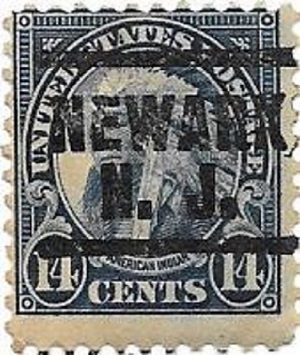 |
|
Send note to Staff
|
|
|
Pillar Of The Community
571 Posts |
|
|
i have to place this in precancel room..like to ask chasa what is the number for this as a bureau stamp. |
|
Send note to Staff
|
|
|
Pillar Of The Community
United States
6668 Posts |
|
|
Sorry but still a small fuzzy image. May I ask why you're using a paint app? |
|
Send note to Staff
|
|
|
Pillar Of The Community
571 Posts |
|
|
stallzer..it is the program that inhances photo images when download from scanner to computer..I was told to wait until arrival before adding any new programs. what I might be able to do is scan the stamp just normal size, and let others enhance image until changes made.
Blazenstar |
|
Send note to Staff
|
|
|
Pillar Of The Community
United States
6668 Posts |
|
|
Personally, I scan my stamps @ 1200 DPI and my scanner (HP) has decent software that I use to crop the image. I then upload it to photobucket and paste the IMG code into the thread, simple and works great. Hope that helps.
What Scanner model and make do you have ?
What setting are you scanning your stamps at ? |
|
Send note to Staff
|
|
|
Pillar Of The Community
571 Posts |
|
|
Thank you stallzer and all..Truly appreciate the information and very helpful..will relay to son to see if can be used. It would be wonderful to get clear photos of the stamps,and hopefully will be able to use with this computer.
Blazenstar |
|
Send note to Staff
|
|
|
Replies: 40 / Views: 6,628 |
|



 Posted 02/23/2016 6:19 pm


