Stamp Community Family of Web Sites
Thousands of stamps, consistently graded, competitively priced and hundreds of in-depth blog posts to read


Stamp Community Forum
 
Username:
Password:
Save Password
Forgot your Password?

This page may contain links that result in small commissions to keep this free site up and running.

Welcome Guest! Registering and/or logging in will remove the anchor (bottom) ads. It's Free!

George Rogers Clark (Scott #651) Spreadsheet And Checklist Resource

 
To participate in the forum you must log in or register.
Author Previous TopicReplies: 10 / Views: 3,663Next Topic  
Valued Member
United States
360 Posts
Posted 05/01/2016   11:56 am  Show Profile Bookmark this topic Add mcgeesorg to your friends list Get a Link to this Message
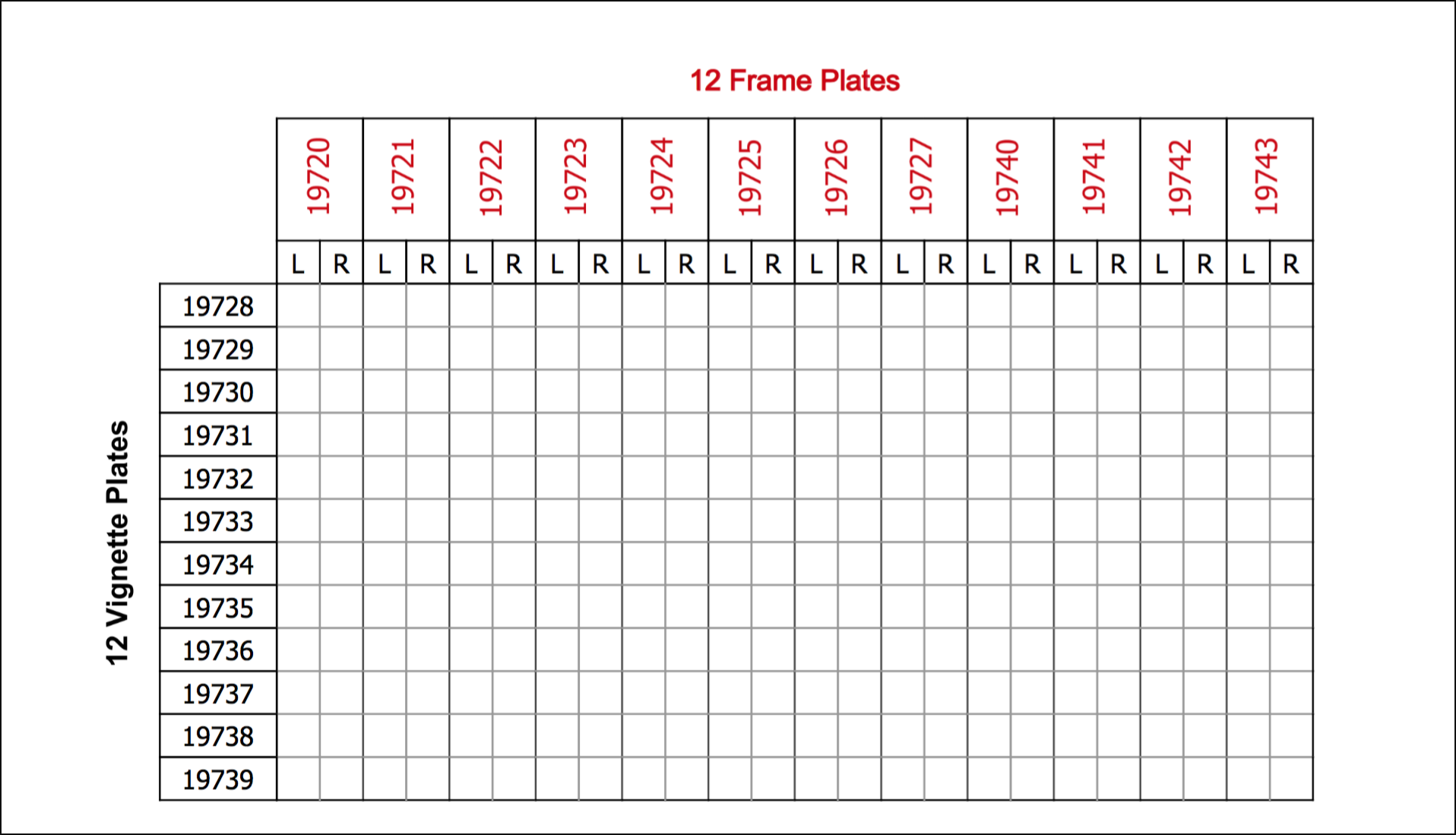
I collect 3x2 plate blocks of the George Rogers Clark issue of 1929 (Scott #651). There are 288 plate and position combinations, so keeping a checklist is essential:
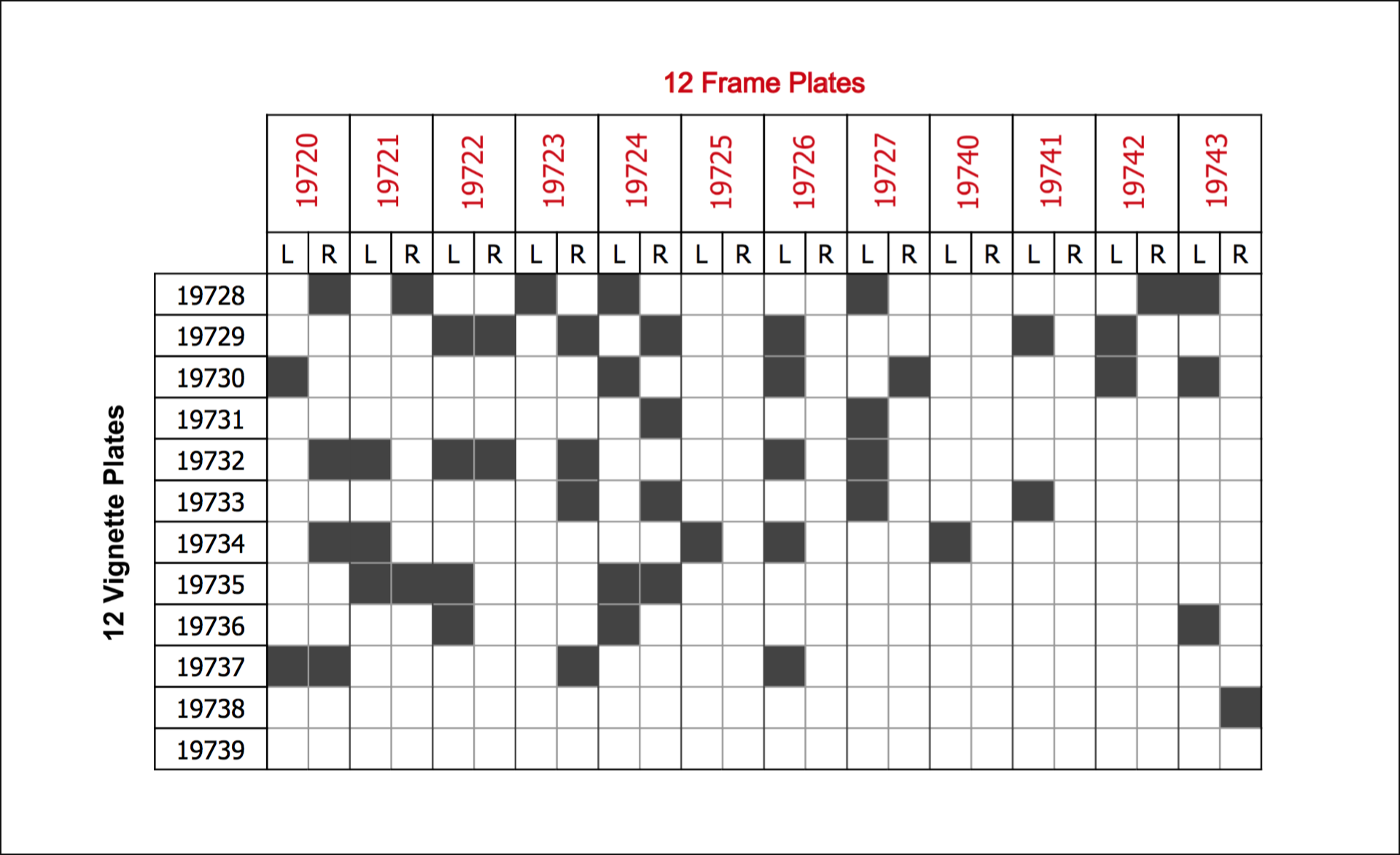


I thought the work I did building the table might be useful to someone else, so I'm sharing it here.

Most easily, if you want to maintain the whole thing with paper and pen, you can just download a PDF file at this link that you can print. It contains an empty copy of the above table:


But if you want to maintain it on your computer, I've also set up a Google Sheet at this link.

If you've never worked with Google Sheets before, and you have a Google account, here's a quick walkthrough of what you need to do:

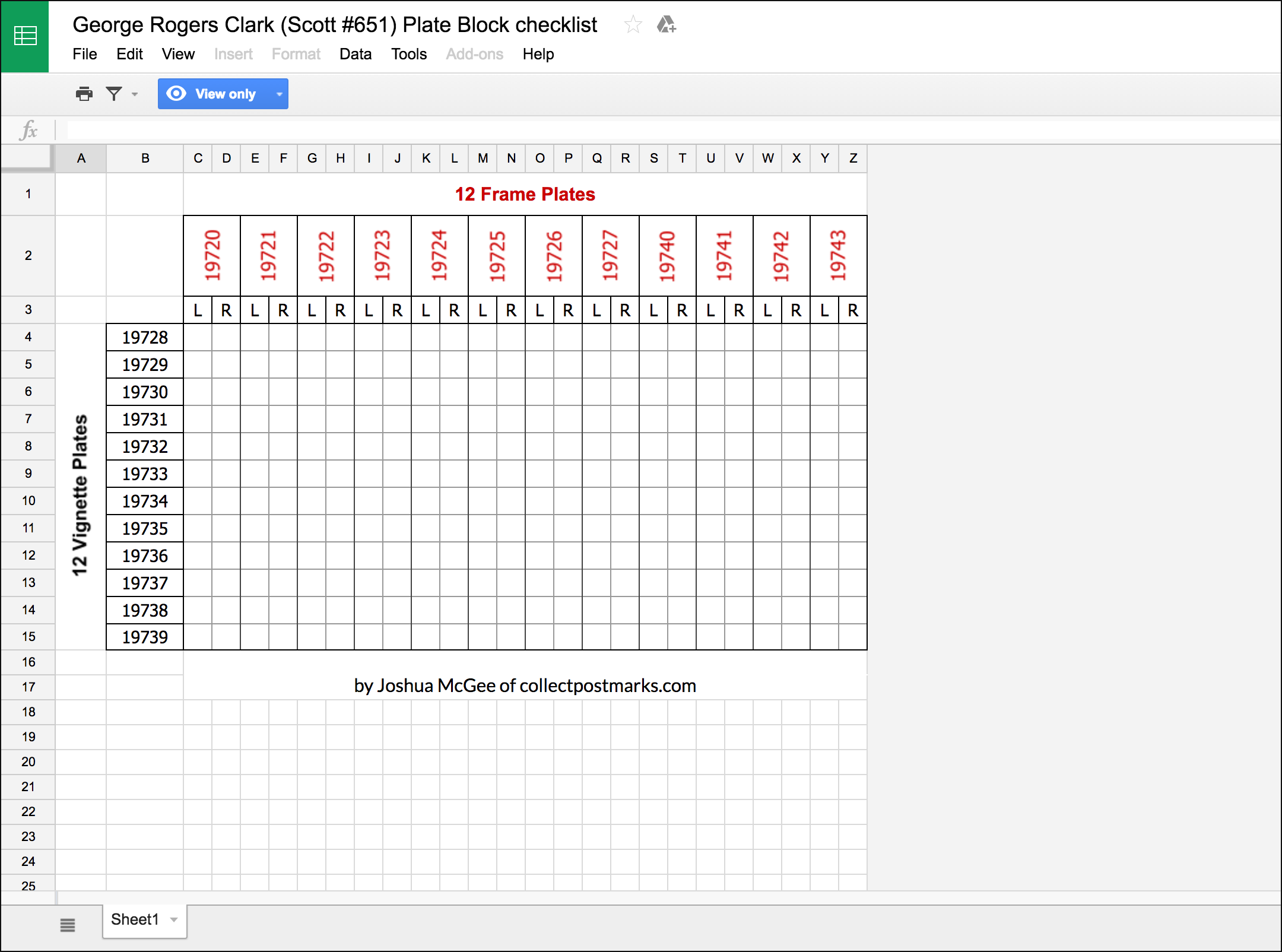
1. Open the shared sheet. It will be in "View Only" mode; you won't be able to make changes to it:


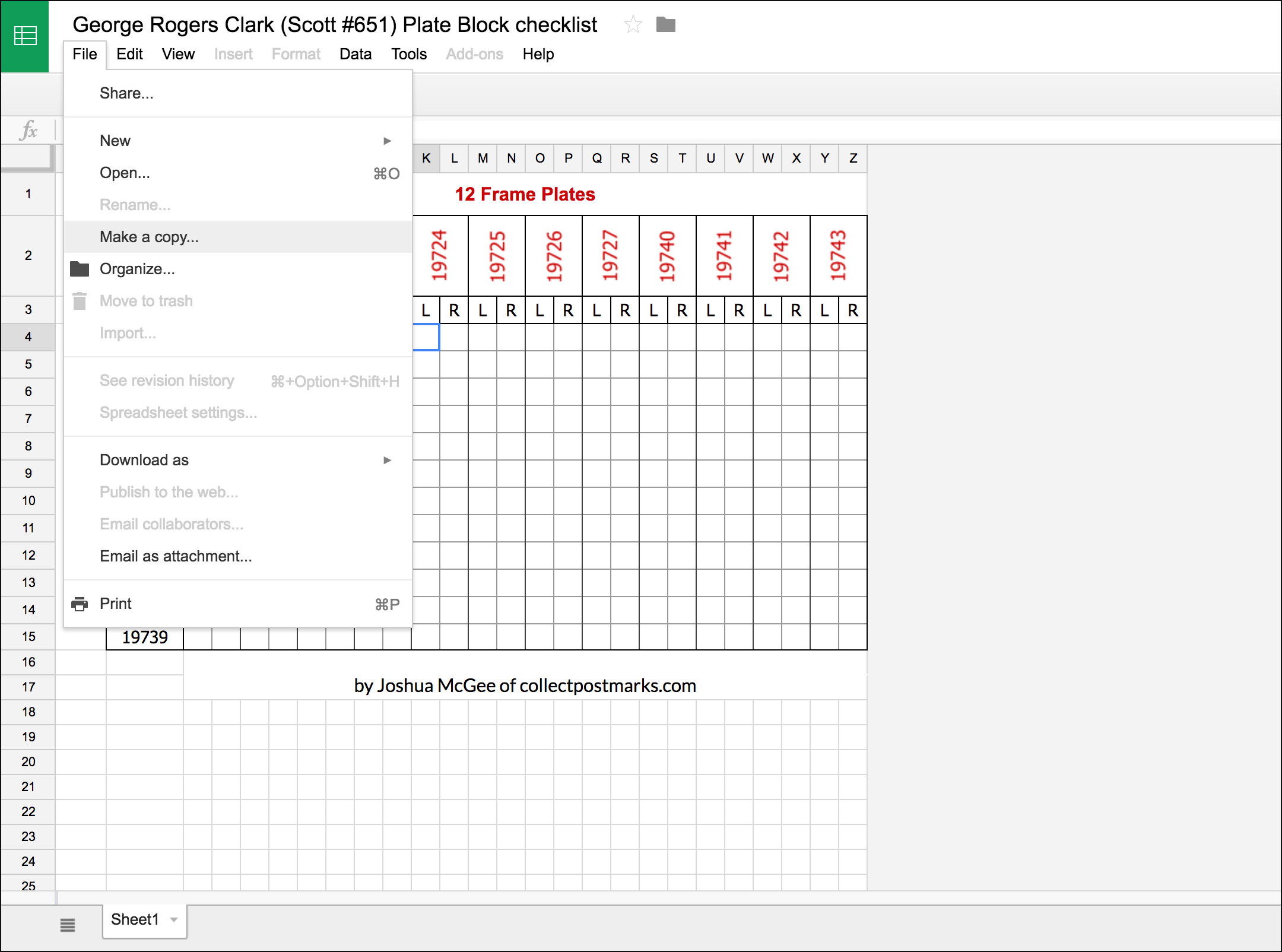
2. Make a copy by choosing "Make a copy..." from the File menu:


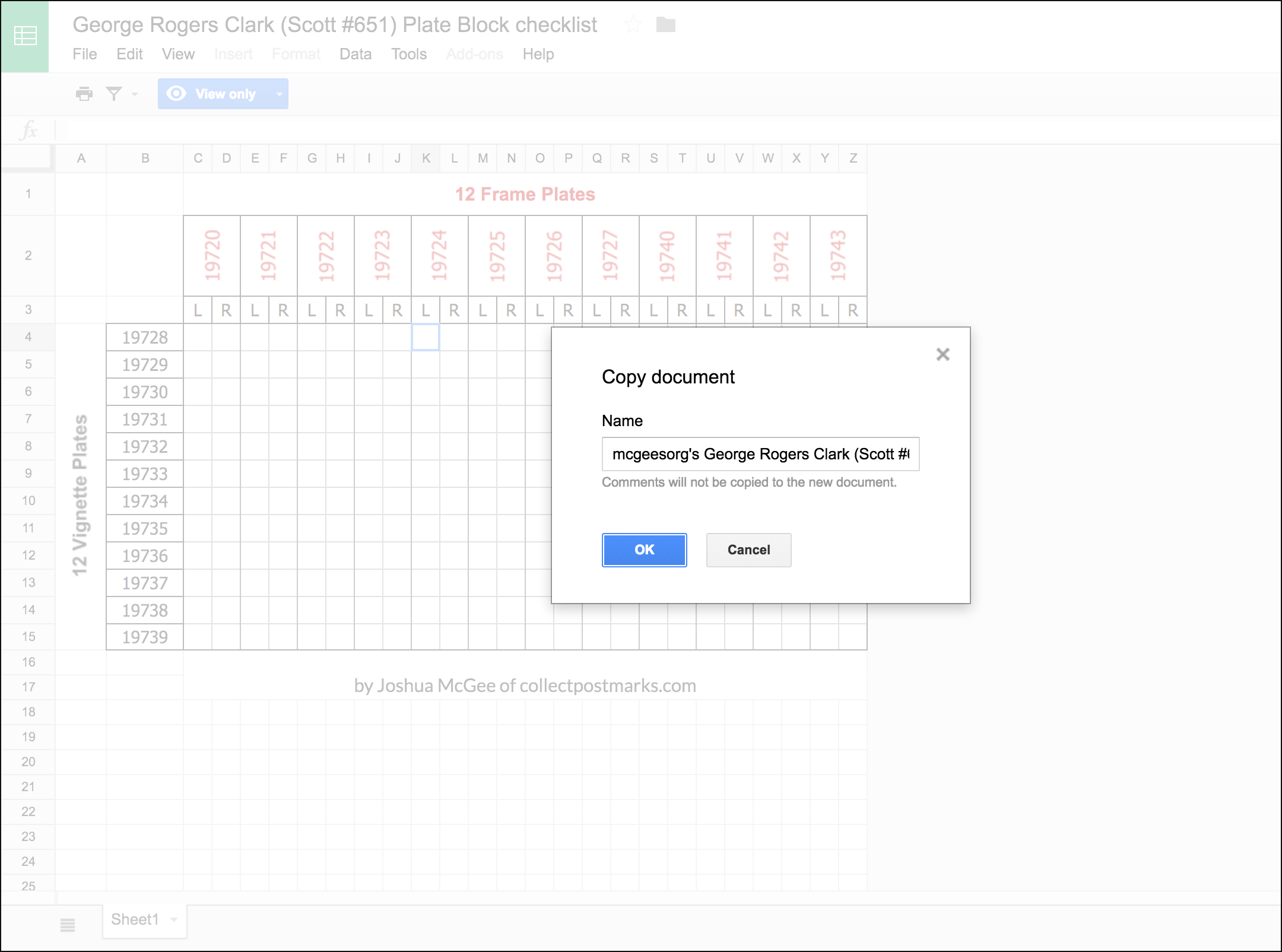
3. When the "Copy document" dialog box comes up, give it a custom name:


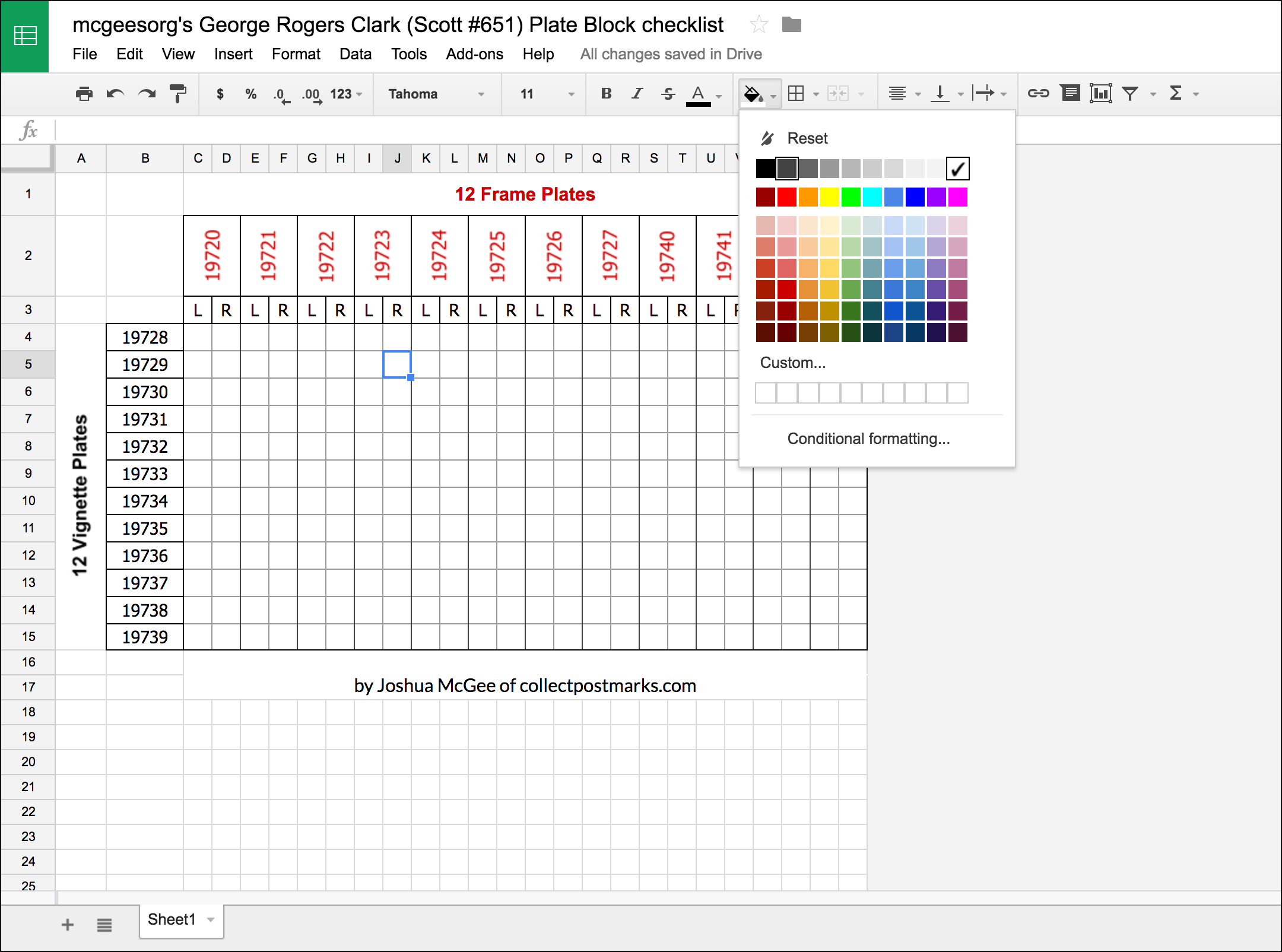
4. Start filling out your spreadsheet with the blocks you have. To do so, highlight the cell that matches the plate and position combination you have, then click the "bucket" icon in the toolbar, and give the cell a different background color (I use the darkest grey that's not black – second from the left – but you can use whatever works for you.)


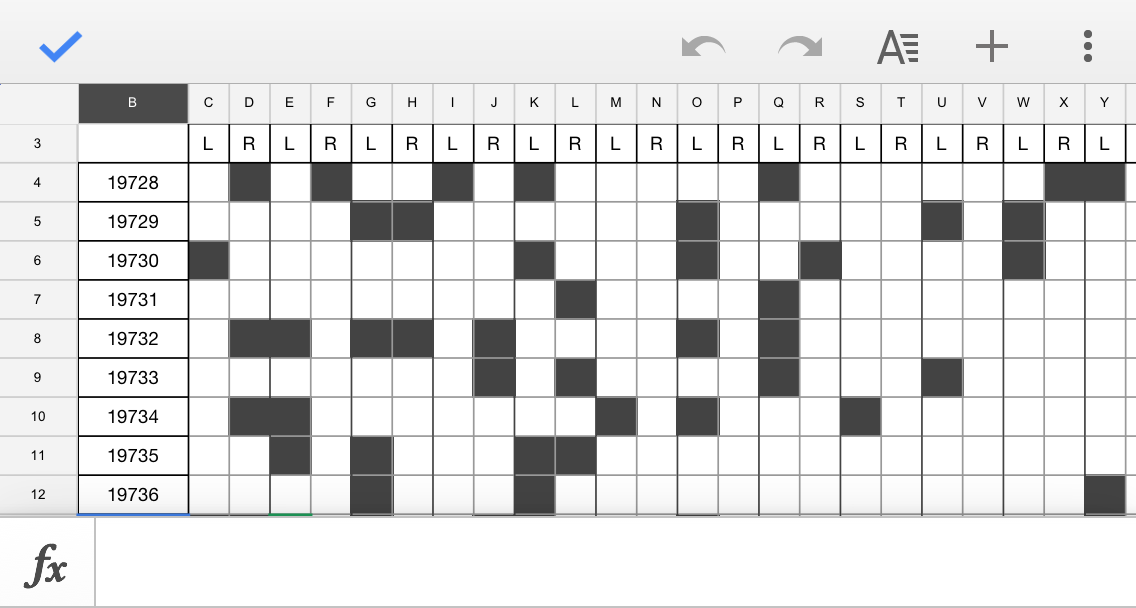
5. Continue until your table is filled out with the blocks you own:
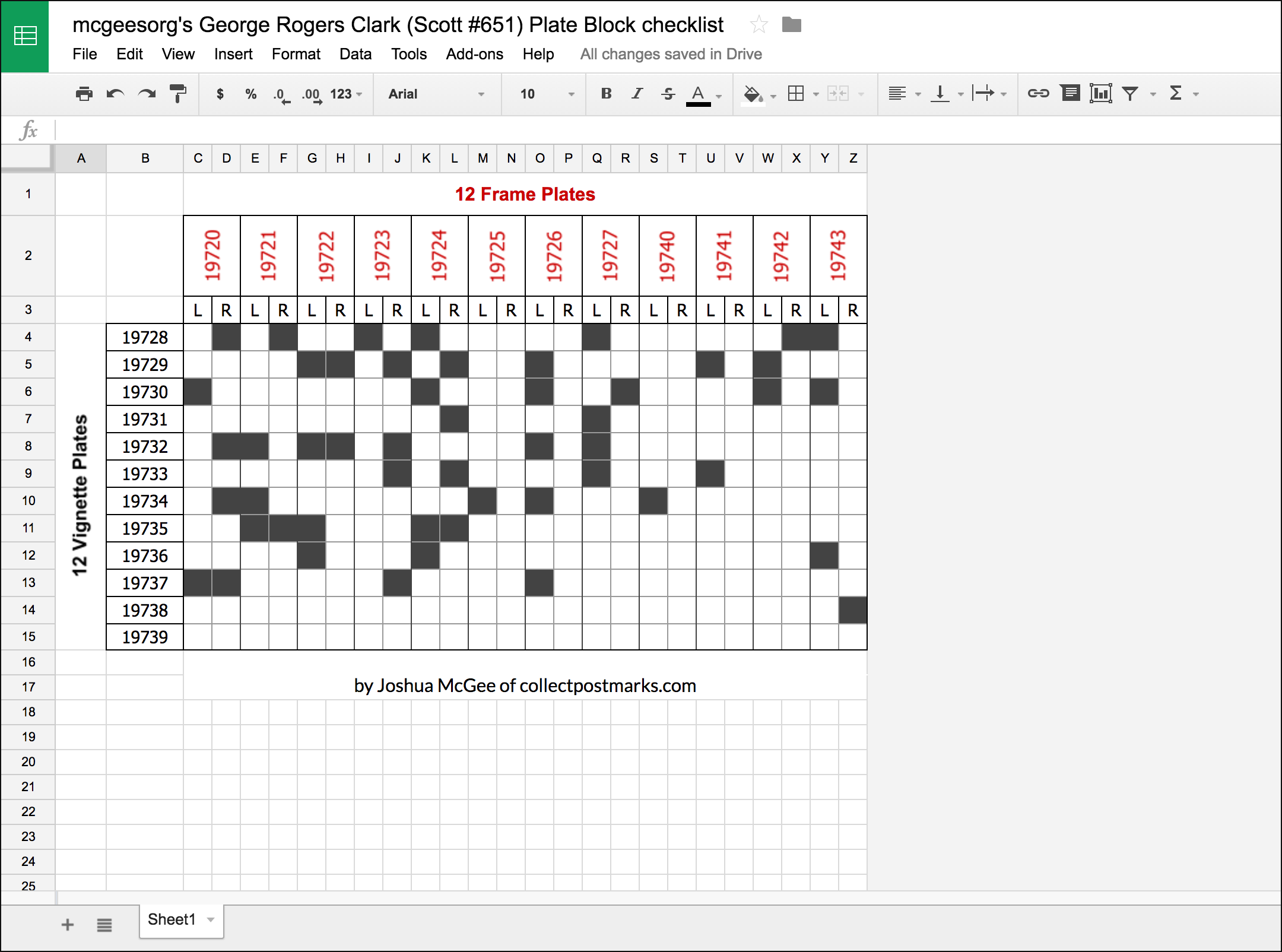


Now, if you want to check the status of your collection (from a stamp show bourse, say) you can do so from any web browser or from your smartphone.

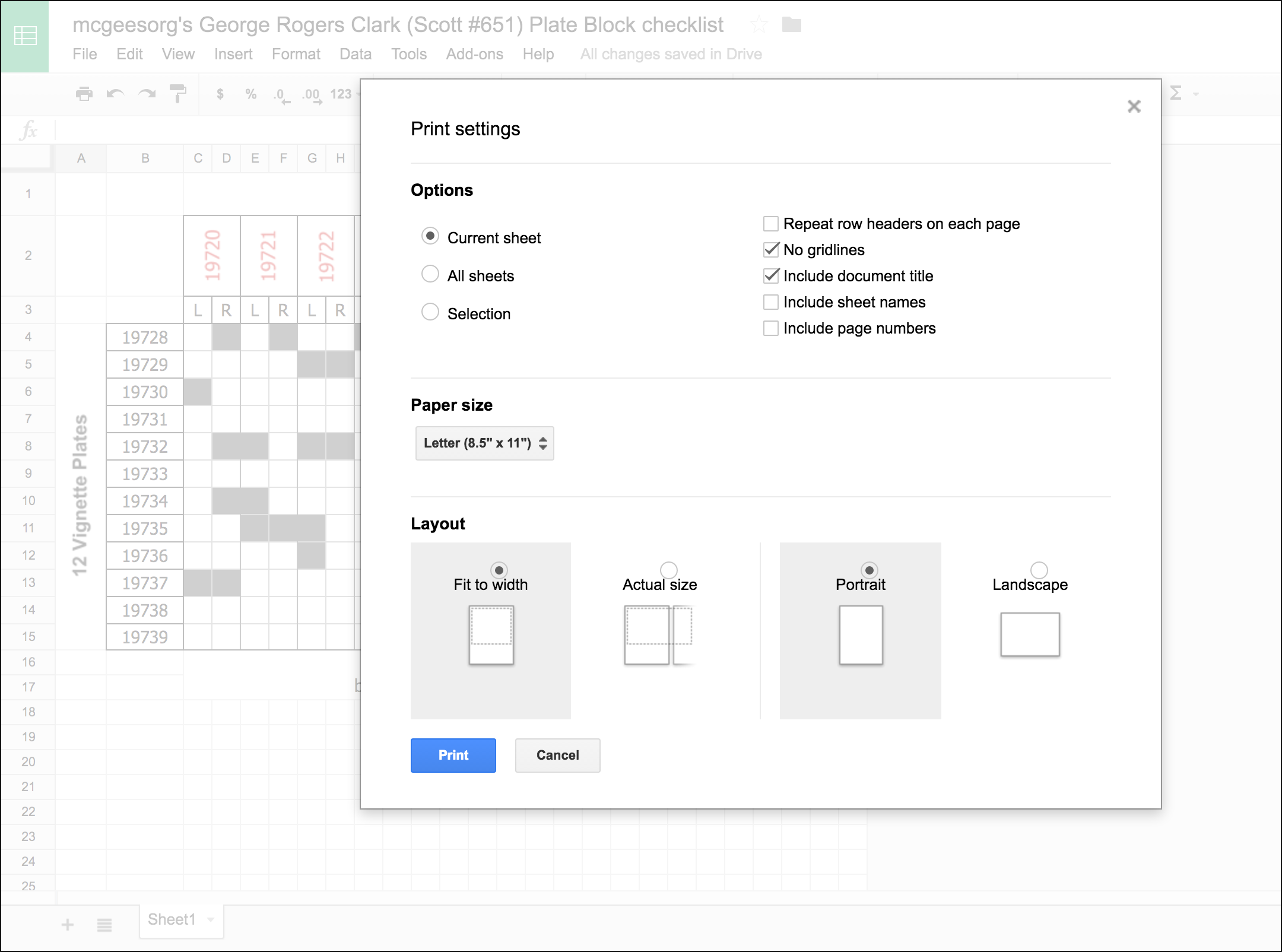
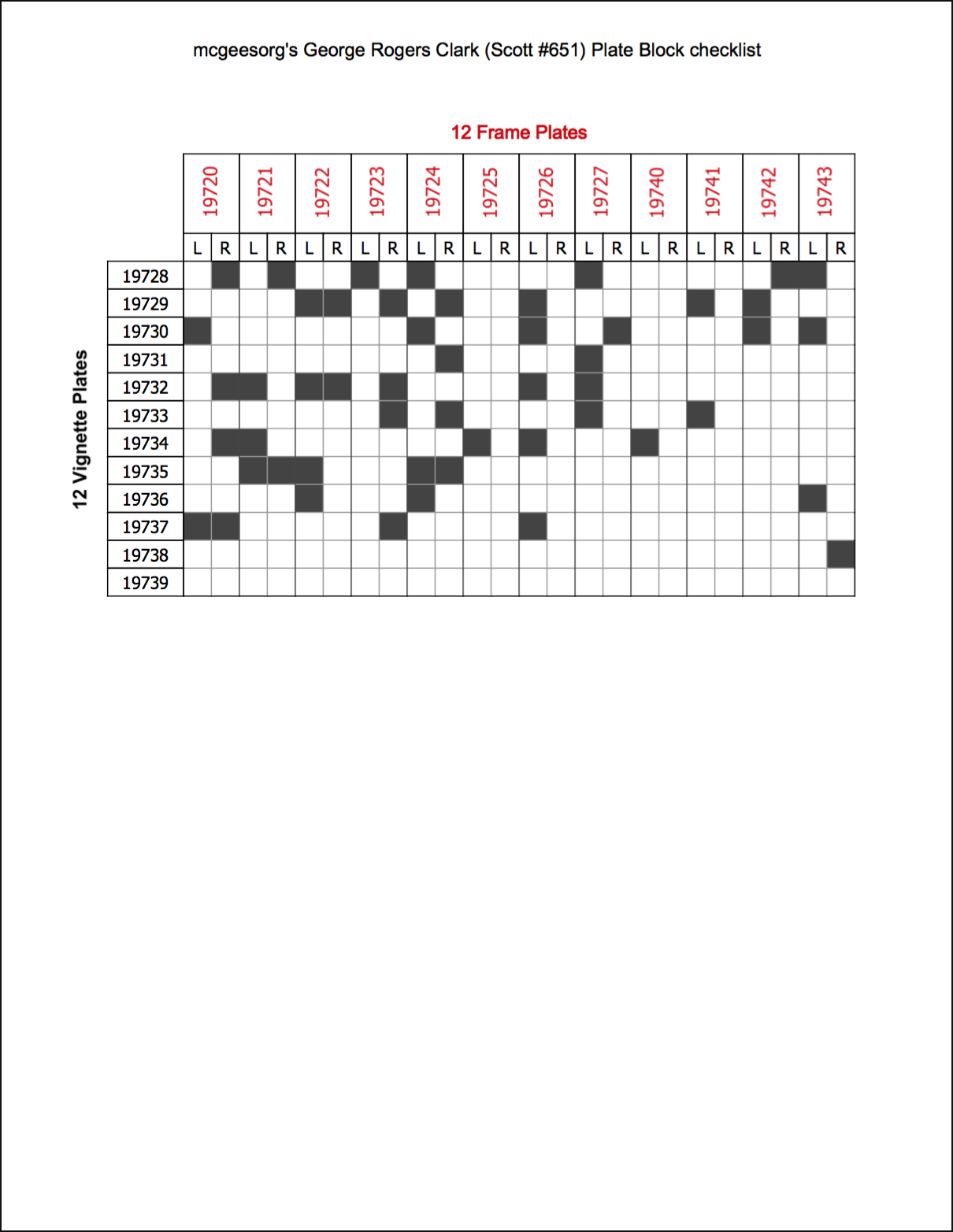
Or, you might want to print a copy to take with you. To get the best effect, when the "Print settings" dialog comes up, choose to print the "Current sheet", with no gridlines, including a document title, fit to the page width, in portrait layout:


That will give you a printed sheet that looks like this:


I hope this helps another George Rogers Clark plate block collector!
Send note to Staff

Rest in Peace
United States
4052 Posts
Posted 05/01/2016   2:54 pm  Show Profile Bookmark this reply Add ikeyPikey to your friends list  Get a Link to this Reply
Excellent resource & tutorial, mcgeesorg!
Send note to Staff  Go to Top of Page
Pillar Of The Community
6327 Posts
Posted 05/01/2016   3:08 pm  Show Profile Bookmark this reply Add John Becker to your friends list  Get a Link to this Reply
Is this any different from the Durland listing?
Send note to Staff  Go to Top of Page
Valued Member
United States
360 Posts
Posted 05/01/2016   7:05 pm  Show Profile Bookmark this reply Add mcgeesorg to your friends list  Get a Link to this Reply

Quote:
Is this any different from the Durland listing?


No difference. It is the Durland table, computerized, so that it's accessible from anywhere, looks neater, allows you do use different colors for table cells to mean different things (such as "this block is in the mail on its way to me" or "the copy I have is hinged") and change them easily later, etc.
Send note to Staff  Go to Top of Page
Edited by mcgeesorg - 05/01/2016 7:06 pm
Valued Member
United States
360 Posts
Posted 05/01/2016   7:21 pm  Show Profile Bookmark this reply Add mcgeesorg to your friends list  Get a Link to this Reply
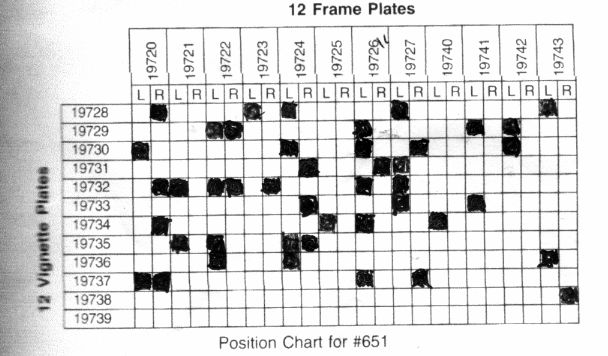
In fact, on that note, this is a scan of the photocopy I kept in the briefcase I took to bourses for years, until I built the spreadsheet. As you can see, just a photocopy from Durland:


Now I look at this on my phone instead:


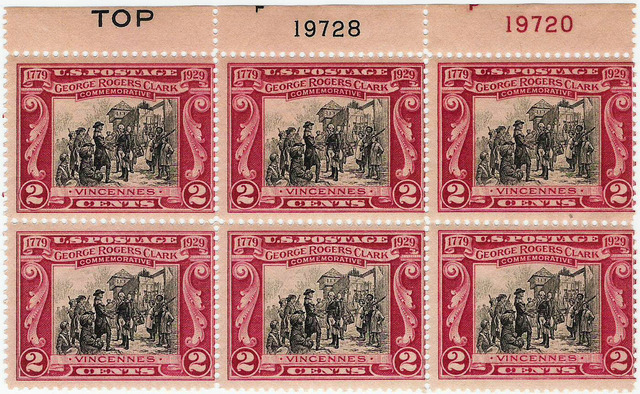
And I just realized some members won't know what we're talking about. The blocks look like this:


Send note to Staff  Go to Top of Page
Pillar Of The Community
6327 Posts
Posted 05/01/2016   7:57 pm  Show Profile Bookmark this reply Add John Becker to your friends list  Get a Link to this Reply
re: Durland
The reason I asked is that it is polite to credit the original source, especially a copyrighted one.
Send note to Staff  Go to Top of Page
Valued Member
262 Posts
Posted 05/02/2016   09:27 am  Show Profile Bookmark this reply Add bobplates to your friends list  Get a Link to this Reply
Thanks very much for starting this thread. I built a 651 spreadsheet very similar to yours using the excellent Durland catalog as a resource. The problem with this approach is that each individual collector operates in a vacuum, effectively reinventing the wheel.

From a bigger picture perspective, I guess my question/comment would be directed to the BIA/USSS. No doubt that Durland remains the definitive resource and a great piece of intellectual property. However, I wonder whether the specialty would be better served by digitizing this resource and creating an accessible virtual checklist for the plate number collector. Plate number collecting could certainly use a shot in the arm. I buy the Durland catalog when a new version or supplement is published. Paper is fine but my guess is that a new generation of collectors would rather have a less cumbersome way to manage their collections. My guess is that other collectors would pay for that as well. What I would be disinclined to pay for is something along the lines of the PDF approach that Scott takes. One can't efficiently manage a database when the data is locked behind a PDF.... electronic paper. I understand the desire to protect intellectual property but there needs to be a better way.

StampSmarter has a plate number resource which is very helpful and Don deserves kudos for his big effort there and for his general advocacy of moving the hobby into the digital age. I think that this movement is the best chance that we have as a community to insure that philately is a growing, rather than a dying hobby.

Bob
Send note to Staff  Go to Top of Page
Edited by bobplates - 05/02/2016 10:30 am
Pillar Of The Community
Learn More...
United States
4415 Posts
Posted 05/02/2016   10:42 am  Show Profile Bookmark this reply Add angore to your friends list  Get a Link to this Reply
PNC3 seems to follow the approach to put as much information online as possible and much of it is open to everyone while others focus on publications. I would think Stamp Smarter would be something that would come out of USSS - or least heavily sponsored.

Al
Send note to Staff  Go to Top of Page
Moderator
Learn More...
United States
12330 Posts
Posted 05/02/2016   7:23 pm  Show Profile Bookmark this reply Add 51studebaker to your friends list  Get a Link to this Reply
There are several issues at work which have slowed the move of philately to the digital age.

First, much of the legacy for our hobby is to NOT share information. Even today we have hobbyists who do not believe in sharing information. (Heck, we have quite a few folks in this forum do not believe in sharing info.) They have spent a lot of time and money to become educated and do not think it is appropriate to simply give this knowledge away for free. Additionally, educating others may mean they end up competing with them. There is a history of some hobbyists taking decades of knowledge and experience with them to the grave.

Not sharing information also extends to many of the philatelic companies, organizations, and clubs. Organizations and clubs traditionally used access to information as an incentive for membership. Philatelic publishing companies like Amos and SG thrived for many years charging for information.

And then the internet came along. Those who follow the legacy model of restricting access to information now squarely find themselves competing with the internet. In my opinion this is a losing battle. People like mcgeeorg and many others (i.e this forum) will continue to freely publish philatelic information for decades to come; everyone can judge for themselves what will happen to those who do not.

There are other ways to capture income and memberships, but anyone who has followed APS knows the problem. Scott touched on it in the 'election' thread. Those in power at APS are faced with some very difficult, and risky, decisions. They are consumed with the logistics of keeping the organization alive today, embracing this paradigm shift is almost unthinkable. It would mean walking away from 'tried and true' methods that have sustained the organization for decades. Amos and SG are in much the same boat.

Adding to this dilemma are the demographics of our hobby. For those who are fearful of change, it is easy to point out that many existing hobbyists are not highly technical. Frankly I do not think that our hobby is shrinking, but without question memberships in traditional organizations and clubs are declining. I think that the hobby is simply transforming. The internet has greatly diluted the value in memberships, whether it is APS or the USSS. Amos is struggling and we all have seen the missteps that SG has made trying to deal with this new world.

And while existing older hobbyists are one discussion, capturing younger hobbyists is another. The existing 'pay to play' approach will never fly with people who are growing up with more information at in their pocket than we grew up with in our entire school library.
Don
Send note to Staff  Go to Top of Page
Edited by 51studebaker - 05/02/2016 9:25 pm
Pillar Of The Community
United States
937 Posts
Posted 05/02/2016   11:45 pm  Show Profile Bookmark this reply Add Historical DNA Collector to your friends list  Get a Link to this Reply
Don,
Your summarized yet detailed viewpoint of these issues is very accurate in my eyes.


Quote:
The existing 'pay to play' approach will never fly with people who are growing up with more information at in their pocket than we grew up with in our entire school library.


This is very much like how a college degree used to guarantee a higher level of success. Today, a college degree guarantees only a high level of debt. Access to information is no longer the defining factor, being able to absorb and process large quantities of information is now what matters. Current higher education curriculums are focusing on imparting a basic knowledge of a subject and a high level of critical thinking to utilize the vast amount of information that is now available to everyone about any subject.

I find it mind boggling that expertizers of 100+ year old stamps still have not collaborated to come up with accurate algorithms of how to conclusively identify them. Certifications have gotten more accurate over the last few decades, but are still very lacking. Let that sink in, decades have passed with little improvement in certification accuracy. Let alone 100+ years of active study by specialists. I attribute much of the lack of progress due to things such as: "...much of the legacy for our hobby is to NOT share information." Over a hundred years have passed and the culture of information hoarding is still affecting the hobby in a very negative way. 100+ years later and it is still extremely difficult to identify anything other than common stamps.

I absolutely believe that hard work should be rewarded, but I don't believe that philatelic research should continue to be a business model for financial gain. It used to be financially viable, but look at where we are now. 100+ years later and I still find many current certificates to be inaccurate.

An example of distinguished philatelists moving towards a modern approach can be found in this thread: https://goscf.com/t/48924

The discussion of these topics deserve its own separate thread. I also believe that such a thread should remain on the U.S. classics subforum because it pertains mostly to classic U.S. material. Similar issues may exist with other country's expertization processes, but your and my thoughts are specifically about the state of the situation with U.S. material.

Thank you for bringing this up for discussion.

Ryan

P.S. Do you have a link to Scott's APS 'election' thread?
Send note to Staff  Go to Top of Page
Ryan = HDNAC = DNA = HDC = Hysterical DNA Collector = Historical DNA Collector = me who just loves stamps :)
Pillar Of The Community
Learn More...
United States
4415 Posts
Posted 05/03/2016   06:46 am  Show Profile Bookmark this reply Add angore to your friends list  Get a Link to this Reply

Quote:
First, much of the legacy for our hobby is to NOT share information.


I am glad someone else believes this. I have seen one prolific writer who says they do not because it can limit them making money writing.
Send note to Staff  Go to Top of Page
Edited by angore - 05/03/2016 06:50 am
  Previous TopicReplies: 10 / Views: 3,663Next Topic  
 
To participate in the forum you must log in or register.

Go to Top of Page

Disclaimer: While a tremendous amount of effort goes into ensuring the accuracy of the information contained in this site, Stamp Community assumes no liability for errors. Copyright 2005 - 2026 Stamp Community Family - All rights reserved worldwide. Use of any images or content on this website without prior written permission of Stamp Community or the original lender is strictly prohibited.
Privacy Policy / Terms of Use    Advertise Here
Stamp Community Forum © 2007 - 2026 Stamp Community Forums
It took 0.38 seconds to lick this stamp. Powered By: Snitz Forums 2000 Version 3.4.05