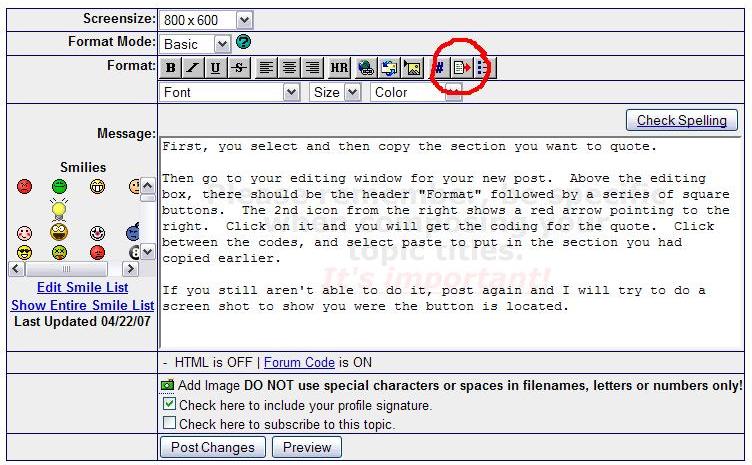
First, you select and then copy the section you want to quote.
Then go to your editing window for your new post. Above the editing box, there should be the header "Format" followed by a series of square buttons. The 2nd icon from the right shows a red arrow pointing to the right. Click on it and you will get the coding for the quote. Click between the codes, and select paste to put in the section you had copied earlier.
If you still aren't able to do it, post again and I will try to do a screenshot to show you were the button is located.
This might be obvious, but it tripped me up at first...you have to use the "Reply to Topic" link and not the Quick Reply box that automatically appears...
Disclaimer: While a tremendous amount of effort goes into ensuring the accuracy of the information contained in this site, Stamp Community assumes no liability for errors. Copyright 2005 - 2026 Stamp Community Family - All rights reserved worldwide. Use of any images or content on this website without prior written permission of Stamp Community or the original lender is strictly prohibited. Privacy Policy / Terms of UseAdvertise Here





 Posted 02/24/2010 03:02 am