Stamp Community Family of Web Sites
Thousands of stamps, consistently graded, competitively priced and hundreds of in-depth blog posts to read


Stamp Community Forum
 
Username:
Password:
Save Password
Forgot your Password?

This page may contain links that result in small commissions to keep this free site up and running.

Welcome Guest! Registering and/or logging in will remove the anchor (bottom) ads. It's Free!

How Do You Display Dropbox Photos On This Forum?

 
To participate in the forum you must log in or register.
Author Previous TopicReplies: 8 / Views: 6,959Next Topic  
Valued Member
Australia
426 Posts
Posted 12/25/2010   06:31 am  Show Profile Bookmark this topic Add peterethio to your friends list Get a Link to this Message
AnthonyUK gave a brilliant tutorial a while ago about scanning and how to display large photos and storing them online, including in dropbox. Does anyone know how to display dropbox photos on this forum?
Send note to Staff

Moderator
Learn More...
United States
4788 Posts
Posted 12/25/2010   09:16 am  Show Profile Bookmark this reply Add kirks to your friends list  Get a Link to this Reply
Funny!

I was just writing to you in another thread suggesting you try Dropbox. Great minds think alike

I assume you already have the image uploaded to Dropbox. It needs to be in your PUBLIC folder (as opposed to your photos folder which is private).

On the SCF side, the trick is to use the IMG tags to surround your link

[ img ] http---whatever---.com [ /img ]

Do not put the spaces inside the IMG tags -- I had to put them there to trick the forum into showing them to you instead of "converting" them to an actual image.

KirkS


Send note to Staff  Go to Top of Page
Edited by kirks - 12/25/2010 09:19 am
Valued Member
Australia
426 Posts
Posted 12/25/2010   1:49 pm  Show Profile Bookmark this reply Add peterethio to your friends list  Get a Link to this Reply
Thanks for your suggestion Kirk. I like it when someone who knows what they're doing gives suggestions. It confirms that I'm on the right track. I've put a file in the public folder and tried it in the test area of SCF just a moment ago. It worked well. Thanks.
Send note to Staff  Go to Top of Page
Valued Member
Australia
426 Posts
Posted 12/25/2010   1:58 pm  Show Profile Bookmark this reply Add peterethio to your friends list  Get a Link to this Reply
I'm copying some of the files as we speak. This is going so well I can hardly believe that it's happening

Another question

How do I find a link to paste so that people can see the whole public folder?
Send note to Staff  Go to Top of Page
Moderator
Learn More...
United States
4788 Posts
Posted 12/25/2010   2:22 pm  Show Profile Bookmark this reply Add kirks to your friends list  Get a Link to this Reply
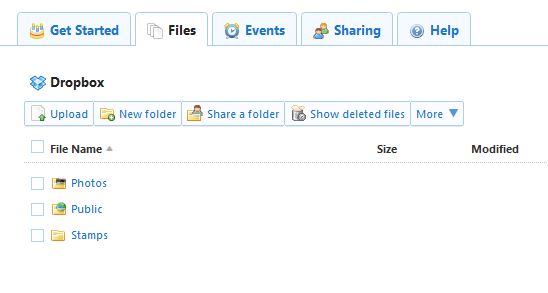
The files in your your Public folder can be shared, but not the folder itself. So you'll have to create a new folder, such as "STAMPS" or something like that.

After creating your new folder, click on the FILES tab, then click "Share a Folder" on the toolbar.


KirkS
Send note to Staff  Go to Top of Page
Valued Member
Australia
426 Posts
Posted 12/25/2010   6:53 pm  Show Profile Bookmark this reply Add peterethio to your friends list  Get a Link to this Reply
I've done it. Thanks Kirk. Made a folder called "overprints" and copied about 40 pages in there. See if the link works

https://www.dropbox.com/home/Public...verprints:::

I know it works for me, but does it work for a non-me?
Send note to Staff  Go to Top of Page
Moderator
Learn More...
United States
4788 Posts
Posted 12/25/2010   7:24 pm  Show Profile Bookmark this reply Add kirks to your friends list  Get a Link to this Reply
No. Doesn't work for me .-- takes me to MY dropbox and my public folder.

Your overprint folder has to be a new top-level folder, it can't be a sub-folder of your public folder?

Kirk

EDIT: Now I'm confused too.. I know I've done this before, but I can't seem to make it work now unless I send you an email inviting you to share my folder ????

Send note to Staff  Go to Top of Page
Edited by kirks - 12/25/2010 7:32 pm
Valued Member
Australia
426 Posts
Posted 12/25/2010   7:45 pm  Show Profile Bookmark this reply Add peterethio to your friends list  Get a Link to this Reply
Thanks for being patient with me Kirk.


Quote:
After creating your new folder, click on the FILES tab, then click "Share a Folder" on the toolbar.


I tried this but it wants me to type in the individual email addresses. I was intending to make it available to anyone. Any ideas? Is this do-able or should I stick with making individual files available?
Send note to Staff  Go to Top of Page
Pillar Of The Community
United Kingdom
1361 Posts
Posted 12/26/2010   03:15 am  Show Profile Bookmark this reply Add AnthonyUK to your friends list  Get a Link to this Reply
I'm glad you found the tutorial useful but I'd just like to mention that I never used Dropbox to display the images.
I only use it as an additional file backup due to the issues you are experiencing displaying single images.

This is an excerpt from the Dropbox doc that is created in your Photos folder - Note: Linking to galleries is limited to folders within your Photos folder. You also cannot link to the Photos folder itself.

One thing I did find useful is setting my photo location in itunes to my Dropbox stamp folder so that when you sync you have all your stamp scans with you. My Dropbox stamp folder is organised by country at the moment. I don't know what smartphone you have but I have multiple options now on iPhone.
There are apps for Flickr and dropbox if you have unlimited data tarrifs or just stored as your photos. I have to say the Iphone 4 screen is great for viewing scans.
For image hosting Flickr or Photobucket have been recommended many times. One of the things I like is that they resize your image when you upload it to about 5 or 6 different sizes that you can select for posting from small thumbnails to actual image size.
I prefer Flickr as they have released tools that allow others to create tools to manipulate and display your images easier.
I particularly like the desktop Uploader and the includr website for easily generating the IMG codes for boards like SCF.

Send note to Staff  Go to Top of Page
Edited by AnthonyUK - 12/26/2010 06:22 am
  Previous TopicReplies: 8 / Views: 6,959Next Topic  
 
To participate in the forum you must log in or register.

Go to Top of Page

Disclaimer: While a tremendous amount of effort goes into ensuring the accuracy of the information contained in this site, Stamp Community assumes no liability for errors. Copyright 2005 - 2026 Stamp Community Family - All rights reserved worldwide. Use of any images or content on this website without prior written permission of Stamp Community or the original lender is strictly prohibited.
Privacy Policy / Terms of Use    Advertise Here
Stamp Community Forum © 2007 - 2026 Stamp Community Forums
It took 0.14 seconds to lick this stamp. Powered By: Snitz Forums 2000 Version 3.4.05