| Author |
 Replies: 26 / Views: 8,862 Replies: 26 / Views: 8,862 |
|
Pillar Of The Community
United Kingdom
1361 Posts |
|
|
I have just found this software on Google code which looks like it could be really useful. It has just been released and is a one man project but already shows great potential for stamp collectors. The software being Java based is platform independant and is used to extract single stamp images from a scanned sheet of many. Webpage for this - http://code.google.com/p/stamp-imagebursting/It is far from perfect at the moment but with feedback and support I'm sure it would save us many hours. |
|
Send note to Staff
|
|
|
|
|
Pillar Of The Community
United States
1947 Posts |
|
|
I have many pages of my US collection scanned. I don't know how to get a single image out for posting. I will have to check this out. |
Send note to Staff 
|
| Edited by rohumpy - 12/24/2011 05:44 am |
|
|
Pillar Of The Community
United Kingdom
1361 Posts |
|
|
It works very well with images of scanned sheets on a black background but with varying degrees of success on lighter backgrounds. |
|
Send note to Staff
|
|
|
Pillar Of The Community
United States
500 Posts |
|
|
Anthony,
I believe lot of the latest scanners come with software that does auto cropping; i.e extracting single images out of a group scan.
Ram |
|
Send note to Staff
|
|
|
Bedrock Of The Community
Australia
38679 Posts |
|
|
What am I missing here?
I have been doing that for 10 years,
You just draw a carousel arond the image and do a "save as"
|
|
Send note to Staff
|
|
|
Pillar Of The Community
United Kingdom
1361 Posts |
|
|
I'm more than aware of the functionality built in to scanner software as I have written a couple of tutorials for this forum  How long does it take to scan each item on a page? I know my scanner has to go back to the end of its travel between each pass. If you scan a single page or have a load of previously scanned pages it is useful but obviously not a replacement for all your software. |
|
Send note to Staff
|
|
|
Pillar Of The Community
United States
7105 Posts |
|
|
If it also included some rudimentary auto-naming functionalities for the resulting files, customizable by the user, that might be something.
If it could do a credible job of breaking up a page of Grenada, say, and then name each jpg "Grenada QV ..." (and probably its own number until customized by the user), it would save some time inserting whatever it is that a person uses for the naming convention in his or her system.
I often scan full pages at one time, and save in a Scans folder; later, when I pull out a particular image with Irfanview, that image is saved within the Stamps hierarchy.
I'd be no help in offering suggestions, but I would be interested in playing with a fleshed out end product. Thanks for the heads up. |
|
Send note to Staff
|
|
|
Bedrock Of The Community
Australia
38679 Posts |
|
|
Yes, I am starting to see the advantages Anthony,
thanks very much for posting.
I did a trial at 3 stamps at 400dpi
It did a cracker job, each stamp came out at 88Kb
which is not too bad.
I had trouble getting resultant images into the folder of choice
and that niggly thing I don't care for, seeing the hagner
glue strip in the scan, but I think that can be overcome
by placing the stamp out of the gully.
I employ ACDSee for renaming conventions
It will do 1-12000 renames in one hit, great for
doing a set of definitives, all I have to do is alter
catalogue number and currency.
Top Job Mr. Drake!
|
|
Send note to Staff
|
|
|
Pillar Of The Community
Canada
669 Posts |
|
|
Nice bit of software, I completely agree! Jason has been working extremely hard on this one to try and get it polished up enough for all of us to use it! He is very committed and is trying very hard to release a product that will assist all of us image junkies!
I had the opportunity to be a beta tester for him the past week or so, and although my input wasn't nearly as technical as some of the other testers, I did find a few wrinkles that he immediately addressed.
Definitely a winner in my books, great job to Mr. Drake!
Skilo54 |
|
Send note to Staff
|
|
|
Valued Member
United States
106 Posts |
|
|
Reading about this program made me want to try it out. I did a 600dpi scan of one of my Czech pages and loaded it into the Stamp Burst program. This was not a Vario page and the stamps were hinged. After it went through its motions it found only one stamp on the page. And it wasn't a stamp, it was the black border surrounding the stamps on the album page. The blue arrow on the screen capture below shows this. I watched his demo video and really liked the way the program works. Maybe it will work better on those white pages that have black stamp mounts. I'm hoping that maybe something can be done where it will recognize hinged stamps on a white page. A good program however. 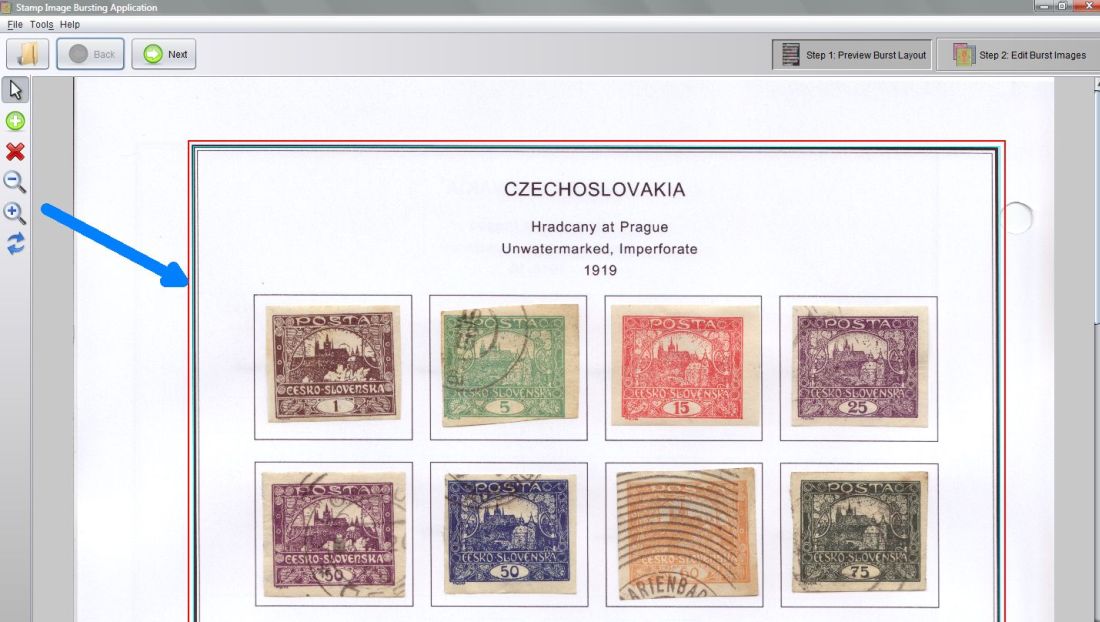 |
|
Send note to Staff
|
|
|
Rest in Peace
Canada
5701 Posts |
|
|
I love Hradcany stamps! Very interesting cancel on the 60! Ooops sorry for going off topic. |
|
Send note to Staff
|
|
|
|
Pillar Of The Community
Canada
1084 Posts |
|
|
I had the same thought as Rod at first. I too have seen the light on watching the youtube demonstration. Looking forward to explanations regarding white backgrounds as most of mine are. |
|
Send note to Staff
|
|
|
Pillar Of The Community
United States
1160 Posts |
|
|
I haven't gone to the link, but don't photo editing programs already do this? Scan a page. Save it. Recall page, crop image area desired. Resave image. Done. |
|
Send note to Staff
|
|
|
Bedrock Of The Community
Australia
38679 Posts |
|
|
When everything else fails,
read the instruction book.
(or in this case, watch the youtube video) :)
|
|
Send note to Staff
|
|
|
Valued Member
United States
302 Posts |
|
|
Basically this software just automates what you would normally do by hand in an ordinary image editing application.
Unfortunately the application, in its current revision, is very buggy for me.
For now I will stick with what I use.
However, would be nice if he could build future versions to support large file sizes and the ability to automatically rotate and center individual stamps. |
|
Send note to Staff
|
|
|
Forum Dad

USA
2059 Posts |
|
|
Open your favorite image software, open the scanned page.
Crop > Save as Stamp001.jpg > Undo
Crop > Save as Stamp002.jpg > Undo
Crop > Save as Stamp003.jpg > Undo
Keep rinsing and repeating for each stamp on the scan.
Takes less than 30 seconds for each extraction. |
|
Send note to Staff
|
|
|
|
Replies: 26 / Views: 8,862 |
|




 Posted 12/24/2011 05:16 am


