| Author |
 Replies: 103 / Views: 15,614 Replies: 103 / Views: 15,614 |
|
|
|
Pillar Of The Community

United States
3046 Posts |
|
|
I usually do greyscale. Makes the stamps stand out more when you put them on the page. Which version of Publisher are you using? |
Send note to Staff 
|
|
|
Pillar Of The Community
United States
2941 Posts |
|
|
Quote:
I usually do greyscale. Makes the stamps stand out more when you put them on the page. I figured that was the case. I've set it where it automatically converts the photos to greyscale. Quote:
Which version of Publisher are you using? 2010. If you're running a prior version let me know and I'll try to make sure the code is 2003-friendly. |
|
Send note to Staff
|
|
|
|
Pillar Of The Community
United States
2941 Posts |
|
|
Quote:
Use 2 Textboxes, 1 for width and 1 for height.
...
In your program you can execute any number of toolbar/ribbon buttons with one form button. I'm not using an input form, so there's no place for textboxes or form buttons. To avoid the large photo problem, I resize large photos on insert to a size that will fit on the page. |
|
Send note to Staff
|
|
|
|
Pillar Of The Community
United States
3046 Posts |
|
|
I have 2010. The big deal for me is this. The distance between the bottom of the caption and the top of the stamp box has to always be the same., even if the caption is two lines.
Also the distance from the bottom of the box and the description must always be the same.
The caption-box distance is what is failing me in my current solution. |
|
Send note to Staff
|
|
|
Pillar Of The Community
United States
2941 Posts |
|
|
Just so I'm straight... You need a consistent distance between: 1. The last line of text above the photo and the top of the photo; and 2. The first line of text below the photo and the bottom of the photo ? If so, piece o' cake.  |
|
Send note to Staff
|
|
|
|
Pillar Of The Community
United States
3046 Posts |
|
|
Yep, that's it! I know some perl, some python and a lot of bash, but VBA I am clueless about. |
|
Send note to Staff
|
|
|
Pillar Of The Community
United States
2941 Posts |
|
|
OK. Not quite a piece o' cake. I can get one or the other, but not both at the same time. Yet. Looks like I'm gonna learn something new today...  |
|
Send note to Staff
|
|
|
|
Pillar Of The Community
United States
3046 Posts |
|
|
The only software I have gotten it to work with is LaTEX. But LaTEX has a significant learning curve associated with it. And it's not really designed to do this kind of page formatting. |
|
Send note to Staff
|
|
|
Pillar Of The Community
United States
2941 Posts |
|
|
apastuszak, I've updated the demo to show the current version. It does the following: 1. Asks you to point it to the photo 2. Inserts the photo 3. Converts it to greyscale 4. Shrinks the photo if it's too large for the page 5. Inserts a text box above the photo with text centered and vertically aligned at bottom 6. Inserts a text box below the photo with text centered and vertically aligned at top 7. Groups the three shapes The default font is set in Publisher and doesn't stay with the file, so you'd need to set that on your Publisher installation. |
|
Send note to Staff
|
|
|
|
Pillar Of The Community
Canada
6525 Posts |
|
|
For what it's worth (you're getting a lot of great advice here), I'm a Mac user, and I find Indesign is great for laying out pages for my albums. Page layout is what it's made for.
You can set type, frames, import images if you choose. Pretty terrific.
|
|
Send note to Staff
|
|
|
Pillar Of The Community
United States
978 Posts |
|
|
Hi PostmasterGS It worked out pretty well. Nice job. I am not too familiar with Publisher (only used it a few times). Is there a paragraph "space before" and "space after" as in WORD? That is the first thing I thought of to get consistent spacing above and below the image. Quote:
The default font is set in Publisher and doesn't stay with the file, so you'd need to set that on your Publisher installation. Can you make a "blank page template" with all the default options, font, point size, etc., already set? If not, you can save a page and have a macro that runs on open that sets up the defaults. Just a thought since I do not know how much VBA you know. Right now I am testing a VB.NET interface to WORD. I have a lot of "stamp" code that I can automate with VB.NET. It is a little tricky, especially making it work for all versions of WORD. Jerry B |
|
Send note to Staff
|
|
|
Pillar Of The Community
United States
978 Posts |
|
|
Hi apastuszak
VBA is a lot easier than PERL and PYTHON. The hardest part is knowing what to use for the particular MS Office product, WORD, EXCEL, PUBLISHER, etc..
Jerry B |
|
Send note to Staff
|
|
|
Pillar Of The Community
United States
3046 Posts |
|
|
I am a Mac user also. But to spend $700+ on a copy of Adobe InDesign is just way too pricey. Pages does a half decent job of laying out a page, but I still have the issue with top captions and bottom descriptions all lining up properly. |
|
Send note to Staff
|
|
|
Pillar Of The Community
United States
2941 Posts |
|
|
Rest in Peace
160 Posts |
|
|
Quote:
Quote:
CindyCan2
I use Microsoft Powerpoint to design stamp album pages.
Now that is clever. I would never, in a million years, have thought of PowerPoint as a "graphics design" program. How did you ever come up with using it.
Jerry B Hi Jerry: I work in genetics research, and Powerpoint is used to present results at conferences. But it can also be used to put together a large poster of the results (e.g. 4 x 4 feet). The key is to get away from the "slide" format or the pre-made templates. In Page Setup you can define the size and orientation of the page. I use Letter Paper (8.5 x 11), but any size can be specified, if you have a printer than can handle larger paper formats for instance. On a blank page, you can add boxes, images and text anywhere, and you can draw lines. There is a very nice Align function in Powerpoint that allows you to align or distribute any number of objects to each other. I collect Canadian revenues and cinderellas, and have designed hundreds of pages for my albums using this software, which many people have access to (part of the MS Office suite). Below are a few examples of pages from my albums, which are based on an old Canada Scott album I had as a boy in the 1970's (and still have). 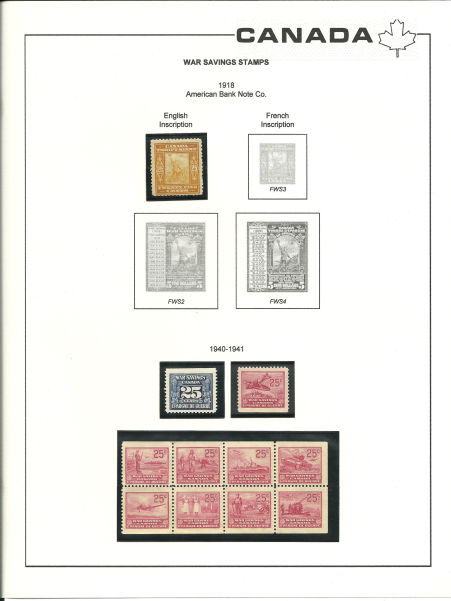 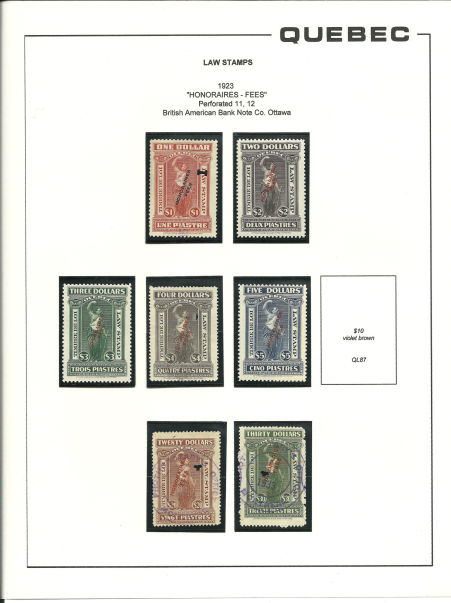 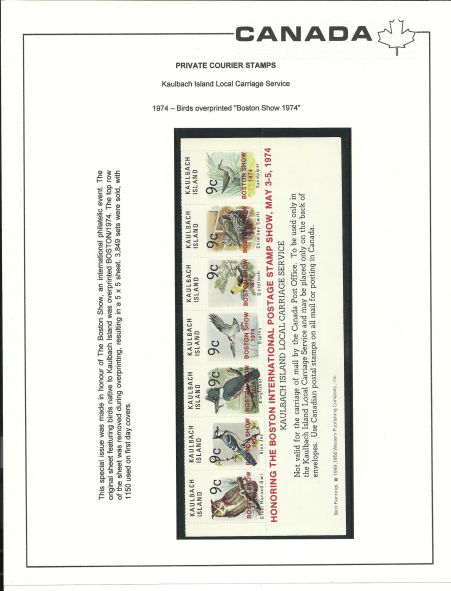 |
|
Send note to Staff
|
|
|
Replies: 103 / Views: 15,614 |
|




 Posted 06/05/2012 08:55 am


