| Author |
 Replies: 103 / Views: 15,615 Replies: 103 / Views: 15,615 |
|
|
|
Pillar Of The Community

United States
3046 Posts |
|
|
Pillar Of The Community
United States
978 Posts |
|
|
Hi CindyCan2 That is really great  Thanks for showing your results. Like they say, "You learn something new everyday". I am planning to get a new machine soon along with MS Office Home and Student. I'll have to try your method. Jerry B |
Send note to Staff 
|
|
|
Pillar Of The Community
United States
2941 Posts |
|
|
apastuszak,
Were you able to get the code working to your satisfaction? If not, let me know and I'll see what I can do. |
|
Send note to Staff
|
|
|
|
Pillar Of The Community
United States
3046 Posts |
|
|
Sadly no. But I haven't had time to play with it since the last email you send. I'm going to try and tinker with it over the weekend. |
|
Send note to Staff
|
|
|
Pillar Of The Community
United States
3046 Posts |
|
|
So, I'm curious. How much of this could be automated? Could we have a database of stamp names, descriptions, sizes and pictures and just have the script auto-create all the stamps on the page with descriptions and then I just move them around to where I want them. That would be something useful for any collector! |
|
Send note to Staff
|
|
|
Pillar Of The Community
United States
2941 Posts |
|
|
The database is easy. It's the automation that would require some creativity. I've used Access databases to automate Word, Excel, Outlook, and PowerPoint, but never Publisher. They're all MS, so it's probably do-able. I know there's no Access for Macs, but do you have the ability to run them using your Windows installation?
I'm without my computer because I'm moving, but I'll give it a stab when my stuff arrives. |
|
Send note to Staff
|
|
|
|
Pillar Of The Community
United States
3046 Posts |
|
|
Pillar Of The Community
United States
2941 Posts |
|
|
It can, but using Access allows a lot more options on the front end. For example, setting custom options like padding, margin, fonts, etc., on the fly before you click the button to generate the page. |
|
Send note to Staff
|
|
|
|
Rest in Peace
Canada
6750 Posts |
|
|
PostmasterGS, I haven't had a chance to view the demo you made at the library where they have high speed (I have dial-up). Still on my to do list. Thanks for making it. |
|
Send note to Staff
|
|
|
Pillar Of The Community
United States
978 Posts |
|
|
Hi PostmasterGS I agree totally that ACCESS is the way to go. However, one must have MS Office Professional, or a stand alone ACCESS which is a little pricy. ACCESS is not included in the "garden variety" MS Office. I have found a couple of freebie Database programs but being free I do not know how good they are. Quote:
apastuszak Said:
Heck, it can be stored in an Excel spreadsheet. It's just a flat file. EXCEL, being a "flat file", is inherently not a "keyed" file. To get a specific entry one has to read each entry and do field inquiries to get what you want. In ACCESS you can set predefined key fields and with one read, maybe two, get exactly the data you want. Since I have been learning VB.NET (VB not C#) I have toyed a little with SQL (System Query Language) which VB.NET has a freebie version. I am thinking of changing my 40 year old inventory system over to SQL for the main reason that I can create keyed files. Also it is not dependent on the pricey MS ACCESS. PostmasterGSIf you want anything in a standalone .EXE let me know. I can try to write something in .NET for you. As I said I am not an expert but I am getting pretty good at it. I once thought that VBA had a lot of stuff to remember but take a look at this: http://msdn.microsoft.com/en-us/lib...50ex0x9.aspxand each one of those expands out to many pages. Jerry B |
|
Send note to Staff
|
| Edited by jbcev80 - 06/23/2012 06:52 am |
|
|
Pillar Of The Community
United States
2941 Posts |
|
|
apastuszak, I've been doing some testing, and it's doable with Access/Publisher. Because I'm without my usual computer, I don't have the ability to make a video demo, but here are some screenshots of what I was able to throw together. 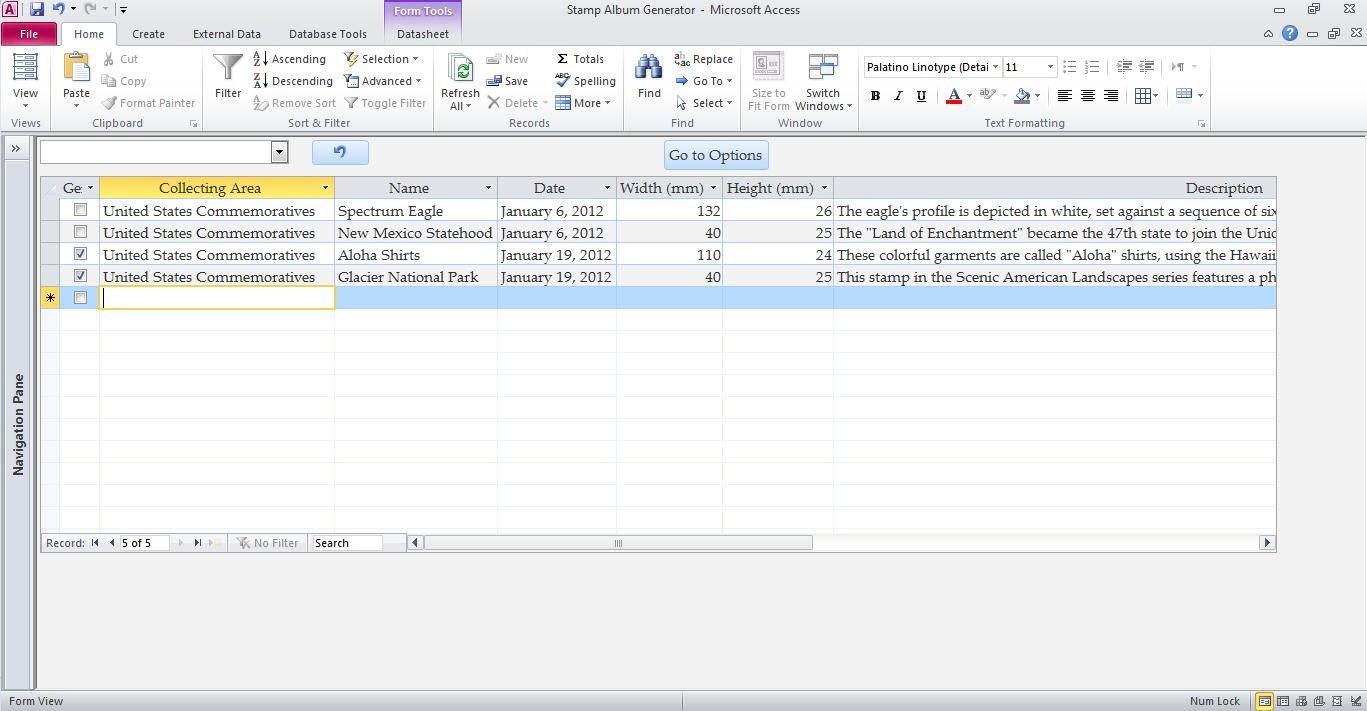 This screen contains the table. At the top left is a dropdown box that allows filtering by collecting area (ex. US Commemoratives). Once I've checked the ones I want, I click to the Options screen. 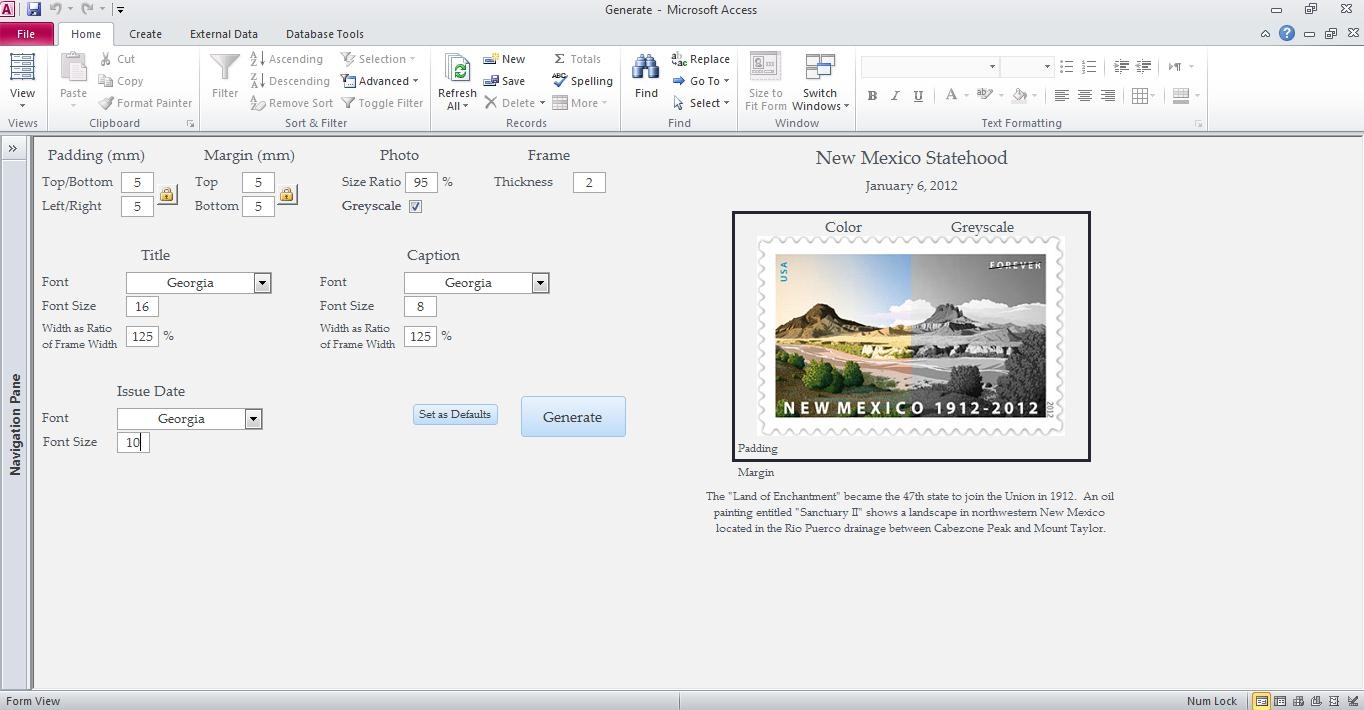 This screen has a lot of options: Setting the top/bottom and left/right padding inside the frame. Setting the top/bottom margins between the frame, issue date (top), and caption (bottom). Setting the photo scale. This option allows you to scale the photo down slightly to avoid having to line the stamp up perfectly if using clear or no mounts. Setting greyscale or full color. Setting the frame thickness. Setting the fonts and font sizes of the various text boxes. Setting the title and caption box ratios. This allows the title/caption boxes to be a set percentage wider than the frame. The example at right is just a sample to explain some of the different settings. After clicking Generate... 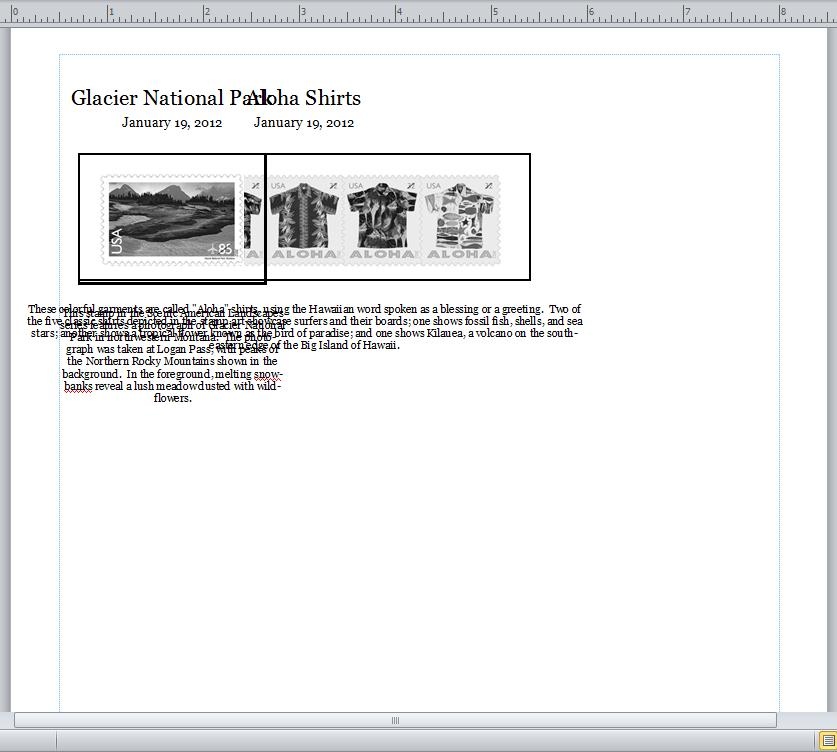 This is what the page looks like in Publisher. The individual stamps, titles, captions, etc., are grouped, so once I drag one group off of the other, this is the end result.  |
|
Send note to Staff
|
|
|
|
Pillar Of The Community
United States
3046 Posts |
|
|
That is absolutely awesome! I don't care if they all pile up on each other. I was planning to move them around. My personal preference is to justify the text on the bottom block, and not center it, but I'll take anything that makes life easier.
This truly is above and beyond!
Damn it, now I am going to have to learn VBA! |
|
Send note to Staff
|
| Edited by apastuszak - 06/23/2012 9:38 pm |
|
|
Pillar Of The Community
United States
2941 Posts |
|
|
On the Options screen, there are independent font selection boxes for the title, date, and caption. The fonts themselves are pulled from your computer, so if you prefer a non-standard font, as long as it's on the computer it should be available.
I should be able to add a justification and centering/non-centering option. Or as a last resort, hard code it.
Is there any way to get Access working on your Mac? If so, I can shoot you a copy of the DB to play with in a couple days.
I've only got 2 days left before I'm without computer access for a few months, so I'm going to finish up a few more features and some error trapping. But I'd be glad to send it to you at that point so I don't leave you hanging for a couple months. |
|
Send note to Staff
|
|
|
|
Pillar Of The Community
United States
2941 Posts |
|
|
OK. I've added the ability to align the caption text left/center/right/justified, and the ability to bold/underline/italicize the title, date, or caption.
Anything else you (or anyone else out there who's interested) can think of that you'd like to see it do? |
|
Send note to Staff
|
|
|
|
Pillar Of The Community
United States
3046 Posts |
|
|
Replies: 103 / Views: 15,615 |
|




 Posted 06/06/2012 09:50 am


