| Author |
 Replies: 121 / Views: 31,941 Replies: 121 / Views: 31,941 |
|
|
|
Pillar Of The Community

United States
3046 Posts |
|
|
Quote:
OK. I had the code which reset the units in the wrong spot. And this is why I don't code for a living. It looked fine to me. |
Send note to Staff 
|
|
|
|
Pillar Of The Community
United States
2941 Posts |
|
|
Version 1.02 posted. Minor bug fixes, and one major addition -- "Outside/Inside" style stamp boxes. "Outside/Inside" boxes allow three text boxes outside the frame, and a photo and single text box inside the frame. 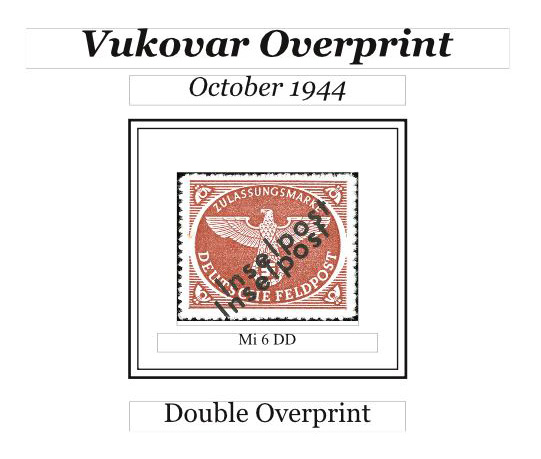 |
|
Send note to Staff
|
|
| Edited by PostmasterGS - 06/22/2013 07:55 am |
|
|
Pillar Of The Community
United States
2941 Posts |
|
|
Version 1.03 posted.
Added the ability to set the vertical spacing between the photo and interior text box when using the "Outside/Inside" style box shown above.
Edit: And fixed minor bugs with text box placement in certain combinations, |
|
Send note to Staff
|
|
| Edited by PostmasterGS - 07/06/2013 10:30 am |
|
|
Pillar Of The Community
United States
2941 Posts |
|
|
Version 1.04 posted. Video demo is here. (as usual, switch to HD and enlarge for best results) This update is a bit of an odd one. I've added a major new feature, but I'm not entirely happy with the algorithms, so it looks like there will be a v1.05 one of these days. But still, it's an improvement over 1.03. What's New?This update adds a plugin for Fiji (a free photo program).  The plugin will take this... 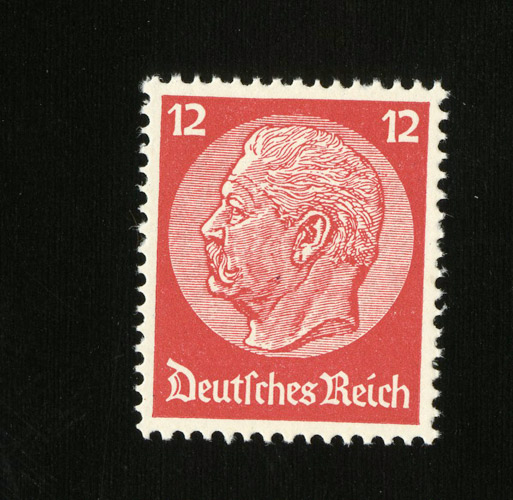 and with the click of a button and a short wait, produce this...  In addition, it will measure the dimensions of the stamp. Again with the click of a button, these dimensions can be imported into the Stamp Album Page Generator Spreadsheet. 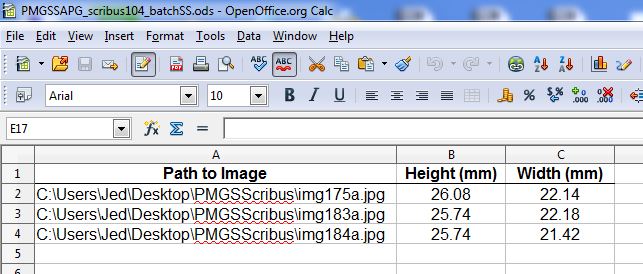 And when you insert the photo into the spreadsheet, the dimensions auto-populate.  So overall, it's now easier to process the scans (no more manual realigning in Photoshop) and get their dimensions (no more trying to find where I laid my ruler). There are a few limitations for which I haven't yet found a workaround (hard-coded scan resolution being the big one), but overall, a neat little addition to the package. I also need to work on the processing algorithms to make them faster and more accurate, but that's a longer-term goal. Software RequirementsScribus (free) OpenOffice (free) Fiji (free) Java SE (free) |
|
Send note to Staff
|
|
|
|
Pillar Of The Community
United States
3046 Posts |
|
|
Ok, it's time to start work on the 2003 Community stamp album supplement. Time to put this script to the test! |
|
Send note to Staff
|
|
|
|
Pillar Of The Community
United States
2941 Posts |
|
|
If you run into any bugs, let me know. I've had remarkably little feedback on whether it works as intended on other people's systems. |
|
Send note to Staff
|
|
|
|
Valued Member
United Kingdom
8 Posts |
|
|
I love the idea of this software. I have downloaded all of the files and only have one problem setting it up.
The file in question is PMSSAPG_.py line 25
I feel a twit not knowing this but where exactly does the path get changed?
I would be grateful if you could help please.
|
|
Send note to Staff
|
|
|
Pillar Of The Community
United States
3046 Posts |
|
|
Line number 25 is this: strPMGSDir = "C:\\Users\\Jed\Desktop\\PMGSScribus\\" Change the "C:\\Users\\Jed\Desktop\\PMGSScribus\\" to the path where your files are. On Mac and Linux, you would obviously use forward slashes and not need to specify a drive letter. |
|
Send note to Staff
|
|
| Edited by apastuszak - 12/10/2013 3:27 pm |
|
|
Valued Member
United Kingdom
8 Posts |
|
|
Wow, thanks it works brilliant.
I have loaded your page generator, fiji on to my external hard drive. would you suggest loading my copy of Scribus and open office also? |
|
Send note to Staff
|
|
|
Pillar Of The Community
United States
3046 Posts |
|
|
Valued Member
United Kingdom
8 Posts |
|
|
I have just run my first stamp through fiji to straighten it.
I scanned it in with a black background as advised.
When fiji finished straightening and cropping the stamp it just left a black stamp no details of the stamp at all.
\have I done something wrong.
|
|
Send note to Staff
|
|
|
Pillar Of The Community
United States
2941 Posts |
|
|
The stamp needs to be close to the correct orientation to start (in other word, not inverted, on its side, etc.). Also is there any black on the interior of the stamp design? That can cause problems.
The auto-align feature isn't yet where I'd like it to be, but I haven't had time to develop a better algorithm. |
|
Send note to Staff
|
|
|
|
Valued Member
United Kingdom
8 Posts |
|
|
Thats me in trouble, I collect Penny Blacks and Reds from the same plates and most of them have nice fat maltese crosses on them. |
|
Send note to Staff
|
|
|
Valued Member
United Kingdom
8 Posts |
|
|
I have been trying fiji using a new stamp with no black within the stamp but it still turns the stamp details all black with white background. |
|
Send note to Staff
|
|
|
Pillar Of The Community
United States
2941 Posts |
|
|
Email me a copy of one of the scans you're having trouble with and I'll see if I can diagnose the problem.
In the meantime, the album generator works well. It's only the Fiji algorithm that still needs some tweaking. |
|
Send note to Staff
|
|
|
|
Replies: 121 / Views: 31,941 |
|




 Posted 06/21/2013 09:53 am


