| Author |
 Replies: 121 / Views: 31,942 Replies: 121 / Views: 31,942 |
|
Pillar Of The Community
United States
2941 Posts |
|
|
I had previously put together an add-in for MS Publisher that assisted in building album pages. The problem with that solution, however, is the not a lot of folks have Publisher, and it really limits you to a PC. So, I decided to follow apastuszak's lead and try a solution using Scribus. So, here's the scoop... Video demo is here (enlarge and switch to HD for best viewing). The PMGS Stamp Album Page Generator for Scribus v1.0Requirements -- Scribus (free here) and OpenOffice (free here). It 's been tested on a Mac with Scribus v1.4.1 and OpenOffice v3.4.1., and on a PC with Scribus v1.4.2 and OpenOffice v3.4.1. I don't have a Linux box to test it on. What it does and how it worksThe package includes an OpenOffice spreadsheet, a Scribus script, and a couple text files necessary for it to work. The spreadsheet lets you select which stamps you want to build boxes for:  Then set the settings for the stamp boxes: 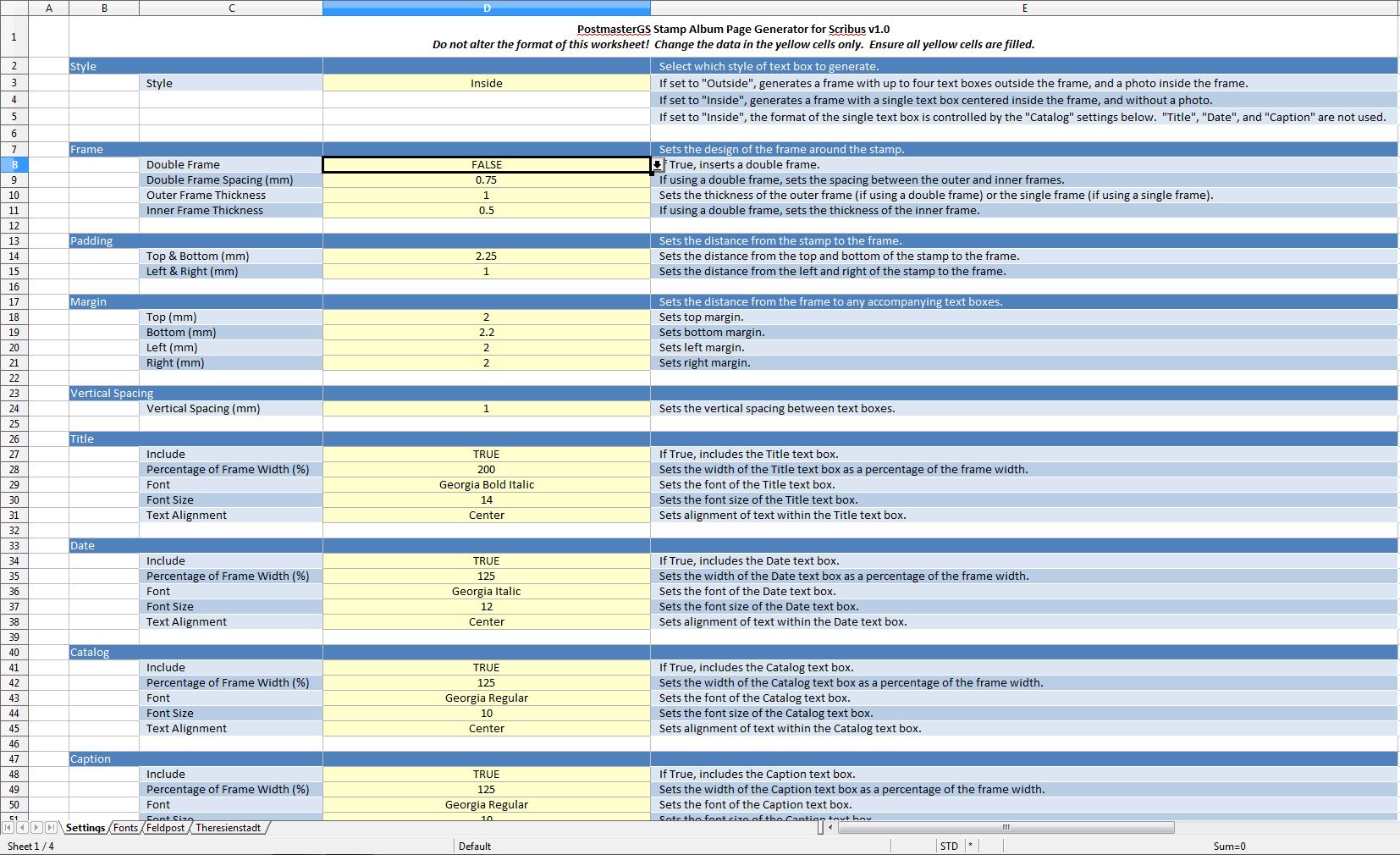 At the click of a button, the stamp data and settings are exported to a text file. Then, in Scribus, when you execute the script, you get this: 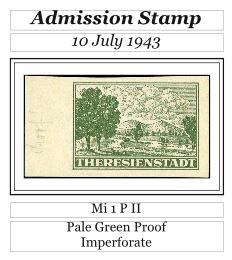 Or this: 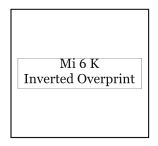 Feel free to give it a try. Instructions are included. It's v1.0, so there are bound to be some typos/bugs, and features that I'd like to implement but haven't yet. Feedback or suggestions are appreciated. Version changes are noted in the thread below. Latest version is here. |
|
Send note to Staff
|
|
| Edited by PostmasterGS - 07/06/2013 10:29 am |
|
|
|
|
Pillar Of The Community

United States
3046 Posts |
|
|
Holy cr*p!
I'm not worthy! I'm not worthy! I'm not worthy!
Oh well, there WAS stuff I needed to do tonight....
Just as a sidenote, Scribus does not embed the picture in the file. It links it. So, if you take the image and convert it to black and white, then you it will show up as Black and White in Scribus. |
Send note to Staff 
|
|
| Edited by apastuszak - 06/19/2013 10:42 am |
|
|
Pillar Of The Community
United States
3046 Posts |
|
|
And another note....
If you're dying to get the B&W working, you can use PIL(Python Imaging Library), to convert the image to B&W. |
|
Send note to Staff
|
|
|
|
Valued Member
Denmark
445 Posts |
|
|
Pillar Of The Community
United States
3046 Posts |
|
|
I've started to modify your python script to use styles instead of directly set fonts and sizes. This works better, because you change the style and it reflows throughout the whole set of pages you designed.
For me, it allows me to include catalog numbers on my pages, and when I want to publicly give my pages away, I just go into the style for the catalog numbers, change them to white, and all the catalog numbers go away, preventing a takedown notice from a catalog publisher.
I'll send you back the code when I finish it and properly comment it, so you can see what's going on. |
|
Send note to Staff
|
|
| Edited by apastuszak - 06/20/2013 08:44 am |
|
|
Pillar Of The Community
United States
3046 Posts |
|
|
Pillar Of The Community
United States
2941 Posts |
|
|
What I'll probably do is implement an option to choose between global or local font styles. I can see the utility of global, but I often have different font settings from page to page due to space limitations, so I have to maintain the option of indivualized settings. |
|
Send note to Staff
|
|
|
|
Pillar Of The Community
United States
3046 Posts |
|
|
Quote:
What I'll probably do is implement an option to choose between global or local font styles. I can see the utility of global, but I often have different font settings from page to page due to space limitations, so I have to maintain the option of indivualized settings. I see your point. I hadn't thought about that. I've been trying to get the greyscale part to work, but you need an external module to get it work, and I'm not sure how to insert them into the Scribus install. I think the easiest way would be to just insert the images as color and use some batch image converter to convert them to black and white. Since Scribus links, it will pick up the change. |
|
Send note to Staff
|
|
|
|
Pillar Of The Community
United States
2941 Posts |
|
|
I ran into the same problem with the grayscale. It rapidly became too complicated for the end user. Batch conversion is the way to go. |
|
Send note to Staff
|
|
|
|
Pillar Of The Community
United States
3046 Posts |
|
|
The 1.5 scripting engine (which I think they're calling ScripterNG), is supposed to offer some of those features. |
|
Send note to Staff
|
|
|
|
Pillar Of The Community
United States
3046 Posts |
|
|
Thinking back on the use of styles, I realize, the only thing I need styles for is catalog numbers, so I can hide them globally, if I need to. I'll send you my code when it's done. |
|
Send note to Staff
|
|
|
|
Pillar Of The Community
United States
2941 Posts |
|
|
Pillar Of The Community
United States
3046 Posts |
|
|
Today was the first time I used the spreadsheet and script to do more than one stamp at a time. Here is the result:  This is on Linux. Have not tried Mac or Windows yet. Other than this, it does 99% of what I need, so I am beyond impressed you ported this! |
|
Send note to Staff
|
|
|
|
Pillar Of The Community
United States
3046 Posts |
|
|
Ok, figured out how to duplicate the problem on Windows. If your Scribus file's default unit is points, the script works fine. If it's millimeters, then this happens. I looked through your code, and I see you are setting the default unit to points in the beginning and then setting it back to whatever the default was at the end. I've only taken a really quick look, so I'm not sure what's going on with the rest of the script yet. |
|
Send note to Staff
|
|
|
|
Pillar Of The Community
United States
2941 Posts |
|
|
OK. I had the code which reset the units in the wrong spot. Version 1.01 (link removed due to update below) posted with the unit conversion bug fixed and the addition of global/individual font styles. |
|
Send note to Staff
|
|
| Edited by PostmasterGS - 06/22/2013 04:32 am |
|
|
Pillar Of The Community
United States
521 Posts |
|
|
Replies: 121 / Views: 31,942 |
|




 Posted 06/19/2013 09:32 am


