| Author |
 Replies: 15 / Views: 7,137 Replies: 15 / Views: 7,137 |
|
|
Valued Member
United States
248 Posts |
|
|
|
Hi - a family friend gave me a 4 volume set of Scott International Albums over 20 years ago. I've rearranged and expanded the set to 11 volumes in order by country with pages through Volume 5. I don't have to go into all the limitations of the album, but its the best World Wide album IMHO.
When Stampalbums.com started releasing pages about 10 year ago, I've created additional albums for areas that I wanted to cover in more depth. Now it's always a question to expand a country with blank International pages or start a new album with Steiner pages.
Well I now have a solution - I purchased a wide format printer (HP Officejet 7110 Wide Format ePrinter) allowing me to print onto blank Scott International Pages. I use OpenOffice to remove the borders and adjust the page location on the "even" pages allowing me to print double sided pages in-line with the rest of the pages.
I just started my first set with Classic Hungary pages. I'll be mounting some stamps then post them here for comment.
Paul
|
|
Send note to Staff
|
|
|
|
|
Pillar Of The Community
United States
1510 Posts |
|
|
Valued Member
United States
248 Posts |
|
|
OpenOffice is a open source Office suite of programs designed to compete with Microsoft Office. It's written in Java so it runs on Windows, Mac, Linux, and other platforms that support Java. If you install the product, there are a number of add-ons that can be installed through their website. A PDF editor is one of the more popular add-ons. Of course you could also use Adobe Acrobat, but that would put you back $$$. Open Office is now owned by Oracle and it still remains open source. However, there is an alternate version called Libre Office that is still 100% compatible with OpenOffice.
In this case I used OpenOffice to remove the borders on each page, them moving the even/back sides of the pages to better center the resulting page. |
Send note to Staff 
|
|
|
Pillar Of The Community
1448 Posts |
|
|
Quote:
I just started my first set with Classic Hungary pages. I'll be mounting some stamps then post them here for comment. Paul- Nice! I am looking forward to your album page pics.  |
|
Send note to Staff
|
|
|
|
Valued Member
United Kingdom
21 Posts |
|
|
Good to learn about this program. Does anyone have experience not only removing borders from the Steiner pages, but replacing them with a scanned alternative (eg Scott or Minkus)? I've done this frequently by cutting and pasting paper, and this manual process is described on Bill Steiner's website, but doing it electronically would save a lot of time.
|
|
Send note to Staff
|
|
|
Valued Member
378 Posts |
|
|
My oldish copy of Adobe Acrobat Professional has a crop function which allows you to specify how far in from the sides of a pdf you want to crop. You have the option of cropping one or all of the pages to the same size. I tried this with the Steiner pages for Aden and it looked like it worked, but I didn't try actually printing out the pages. |
|
Send note to Staff
|
|
|
Pillar Of The Community
United Kingdom
1187 Posts |
|
|
You can use Adobe Photoshop / Image Ready / Illustrator to do most anything in creating and modifying page layouts. There are different ways to achieve the results you want, some often much simpler and quicker than the tortuous methods described in the block sized 'how to' manuals. Explore, experiment and create your own solutions.
Terry |
|
Send note to Staff
|
|
|
Pillar Of The Community

United States
3046 Posts |
|
|
Openoffice at one point was abandoned by it's developers. The left and formed The Document Foundation and started a new project called Libreoffice. Though Openoffice development has resumed, Libreoffice is farther ahead, in terms of features and bug fixes. http://www.libreoffice.comLibreOffice Draw (part of the Suite), will let you edit PDF files. The only issue you may face is centering of text is sometimes a tiny bit off, unless you have the original font installed. Bill Steiner uses Helvetica, but there are quite a number of Helvetica fonts available. If you click on a text field, and the font name in the font selector is in italics, then you don't have the font installed and your centering may be off. I'll post a small tutorial later on today to explain what I am talking about. I am obviously way too anal about this stuff. |
|
Send note to Staff
|
|
| Edited by apastuszak - 06/05/2014 1:47 pm |
|
|
Pillar Of The Community
United Kingdom
1187 Posts |
|
|
Hi apastuszak. Helvetica is one of the more popular typefaces, but there are others as nice or nicer, and it is a shame to be limited to just Helvetica by a system. As an ex graphic artist I understand your anality about detail. It is not to be neglected. I make my page layouts with Adobe Photoshop CS and use Illustrator to set the type as it produces sharper results at the print stage.
Really all I need is a reference for the stamps issued in sets or singly, the Scott numbers, and the box sizes. I dump all the rest including the borders, Set a script face for the page headers, amend the box layouts to suit my preferences, print the pages and hand write the numbers and notes. Although it would be just as easy to set numbers and notes in the script face at a smaller point size it would be too mechanical and not the look I am after.
Out of interest I have downloaded libreoffice 'Fresh' for Mac OS and I am looking forward to your tutorial.
Terry
Edited for additions. TC. |
|
Send note to Staff
|
| Edited by Terence Collins - 06/05/2014 2:24 pm |
|
|
Pillar Of The Community
United States
3046 Posts |
|
|
I completely agree about Helvetica. A true timeless classic. But it is everywhere and some times you want something fresh. Bill Steiner used Helvetica in his pages. If you're going to hack them, then you can change the font to anything you want. I wrote a very barebones tutorial on this post: https://goscf.com/t/37908Feel free to ask questions to help me flesh it out some more. |
|
Send note to Staff
|
|
| Edited by apastuszak - 06/05/2014 2:43 pm |
|
|
Valued Member
United States
248 Posts |
|
|
Thanks for the info, I'll also try Scribus - I also have an old CD with the Pagemaker files but they are no longer supported by the modern Adobe products. Luckily I kept an old Windows XP machine up and running that has a copy of PageMaker so I'm able to do some basic editing, since I never really learned the program. |
|
Send note to Staff
|
|
|
Valued Member
United States
248 Posts |
|
|
Here is a sample of 2 pages I printed on Scott International Paper - I have to work on the centering, but otherwise, I'm happy with the result: 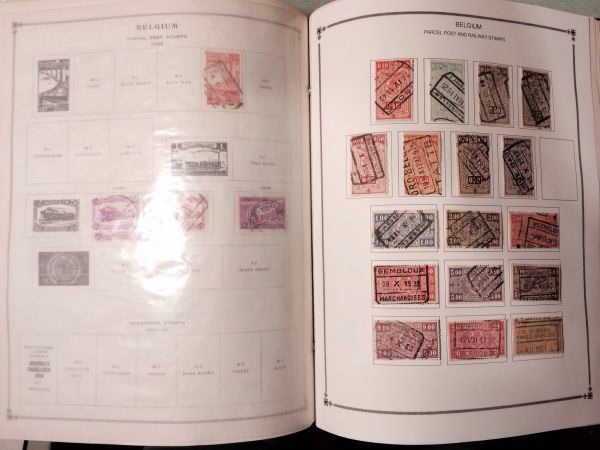 |
|
Send note to Staff
|
|
|
Pillar Of The Community
United Kingdom
1187 Posts |
|
|
Thanks for the link Zac, I have had a quick look and will go through it tonight.
Terry |
|
Send note to Staff
|
|
|
Pillar Of The Community
United Kingdom
1187 Posts |
|
|
New Member
United States
1 Posts |
|
|
Like Andy I have used Scribus to produce what I think are professional looking album pages. For those who wish to learn how to use Scribus there is an EXTENSIVE set of tutorials available at - http://www.showmedo.com/ There are forty five 8-10 minute videos covering everything from basics to integrating with Blender and Inkscape. The tutorials are very useful, but be aware that Dai's (the instructor) voice can be hypnotic :) The tutorials are well worth the effort to go through them. |
|
Send note to Staff
|
|
|
Pillar Of The Community
United States
772 Posts |
|
|
Paul,
I would like to follow-up with you regarding your post on printing Steiner pages onto blank Scott International pages. There was a whole discussion about this over on Bob's Filling Spaces blog some time ago. I recently managed to successfully use my standard Epson print to print Scott International pages so I'm revisiting this idea (although, I still may consider buying a large-format printer). I too basically really like my BigBlue album except for the many spaces that are missing. To be able to supplement the album with Steiner pages for certain specific countries, while keep everything else on the Scott International pages really sounds like a great solution. I have been editing my Steiner pages using PowerPoint for some time now so I can easily remove the borders, change the font, move boxes around, etc.
I just wanted to know if you are still doing this, if it is still working out well for you, any unforeseen problems or issues? Do you replace entire countries or just add individual pages? Would also love to see any additional photos.
Thanks!
|
|
Send note to Staff
|
|
| |
Replies: 15 / Views: 7,137 |
|




 Posted 06/01/2014 5:46 pm


