Stamp Community Family of Web Sites
Thousands of stamps, consistently graded, competitively priced and hundreds of in-depth blog posts to read


Stamp Community Forum
 
Username:
Password:
Save Password
Forgot your Password?

This page may contain links that result in small commissions to keep this free site up and running.

Welcome Guest! Registering and/or logging in will remove the anchor (bottom) ads. It's Free!

Editing Steiner Pages - Libreoffice Vs. Scribus

 
To participate in the forum you must log in or register.
Author Previous TopicReplies: 7 / Views: 7,352Next Topic  
Pillar Of The Community
Learn More...
United States
3046 Posts
Posted 06/05/2014   1:17 pm  Show Profile Bookmark this topic Add apastuszak to your friends list Get a Link to this Message
Ok, I made a blog post about this here:

http://stamphacks.com/wp/?p=925

The gist of things is that Libreoffice/Openoffice will change the centering of your text and you'll need to manually tweak stuff. Scribus preserves the text spacing, but won't let you edit the text.

Here is the blog post redone here:

Ok, in case you don't know, there's an awesome site known as stampalbums.com. A gentleman by the name of Bill Steiner sells album pages as PDFs for almost every country in the Scott Catalog.

But, unlike me, Bill only provides PDFs for you to download and print. But what if you wanted to modify these pages in some way?

If you want to do minor edits and don't want to spend hundreds of dollars and software, you can use either Libreoffice or Scribus to edit the PDFs. What you choose to use, really depending on your needs.

Let's go over the pros and cons of each solution

LibreOffice Draw

If you want to edit the text of the Steiner Pages, LibreOffice is your best bet. However there is one drawback: centering of text. Let me demonstrate by showing you this screenshot of a file opened in Libreoffice. This is Bill Steiner's Ukraine 2013 supplement, page 1:


Ok, there are a few things you should notice about this picture. Tree Leaves and Fruit is outlined in blue, because I clicked inside the text to edit it. Here is where you'll have some work to do:

The text "Tree Leaves and Fruit" is not centered inside the box it is in
The font in the upper left hand corner (Helvetica) is italicized

So, here is where the problem comes in. The font is shown italicized, because you don't have the font installed that Bill used when he designed the page. At least I don't.

The other problem is that, since the text is not centered inside the text box, it is no longer centered on the page. Depending on which page you edit, this is sometimes more noticeable than on other pages.. So, if you're as anal retentive as I am when it comes to this stuff, you need to clean it up by shrinking the text box and re-centering everything.

Before:
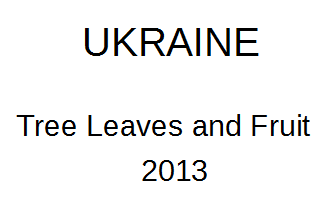


After:
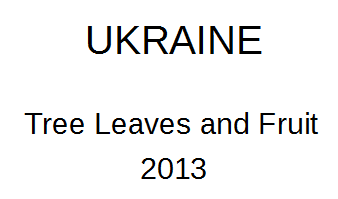


The difference in this example is small, but for some of the text on these pages it can look pretty bad. But, if you want to edit text and use one of these free tools. Libreoffice is the only way to go.

Which, of course, will let you do other fancy stuff, if you want:


Scribus

Now, if you're planning to do something like get rid of the border and don't feel like editing and re-centering a ton of text, then Scribus may be the way to go.

Here's the same page opened in Scribus:
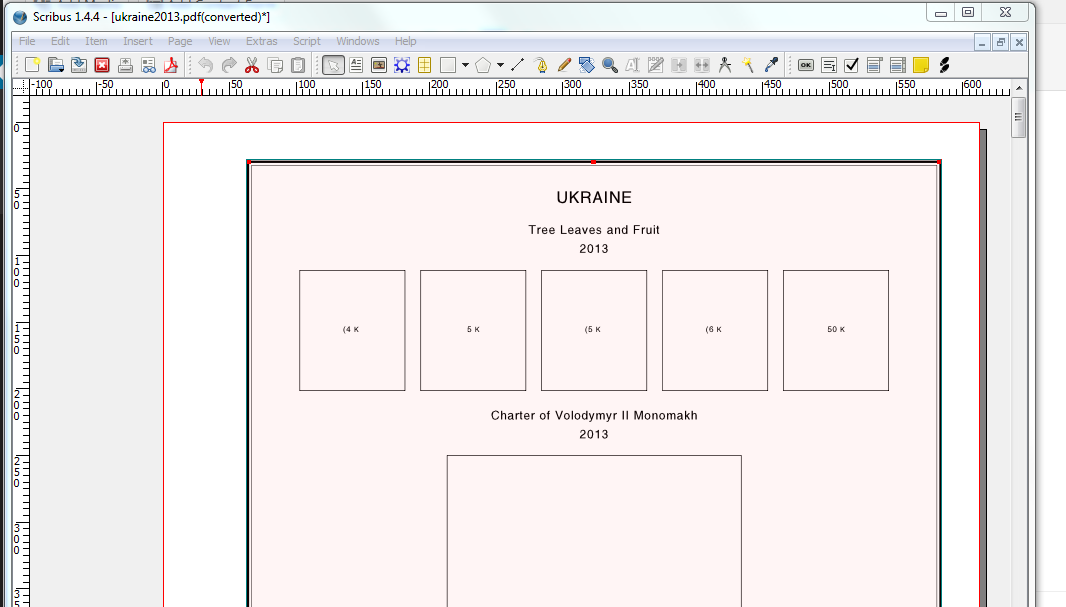


The reason why the whole thing is pink, is because I selected it. Scribus keeps the whole page grouped. Press Shift+CTRL+G to ungroup it:


So, notice the box around each individual letter? That's because Scribus imports each letter individually, rather than one text box.

So, what do you get from this?

Well, you lose the ability to edit the text, but the text stays right where Bill Steiner put it. So, everything is still centered.

The only thing this is horribly useful for is removing the border without having to recenter all the text on the page:
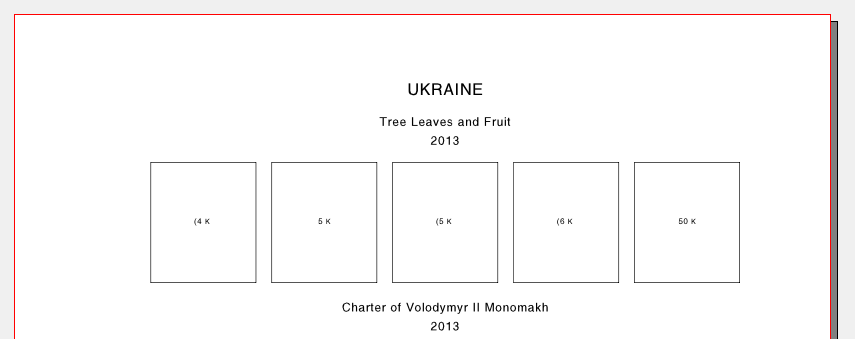


Useful if you're going to print on someone else's pages that have a border already.

If there are other free ways to open and edit these files, please let me know and I will add to this page.
Send note to Staff
Free Ukrainian Stamp Album and modified Mystic Stamp Album Pages - http://www.stamphacks.com
Ukrainian Philatelic and Numismatic Society Member #1212: http://www.upns.org
Eire Philatelic Association Member #2869: http://www.eirephilatelicassoc.org/

Pillar Of The Community
United States
898 Posts
Posted 06/05/2014   3:21 pm  Show Profile Bookmark this reply Add Philatarium to your friends list  Get a Link to this Reply
Andy -- Thanks very much for explaining this and writing it up. I really appreciate it!

-- Dave
Send note to Staff  Go to Top of Page
-- Japan, Korea, Trucial States & more on HipStamp: https://www.hipstamp.com/store/the-philatarium

long-term member: American Philatelic Society, Int'l Society for Japanese Philately, & others
Pillar Of The Community
Learn More...
United States
3046 Posts
Posted 06/05/2014   3:37 pm  Show Profile Bookmark this reply Add apastuszak to your friends list  Get a Link to this Reply
Does it make sense? I tend to talk over people's heads when I write this kind of stuff
Send note to Staff  Go to Top of Page
Free Ukrainian Stamp Album and modified Mystic Stamp Album Pages - http://www.stamphacks.com
Ukrainian Philatelic and Numismatic Society Member #1212: http://www.upns.org
Eire Philatelic Association Member #2869: http://www.eirephilatelicassoc.org/
Pillar Of The Community
United States
898 Posts
Posted 06/05/2014   5:57 pm  Show Profile Bookmark this reply Add Philatarium to your friends list  Get a Link to this Reply
Andy -- I just went through your explanation more carefully and I'm pretty sure I follow it, but I have also used page-layout software in the past (even going back to when it was Aldus Pagemaker!), although I rarely do so today.

I do appreciate your doing the test and documenting to show why Scribus is not the right choice to edit text, and I especially appreciate that you found the undocumented exploit feature in it, though, to delete the borders without losing the text-centering on the page.

A couple of follow-up questions:

(1) If someone just wanted to change the border style to a different type, which application would you recommend?

(2) If someone were starting from scratch in drawing up a page, which application would you recommend?

Thanks!
Send note to Staff  Go to Top of Page
-- Japan, Korea, Trucial States & more on HipStamp: https://www.hipstamp.com/store/the-philatarium

long-term member: American Philatelic Society, Int'l Society for Japanese Philately, & others
Valued Member
United States
248 Posts
Posted 06/08/2014   2:05 pm  Show Profile Bookmark this reply Add pk-short to your friends list  Get a Link to this Reply
Thanks for the information - I never realized that LibreOffice changed the spacing of text causing it to be off-center. I was just modifying pages from StampAlbums.com and used your advice.
Send note to Staff  Go to Top of Page
Pillar Of The Community
Learn More...
United States
3046 Posts
Posted 06/09/2014   08:42 am  Show Profile Bookmark this reply Add apastuszak to your friends list  Get a Link to this Reply

Quote:
A couple of follow-up questions:

(1) If someone just wanted to change the border style to a different type, which application would you recommend?

(2) If someone were starting from scratch in drawing up a page, which application would you recommend?


1. If I wanted to change the border style, I personally would use Scribus. In Scribus you can delete all the borders and then go edit the master page, add a border there, and it will flow onto all the pages without you needing to add a border to each page individually.

2. This one is a tough call.I spent a good deal of time learning Scribus and I really like the flexibility it gives me. But it's not just something you can grab and go with. But I would think that a Desktop Publishing solution will beat out anything else in the long run.

If your needs are simple, you can get away with making custom pages using the free Stamp Page Creator: http://stamppagetor.sourceforge.net/
Send note to Staff  Go to Top of Page
Free Ukrainian Stamp Album and modified Mystic Stamp Album Pages - http://www.stamphacks.com
Ukrainian Philatelic and Numismatic Society Member #1212: http://www.upns.org
Eire Philatelic Association Member #2869: http://www.eirephilatelicassoc.org/
Edited by apastuszak - 06/09/2014 08:42 am
Pillar Of The Community
Learn More...
United States
3046 Posts
Posted 06/09/2014   08:48 am  Show Profile Bookmark this reply Add apastuszak to your friends list  Get a Link to this Reply

Quote:
Thanks for the information - I never realized that LibreOffice changed the spacing of text causing it to be off-center. I was just modifying pages from StampAlbums.com and used your advice.


It doesn't really change the spacing. The text box is still centered. The issue is, that you don't have the exact same version of Helvetica that Bill uses installed on your computer. So the font doesn't fill the text box. And the annoying part is that selecting the text box and centering the text does not work. I think that's a bug with LibreOffice. I should file a bug report with them.
Send note to Staff  Go to Top of Page
Free Ukrainian Stamp Album and modified Mystic Stamp Album Pages - http://www.stamphacks.com
Ukrainian Philatelic and Numismatic Society Member #1212: http://www.upns.org
Eire Philatelic Association Member #2869: http://www.eirephilatelicassoc.org/
Pillar Of The Community
United States
898 Posts
Posted 06/09/2014   5:03 pm  Show Profile Bookmark this reply Add Philatarium to your friends list  Get a Link to this Reply
Thanks, Andy, for your informed opinion on this.

Really appreciate it!
Send note to Staff  Go to Top of Page
-- Japan, Korea, Trucial States & more on HipStamp: https://www.hipstamp.com/store/the-philatarium

long-term member: American Philatelic Society, Int'l Society for Japanese Philately, & others
  Previous TopicReplies: 7 / Views: 7,352Next Topic  
 
To participate in the forum you must log in or register.

Go to Top of Page

Disclaimer: While a tremendous amount of effort goes into ensuring the accuracy of the information contained in this site, Stamp Community assumes no liability for errors. Copyright 2005 - 2026 Stamp Community Family - All rights reserved worldwide. Use of any images or content on this website without prior written permission of Stamp Community or the original lender is strictly prohibited.
Privacy Policy / Terms of Use    Advertise Here
Stamp Community Forum © 2007 - 2026 Stamp Community Forums
It took 0.58 seconds to lick this stamp. Powered By: Snitz Forums 2000 Version 3.4.05
