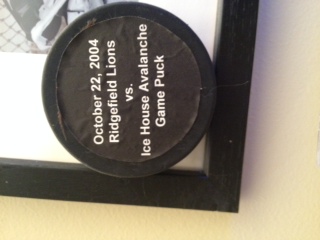
a slightly different approach I used to "print" on a hockey puck, that also could be used here:
1) In a word processing or graphics layout program (I use PowerPoint, but Word or Excel would likely work), make a rectangle using the graphics tool and fill it with black color (or fill in the cel in Excel)
2) Add text to the rectangle - you can center it, pick the size and pick the font.
3) color the text white (so you have white text on a black background)
4) print on gummed label stock
5) cut out the text - you don't have to be precise - leave some black around the text
6) paste on the page. If you pick the "right" shade of black, it will just about disappear on the page, leaving printed white text
Attached is a photo of the puck (done 10 years ago, as I see now). Your label won't be as big, so it probably will look better. Give it a try and let us know how it works.
Chip





 Posted 12/08/2014 4:27 pm


