| Author |
 Replies: 35 / Views: 7,375 Replies: 35 / Views: 7,375 |
|
|
|
Moderator

United States
12330 Posts |
|
|
I have a love/hate relationship with Excel. If I only had one application in the world to use it would probably be Excel because it is so flexible. That said, I never keep my data in Excel anymore due to its limitations.
For example, trying to store dates in Excel can be extremely frustrating since it uses serial numbers for dates. This makes working with any date before 1900 in Excel a pain in the butt since it starts the serialization at 1900 and does not support negative serial numbers.
Another issue for me is how Excel works with text encoding. I often use Excel when working with large CSV files containing large amounts of stamp data. It has the bad habit of screwing up foreign language text characters because its default encoding is ANSI (this can be changed in the settings but at other times I need ANSI). This issue has bitten me many times.
And since I am often entering and storing very large amounts of data; SQL format offers much smaller, efficient file sizes. This helps immensely when uploading and downloading large data sets. (I have some files which can take hours to transfer when using Excel but only take minutes with SQL.) Excel also has a limit of the number of rows and columns (1,048,576 rows by 16,384 columns); while I never have run into the column limit I have two data sets which exceed the number of rows.
SQL is by far the 'lowest common denominator' for any data based application. This means the time I have invested in SQL data entry can be taken in any direction for decades to come; SQL data will never be orphaned in the future. Being truly cross-platform, SQL has no dependency upon Microsoft, Apple or any other single company.
So I have learned over the years that if I am investing a lot of time into data entry it is best to keep it in a SQL format/database.
Don |
Send note to Staff 
|
|
|
Pillar Of The Community
United States
8571 Posts |
|
|
Inventory - unacceptable waste of time .When your trying to build a decent worldwide collection . It would be better to inventory all the various binders which house specialized collections . This week will start a new separate binder for U.S. used plate number coils . It will be a fun project because everything came thru purchases of other things. Just finished a impressive binder of Albania Cinderella stamps.
I value the time to put a collection together and see another interesting study mounted and written up . |
|
Send note to Staff
|
|
|
Pillar Of The Community
United Kingdom
569 Posts |
|
|
I only collect a relatively small period of Canada 1937 to 1990 definitive stamps and postal stationery. I use MS Access for inventory. the data base is basically a copy of Unitrade and Webb catalogues but from this I can produce reports of things I have and also what I want and any other listing I need. If I produce these reports in pdf format I can take my tablet with me when I go to stamp fairs etc. In this format it is very easy to add any other information I fins about a particular stamp / issue in the form of notes.
One word of advice if you use a computer to keep an inventory KEEP SEVERAL BACKUPS on disks NOT CONNECTED TO THE PC |
|
Send note to Staff
|
|
|
Rest in Peace
United States
1189 Posts |
|
|
I suppose this is largely personal preference. I can't imagine trying to keep a world wide collection in Excel or any other database system, but I only collect United States.
I've been collecting for over fifty years now and having shown some of the stamps at our local club, one of the long time members asked me a pointed question "Do you have it insured?" I didn't at the time, and when I checked with my homeowner's policy, it only covered the collection up to a maximum of $2,500.00. I knew it was worth more than that, but I honestly had no idea how much more.
I have been working diligently over the past five years to put EVERYTHING into an excel spreadsheet. I list it by Scott catalog number with an extension (830-001, 830-002, 830-003...) If I have to add another example, say an essay or publicity photo, and since those belong at the beginning, I'll add a further extension (830-001-001). It's a little cumbersome at time, but that as far out as I've had to go with the extensions.
I also keep a scan of each item, using the same numbering system. While they are not conjoined, the keeping of the two parts separate keeps the file speed up.
My inventory number is the key field. I don't bog the system down with color coding. I have a column for the inventory number, type of item (unused, used, proof, essay, photo, document, etc.), description, date of purchase, purchase price, catalog value and explanation/notes. I have the type column so I can segregate all of the different items into groups if I need to work with say FDC's for a while individually or for research. This allows me to create a subset in Excel which I can then pull into a separate report. I maintain this electronically only, but have it with multiple back-ups and back it up on a monthly basis.
I also found that by doing this, it's forced me to LOOK at every stamp, cover, essay, proof, FDC or document I have and evaluate whether or not this item still fits in my collection. As I winnow the collection down (if you can call over 44,000 items winnowing...) I have begun to organize it and within the next year or so will begin formating pages which I will create myself.
As to value, if I had not done an inventory and begun tracking the value, I'd have grossly under-insured the collection. If for no other reason, this is a tremendous incentive to begin tracking your collection. You will be stunned by how quickly even $1.59-$25.00 items add up, not to mention those with higher values.
Hope this helps you out some in your decision making process. |
|
Send note to Staff
|
|
|
Pillar Of The Community
United States
4489 Posts |
|
|
I also consider inventorying as educational since it will introduce to varieties rather following some rigid stamp album set up if that is all you to inventory. |
|
Send note to Staff
|
Al |
|
|
Pillar Of The Community
United States
1414 Posts |
|
|
I use SQL Server with Excel as the input or report medium. I also use the SQL Server based SixBit eCommerce solution for ebay listings. It is a relatively simple matter to move data from SixBit into another SQL Server database. Because ebay Item Specifics are XML based, it is much more complex to move new listings into SixBit from SQL Server, but it is possible. It was even possible in Blackthorne when it was based on the Microsoft Access Platform. For intermediate to advanced Office users, Access may be a better choice than Excel for storing relational data. However, now that Microsoft SQL Server express is a free download, there is no reason for the more technically inclined users not to try it. It is much more robust and offers much better data protection than the much touted and politically correct MySQL. Also, for all practical purposes, Excel row and column limits disappear in the 64 bit version. It should be noted that Office 365 installs the 32 bit version by default, even for new users who will not likely to be using old legacy Office add-on software. The killer for any inventory system is data entry. Since most of the value in any stamp collection is likely to be I a few stamps, cataloging them in Excel along with estimats or totals for the rest should provide some peace of mine. |
|
Send note to Staff
|
| Edited by cfrphoto - 10/22/2016 7:37 pm |
|
|
Valued Member
United States
114 Posts |
|
|
My father started a card file inventory system before I was able to walk. Together he and I collected for the greater part of my life and even after his death I continue that card file. In the past I tried excel and the like but all fell to the way side, but the card file continued.
About ten years ago, maybe more, I became involved with EzStamp and I continue working with it even now. It has changed from one operating system to the next without so much as a hiccup. Right now I am working on my Portugal collection and have been almost everyday for a month or so. I was thinking the other day, as I crunched away, that inventorying is as much a hobby as the collecting itself. To be honest, it does distract me from the task of printing pages and mounting the collection. But I feel it is a necessary part of it.
Without the original card file we never would have been able to keep the duplicate pieces from eating away at the investment as time went by. I would say that I only have a few hundred duplicates, maybe up to a thousand but that's it! Considering the size of the entire collection, it's not many. I have never sold a single stamp in all the years of collecting. I have thought and talked about it but have not done anything about it.
I don't see the EzStamp inventory ever being completed but the countries that have been completed have allowed me to print want lists to take with me when on the hunt at stamp shows and so-forth. Not to mention having a reasonable guesstimate of the entire investment and catalog value.
I most likely put 20-30 hours a week into the collection, sometimes more, sometimes less. I try to finish one project before moving on to the next. The next project will be rebuilding my Portugal album pages replacing pages that have seen better days and adding new ones as needed. I am sure I will have 3-5 months time just working on Portugal but the satisfaction of another completed country is worth the effort.
|
|
Send note to Staff
|
|
|
Pillar Of The Community
United States
1334 Posts |
|
|
I downloaded the trial version of EzStamp and I really like it. I can add my pictures of my stamps that are in my album rather than the stock photos. I played today with the spreadsheet reports and was able to get it to look like what I wanted. It will take a long time to enter data but it will be worth the time. I will have to consider buying the full 18 cds. Will have to save up some money for it. To do that, I have to STOP buying stamps. It is an addiction. |
|
Send note to Staff
|
|
|
Pillar Of The Community
United States
507 Posts |
|
|
Too bad EzStamp and Scott/Amos cannot figure out a way to jointly produce a complete WW product. And while "complete" in terms of an image for every stamp would be great, I would be happy to settle for a complete database, with Scott's "A" figures in lieu of actual images where there was a lack. YMMV. |
|
Send note to Staff
|
|
|
Moderator
United States
12330 Posts |
|
|
Scott/Amos does not have a foundational database; they use FrameMaker to layout the catalogs and albums. To use a database backend they would have to walk away from years of investment in FrameMaker, invest in new technologies, new developers, and in new hardware/software.
Don |
|
Send note to Staff
|
|
|
Moderator
United States
12330 Posts |
|
|
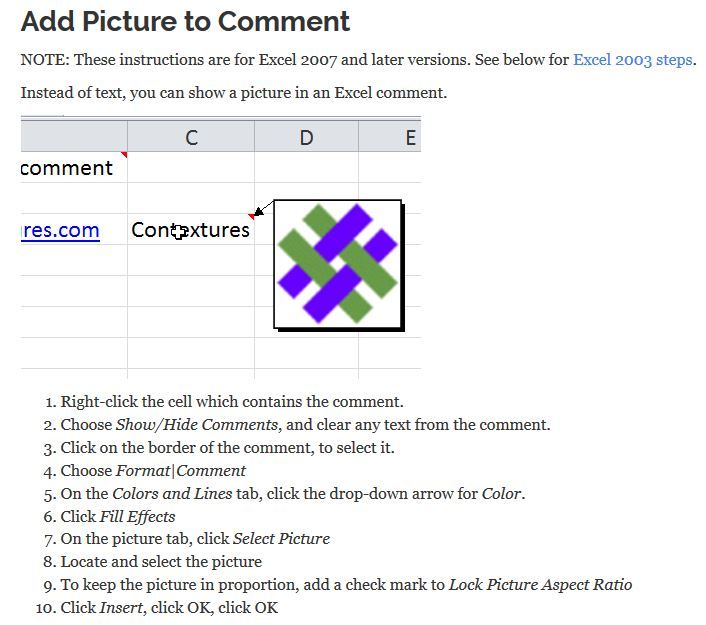
Excel can be used as a relational database with a bit or work. Relational data is far superior then to be trying to cram all the data into a single table or spreadsheet. What is 'relational' approach? A typical example would be customer information. Say you wanted to store customer data which includes data such as their name, address, email, and sales history. You could make single table/spreadsheet and each line (row) would hold each transaction and the fields (columns) would hold the name, address, email, and sales info such as date, item, price etc. This works but you are storing a lot of duplicate info and over time the file size gets huge, slow, and in efficient. Instead this is ideal for a relational design. Build one table/spreadsheet to hold the primary customer info such as name, address, and email. Build a second one which holds just the customer name and sales details. The connect the two (using queries in a database or a Pivot Table in Excel) to merge the two data sources into a single view or report. Taking this a bit further in Excel, you can build forms in yet another spreadsheet which then 'enter' the data into the other spreadsheets. The actual spreadsheets which are holding the data can be hidden from view; giving the whole thing the look and feel of a application. Lastly one Excel tip that I have used in the past for displaying stamp images. Adding images directly into a cell can become an issue with loading times, display space and when you go to print the spreadsheet. A slick work-around is to use image embedded into in the cell 'comment' feature. This has the effect of 'popping up' the image as you pass the mouse over it in the spreadsheet as shown below. Don 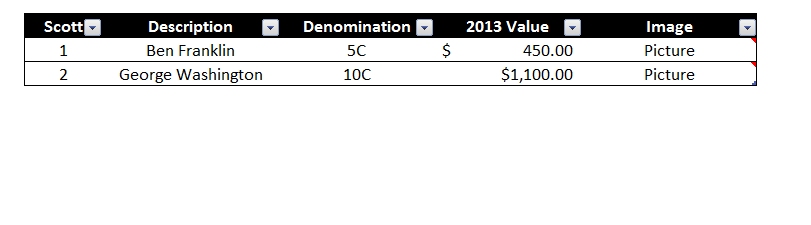 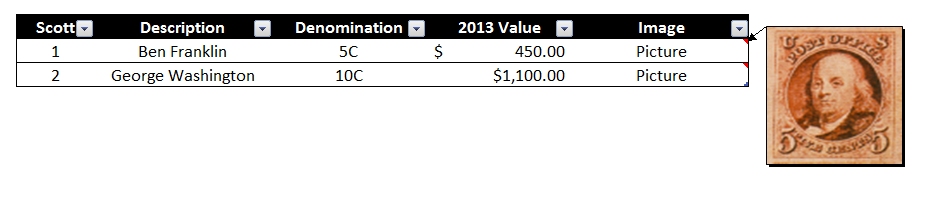 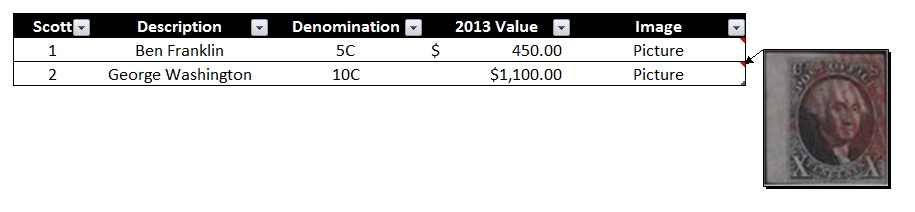 |
|
Send note to Staff
|
|
|
Pillar Of The Community
United States
1414 Posts |
|
|
Don,
For what you describe, it would be more efficient to use Microsoft Access. It is still included as part of the Office 365 offering. Many Excel users will find Access already installed on their system.
Images embedded in Excel seem to have problems with maintaining a proper aspect ratio.
Clark |
|
Send note to Staff
|
|
|
Moderator
United States
12330 Posts |
|
|
Hi Clark,
Yes, the image aspect ratio is dependent upon the size of the 'comment' box. I completely agree with using a database but whatever reason(s) a lot of users seem more comfortable with spreadsheet apps. With so many SQL solutions being freely available for over a decade (MS SQL Express and MYSQL) one would think that it would be more widely utilized by stamp collectors. But on the desktop spreadsheets still predominate.
Frankly databases are so deeply engrained in my brain that I see them as a solution to most information problems. But I have never liked Access even through I have built and supported many applications using it. There is a huge issue with Access sharing various DLL, Jet engine, and other files on a single operating system. Because many other 3rd party apps also install and use these shared files it is inevitable that at some point they will step on each other. Just another good reason to go SQL.
Don |
|
Send note to Staff
|
|
|
Valued Member
United States
200 Posts |
|
|
Don - I was reading this 2 year old thread and was interested in your use of the comment field on an excel cell to imbed the stamp image.
I am very familiar with Excel and the Microsoft family, but am having trouble making this work.
I have tried several different ways, including creating a new comment and editing an existing comment and then pasting the image and for some reason the selection of paste is "grayed out" and the key command doesnt work either. I have tried copy and paste of an image from within excel, from another applicatoin and from the file folder/finder. I have even tried on both pc and mac. And no luck.
Any suggestions on this or can you explain your method?
Or maybe excel changed and won't allow this any longer?
And since this is a 2 year old thread and I see that you often comment on inventory systems and databases, feel free to add other advice or musings on this topic.
I am just starting to consider an inventory system of some sort and am leaning towards a simple spreadsheet.
Much thanks in advance |
|
Send note to Staff
|
|
|
Moderator

United States
5106 Posts |
|
|
Replies: 35 / Views: 7,375 |
|




 Posted 10/22/2016 07:52 am