| Author |
 Replies: 253 / Views: 62,609 Replies: 253 / Views: 62,609 |
|
|
|
Pillar Of The Community
2013 Posts |
|
|
Quote:
PDF Converter Free
By Wondershare Software Co., Ltd
it's not free, it's a demo  |
Send note to Staff 
|
|
|
Valued Member
United States
262 Posts |
|
|
Quote:
51studebaker says:
Power Point is a presentation app, not a graphic layout app. It is a bitmap based app, so resizing things gets ugly. Adobe Live Cycle is built from the ground up to be a page layout app. It's very powerful, including being able to run custom code for incredible functionality. For example, you can populate catalog numbers from another data source such as an XML or database file. It is child's play to add tables that do math like total columns. For example, you can quickly make an PDF invoice that totals the order and then add a button which will send the invoice to PayPal for payment. If you are working with multiple pages you can place the same design element on each page, so if you change one it changes them all. This just scratches the surface of what Live Cycle Designer can do. Power Point is a work-around, nothing wrong with that but it is not the same.
Don Don I understand the power of what you are suggesting. I also understand the limitations of Powerpoint, but I only use it to design the page layout and assembly the final product. (again, primarily because I know it well). Album pages are not very complex and it is simple to draw and resize boxes, move things around, change fonts or colors, add images 1:1, etc. all in a snap. Regarding pictures, ALL of my image work is done in Photoshop Elements. So if I need to resize an image or change it in some way (which is quite rare), I would normally do it in Elements. |
|
Send note to Staff
|
| Edited by DCStamps - 01/21/2016 7:12 pm |
|
|
Pillar Of The Community
United States
772 Posts |
|
|
No, its a free software App. I have not paid anything and have been using it for more than a year.
I'm using the Mac version from the Mac Appstore.
There is a "Pro" version that cost, but the regular version does what I want it to...converts PDF to PP. |
|
Send note to Staff
|
|
|
Valued Member
Mexico
9 Posts |
|
|
Hi all, I don't see a very practical use on having digital pages mimic their physical counterparts. If we are having a digital catalogue, it needs to add some extra value and be more dynamic on the way information can be arranged and presented. I had my own collection and also inherited my grandfather's collection. So I ended up having lots of albums and not knowing what I really have. So I decided to re-arrange and merge the collections. Here is my approach: 1. I am using a tool called The Brain, which is kind of a mind map. It allows me to create relationships between its "thoughts". I scan my stamps and assign each one to a "thought", and then I link them to whatever topic it relates to. So in my Brain, you can get to view a stamp navigating through, years, countries, topics, persons or series. Here is an example I uploaded into the cloud, which contains mainly Argentinian stamps I am currently scanning (the catalogue is in Spanish, btw): https://webbrain.com/brainpage/brai...467E789972632. Once I've scanned and registered the stamps into the Brain. They go into a stockbook. 3. Ultimately I will transfer them to VARIO sheets. Cheers, Serge  |
|
Send note to Staff
|
|
|
Pillar Of The Community
2013 Posts |
|
|
Samorgon welcome to the forum
You link don't work as we are not log as member. You can make a print screen and post it here |
|
Send note to Staff
|
|
|
Valued Member
Mexico
9 Posts |
|
|
Hi area66, thank you :D Here is a screenshot of how it looks like: In the centre there is a German stamp related to the 350th anniversary of the Westfalia Peace Treaties. The image of the stamp is displayed at full size on mouse-over. To the left you can see the "jump thoughts": in this case all people depicted in the stamp, the "Peace", "Anniversary" & "Historic Event" topics and the issue year (1998). To the right you can see the "sibling thoughts", i.e. more German stamps in this case. 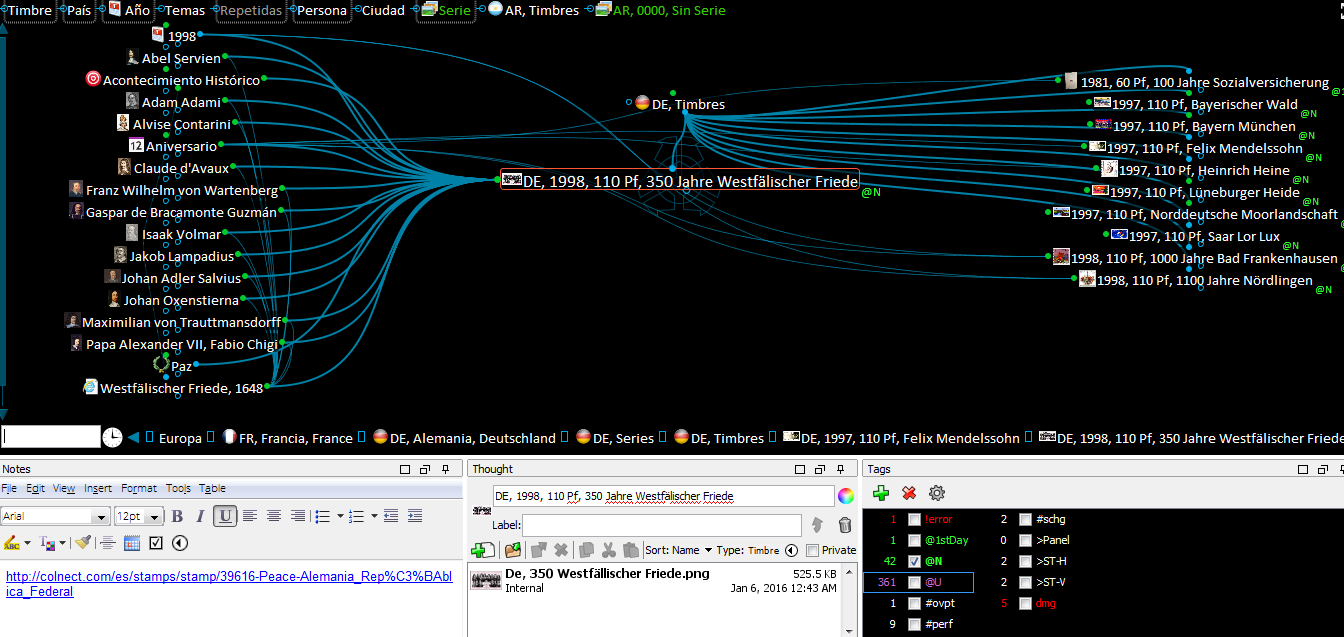 Cheers, Serge |
|
Send note to Staff
|
|
|
Valued Member
United States
262 Posts |
|
|
Quote:samorgon said: I don't see a very practical use on having digital pages mimic their physical counterparts. If we are having a digital catalogue, it needs to add some extra value and be more dynamic on the way information can be arranged and presented. I had my own collection and also inherited my grandfather's collection. So I ended up having lots of albums and not knowing what I really have. So I decided to re-arrange and merge the collections. Hi Serge, welcome to the thread. I am not sure I understand. Your mind map tool might be for cataloging your stamps, but the Digital Albums are for displaying your stamps, which can almost be done in an unlimited number of ways. Do you have an example of how you use this to display your stamps? Michael |
|
Send note to Staff
|
|
|
Pillar Of The Community
2013 Posts |
|
|
I'm kind on the midle now, before last nigh I was in the 51stud camp, but I played all the night with PowerPoint and it's quite capable to make album pages. You can use a master page and put the border and the Country name , the grid can be adjust to 2.5 mm, so it will place your stamps at 5mm distance betwen them, the good part is that you make hyperlink and also link the stamp display at regular size with oversize scam images to see the details and all work when you export to HTML.
If you want to use Steiner's page, it's easy to convert them in Powerpoint, the box are already align, so I don't see the point to use expensive Publishing application when Powerpoint can do it. Now if I was redoing the full Steiner's pages for printing, or build a website to display my collection it will be a different story.
So bad EzStamps is so freak about copy protection of their AlbumGen. It will be nice to be able to use a digital copy of the album we make with it. It's so easy to align row and line of stamps with it. The fact you can only insert bitmap images is pita. |
|
Send note to Staff
|
| Edited by area66 - 01/22/2016 12:47 pm |
|
|
Pillar Of The Community
United States
772 Posts |
|
|
Quote:
PowerPoint and it's quite capable to make album pages.  And as you said, the "Master Slide" is quite useful. I use it for the border and page numbering. Hadn't thought about it for the country title, but that's a good idea. Also, don't forget to turn off "Snap to Grid" which will allow you to more finely tune your movements |
|
Send note to Staff
|
|
|
Valued Member
United States
262 Posts |
|
|
For anyone interested, I put together a very detailed tutorial on how to make digital albums using PowerPoint on another Forum. Not sure if it is kosher to link to another forum, but if you would like a link, either email me, or drop by DCStamps.com and leave a comment with the request.
Michael |
|
Send note to Staff
|
|
|
Valued Member
Mexico
9 Posts |
|
|
Quote:
Your mind map tool might be for cataloging your stamps, but the Digital Albums are for displaying your stamps, which can almost be done in an unlimited number of ways. @Michael: Completely true. For displaying purposes I would use physical albums. The Brain would serve as a way to discover stamps by topic, that not necessarily would be on the same album page, e.g. Einstein stamps from different countries. Now that you mention it, I think I did deviate a little bit from the original sense of the thread. I also entertained the idea of making a paper album, but later decided to go for the stocksheets for 2 reasons: better preservation and re-hinging the whole collection would be a nightmare. I will make cover and fact sheets where needed, and that is where the ideas I've seen in this thread are very valuable. Cheers, Serge |
|
Send note to Staff
|
|
|
Pillar Of The Community
2013 Posts |
|
|
Working hard tonight on a digital version. But it will Not be online so only what I want to show
We will be available. For now it's look that stamps will be store in Scott Int for the one that fit and others in vario. I don't want to use stockbook as you have to move too much stamps to rearrange with vario you just add pages between.thats for stamps under 1940 (50 ) younger stamps will just be place with hinges on steiner's pages in plastic protector. |
|
Send note to Staff
|
| Edited by area66 - 01/22/2016 11:43 pm |
|
|
Pillar Of The Community
Norway
1661 Posts |
|
|
I have been watching and  -ing, and really enjoyed seeing this thread resurrected! Thanks for that Chris. And thanks so much for sharing your Bechuanaland pages, they are simply beautiful in it's simplicity. I understand those pages are modified Steiner pages that's actually printed with stamps mounted, and not virtual pages? About pdf to PP converter (for Steiner): Thanks a lot for the kind suggestion, for now I have been happy making my own pages from scratch in order to avoid being influenced by Steiner. Not that I dislike Steiner at all - I just want my own personal style. Adobe Live Cycle versus Powerpoint: Don - thanks for your recommendation. It made me very curious, so I read lot more about it online. Seems it can do lot of things not achievable in PP - but unfortunately all the hardcore data language, XML etc made me back-up. I understood only fractions of this data-language, so I will stick with the 'old-fashioned' PP. Also I feel uncertain if the software and platforms reading it will be discontinued in the future? PP seems to me more settled and safe in that respect. Yes, the pictures in PP may look blurred sometimes, however that's fine with me as I am only working on pre-1900 pages for now - the blurred thing simple gives me some vintage feeling for free. Keijo (SCB) and Michael (DCstamps) once recommended me to use PP, and I have been very satisfied with the intuitive use and endless design-possibilities. I can only recommend PP for anyone considering to make their own pages, but there are many different ways leading to Rome. |
|
Send note to Staff
|
|
|
Pillar Of The Community
2013 Posts |
|
|
Blaamand you can use Steiner's box only and remove the rest including the border. Or at least you can use them as reference for the box size, it's save a lot of research |
|
Send note to Staff
|
|
|
Pillar Of The Community
Norway
1661 Posts |
|
|
Samorgon: Quote:
I don't see a very practical use on having digital pages Neither do I - my stamp collection in general is not for very practical use, only for pure pleasure  Sorry , I could not resist a joke! Welcome to the forum by the way. You are introducing something quite different with your 'brain' model for stamps, good luck on that. Regarding 'practical use' - I find it very 'practical' that I can let one single stamp take part in several different virtual collections, while the stamp in real life all the time is safely stored in a stockbook. I also find it practical that if I want to change the page design/layout, or add space for another variant, a pair/block or whatever - a digital page can be almost instantly re-arranged without any hazzle. area66: Quote:
You can use a master page - wow, that's a feature in powerpoint that I was not aware of - excellent! Quote:
Working hard tonight on a digital version...(...) I don't want to use stockbook as you have to move too much stamps to rearrange with vario you just add pages between I agree on the Vario route, just so frustrating this insight came to me only after I had already purchased 'a ton' of stockbooks  I am really looking forward to see last nights work on your digital version! |
|
Send note to Staff
|
|
|
Replies: 253 / Views: 62,609 |
|




 Posted 01/21/2016 6:33 pm


