Stamp Community Family of Web Sites
Thousands of stamps, consistently graded, competitively priced and hundreds of in-depth blog posts to read


Stamp Community Forum
 
Username:
Password:
Save Password
Forgot your Password?

This page may contain links that result in small commissions to keep this free site up and running.

Welcome Guest! Registering and/or logging in will remove the anchor (bottom) ads. It's Free!

Simple Color Subtraction Software

 
To participate in the forum you must log in or register.
Author Previous TopicReplies: 5 / Views: 2,165Next Topic  
Rest in Peace
United States
4052 Posts
Posted 10/05/2015   9:30 pm  Show Profile Bookmark this topic Add ikeyPikey to your friends list Get a Link to this Message
I need Simple Color Subtraction Software.

Consider (what I have tentatively identified as) Mexico's 6c of 1944:
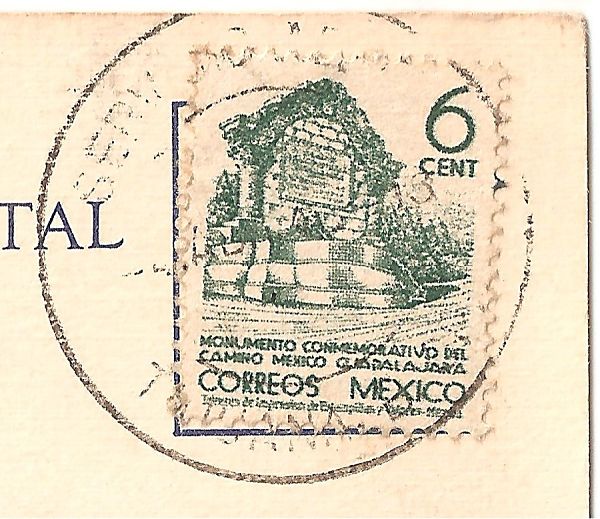


I cannot read the date in the cds.

I tried Retro Reveal (you can still find the image in the public gallery) and a half-dozen online photo editors, and all of them have wonderfully sophisticated algorithms, and none of them helped very much.

I think my best result would come from something dreadfully simple.

If I could simply turn all of the green pixels to white (or, in this case, pinky background), I'd have my best cheap'n'easy shot at reading the cds.

In fact, it seems to me that, most of the time, all we really need is software that would:

1) Identify the major colors in the image, and

2) Allow the user to click on the colors to keep and/or drop.

Having the software create a palette of the colors from the image insures device independence and fault tolerance; for example, whether the stamp is red/pink/carmine/rose/etc matters little if you are simply subtracting the color that the software found, and leaving the black (or gray black or blue black) cds.

And, of course, the background 'color' of the paper would be one of the colors we could keep and/or drop.

The biggest problem that I see is that, in the land of inks on paper, no color is ever a 'single' color, and no ink is ever evenly spread, so the software needs two (what are known in MS-Windows Developer Speak as) user-operated scroll bars:

Spatial: to control the size of the group of adjacent pixels that are averaged together before analyzing their 'color', and

Spectral: to widen the definition of a color, so that more pixels in the image look like they are the same color.

(To put this simply, a spectral analysis of the 'dark green' Mexican stamp, above, might easily find ten or twenty different shades of green.)

The user could fiddle the spatial & spectral settings, and watch the effect on the palette & image, and stop when s/he has a well-defined 'color' for the features s/he wants to see, eg, the cds.

While I could certainly write this software myself, I really do not want to.

Q/ Has anyone run across any cheap'n'easy software that can do this job?

(I understand that creating a custom color filter and performing a subtraction can be done in PhotoShop, but that seems heavy & expensive for this narrow application.)

Q/ Has anyone got any thoughts about this little, uh, project?

Cheers,

/s/ ikeyPikey
Send note to Staff

Moderator
Learn More...
United States
12330 Posts
Posted 10/06/2015   07:22 am  Show Profile Bookmark this reply Add 51studebaker to your friends list  Get a Link to this Reply
Many graphics applications have a 'color picker' and 'color replace' function. So one way to do this is to use the 'color picker tool' to identify the green and white/pinkish background colors. Then use the 'color replacer' tool to remove the green colors in the image. The 'color replacer tool' has a tolerance setting which controls how aggressively it will match and replace the green shades with the white/pink background shades. The tolerance setting is key to effectively using this method.

I think you can find and download early version of Paint Shop Pro (Corel) for free although the more recent versions carry a cost. Adobe Photoshop also has these functions and are used in the same way. These functions are not limited to high end graphics apps, you should be able to find similar tools in many of the free apps.
Don
Send note to Staff  Go to Top of Page
Pillar Of The Community
Germany
1714 Posts
Posted 10/06/2015   08:41 am  Show Profile Bookmark this reply Add scotzm to your friends list  Get a Link to this Reply
Irfanview has that Replace Color option.

click Image...Replace Color...Replace Source Color (you can click on the image/photo/scan to Choose the exact source color to replace then you can define the color you want to replace it with). The fiddly bit is the Tolerance value box which ranges from 0 to 128.
Send note to Staff  Go to Top of Page
Valued Member
169 Posts
Posted 10/06/2015   10:47 am  Show Profile Bookmark this reply Add soft-pro to your friends list  Get a Link to this Reply
The problem here is that the colour of the cancel & the green background are VERY similar & no way to correct that.
I put it thru EzImage & separated the channels & adjusted gamma & saturations, but still not going to work.
Your best bet is a high power magnification or scan at 4800 dpi & look it over carefully

Marios
Send note to Staff  Go to Top of Page
Pillar Of The Community
United States
2941 Posts
Posted 10/06/2015   11:31 am  Show Profile Bookmark this reply Add PostmasterGS to your friends list  Get a Link to this Reply
Creating an app to do that is no small task. The closely-related colors and weak impression on this stamp make it a tough one to decipher. If you have a flatbed scanner that can scan photo negatives, try scanning it like a photo negative. Sometimes that brings out the ink a little better.
Send note to Staff  Go to Top of Page
Presenting the GermanStamps.net Collection - Germany, Colonies, & Occupied Territories, 1872-1945
Rest in Peace
United States
4052 Posts
Posted 10/06/2015   10:45 pm  Show Profile Bookmark this reply Add ikeyPikey to your friends list  Get a Link to this Reply
Thoughtful replies, one & all. Thank you,
Send note to Staff  Go to Top of Page
  Previous TopicReplies: 5 / Views: 2,165Next Topic  
 
To participate in the forum you must log in or register.

Go to Top of Page

Disclaimer: While a tremendous amount of effort goes into ensuring the accuracy of the information contained in this site, Stamp Community assumes no liability for errors. Copyright 2005 - 2026 Stamp Community Family - All rights reserved worldwide. Use of any images or content on this website without prior written permission of Stamp Community or the original lender is strictly prohibited.
Privacy Policy / Terms of Use    Advertise Here
Stamp Community Forum © 2007 - 2026 Stamp Community Forums
It took 0.13 seconds to lick this stamp. Powered By: Snitz Forums 2000 Version 3.4.05
