| Author |
 Replies: 25 / Views: 8,542 Replies: 25 / Views: 8,542 |
|
|
|
Pillar Of The Community
United States
772 Posts |
|
|
Thanks. Yes, I should have known this from always changing the ink in my inkjet printer and never seeing a white ink cartridge!
I actually tried making some black labels using PowerPoint and it worked quite well and looks good in my Vario pages. Thanks for the idea. |
Send note to Staff 
|
|
|
Pillar Of The Community
United States
772 Posts |
|
|
SWH,
I would love to see more examples of your pages with examples of your various different types of labeling.
Do you collect only specific countries or WW?
Thanks! |
|
Send note to Staff
|
|
|
Rest in Peace
Netherlands
153 Posts |
|
|
Pillar Of The Community
United States
772 Posts |
|
|
Dear Gerben,
Huh, I didn't realize you are stampworldhistory.com. Makes sense now. Great resource for classic stamp collectors.
Thanks!
Chris
|
|
Send note to Staff
|
|
|
Pillar Of The Community
United States
772 Posts |
|
|
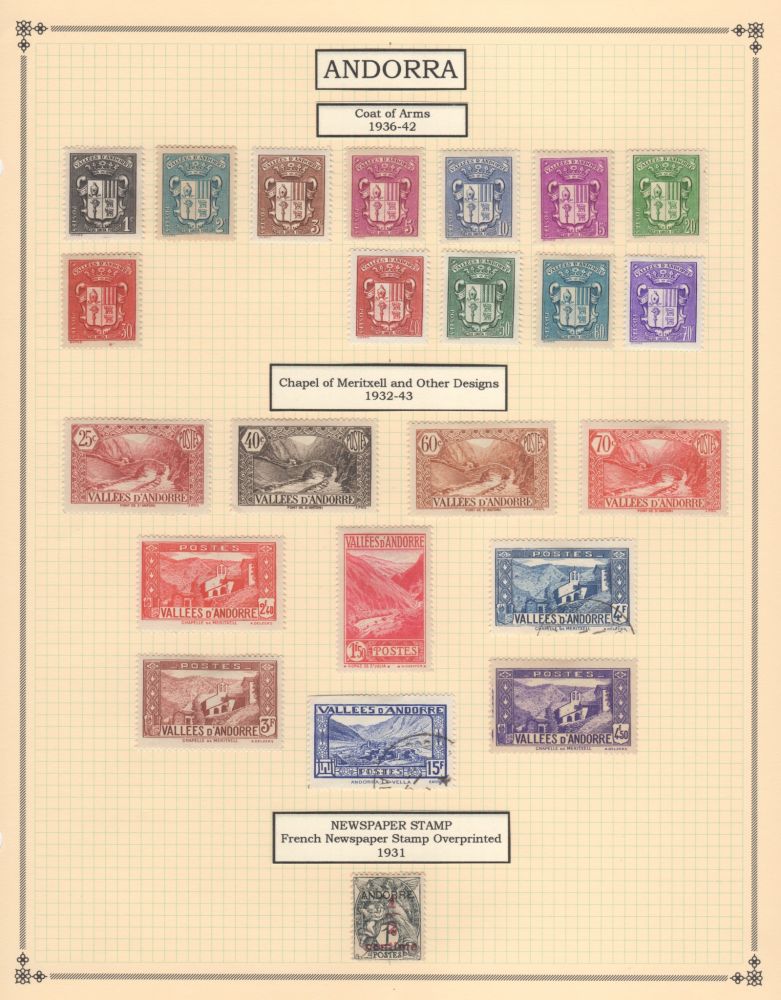
Ok, another thought. Instead of handwriting your pages, anyone print out text and then cut them out and paste onto blank quadrille pages? How to attach the cut-out labels onto the page? Glue? Gluestick? Something else?
Would love to hear from anyone doing this or anyone with ideas. |
|
Send note to Staff
|
|
|
Pillar Of The Community
United Kingdom
8631 Posts |
|
|
I scrawl, personally, but gluestick (as for mounts) would be the way to go. Gives the equivalent of those old printed country labels (not so old, in fact, as they're still on sale). |
|
Send note to Staff
|
|
|
Pillar Of The Community
United States
772 Posts |
|
|
Pillar Of The Community

United States
856 Posts |
|
|
Pillar Of The Community
United States
1179 Posts |
|
|
Pillar Of The Community
United States
772 Posts |
|
|
Thanks guys. I'm pretty happy with this method as a way to display all the extra stamps that don't have a dedicated space in the BigBlue album. |
|
Send note to Staff
|
|
|
Replies: 25 / Views: 8,542 |
|




 Posted 11/07/2015 07:51 am