Stamp Community Family of Web Sites
Thousands of stamps, consistently graded, competitively priced and hundreds of in-depth blog posts to read


Stamp Community Forum
 
Username:
Password:
Save Password
Forgot your Password?

This page may contain links that result in small commissions to keep this free site up and running.

Welcome Guest! Registering and/or logging in will remove the anchor (bottom) ads. It's Free!

Question For Albumeasy Users

 
To participate in the forum you must log in or register.
Author Previous TopicReplies: 6 / Views: 3,108Next Topic  
Pillar Of The Community
United States
1121 Posts
Posted 12/12/2015   8:49 pm  Show Profile Bookmark this topic Add spain_1850 to your friends list Get a Link to this Message
Is there a way to insert small graphic images into the pages, without having to print the page first and then send it through again to print the image from another program?

I would like to make pages for Danish perfins and include a small picture of each perfin to fit into the stamp square. I guess I could draw each by hand, but that would be a lot of work.

Anyone have any ideas?
Send note to Staff

Pillar Of The Community
United States
8956 Posts
Posted 12/12/2015   10:00 pm  Show Profile Bookmark this reply Add Petert4522 to your friends list  Get a Link to this Reply
Spain 1850, I have been using Albumeasy for as long as they have been available, and have the same problem. I collect tagging varieties and since they are invisible I have to insert a picture or drawing. I use your "two step" method as well and have never contacted the publisher.

Peter
Send note to Staff  Go to Top of Page
Pillar Of The Community
United States
1121 Posts
Posted 12/12/2015   10:17 pm  Show Profile Bookmark this reply Add spain_1850 to your friends list  Get a Link to this Reply
I haven't actually tried the 2-step method yet, I just assumed that was the way to do it. Do you have any "tips"? I would imagine it's going to take a lot of trial and error to get them registered correctly so the pictures wind up in the right places?
Send note to Staff  Go to Top of Page
Pillar Of The Community
United States
8956 Posts
Posted 12/12/2015   10:44 pm  Show Profile Bookmark this reply Add Petert4522 to your friends list  Get a Link to this Reply
Spain, I have made a couple of templates for my (mainly) coil strips of 5. I realize it is a lot of work, but if you print the page in question first, cut out the area where you want the picture, position the picture in the cut out, then remove the page without moving he picture, and scan it. It is very doable with a bit of practice!
Of course, we could do it the easy way and contact http://thestampweb.com !

Peter
Send note to Staff  Go to Top of Page
Moderator
Learn More...
United States
12330 Posts
Posted 12/13/2015   03:45 am  Show Profile Bookmark this reply Add 51studebaker to your friends list  Get a Link to this Reply
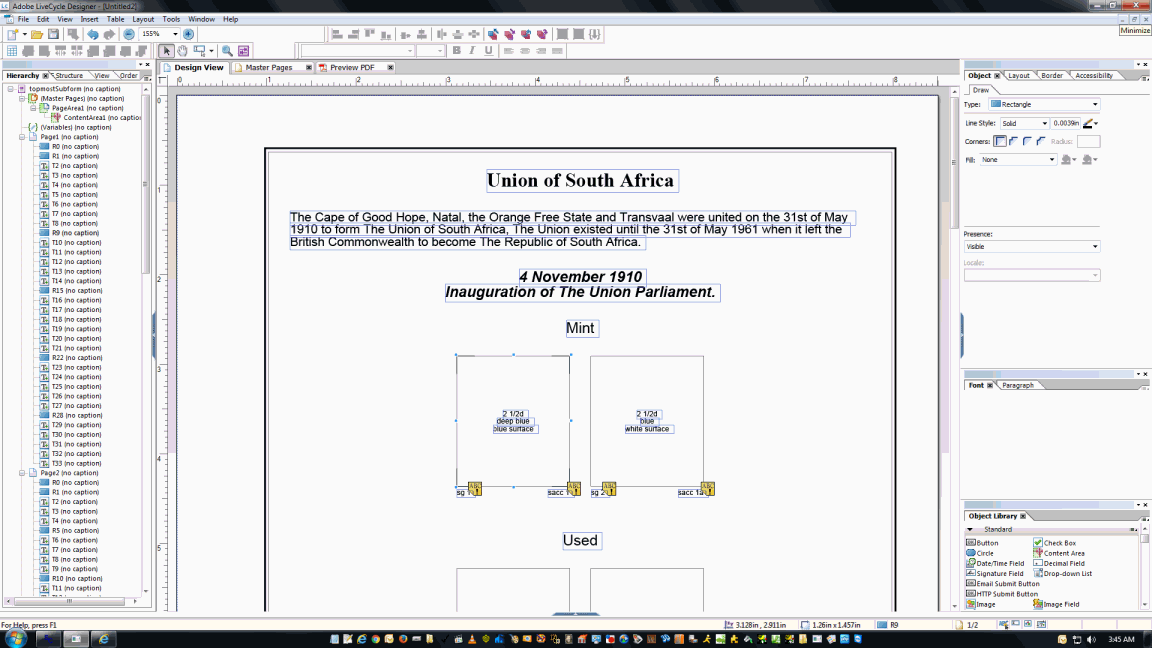
Yes, you can modify the AlbumEasy PDF (like most PDFs) without having to print it out first.

To do so, you need a full version of Adobe Acrobat. Adobe Acrobat (version 11 and earlier?) traditionally came with several 'companion' applications including one called LiveCycle Designer. You can download a 60 day free trial version from Adobe at http://www.adobe.com/products/livec...esigner.html I think you can now purchase LiveCycle as a standalone app.

You simply open the PDF in LiveCycle and it allows you to edit and modify the PDF in any way you desire. Add images, modify existing elements like borders or text. You can even start adding code to the PDF to execute; in other words sum a column total or add a button to link a PayPal payment.
Don

Edit: Here is screen shot of AlbumEasy PDF being edited in LiveCycle.
Send note to Staff  Go to Top of Page
Edited by 51studebaker - 12/13/2015 03:47 am
Pillar Of The Community
United States
772 Posts
Posted 12/13/2015   10:43 am  Show Profile Bookmark this reply Add chris2015 to your friends list  Get a Link to this Reply
Another option, once you have your file in PDF, you can use a free app called "PDF Converter Free" to convert your file into PowerPoint. Then add your graphics, and "save as PDF" to get it back to a PDF file.

Send note to Staff  Go to Top of Page
Valued Member
Canada
77 Posts
Posted 01/09/2016   8:30 pm  Show Profile Bookmark this reply Add medoc to your friends list  Get a Link to this Reply
Interestingly enough, I received an email today regarding the new version of AlbumEasy V3.1 which supports adding images inside rectangular stamps. I have not tried it yet.
Send note to Staff  Go to Top of Page
  Previous TopicReplies: 6 / Views: 3,108Next Topic  
 
To participate in the forum you must log in or register.

Go to Top of Page

Disclaimer: While a tremendous amount of effort goes into ensuring the accuracy of the information contained in this site, Stamp Community assumes no liability for errors. Copyright 2005 - 2026 Stamp Community Family - All rights reserved worldwide. Use of any images or content on this website without prior written permission of Stamp Community or the original lender is strictly prohibited.
Privacy Policy / Terms of Use    Advertise Here
Stamp Community Forum © 2007 - 2026 Stamp Community Forums
It took 0.14 seconds to lick this stamp. Powered By: Snitz Forums 2000 Version 3.4.05
