| Author |
 Replies: 109 / Views: 34,865 Replies: 109 / Views: 34,865 |
|
|
|
Pillar Of The Community
United States
6483 Posts |
|
|
It's also an aesthetic preference. I actually prefer the first image above to the second, regardless of intent. Areas of blast white that are void of background annoy me. It's like visual nails on a chalkboard... that along with excessessive sharpening and lossy image compression. Banish them from the earth!  You actually can achieve a result similar to your second image without blowing out the highlights by taking the original image and doing an Auto-Contrast (Ctrl + Alt + Shift + L) in Photoshop. See below. It's definitely a more "alive" image than your first image, but the surface detail is still present, unlike your second image. 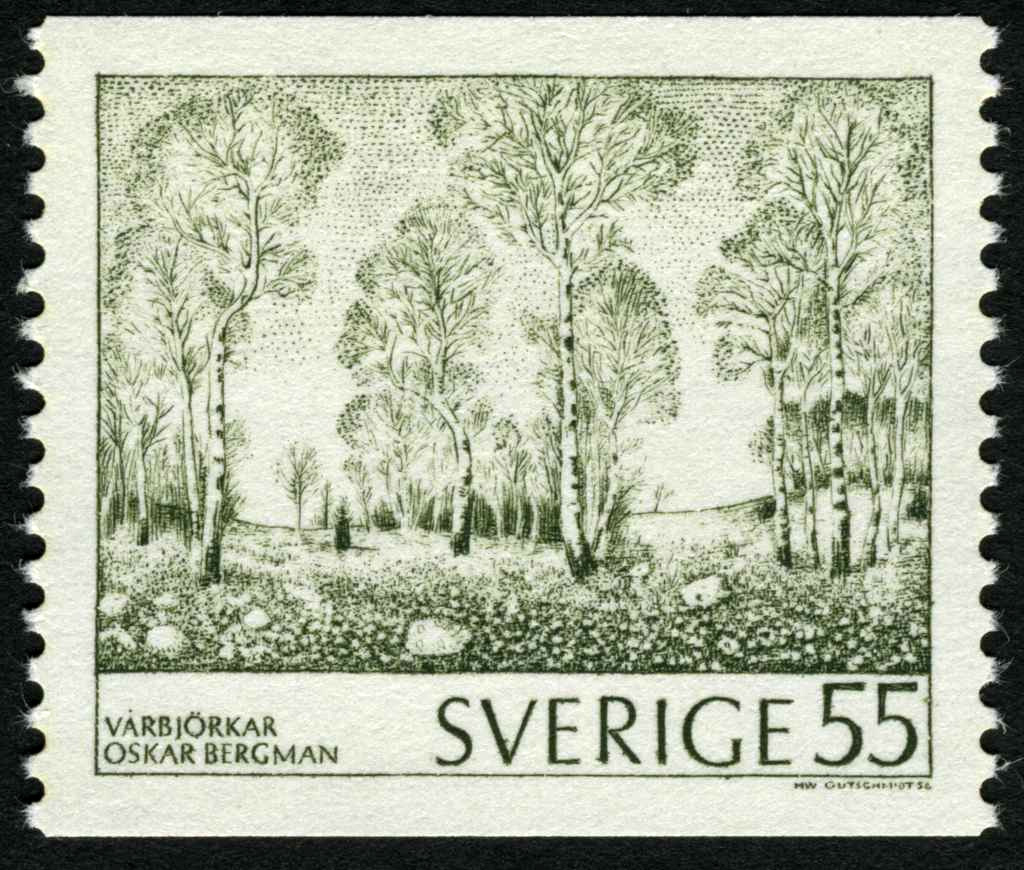 |
Send note to Staff 
|
|
| Edited by revenuecollector - 11/03/2016 5:21 pm |
|
|
Moderator

United States
12330 Posts |
|
|
Litho,
You might want to consider lowering the 48-bit color to 24-bit color.
While technically having more bits per channel is better (the computer can generate more color shades), you cannot see the difference. The reason you cannot see the difference is that your monitor can only display 24-bit color. It is like playing a Blue Ray movie on a standard definition TV.
Additionally, the only common 48-bit file format is TIFF. If you save the file in another format like JGP it will convert the color channels back to 24-bit anyway.
Don
|
|
Send note to Staff
|
|
|
Pillar Of The Community
Canada
5821 Posts |
|
|
Thanks 51studebaker.
So since I save the file in JGP format then it makes no difference.
Correct?
|
|
Send note to Staff
|
|
|
Pillar Of The Community
Canada
5821 Posts |
|
|
Anthony mentioned that he uses a sharpening feature and I believe graphis does also. I haven't up to now but after experimenting with FastStoneImage Viewer I find it really sharpens the engraving.  |
|
Send note to Staff
|
|
|
Moderator
United States
12330 Posts |
|
|
Quote:
So since I save the file in JGP format then it makes no difference. Litho, Correct, JPG is a 24-bit format. So while you scan it in 48-bit when you save it as a JPG it converts it back to 24-bit. An added benefit is that it will scan/process faster. Don |
|
Send note to Staff
|
|
|
Pillar Of The Community
United Kingdom
1361 Posts |
|
|
Quote:
I actually prefer the first image above to the second, regardless of intent. Horses for courses etc but the original image looks dreary, dull and miserable. The slight adjustments Litho made were definite improvements aesthetically at least. The important point was mentioned that the raw scan should be kept and they have their place. I would never post-process a scan of an item I wanted to advertise for sale for example. |
|
Send note to Staff
|
|
|
Pillar Of The Community
United States
6483 Posts |
|
|
Pillar Of The Community
United States
4523 Posts |
|
|
We just have to remember a JPG is image is a processed scan. You are getting the scanner maker's initial adjustments. The camera or scanner makes corrections such as sharpening, color, brightness, etc. to compensate for the flaws in the sensor. Then you have to deal with color matching and monitor calibration and then printing offers more variables. |
|
Send note to Staff
|
Al |
|
|
Moderator
United States
12330 Posts |
|
|
For me the question is not whether the image looks better, the question is has ANY processing been done? I certainly agree that processing can make an image look better. For example, saturation processing almost always make an image more colorful and vivid. But is modifying an image of a stamp to look better a good thing?
It may be a good thing if you want a splashy image for a website. But if I come into this forum with a modified image and ask for identification help do I have an obligation to tell people the image has undergone modifications? Do not folks deserve to know, if they are spending their time helping me, that the stamp image does not really look like the actual stamp? It also seems to me that modifying a stamp image look better than the stamp itself can be considered unethical if you are trying to use the image to sell it.
Perhaps we should be emphasizing the use of un-modified images which accurately show the stamp as it appears. Ideally any image which has undergone modification(s) would included the processing info in the meta-data of the file itself. This would solve many problems with the misuse of image processing.
Don
|
|
Send note to Staff
|
|
|
Pillar Of The Community
United States
6483 Posts |
|
|
I disagree. Even if you don't make ANY adjustments to an image manually after the fact, it is still being adjusted by the device doing the image capture (camera, scanner, etc.), and no two devices capture images the same. Some scanners have a bit of a red push or green push. Some scanning software modify aspects of the image by default, in ways that the user may be completely unaware of. The further down the device food chain you go (with pro level equipment at the top and entry-level consumer equipment at the bottom), the more the maker tries to do for the end user in the name of simplification and ease of use, but there's no telling how the image may be altered.
In short: ALL images have been processed in some way, whether intentionally or unintentionally. It's best (and easiest) to just assume that all images have been adjusted/processed in some way.
What you are suggesting is a futile solution anyway: unless everyone is using identical capture devices and software in a fully calibrated workflow, it's a moot point.
I always process my images... with the intent that the image match as closely the real-world object as possible in hand. Not everyone's motivation is the same. The problem in forcing people to reveal image manipulation is that in and of itself, it doesn't reveal intent, which is what you're actually trying to police.
It can't be done.
And actually I don't know that a world where raw unaltered images are the only acceptable standard is desirable. As a general rule, raw images from most devices don't look good; the detail is subdued and the appearance is flat. If everyone only used raw images for everything, auction catalogs would look dull and lifeless, online images would be murky, it would be harder to discern detail for flyspecking, etc.
The problem is the extent to which images are processed by some parties, not that any processing was done at all. It's a matter of degree. |
|
Send note to Staff
|
|
|
|
Moderator
United States
12330 Posts |
|
|
I concur that any scanned image is processed, I assumed that the firmware processing was written by engineers who know what they are doing, that the scanner/camera is calibrated and in good working order. I thought it was understood that I was referring to user modifications.
If we are to assume that every image may or may not look anything like the actual stamp should we just lock threads which ask about stamp colors? Or should we try to educate users on the importance of generating unmodified images?
|
|
Send note to Staff
|
|
|
Pillar Of The Community
United States
4523 Posts |
|
|
The problem is I am sure the scan software will make changes depending on the image so no set correction. I am sure starts with a white balance correction since the lamp may not have ideal output. A way to check the end to end to include a color card (I used more often with "analog" photography) to have a reference on colors if accurate color is absolutely critical. 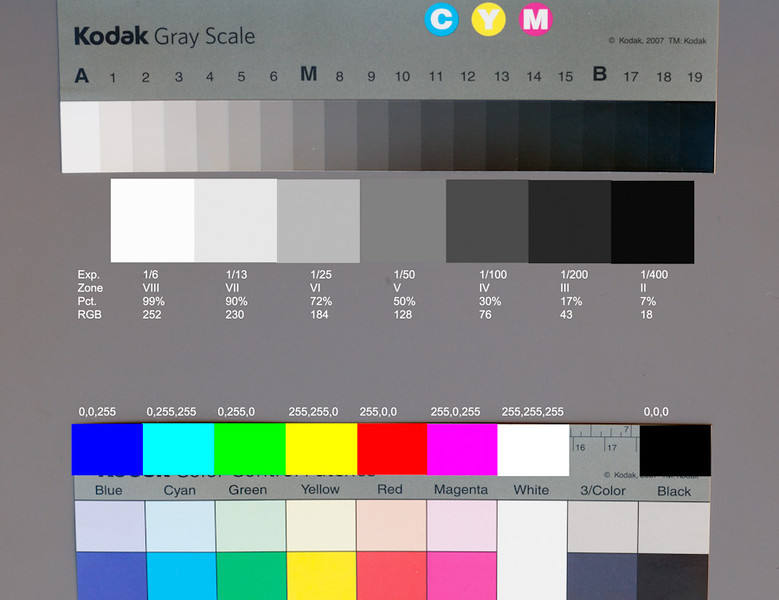 |
|
Send note to Staff
|
Al |
| Edited by angore - 11/04/2016 1:30 pm |
|
|
Moderator
United States
12330 Posts |
|
|
Al, We can take steps to scan and save fairly accurate images. You must first begin by putting your scanner into a locked down condition with no 'auto-adjustments'. Your scanner must also be profiled before trying to reproduce accurate colors. Scanner profiling is the process of determining the precise color characteristics of a particular scanner. If you purchased a better quality scanner, it should have come with a hardcopy color profile page or 'target'. The industry standard targets are IT8 or Q60 targets. If your scanner manufacturer did not supply a target you can purchase one from a third party. Here is a third party vender for them; http://www.targets.coloraid.deDon |
|
Send note to Staff
|
|
|
Pillar Of The Community
United States
4523 Posts |
|
|
The question is now what is good enough to met your needs. It is an increasing cost to go from out of the box to full calibration. It is about workflow. |
|
Send note to Staff
|
Al |
|
|
Valued Member
Netherlands
230 Posts |
|
|
Thanks for all the answers.
I'm going to do my first stamp-scans today..
But one little question:
Which program can I use to crop the pictures before uploading?
Just IrfanView?
Many thanks! |
|
Send note to Staff
|
|
|
Replies: 109 / Views: 34,865 |
|




 Posted 11/03/2016 5:20 pm





