| Author |
 Replies: 109 / Views: 34,869 Replies: 109 / Views: 34,869 |
|
|
|
Pillar Of The Community
1448 Posts |
|
|
Quote:
I always process my images... with the intent that the image match as closely the real-world object as possible in hand......
.....As a general rule, raw images from most devices don't look good; the detail is subdued and the appearance is flat
Revenuecollector Ah, there's the rub.  It is rare, in my experience, to find a stamp scanner who is able to turn a flat raw image into an aesthetically accurate one with surface detail still intact. Revenuecollector, you are one of those rare individuals.  Would you mind providing a tutorial? (Start a new thread if you wish.) For myself, I do have a fair amount of scanning experience, have an Epson V600 flatbed scanner, and would like to squeeze out that last bit of aesthetic perfection. |
Send note to Staff 
|
|
|
|
Pillar Of The Community
United States
772 Posts |
|
|
Pillar Of The Community
United States
4523 Posts |
|
|
I have the Epson V600 and find the automatic setting (brightness, contrast) do not work that well with stamps sometimes. For example, if I scan a cream colored page (like an album page) it is often too yellow. I suspect it is intentionally done to add "punch" to but for accurate work it is not appropriate. |
|
Send note to Staff
|
Al |
| Edited by angore - 01/01/2018 07:53 am |
|
|
Rest in Peace
United States
1189 Posts |
|
|
My Epson 2540 does a pretty good job with most items, the exception being blue paper postal stationery items. It tends to be washed out almost white. I've found that by adjusting the light, it will appear as it really does.  |
|
Send note to Staff
|
|
|
Pillar Of The Community
United States
772 Posts |
|
|
Ok, I played around with some the settings on my new HP scanner. Scanned at 1200 dpi (size was 3.5 MB), reduced the brightness a bit, ran it through the optimizer to get it to 200kb. Any better?  I'm using an HP Color Laser Jet Pro MFP M281. |
|
Send note to Staff
|
| Edited by chris2015 - 01/01/2018 09:49 am |
|
|
Pillar Of The Community
1448 Posts |
|
|
Quote:
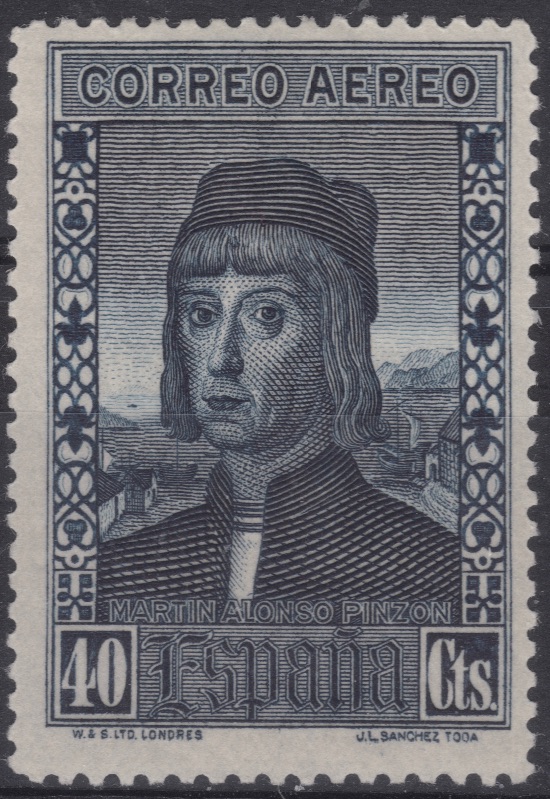
HP Color Laser Jet Pro MFP M281. Nice printer! A Christmas present? Chris, I'll bet the custom pages you design will look good with that printer. Generally, I prefer a dedicated flatbed scanner rather than a 3 in 1, for scanning. The scanner and software in a 3 in 1 sometimes takes a backseat to the printer portion. But not always. Your scanner definitely looks like it has potential. Your second scan looks like the better one. When I get home later today, I will upload your Spanish air mail stamp example (If I have it) for comparison purposes. |
|
Send note to Staff
|
|
|
|
Pillar Of The Community
United States
772 Posts |
|
|
Thanks Jim. Yes, it was a Christmas present, still playing around with the settings, but thus far, it seems to do a much better job than my old Epson printer/scanner. I specifically got it to print out Steiner pages (upgrade from Inkjet to Laserjet) and the scanner was just a bonus. Now I'm seeing what it can do with it. Here's an example full page (unmodified) Steiner page that I scanned with it.  |
|
Send note to Staff
|
|
|
Pillar Of The Community
1448 Posts |
|
|
 Epson V600 Professional Mode Document 24 bit color 1200 dpi No unsharp mask No Descreening "Show Texture" No adjustments to Histogram, Tone correction, Image adjustment Image Format = jpeg; Compression level - None 1.97 MB No document slew correction Open in Windows Live Photo Gallery where image scan is straightened and cropped. No auto adjustment applied. |
|
Send note to Staff
|
|
|
|
Pillar Of The Community
United States
772 Posts |
|
|
Well, clearly you got me beat there...It may be, as you suggested, just the superior quality of a dedicated flatbed scanner as compared to the all-in-one printer/scanner.
My Epson has many of those settings, but my HP does not.
One question, are you then running the image through the "Free Image Optimizer" to get the size down from 1.97 MB to 200 KB in order to upload?
|
|
Send note to Staff
|
|
|
Pillar Of The Community
1448 Posts |
|
|
Quote:
One question, are you then running the image through the "Free Image Optimizer" to get the size down from 1.97 MB to 200 KB in order to upload? No, the image link at SCF is to the scan jpg image that is located at my blog site. The scan pic at the blog site is a 648 KB file when downloaded. |
|
Send note to Staff
|
|
|
|
Pillar Of The Community
United States
772 Posts |
|
|
That may be part of my problem too. Here's another try scanned at 4800 dpi. I guess I will just have to settle with a little lower image quality, which still is not terrible and good enough to see details for ID, etc.  |
|
Send note to Staff
|
|
|
Pillar Of The Community
1448 Posts |
|
|
Quote:
image quality, which still is not terrible and good enough to see details for ID, etc Your image scan is more than sufficient - in fact surprisingly good. Chris, I think you are being constricted in this case by trying to squeeze the image down to 200 KB for presentation here. |
|
Send note to Staff
|
|
|
|
Pillar Of The Community
United States
772 Posts |
|
|
Quote:
Chris, I think you are being constricted in this case by trying to squeeze the image down to 200 KB for presentation here. Jim, Yes, I think you hit the nail on the head. Short of having my own blog website to host images (like you do), any suggestions? What are others doing on SCF regarding posting images? |
|
Send note to Staff
|
|
|
Pillar Of The Community
1448 Posts |
|
|
 Chris's 200 KB Upload Image: Note obvious pixels Chris's 200 KB Upload Image: Note obvious pixelsUnfortunately, one cannot make a silk purse pic out of a sow's ear 200 KB image limit for direct upload.  Too much information has been "optimized" out. The lovely stamp images by Revenuecollector earlier in the thread that show great surface detail are hosted at his site and exceed by a comfortable margin the 200 KB limit for upload directly here. And my images are hosted at my blog site, and therefore not limited by 200 KB. That doesn't mean that the 200 KB limit won't show reasonable detail for a stamp image and perhaps be adequate 90% of the time for various stamp threads. Just not for this one.  |
|
Send note to Staff
|
|
| Edited by Jkjblue - 01/02/2018 10:47 am |
|
|
Moderator

United States
12330 Posts |
|
|
To achieve the best possible scanned image you need to save in uncompressed TIFF format and never use any post scanning image manipulation (i.e. rotating, resizing, reducing color levels, etc.).
It is a question of math...scanning at higher d.p.i. levels and saving in an uncompressed file format like TIFF results in very large files sizes. While this might not be a big issue if you have a big hard drive and fast computer, it is a big deal if you are a website owner. We pay for website hosting space and we deal with angry users who do not want to wait for slow loading web pages. We also deal with angry users who are using mobile devices who have slow connections and are paying for their bandwidth usage. Truth is that there is not a need to post huge uncompressed images online when 98% of the images are just fine in a compressed format.
So 'optimizing' images or using reduced file format sizes is what many websites do. And of course if users post images using a 3rd party site (commercial or their own) on forums like ours, the threads get trashed when the 3rd party image links are broken (for any of a multitude of reasons). So this is not a good solution either.
Don |
|
Send note to Staff
|
|
|
Replies: 109 / Views: 34,869 |
|




 Posted 12/31/2017 11:23 pm