Stamp Community Family of Web Sites
Thousands of stamps, consistently graded, competitively priced and hundreds of in-depth blog posts to read


Stamp Community Forum
 
Username:
Password:
Save Password
Forgot your Password?

This page may contain links that result in small commissions to keep this free site up and running.

Welcome Guest! Registering and/or logging in will remove the anchor (bottom) ads. It's Free!

Pasting Column Data To Preserve Spacing

 
To participate in the forum you must log in or register.
Author Previous TopicReplies: 8 / Views: 1,515Next Topic  
Pillar Of The Community
Learn More...
United States
4415 Posts
Posted 07/04/2017   07:17 am  Show Profile Bookmark this topic Add angore to your friends list Get a Link to this Message
Is there a way to paste column data so columns can be preserved. I know I can out in underscore or other actual characters but prefer something where the spaces appear blank.


Original with underscores
98______1_C_____lilac/black

After saving without forced characters to preserve columns
98 1 C lilac/black

Send note to Staff
Al
Edited by angore - 07/04/2017 07:17 am

Moderator
Learn More...
United States
4788 Posts
Posted 07/04/2017   07:38 am  Show Profile Bookmark this reply Add kirks to your friends list  Get a Link to this Reply
@angore:

I have struggled with this as well and there is a decent (but not perfect) solution. Use the CODE tag on the Format Bar -- the # symbol.

This produces a Courier Monospaced Font that preserves spaces inside the CODE block:

A       5     Red
B       7     Blue
C      10     Green

If you're going to copy/paste create the CODE block first, then paste inside it.

Hope this helps,
Kirk

Send note to Staff  Go to Top of Page
Pillar Of The Community
Learn More...
United States
4415 Posts
Posted 07/04/2017   07:49 am  Show Profile Bookmark this reply Add angore to your friends list  Get a Link to this Reply
Thanks.


1867 India Postage Stamps Surcharged in Different Colours						
1 September 1867 Nos. 54, 59, 61, 69 and 73 of lndia						
		1	1		 1½c.	blue (Die I) (R.)
		2	2		 2c.	deep brown (R.)
		3	3		 3c.	deep brown (B.)
		4	4		 4c.	deep brown (Bk.)
		5	5		 6c.	yellow (P.)
		6	6		 8c.	yellow (G.)
		7	7		 12c.	green (R.)
		 		a.		Surch double
		8	8		 24c.	rose (Die II) (B.)
		9	9		 32c.	yellow (Bk.)


Send note to Staff  Go to Top of Page
Al
Edited by angore - 07/04/2017 08:23 am
Moderator
Learn More...
United States
12330 Posts
Posted 07/04/2017   07:54 am  Show Profile Bookmark this reply Add 51studebaker to your friends list  Get a Link to this Reply
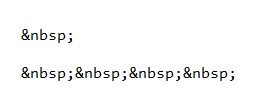
You can also use html and insert a non-breaking space (or multiples to get the white space you need)


1       1       1½c.       blue (Die I) (R.)
2       2       2c.       deep brown (R.)
3       3       3c.       deep brown (B.)
4       4       4c.       deep brown (Bk.)


Don
Send note to Staff  Go to Top of Page
Pillar Of The Community
United States
3224 Posts
Posted 07/04/2017   08:34 am  Show Profile Bookmark this reply Add hy-brasil to your friends list  Get a Link to this Reply
I think it's easier to set it up in a word processor program, snip it and save it as a gif. Then upload it as one would a scan. It's cumbersome with large lists but so is creating the proper format by typing on site. I'm sure the mods would insist we use black type only.
Send note to Staff  Go to Top of Page
Edited by hy-brasil - 07/04/2017 08:45 am
Pillar Of The Community
Learn More...
United States
4415 Posts
Posted 07/04/2017   08:45 am  Show Profile Bookmark this reply Add angore to your friends list  Get a Link to this Reply
Don, I see HTML is off and forum code on. I was wondering how to enable it.
Send note to Staff  Go to Top of Page
Al
Edited by angore - 07/04/2017 08:45 am
Moderator
Learn More...
United States
12330 Posts
Posted 07/04/2017   09:22 am  Show Profile Bookmark this reply Add 51studebaker to your friends list  Get a Link to this Reply
Hi Al,
No need to enable it, simple 'paste' it in the editor.

What I do is lay out the list in Excel and simple copy the non-breaking html 'spaces' in the white space areas like this..
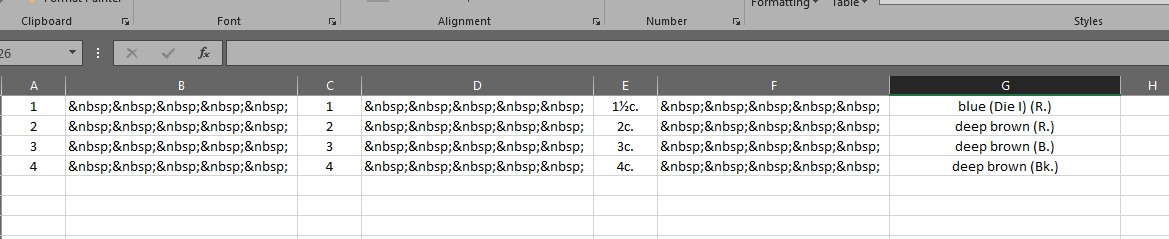


And then 'copy and paste' straight from Excel into the editor and it then does this...

1       1       1½c.       blue (Die I) (R.)
2       2       2c.       deep brown (R.)
3       3       3c.       deep brown (B.)
4       4       4c.       deep brown (Bk.)

Bingo...you can add/remove the non-breaking 'space' characters as needed to keep columns in line.
Don
Send note to Staff  Go to Top of Page
Pillar Of The Community
United States
978 Posts
Posted 07/04/2017   09:58 am  Show Profile Bookmark this reply Add jbcev80 to your friends list  Get a Link to this Reply
Hi

You can also use the Character Map instead of HTML code. The space in the map is a non breaking space.

I create the table, copy the space and paste the space wherever needed.

Usually I just create the table in WORD with regular spaces. When done, I select the document and do a global search and replace (CTRL H) replacing every space with a non-breaking space.

Don: Since EXCEL is MS Office, the CTRL H should work the same as WORD.

Jerry B
Send note to Staff  Go to Top of Page
Edited by jbcev80 - 07/04/2017 10:08 am
Forum Dad
Learn More...
USA
2055 Posts
Posted 07/04/2017   11:09 am  Show Profile Bookmark this reply Add bobby131313 to your friends list  Get a Link to this Reply

Quote:
Don, I see HTML is off and forum code on. I was wondering how to enable it.


Can't, it's waaaaaaaay to dangerous.
Send note to Staff  Go to Top of Page
  Previous TopicReplies: 8 / Views: 1,515Next Topic  
 
To participate in the forum you must log in or register.

Go to Top of Page

Disclaimer: While a tremendous amount of effort goes into ensuring the accuracy of the information contained in this site, Stamp Community assumes no liability for errors. Copyright 2005 - 2026 Stamp Community Family - All rights reserved worldwide. Use of any images or content on this website without prior written permission of Stamp Community or the original lender is strictly prohibited.
Privacy Policy / Terms of Use    Advertise Here
Stamp Community Forum © 2007 - 2026 Stamp Community Forums
It took 0.3 seconds to lick this stamp. Powered By: Snitz Forums 2000 Version 3.4.05