|
This page may contain links that result in small commissions to keep this free site up and running.

Welcome Guest! Registering and/or logging in will remove the anchor (bottom) ads. It's Free!
To participate in the forum you must log in or register.
| Author |
 Replies: 38 / Views: 11,501 Replies: 38 / Views: 11,501 |
|
|
|
Valued Member
87 Posts |
|
|
Pillar Of The Community
Canada
877 Posts |
|
|
Another question re self-designed, self-printed pages:
Do you include catalogue numbers for each stamp location?
The problem, of course, is that catalogue numbers can change. Prior to arranging my stamps on new pages, I am renumbering them on the old album pages. My main interest is Australia and SG has renumbered them since I made up the pages in late 1976. The Australian Commonwealth Specialist Cataloge has had at least two numbering changes over this period.
Currently, I am considering a companion page for each album page with catalogue numbers. One of the advantages of this is that multiple numbers can be included, eg SG, Scott Nd ACSC together with addition information on the stamps without the album page becoming too busy.
Any thoughts, anyone?
|
Send note to Staff 
|
|
|
Pillar Of The Community
United States
626 Posts |
|
|
For my pages, I design them with PowerPoint which has worked extremely well for me. I use 110lb cardstock in colors based on category, three hole punch with paper reinforcements (plastic tended to shed adhesive on the posts of my binders), and ShowGard for everything. The pages are printed with a Canon MG7720 inkjet printer. I prefer that to laser printers as the print from the later will come off with age. I do not use Scott numbers, but do include relevant information on the bottom part of each space such as printer, press type, watermark, tagging, issue city, and issue date. By keeping the info on the bottom half of the space, I can lift the ShowGard and view the information for the issue. Here's some samples of my pages: 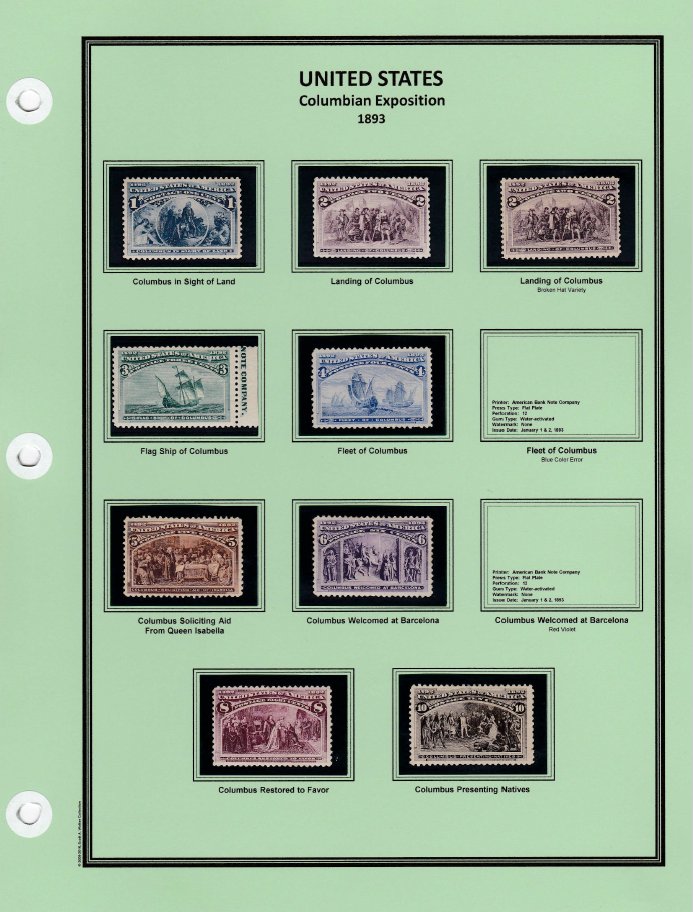 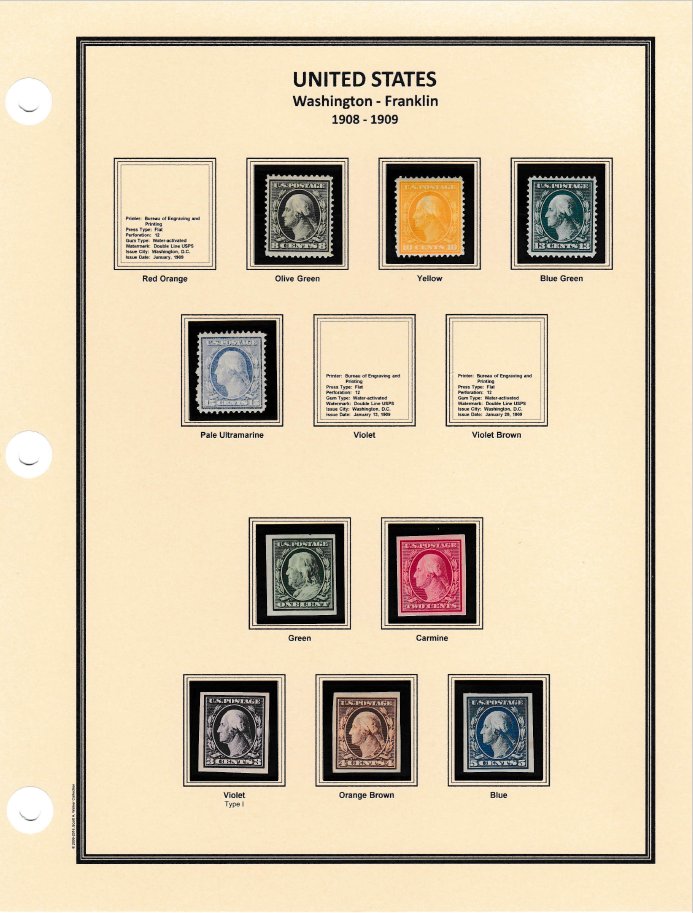 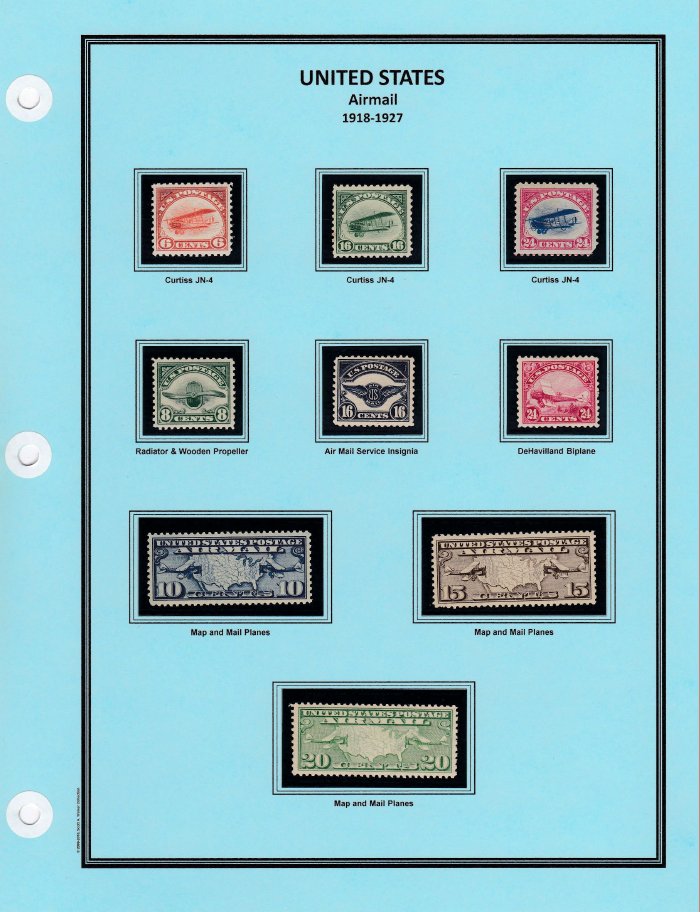 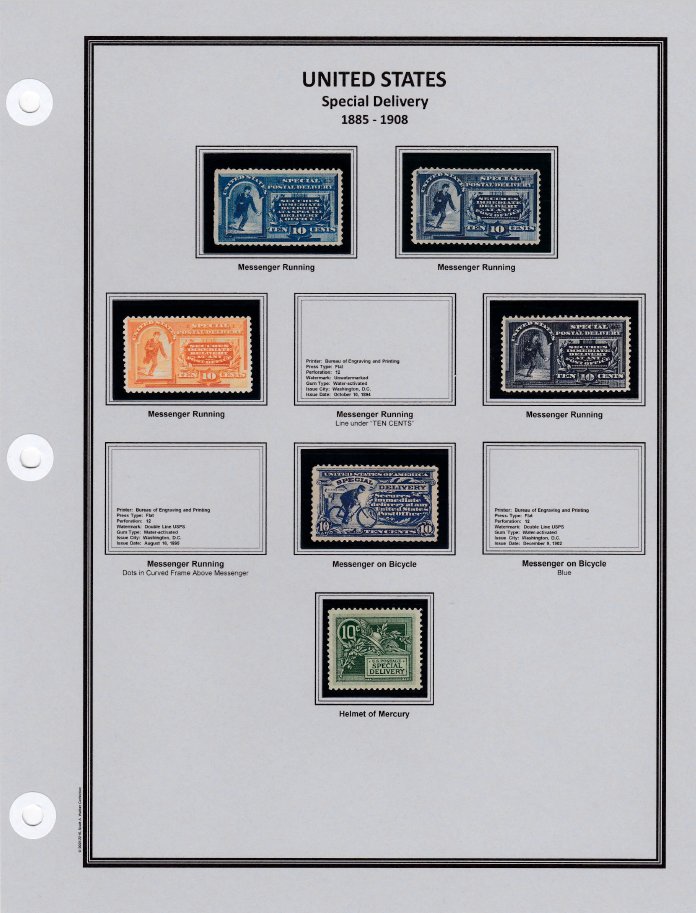 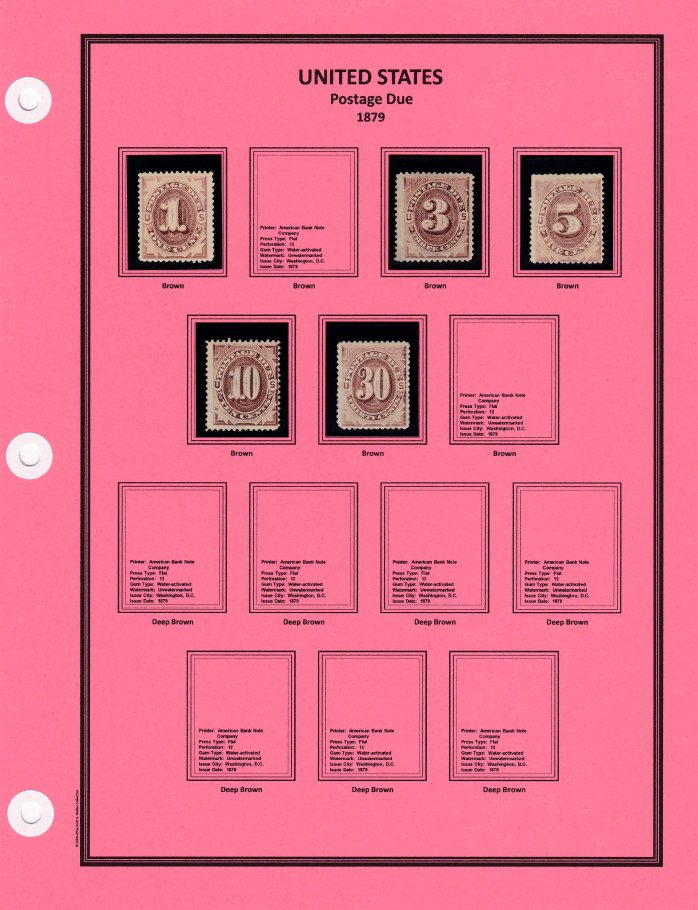  |
|
Send note to Staff
|
|
|
Pillar Of The Community
1367 Posts |
|
|
The question of whether or not album pages bleed printer ink might better be asked about whether printer ink bleeds on any paper. Album pages make up on the tiniest percentage of all the computer printing that is done. There are tens of millions of pages being printed on home and office printers every year, and I can't think of anything significantly different about album pages printed on home printers compared to all the other printing being done. Our test group should be all the pages being printed, not just album pages.
If we haven't already heard of ink bleeding under all normal circumstances (excluding extreme heat and moisture), the likelihood that it might happen would seem to be extremely small -- if it exists at all. Any album, no matter how its printed, can be damaged by moisture, extreme heat, mildew, mold, and other factors. If you keep your album in normal conditions, I'd bet it will have no problems.
I have a Scott National album I received as a child in 1960. That's 57 years ago, and it looks as good as new. And I've moved with it to new homes and cities at least 15 different times. It wasn't printed with computer printer ink, but I'd venture to say that albums printed on computer printers will survive just as well if they are also kept in a moderate temperature without high humidity. A much greater danger to computer printed pages is printing on acidic paper which will yellow badly and eventually disintegrate, transferring acids to the stamps themselves. There's nothing sadder in stamp collecting than looking through an old ruined album and seeing all the old, ruined stamps. Make sure all paper you print pages on is marked Acid-Free, at the very least.
As for printer ink, the companies that produce it know their product is being used for contracts, wills, licenses, and other legal documents and that it will be archived for many years. I imagine they've tested their ink and can guarantee it is safe. Checking web pages of major computer ink manufacturers for their testing regimes might be worth a look.
You could also do home tests. Print a dozen pages. Store them in a very hot location for a day, subject them to having heavy books stacked on top of them, and so forth. See if the ink migrates. You can't simulate aging, I suppose, but the ink manufacturers and the extensive use of computer printed documents (by the millions) would tell you a great deal about that.
|
|
Send note to Staff
|
| Edited by DrewM - 11/13/2017 10:54 pm |
|
|
Pillar Of The Community
1367 Posts |
|
|
"Do you include catalogue numbers for each stamp location?" The more you add, the more cluttered the page gets. Also, the more you add that could change someday, the more headaches you may be creating for yourself. I'd be inclined to not add catalogue numbers, but if you did it's your album and I imagine that would be just fine. If I had to, I'd pencil them in lightly underneath where the stamp would be mounted just to help myself mount the stamps. I've seen some collectors' albums where they very neatly (and very lightly) penciled in the catalogue number beneath, or right below, each stamp. I'm not sure what purpose that serves. Maybe they were just bored? Another option that just occurred to me is to make two sets of pages (electronically "copy" the set of pages to make a second document). On one document you can add numbers, on the other you don't. Print and mount your stamps on the one without numbers. Use the document with catalogue numbers (printed or not, it's up to you) as your reference to which stamp goes in which box. If the numbers do change, your actual album pages don't need to change because they have no numbers on them. You can change the numbers on the other set of pages if you really want to. In fact, that seems like the best choice of all. I'm glad I just thought of it.  |
|
Send note to Staff
|
| Edited by DrewM - 11/13/2017 11:11 pm |
|
|
Pillar Of The Community
United States
4515 Posts |
|
|
I always add catalogue numbers. My US collection is based upon Mystic's so I follow most of their style. If I was starting from scratch I would put the number below the stamp frame. I add varieties, etc. so having the number is important to me. On my worldwide Steiner pages, I pencil them in under the stamp. Example page.. 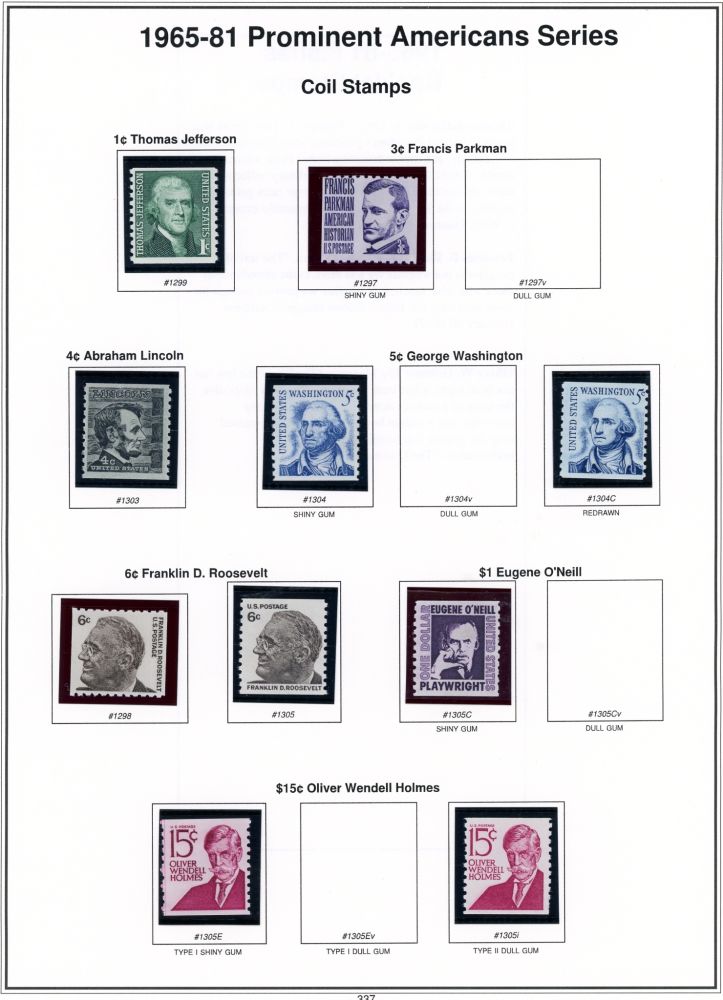 |
|
Send note to Staff
|
Al |
| Edited by angore - 11/14/2017 06:47 am |
|
|
Pillar Of The Community
Canada
1449 Posts |
|
|
Pillar Of The Community
674 Posts |
|
|
Valued Member
Canada
440 Posts |
|
|
On my pages created with AlbumEasy I like to include underneath the stamp both the SG cat number as well as an appropriate cat number from a more specialised catalogue such as the SACC (South African Colour Catalogue). In the areas I collect I find that some varieties are listed in SG, some in the specialised catalogue and some in both. For example the page below - Rhodesia and Nyasaland World Tobacco Congress 1963 - with space for both the mint and used stamps, contains two varieties SACC-44a and SACC-45a which are not listed in Gibbons. 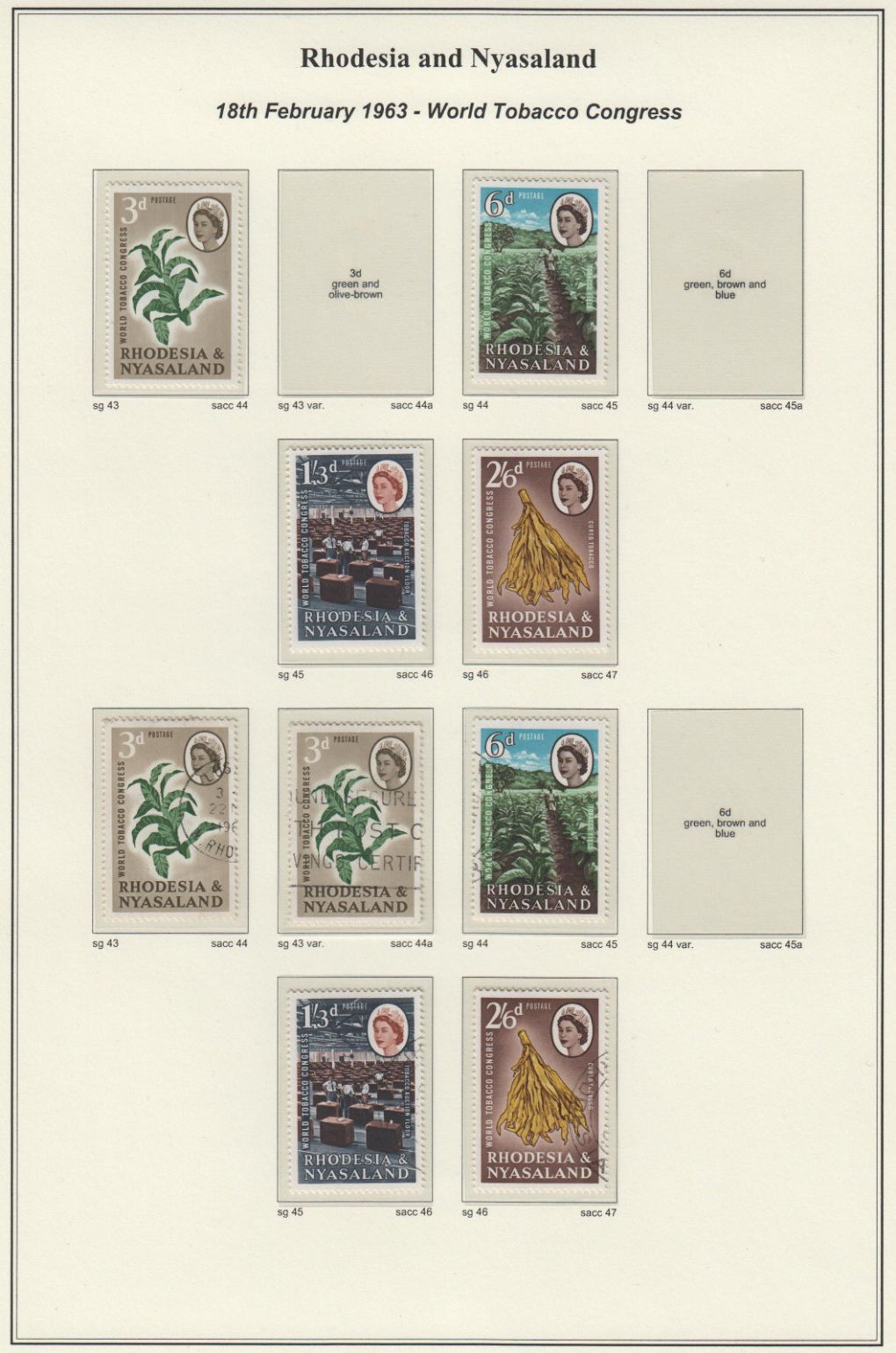 I use the inside of the stamp block for a description of the colour and denomination that will be the covered up by the stamp itself. Clive |
|
Send note to Staff
|
AlbumEasy - Free software for creating custom stamp album pages ChromaMate - Compare, match, analyse, free colour matching software ImageSleuth - Images, hidden inside images, revealed. A retroReveal alternative PSGSA - The Philatelic Society for Greater Southern Africa |
|
|
Pillar Of The Community
United States
626 Posts |
|
|
mdroth - I created my page border in PowerPoint by drawing 3 rectangles. I right-click on each rectangle, choose "Format Shape..." and set the line width to (starting from the outside) 3.5 pt, 1 pt, and 2 pt. I also offset the page border slightly to the right on the paper to accommodate the 3-hole punch on the left side. |
|
Send note to Staff
|
|
|
Pillar Of The Community
Canada
877 Posts |
|
|
Here is a draft of which I think is pretty close to my standard format. 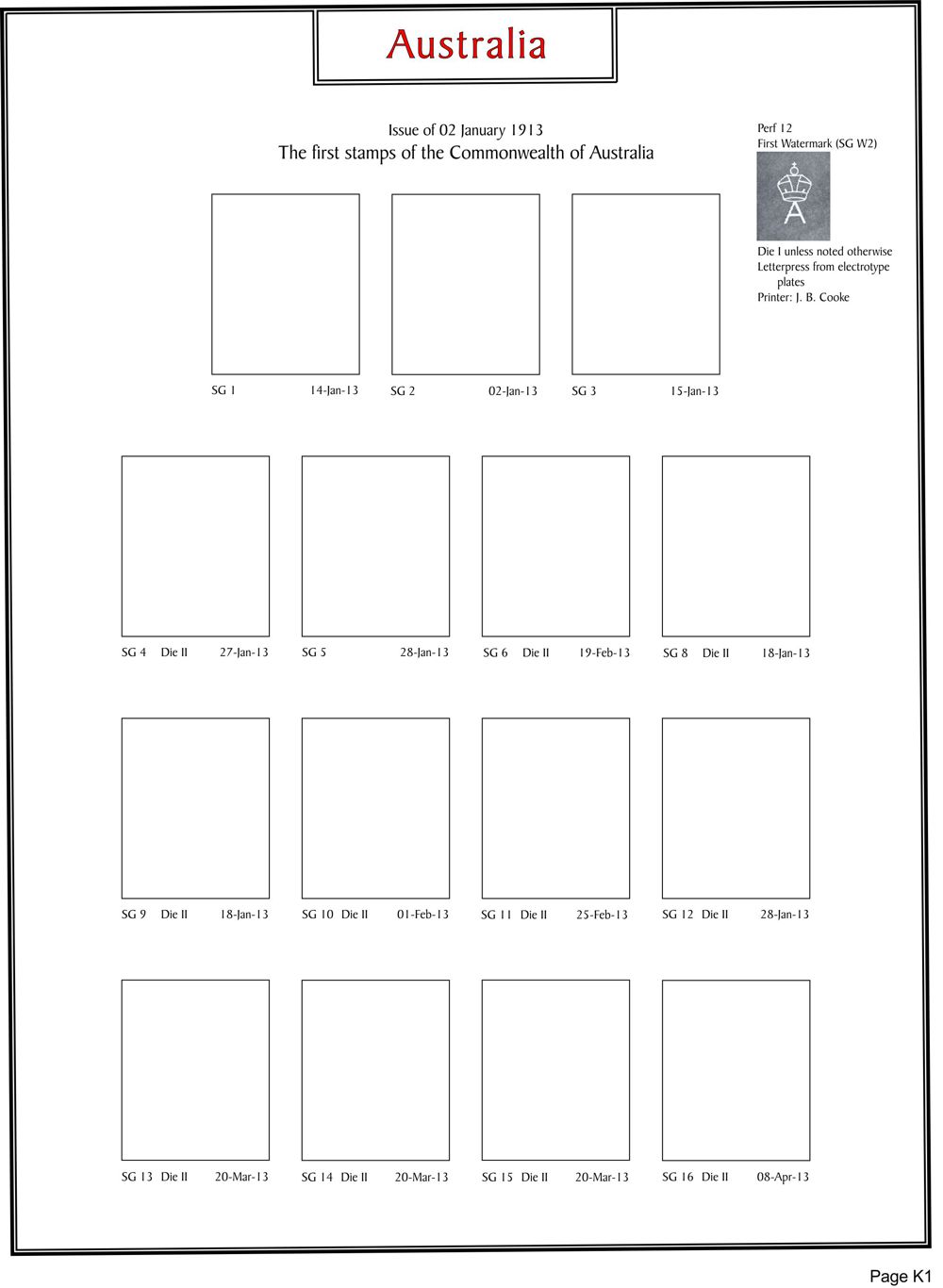 I use CorelDraw Home & Student which is a pretty good programme, though I do miss a lot of the features which were in the full CorelDraw set which I have used for something like 20 years. Drawing the border is easy. I staru by making the outer frame line using "snap to grid". I then do the inner frame line, also snap to grid with a very fine grid, by drawing a multi-segment line. I finish off the fram by inserting a box at the top to hold the country name. I'm still figuring out how much information about the stamps that I'll put on the page and am now leaning towards an information page for each page of stamps. |
|
Send note to Staff
|
|
|
Pillar Of The Community
Norway
1661 Posts |
|
|
itma - very nice, ready for housing some nice stamps!
Which font are you using? |
|
Send note to Staff
|
|
|
Pillar Of The Community
Canada
877 Posts |
|
|
Blaamand:
It's Baker-Signet. I have been using it for almost 20 years. I bought if for our company logo and web site, but I think it is now in the public domain. To my mind it shouts high quality.
Frank. |
|
Send note to Staff
|
|
|
Pillar Of The Community
Norway
1661 Posts |
|
|
Quote:
. How do you create the page border in powerpoint?? Another option is to make a screenshot of any other frame you like, adjust the screenshot to match the page size and use it as background. Btw - in PPT, add the frame to the 'slide master, and it will stay fixed while working on your pages. |
|
Send note to Staff
|
|
|
Valued Member
United States
28 Posts |
|
|
Quote:
For those looking for the next level in album pages, I would suggest getting a color laser printer. I purchased an HP M252dw. Totally second this suggestion. One additional advantage is that this printer accepts ticker cardstocks. I've been using 65 lbs cardstock with no issue so far. I'm pretty sure it's not the ticker it can handle. After a page is printed, I use Showgard mounts, black background. Sometimes pre-cuts sometimes strips (I use a cheap Fiskars guillotine to cut them and can't be happier!) Finally, I put the page in a "clear super heavy weight" sheet protector. Originally I used AVERY PVH119 but I stopped using them: 1) Can't find them anymore and 2) Had bad experience with pages stored in them for 7-8 years. These sheets are supposed to last decades! Now I'm using a cheaper version, from Office Depot. I can't say how good they are long term but they looks and feel exactly like the PVH119. I store my pages in regular three ring binders or 1" or 1.5" depending on number of pages. |
|
Send note to Staff
|
|
|
Replies: 38 / Views: 11,501 |
|
|
To participate in the forum you must log in or register. | |
 Metropex Stamp Show: Roseville, Minnesota October 23-24 Weird Covers, 1885,1886, And 1982 For Users Of Two-Post Blue International Albums What Is Your Experience With Binders. New Member Posting Image Of Avatar, Front And Back Of U2 Cut Square, Market Value Or References? Working On An Offline Collection George Washington 3 Cent 1861 With Print On The Back Hello From The Netherlands - New Member Then And Now, From Old Postcards New Member Wanting To Add An Avatar Sparks Auction Fees? 163 VF Nyfm Vertically Ribbed 163 XF Quartered Cork, Labeled Jumbo 136 VF Quadruple Split H Grill Nashville Philatelic Society-Your Invitation To Our Auction Night Meeting Monday, October 26, 2026 Nashville Philatelic Society-Your Invitation To Our Meeting Monday, October 19, 2026 Christmas Around The World 2026 C.e. In The Large Queen Cancel A More Condensed Album Page Experiment. US Scott #3 Postmarked Or Fake? Linn's Is Back - The Newspaper Is Back In Print Lots Of 1867 Grills On Sale Ajman Michel 1292A (1294A?) International Postage Stamp Album, Junior Edition By Scott C. 1928 Need Help Finding Original Source Of This Patriotic "paste-On" Cutout It's Now Cheaper To Use Fedex Ground Than USPS Ground For Some Zip Codes Metropex Stamp Show: Roseville, Minnesota October 23-24 Weird Covers, 1885,1886, And 1982 For Users Of Two-Post Blue International Albums What Is Your Experience With Binders. New Member Posting Image Of Avatar, Front And Back Of U2 Cut Square, Market Value Or References? Working On An Offline Collection George Washington 3 Cent 1861 With Print On The Back Hello From The Netherlands - New Member Then And Now, From Old Postcards New Member Wanting To Add An Avatar Sparks Auction Fees? 163 VF Nyfm Vertically Ribbed 163 XF Quartered Cork, Labeled Jumbo 136 VF Quadruple Split H Grill Nashville Philatelic Society-Your Invitation To Our Auction Night Meeting Monday, October 26, 2026 Nashville Philatelic Society-Your Invitation To Our Meeting Monday, October 19, 2026 Christmas Around The World 2026 C.e. In The Large Queen Cancel A More Condensed Album Page Experiment. US Scott #3 Postmarked Or Fake? Linn's Is Back - The Newspaper Is Back In Print Lots Of 1867 Grills On Sale Ajman Michel 1292A (1294A?) International Postage Stamp Album, Junior Edition By Scott C. 1928 Need Help Finding Original Source Of This Patriotic "paste-On" Cutout It's Now Cheaper To Use Fedex Ground Than USPS Ground For Some Zip Codes
What Is The Strangest Or Most Unusual Stamp Material You Own? Weird Covers, 1885,1886, And 1982 Gems And Minerals Metropex Stamp Show: Roseville, Minnesota October 23-24 Working On An Offline Collection For Users Of Two-Post Blue International Albums What Is Your Experience With Binders. New Member Posting Image Of Avatar, Front And Back Of U2 Cut Square, Market Value Or References? Hello From The Netherlands - New Member Lakes, Marshes, Mangroves, And Wetlands On Stamps Show Your Film And Music Star Stamps Pushing 330,000 All Different Worldwide Stamps In One Collection . World Post Day And International Letter Writing Week The Albumeasy Examples Thread With Code What Did You Do Philatelically: Today Or Recently? Stamps On Stamps Big Top Philately Lighthouses On Stamps Happy Halloween 2018 International Postage Stamp Album, Junior Edition By Scott C. 1928 Odd Shapes On Stamps (Including Hexagons) Venues For Art And Culture: Museums, Theatres, Galleries, Concert Halls, Etc. US Slogan Cancels Christmas Around The World 2026 Science-Fiction/Fantasy Stamps George Washington 3 Cent 1861 With Print On The Back
Disclaimer: While a tremendous amount of effort goes into ensuring the accuracy of the information contained in this site, Stamp Community assumes no liability for errors. Copyright 2005 - 2026 Stamp Community Family - All rights reserved worldwide. Use of any images or content on this website without prior written permission of Stamp Community or the original lender is strictly prohibited.
Privacy Policy / Terms of Use Advertise Here |
| Stamp Community Forum |
© 2007 - 2026 Stamp Community Forums |
| It took 0.23 seconds to lick this stamp. |
 |
|
|
|


 Posted 11/12/2017 2:01 pm