Stamp Community Family of Web Sites
Thousands of stamps, consistently graded, competitively priced and hundreds of in-depth blog posts to read


Stamp Community Forum
 
Username:
Password:
Save Password
Forgot your Password?

This page may contain links that result in small commissions to keep this free site up and running.

Welcome Guest! Registering and/or logging in will remove the anchor (bottom) ads. It's Free!

Chart For Homemade Steiner Pages

 
To participate in the forum you must log in or register.
Author Previous TopicReplies: 7 / Views: 1,575Next Topic  
Pillar Of The Community

United States
1510 Posts
Posted 11/23/2017   7:36 pm  Show Profile Bookmark this topic Add Timm to your friends list Get a Link to this Message
I don't have the computer skills to use stamp page making programs but I have found a simple way to make my own pages.

I don't need the stamp boxes because I mount all of my stamps and you don't see the boxes any way.

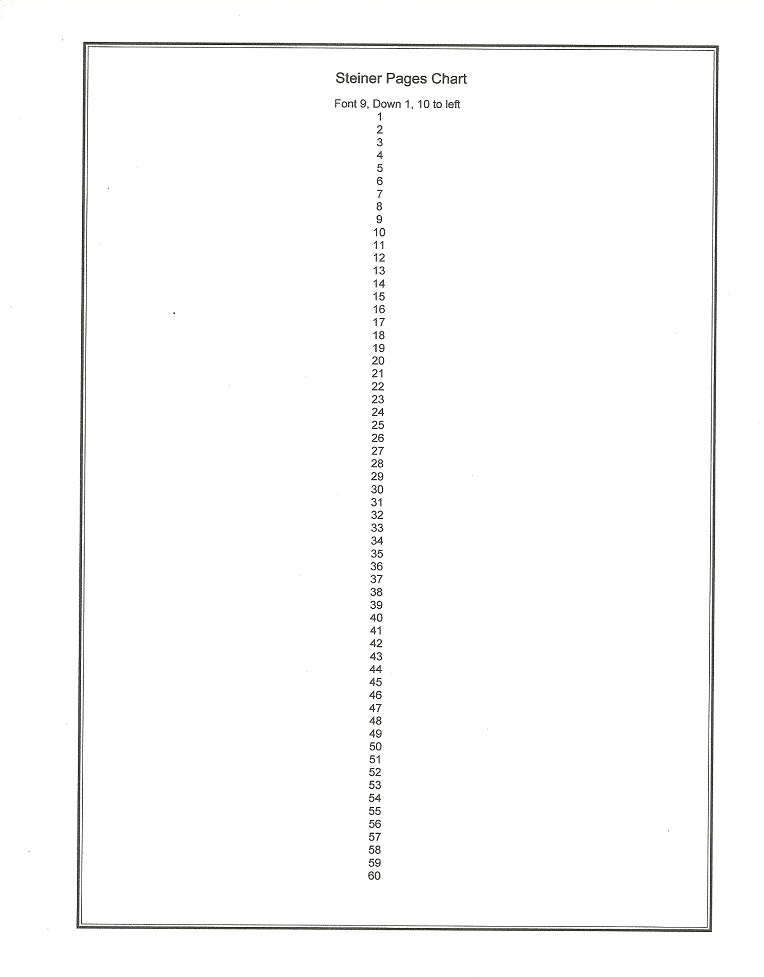
I created a simple chart to help me align the descriptions I need.

Using my MS Word program, I simply use the chart to count down the number of spaces to the line I want. Type what I want and use the space bar to position right to left. With a little practice is works well.

Send note to Staff
Edited by Timm - 11/23/2017 7:38 pm

Pillar Of The Community
Learn More...
United States
4424 Posts
Posted 11/24/2017   05:10 am  Show Profile Bookmark this reply Add angore to your friends list  Get a Link to this Reply
I am confused on your system. Do you have a finished page?
Send note to Staff  Go to Top of Page
Al
Pillar Of The Community
United States
1510 Posts
Posted 11/24/2017   11:39 pm  Show Profile Bookmark this reply Add Timm to your friends list  Get a Link to this Reply
It's simple. It starts with Steiner blank page with country and 1 line. Represented by the first 2 lines on the chart. I lay the stamps I want to mount om the chart and record their position. Lets say a row of 3 stamps. The chart tells me how may lines (or space down using font 9).
If I have a one line description, I count back 2 and type my description. That give me a blank space between the description and the stamp.
For me to find the center of the page (at font 9 and center alignment tab clicked)since the page is off set for the left margin, I space bar 10 spaces to the right which gives me the center of the page.

Of course this is based on the MS WORD program that came with my 10 year old computer. I often double check my alignment on scrap paper before printing an album page.

I am sure with a little tinkering you can make alignment charts to match your system.

I use 4 charts based on Steiner's blank pages
Country plus one line
Country plus two lines
Country plus three lines
Country plus four lines
Send note to Staff  Go to Top of Page
Edited by Timm - 11/24/2017 11:41 pm
Moderator
Learn More...
United States
4788 Posts
Posted 11/25/2017   5:43 pm  Show Profile Bookmark this reply Add kirks to your friends list  Get a Link to this Reply
There now, clear as mud
Send note to Staff  Go to Top of Page
Pillar Of The Community
United Kingdom
8582 Posts
Posted 11/25/2017   5:47 pm  Show Profile Check GeoffHa's eBay Listings Bookmark this reply Add GeoffHa to your friends list  Get a Link to this Reply
I'm a little lost. What's the point of using Steiner, rather than quadrille, if you aren't going to use his boxes etc?
Send note to Staff  Go to Top of Page
Pillar Of The Community
United States
8956 Posts
Posted 11/25/2017   6:27 pm  Show Profile Bookmark this reply Add Petert4522 to your friends list  Get a Link to this Reply
I am not just a little lost. I think I am having the worst senior moment ever!

Peter
Send note to Staff  Go to Top of Page
Pillar Of The Community
Canada
1449 Posts
Posted 11/25/2017   6:31 pm  Show Profile Bookmark this reply Add Renden to your friends list  Get a Link to this Reply
Send note to Staff  Go to Top of Page
Pillar Of The Community
United States
1510 Posts
Posted 11/26/2017   12:07 am  Show Profile Bookmark this reply Add Timm to your friends list  Get a Link to this Reply
I have 4 charts
Country plus 1 line
Country plus 2 lines
Country plus 3 lines
Country plus 4 lines

I decide which one to use after I decide which Title is am using
For example
NETHERLANDS
BOOKLETS
1975-1977

I print the page.

That would mean I would select chart Country plus 2 lines
That gives me the spaces I already used to the title and the starting point using Arial fort 9 to match the Steiner font.

I place the stamps in their mounts on the chart in the positions I want.

The chart tells me how many font 9 spaces to the top of each stamp.

I count two spaces up and that tells me what line to use to type my description.
If it is a 2 line description I would count 3 spaces up from the stamp.
When printed that give me the description plus a space between the description and the mounted stamp.

On my MS WORD program has 4 alignment boxes (Align left) (Center) Align right) (Justify). When I chose (Center) it place my cursor too far left because of the off set page.
10 taps on my space bar puts me back to canter when using font 9. I use this for a center description.

If I have more that one description because I have two or more mounted stamps on a line, I use (Align left).
I type my descriptions and use the space bar to center them.

Once you have the description to your liking on your MS Word page you can then print it on top of the preprinted Steiner page.

Send note to Staff  Go to Top of Page
Edited by Timm - 11/26/2017 2:23 pm
  Previous TopicReplies: 7 / Views: 1,575Next Topic  
 
To participate in the forum you must log in or register.

Go to Top of Page

Disclaimer: While a tremendous amount of effort goes into ensuring the accuracy of the information contained in this site, Stamp Community assumes no liability for errors. Copyright 2005 - 2026 Stamp Community Family - All rights reserved worldwide. Use of any images or content on this website without prior written permission of Stamp Community or the original lender is strictly prohibited.
Privacy Policy / Terms of Use    Advertise Here
Stamp Community Forum © 2007 - 2026 Stamp Community Forums
It took 0.16 seconds to lick this stamp. Powered By: Snitz Forums 2000 Version 3.4.05
