| Author |
 Replies: 31 / Views: 3,698 Replies: 31 / Views: 3,698 |
|
Valued Member
United States
55 Posts |
|
|
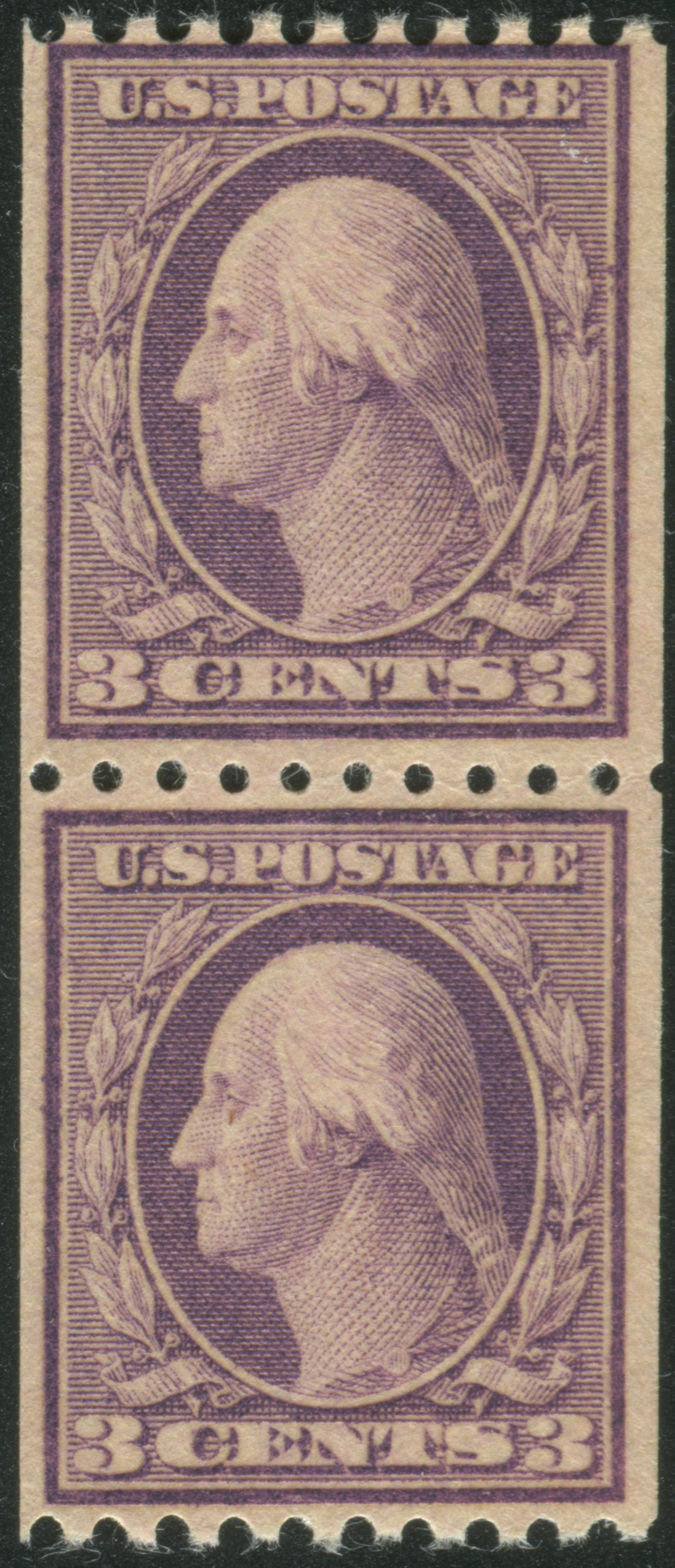
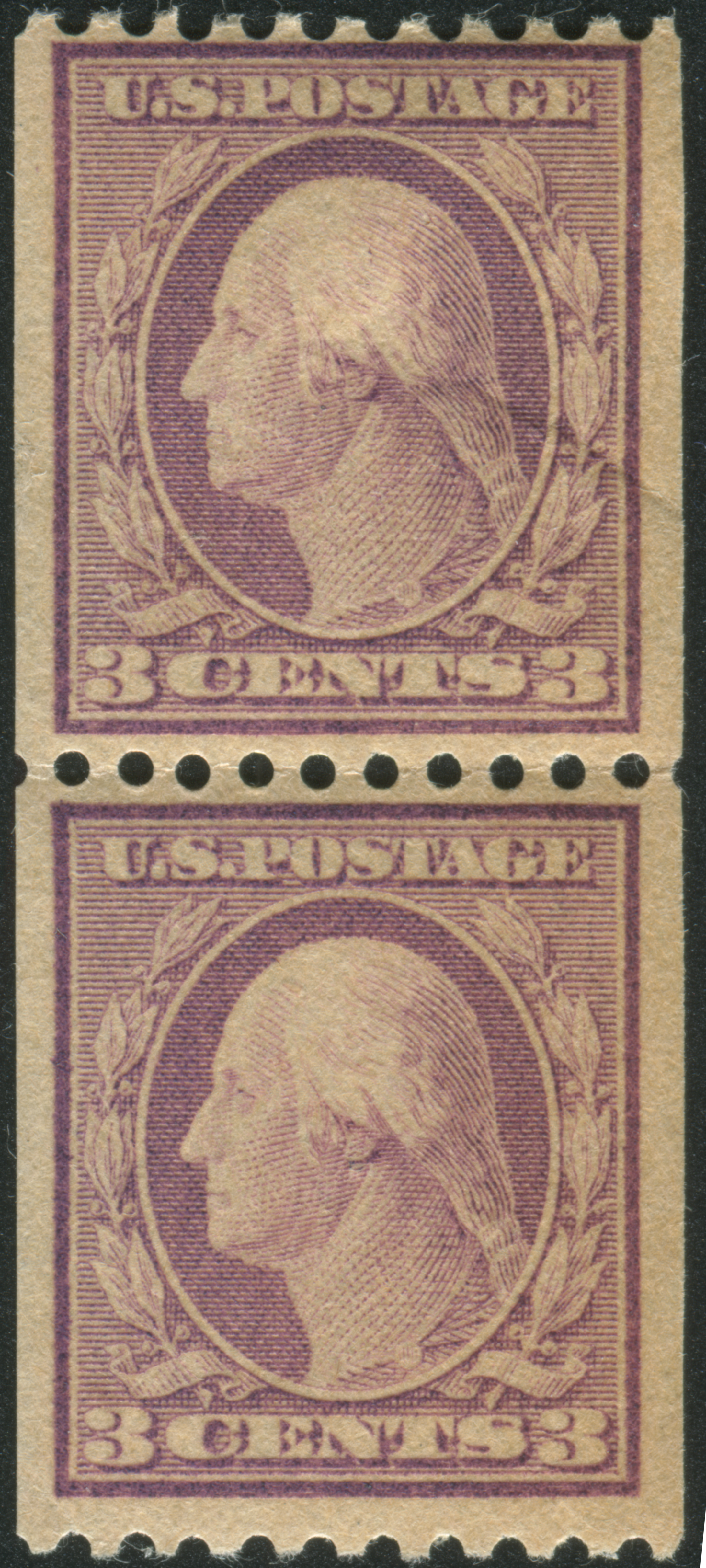
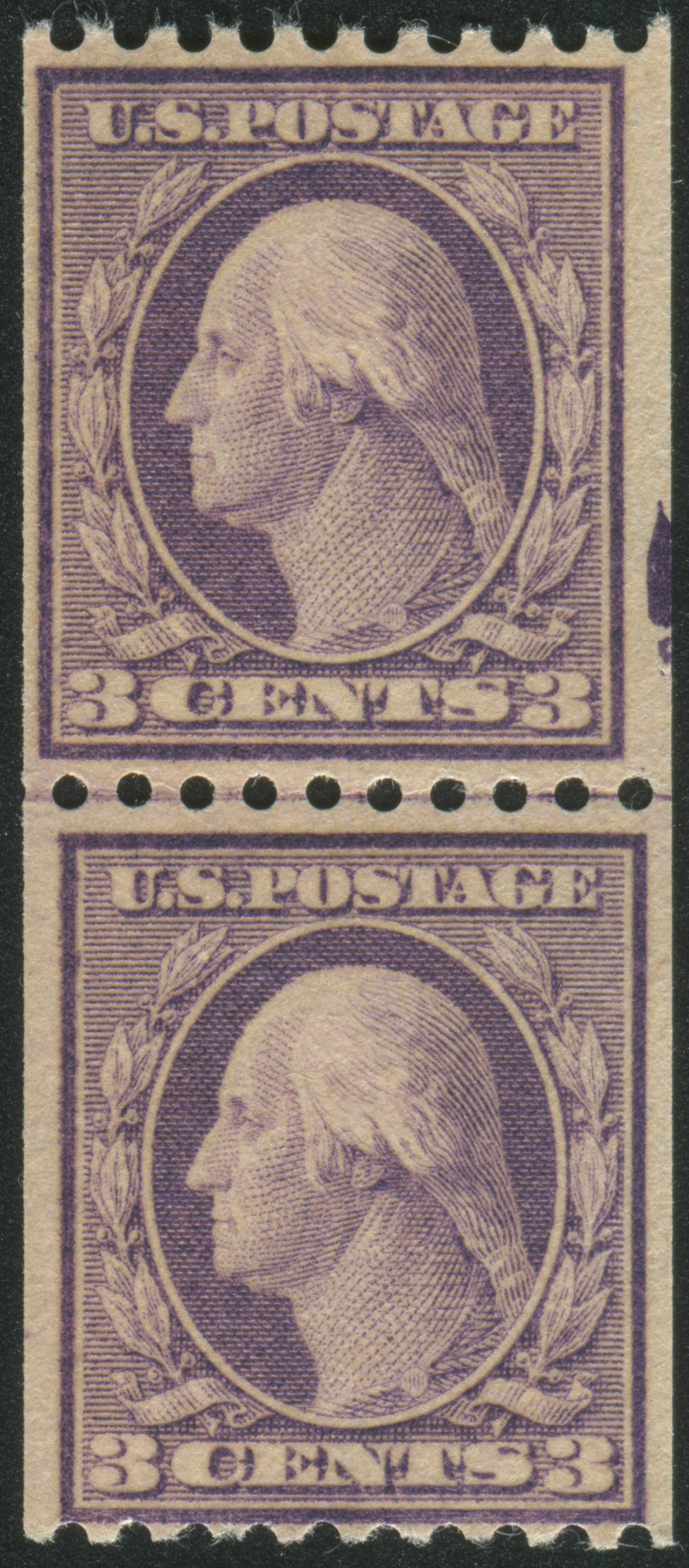
Hi, I picked this up a few years ago at a show because it looked funny, and the dealer only wanted $2 for it. What drew me to the item were the small perforation holes between the stamps. The center perfs, while the correct gauge, are quite a bit smaller than normal. They measure a full 1/10 of a mm smaller when compared to other 489 coil pairs I have in my collection. What is even more odd is that the top and bottom perfs appear to be the normal kinds of perfs for a 489! They line up perfectly with other 489's I have in my collection -- the best perf gauge really is another stamp. ;) I don't think the cause is paper shrinkage. That would have impacted the top/bottom perfs too, and the design size is dead on at about 18.9x22.5. I can't imagine that someone had an "imperf between" coil pair and decided to "fix" it by adding perfs. So... What gives? The first picture is the "small hole" pair, and the other two are normal: 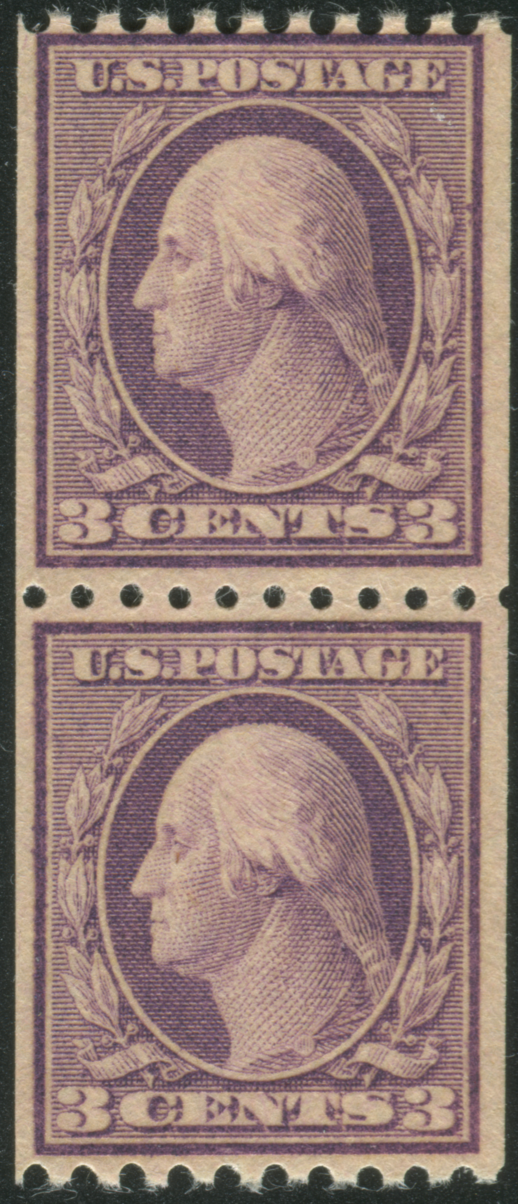 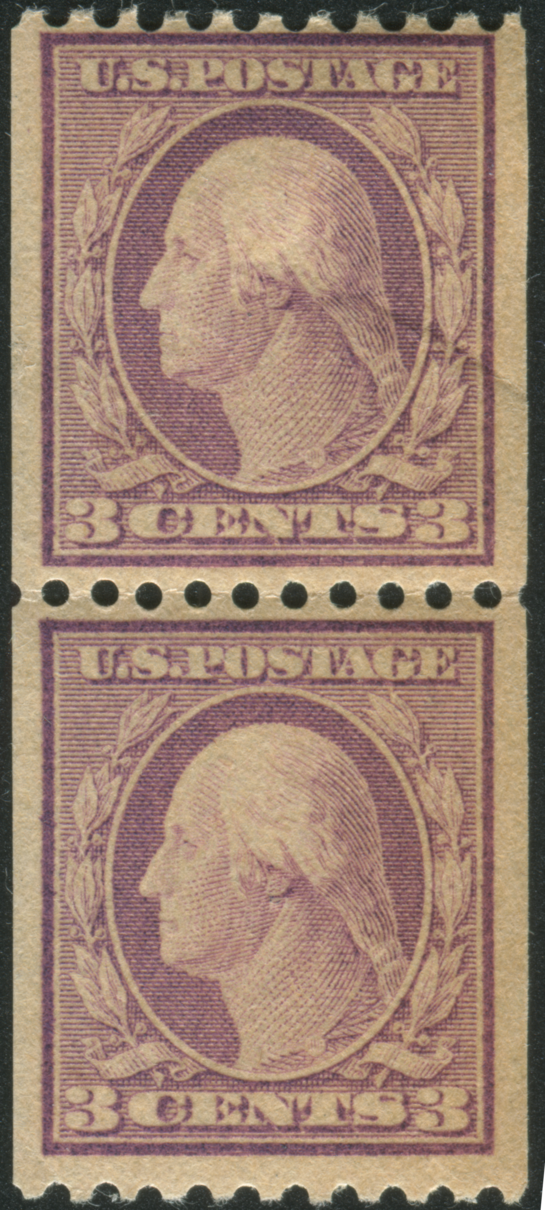 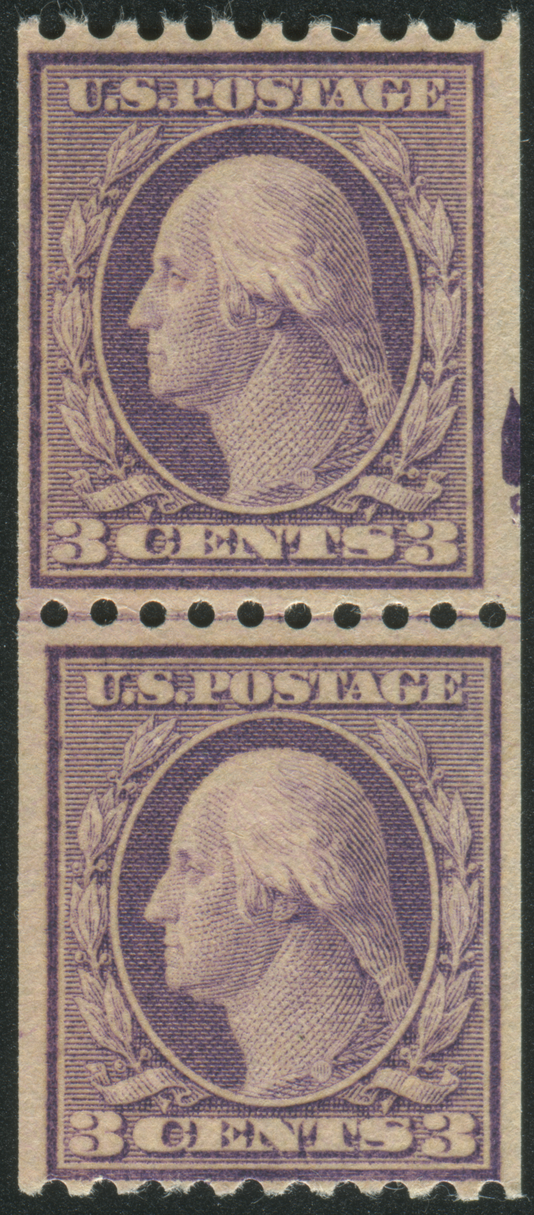 |
|
Send note to Staff
|
|
|
|
|
Rest in Peace
United States
205 Posts |
|
|
I have a similar pair. Waiting to see if anyone can shed light on this. |
Send note to Staff 
|
|
|
Pillar Of The Community
United States
1414 Posts |
|
|
A 2400 DPI scan would be helpful, but posting a high resolution scan is not possible on this site.
The short answer: Scott 496 and 495 have been certified with "small" holes, similar in size to more modern dry printed coils. Although documentation is scant, it is possible that smaller pins could have been used on the bar perforator for coils. Instead of lines of pins around a cylinder, bars with pins were mounted on a cylinder to punch holes across the web. It is also possible, but not documented, that pins on some bars could have been smaller if the supply of normal size pins was depleted. Since the holes in the brass cylinder remain the same, perforation holes could be expected to be somewhat ragged. For now, this is conjecture, but seems like the most plausible answer. send the coil pair is sent to the APS for expertizing or bring it to NAPEX in McLean, VA this weekend to booth 73.
I have a 3 cent Liberty wet printing coil strip of five certified as the small hole variety, but one row of holes appears to be the normal size.
|
|
Send note to Staff
|
| Edited by cfrphoto - 06/06/2019 11:29 pm |
|
|
Forum Dad

USA
2059 Posts |
|
|
Quote:
A 2400 DPI scan would be helpful, but posting a high resolution scan is not possible on this site. Sure it can, DPI has nothing to do with uploading.... or the internet. |
|
Send note to Staff
|
|
|
|
Pillar Of The Community
United States
1339 Posts |
|
|
This site is limited to about 800dpi of an entire stamp if cut close because of the size limitations. You can post 2400dpi images of small sections, but not an entire stamp. |
|
Send note to Staff
|
|
|
Forum Dad
USA
2059 Posts |
|
|
No one has higher than a 96 DPI monitor, DPI is almost irrelevant for the internet. Scanning at 300 or 2400 will be virtually indiscernible on the internet. Scan at whatever you want, 150 or higher, resize to 600 to 800 along the short side, and save as jpg at 75% compression and you'll be able to upload a tremendous image here that you will be able to grade or whatever. This image is 96 DPI.  DPI is very important for print, for the internet 150 or higher is fine because no one is going to see it greater than 96 anyway.... https://daraskolnick.com/image-dpi-web/ |
|
Send note to Staff
|
|
|
|
Moderator
United States
12330 Posts |
|
|
DPI and resolution are often incorrectly used interchangeably. There is a relationship but they are two different things.
DPI = pixel density
Resolution = number (count) of pixels (vertical or horizonal) across the display
There are now some displays (typically found on laptop and/or smart phones) with dpi higher then 96. They are referred to as 'retina' displays and go on up to 200-300 dpi. But Bobby is correct that the majority of desktop displays are around 100 dpi.
Don |
|
Send note to Staff
|
|
|
Forum Dad
USA
2059 Posts |
|
|
My main point is that scanning at 2400 DPI for the internet is ridiculous, sorry if I offend anyone. |
|
Send note to Staff
|
|
|
|
Pillar Of The Community
United States
4182 Posts |
|
|
If you scan something 1 inch wide at 400 dpi and upload it to this site it will display just over 4 inches wide (400 pixels). How is thos not better than scanning at 96 dpi? |
|
Send note to Staff
|
|
|
Pillar Of The Community
United States
1414 Posts |
|
|
I did not suggest that the scan was necessary for viewing on the Internet, For those who misinterpreted the previous post, a 2400 dpi scan would allow accurate measurements of perforation holes in Photoshop.
Shortcut: Rotary coil perforation holes larger than 1 millimeter in diameter are the "large hole" variety and holes less than one 1 millimeter in diameter may be the "small hole" variety. A 10x loupe with a reticule is necessary,
Avoid: A 200 dpi scan would be pixelated and useless if expanded. Resizing the image may also result in metadata corruption.
Certificate: The OP's question may not be resolved unless the pair is submitted to the APS, PSE, PSAG or the PF for an opinion.
|
|
Send note to Staff
|
| Edited by cfrphoto - 06/08/2019 12:27 am |
|
|
Moderator
United States
12330 Posts |
|
|
The confusion between dpi (really pixels per inch) and resolution is probably coming from the way many graphics programs confuse the dpi and resolution. Bobby perspective is one from a software developer who understands how graphics files actually work. Others perspective is from an end user and do not understand the mechanics of graphics files and is made worse by many graphics application which also use these terms 'dpi' and 'resolution' interchangeably. Let me see if I can clear up the confusion. At a file mechanic level the terms dpi and resolution are not interchangeable; they mean two distinctly different things. But let's see how to 'decouple' the terms 'dpi' and 'resolution'. 1. Open Photoshop and scan something at 2400 dpi. Note how Epson Scan app couples the two terms 'dpi' and 'resolution' 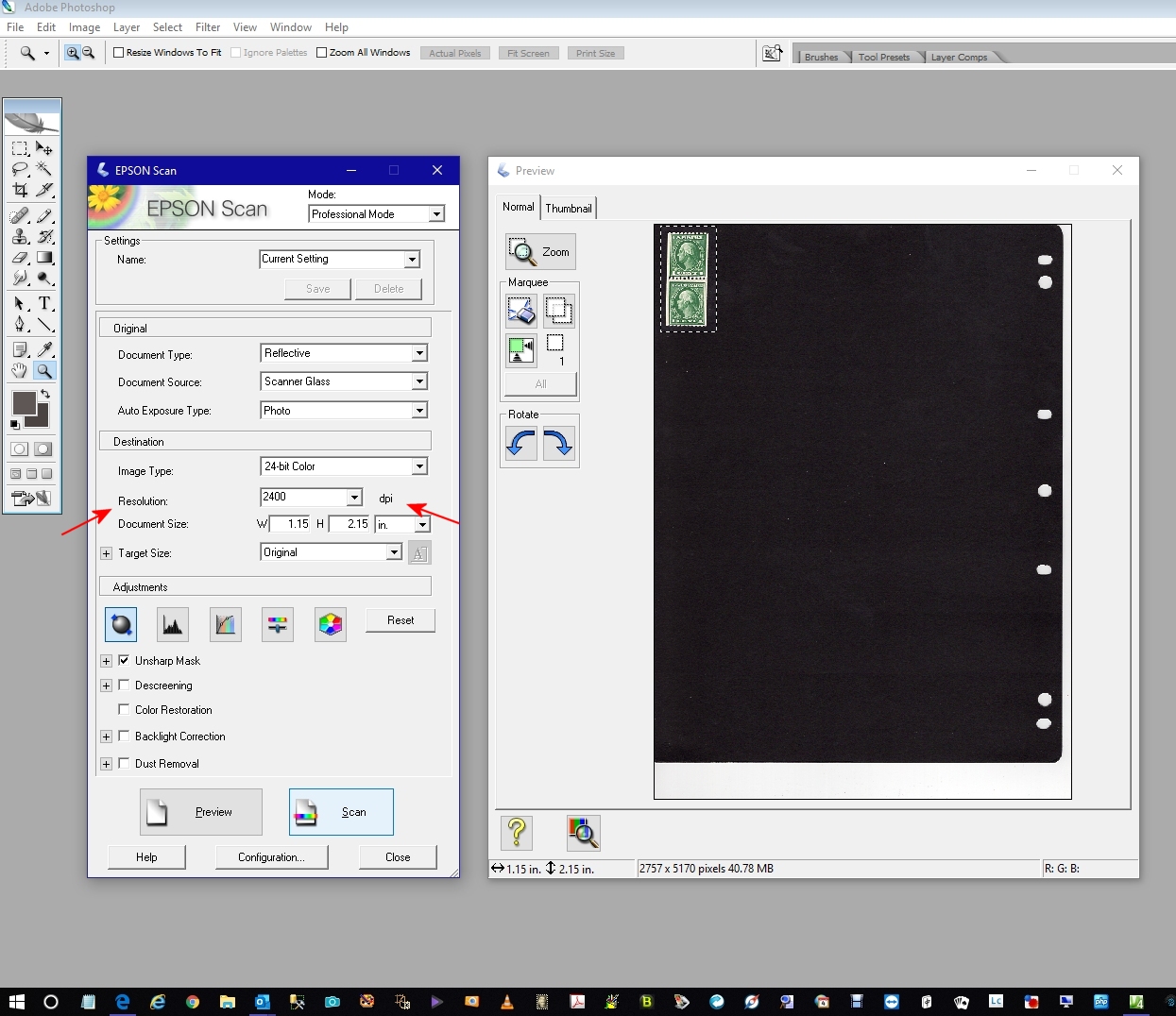 2. When we look at the 'image size' using Photoshop, we see note that the image resolution size is 2757x5170 (your image might be different) 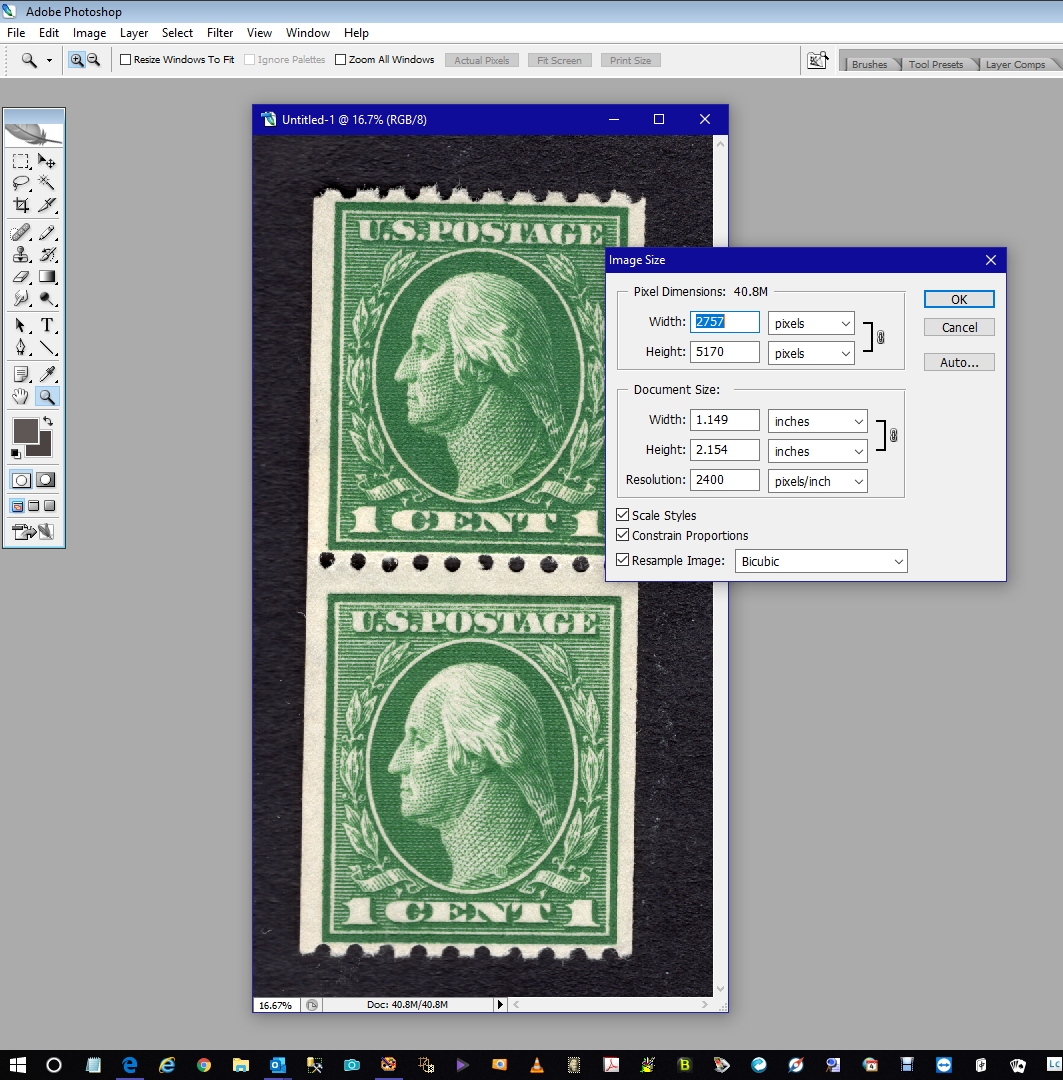 3. Now using the width and height, open a "new file" in Photoshop but with a 72 dpi as shown here 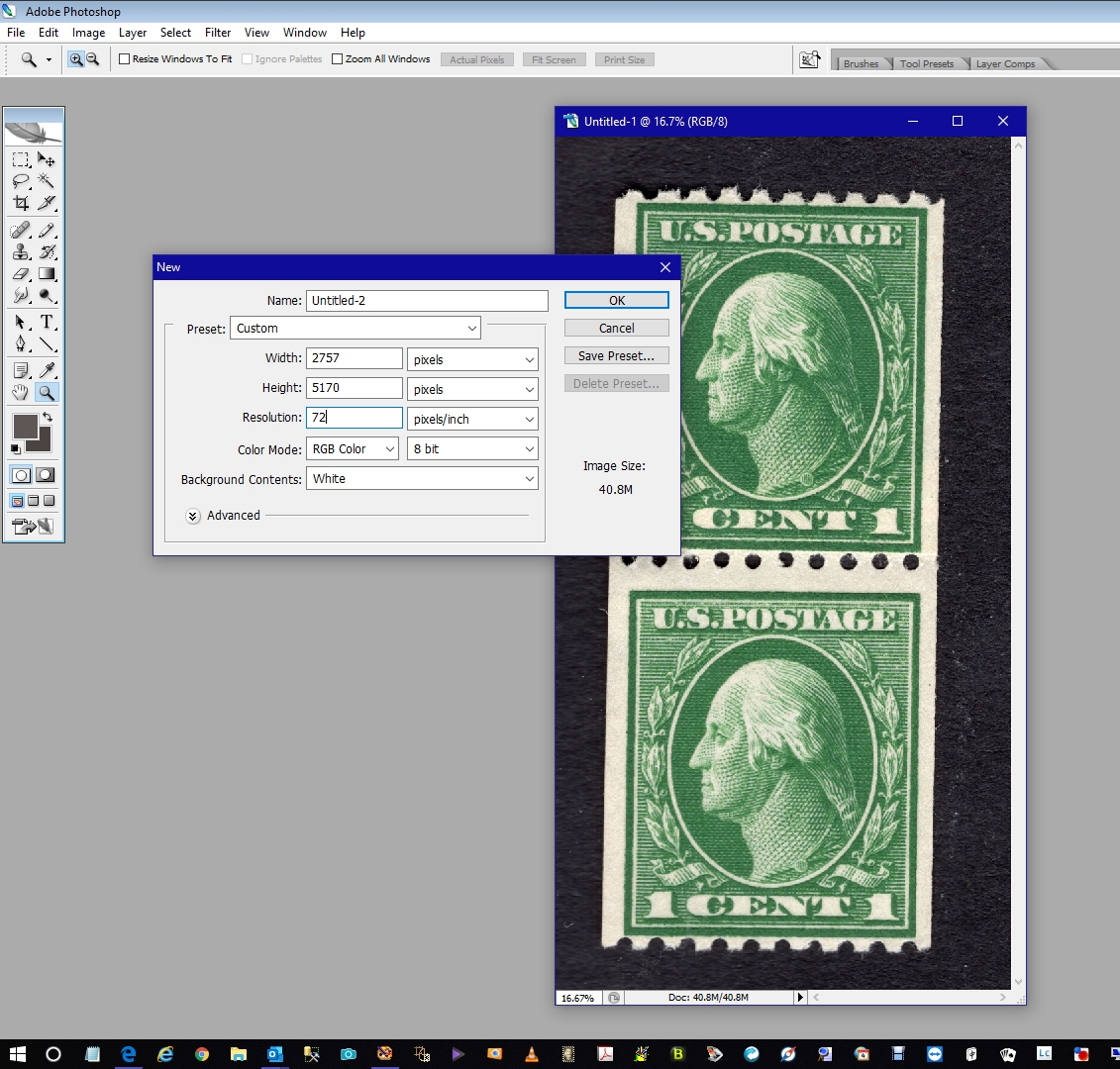 4. "Select All" in the 2400 dpi image and then copy/paste it into the new blank 72 dpi image as shown here 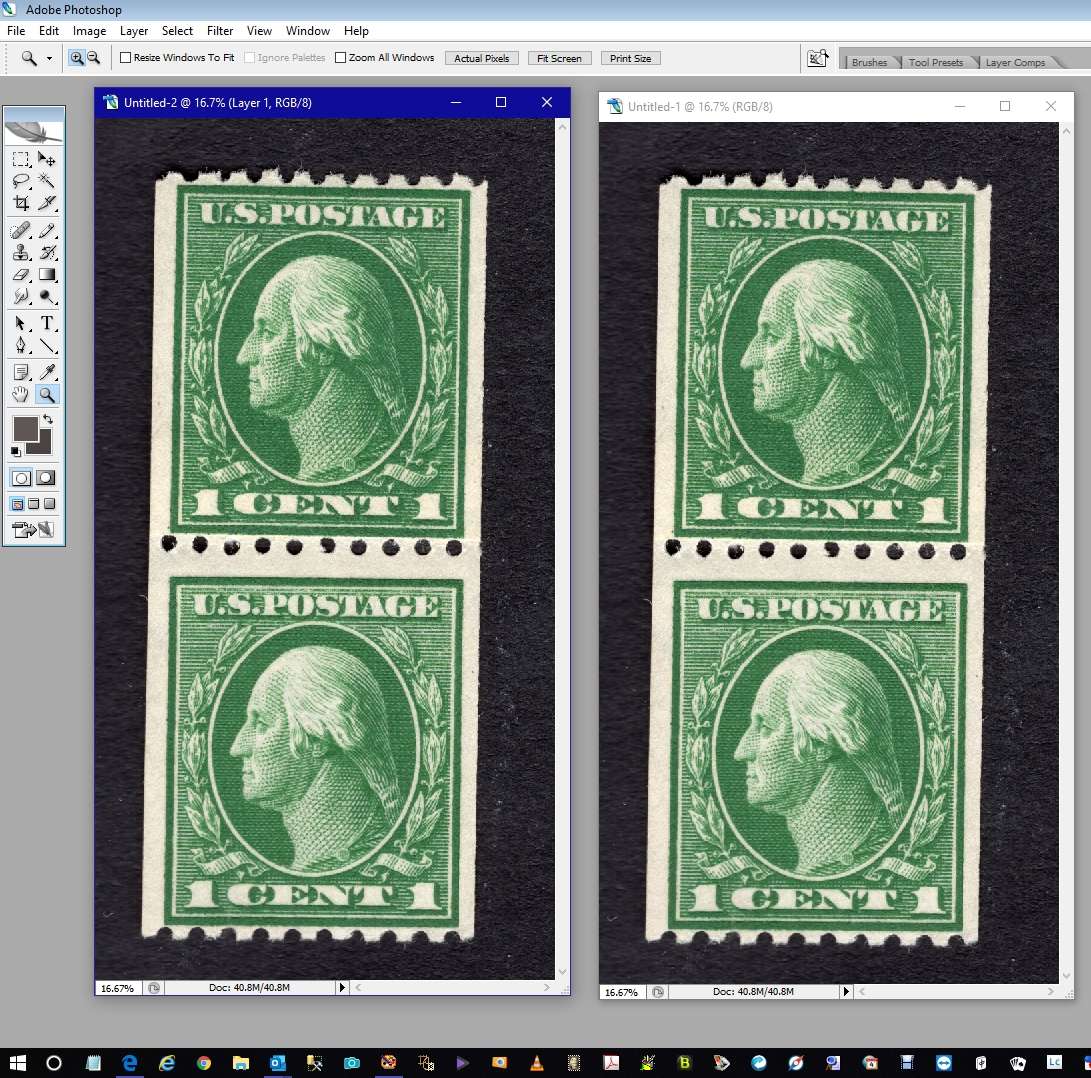 5. Now I have two images, both 2757x5170 but one at 2400 dpi and one at 72 dpi; both look identical on my screen. When viewed at 1:1 there is no loss of detail as shown here 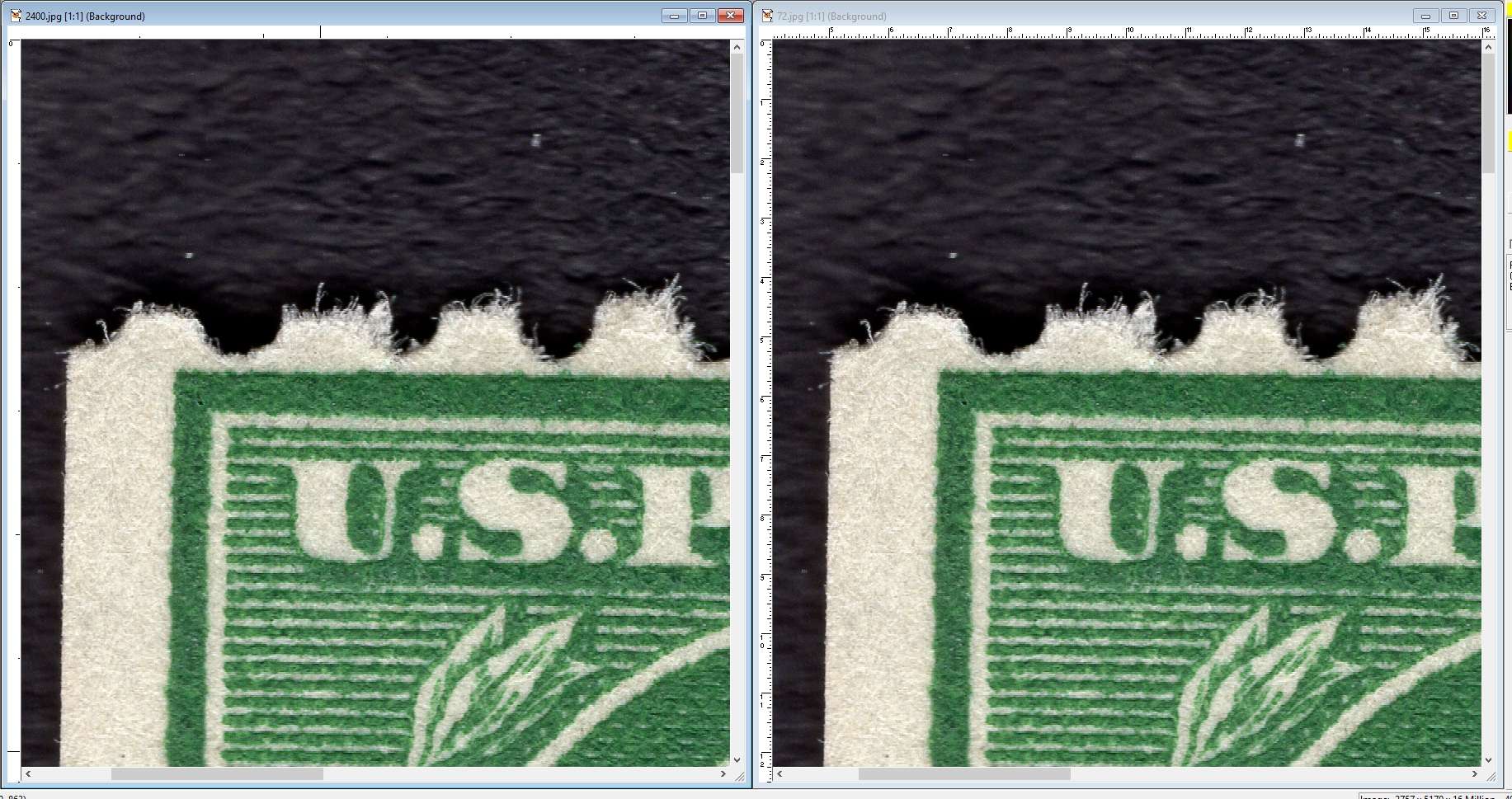 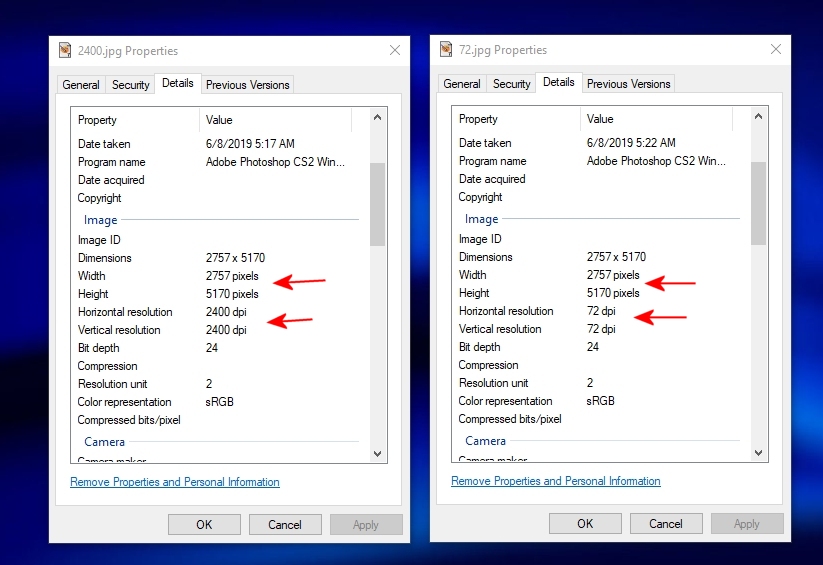 As shown above, I have 'decoupled' the dpi and image resolution. Bobby and other software developers have to get into the image mechanics and understand that dpi = pixel density and that resolution = height and width. They work on things like 'image optimizers' and have to get into the nuts and bolt of this stuff. But end users work with image applications which confuses both terms by coupling them. This is why Clark and Bobby are not on the 'same page'. Don |
|
Send note to Staff
|
|
|
Pillar Of The Community
United States
1339 Posts |
|
|
Regardless, 96 dpi is useless for any detail. If you need to zoom in on a stamp, 96dpi is totally useless. If my images were 96dpi instead of 2400 dpi, they would not be worth the effort. 300 dpi is useless. 600 dpi is barely usable. This website will take an 800dpi image of a stamp, if you clear out the background, you can increase it to 1100dpi sometimes. You will never post a 1200dpi image because of the size. It really stinks because 1100 dpi is not any standard that I can use. I have to make special images to post here and then delete them. This site cannot handle the images that I use. Any image that I post here has to be scaled down to about 30%. They would be "out of scale" where as 1200 dpi can be zoomed in to 2400 dpi and MATCH from one image to another without distortion. Trying to copy a piece of one stamp image onto another image needs precise dpi. When 96 dpi was mentioned, I laughed so hard that I fell out of my chair. How many times has a poster been told that they need to post larger images to receive any assistance? 8 out of 10 new posters maybe? And then they have issues because this site will not upload larger images. There are many major auction houses that I cannot use their images because they also believe that size does not matter. I work with images daily so I cannot be convinced otherwise. I know better.
It would be so helpful to me if the size limitations here were change from 248kb to 300kb to take a 1200 dpi image. |
|
Send note to Staff
|
| Edited by jaxom100 - 06/08/2019 09:18 am |
|
|
Moderator
United States
12330 Posts |
|
|
Quote:
...It would be so helpful to me if the size limitations here were change from 248kb to 300kb to take a 1200 dpi image... Is everyone willing to start paying for the larger server and more bandwidth? Or are we saying we want more free stuff and have Bobby pay for it? Don |
|
Send note to Staff
|
|
|
Pillar Of The Community
United States
1339 Posts |
|
|
Wow. I do not see those words in what I wrote. My point was that it would be NICE if we did not have to make "special" SCF images to post them. Your response should have been "it would cost too much more for the bandwidth and server space." Rather than assuming something that was not said for the sake of an argument. If server space is an issue, purge all posts that have no comments in 5 years. |
|
Send note to Staff
|
|
|
Moderator
United States
12330 Posts |
|
|
You made a suggestion which requires an investment of both time and money. The question I posted, which was who is going to make this investment, was logical. We should not assume that the forum owner is willing to invest more than he already has or that this community is 'in the black'.
Don |
|
Send note to Staff
|
|
|
Forum Dad
USA
2059 Posts |
|
|
Quote:
It would be so helpful to me if the size limitations here were change from 248kb to 300kb to take a 1200 dpi image. Scan at 4 million DPI if you want. DPI is irrelevant on the internet.Then resize your image to 6 to 8 hundred pixels on the short side at 75% compression and upload it. Leave it at 4 million DPI, I couldn't care less. You will have a perfectly fine image for the purposes of this forum. The limit isn't going to change. I'm not Facebook that can afford a gymnasium sized room with floor to ceiling servers. I can't afford to let users upload 8MB images straight from their camera like Facebook does. |
|
Send note to Staff
|
|
|
|
Replies: 31 / Views: 3,698 |
|



 Posted 06/06/2019 2:35 pm