| Author |
 Replies: 31 / Views: 3,696 Replies: 31 / Views: 3,696 |
|
|
|
Pillar Of The Community
United States
4182 Posts |
|
|
I know you are trying to help, but you muddied the waters with:
"2.When we look at the 'image size' using Photoshop, we see note that the image resolution size is 2757x5170 (your image might be different)"
There is no such thing as "image resolution size" - the 2757x5170 you quoted are the pixel dimensions of the image. The resolution is the smallest feature resolvable - assuming the optics are good enough, the resolution is 1 pixel, which in this case is 1/2400 inches or about 10 microns (whch shouldn't be pushing the optics too far).
In 3 thru 5, all you have done is lie to Photoshop and told it the image is only 72 dpi, but the entire 2757x5170 pixels are still there, so when you display tit side by side with the original at the same size of course they images look exactly the same because they are exactly the same. |
Send note to Staff 
|
|
|
Pillar Of The Community
United States
4182 Posts |
|
|
Depending on what one is trying to show, you might be able to scan at a higher resolution and get the image to upload IF you only need to show a portion of the stamp instead of the entire stamp. |
|
Send note to Staff
|
|
|
Moderator

United States
12330 Posts |
|
|
eye, The waters were muddied because the term 'resolution' can mean either 'dpi' (dots per inch) or 'ppi' (pixels per inch). My post above was demonstrating the difference between 'dpi' and 'ppi'. I did not "lie to Photoshop", I changed the resolution of the two images while maintaining the exact same image size. There is another way to demonstrate this using a single image. Open any image in Photoshop and then go to 'image size'. This dialog box shows both 'Pixel Dimension' (top) and 'Document Size' (bottom). They are explicitly connected but only because the default is that the 'Resample Image' is checked. Note how Photoshop shows the explicit connection with the little chain icon. 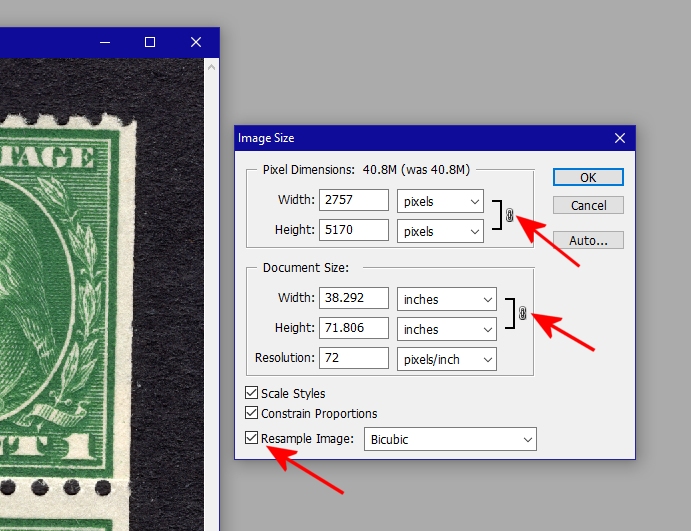 But Photoshop only has an option to change one 'resolution'; that option is in the document size section. If you change the 'resolution' it will also change the 'Pixel Dimension' because 'Pixel Dimension' and 'Document Size' are explicitly connected in this dialog box. The image below shows how changing the 'Resolution' from 72 to 300 dpi also changes the 'Pixel Dimensions' numbers. 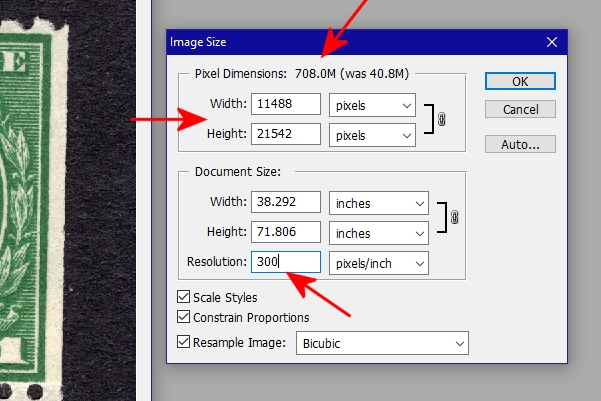 If you uncheck the 'Resample Image' option, note how the Photoshop dialog box removes the are explicit connection as shown below. 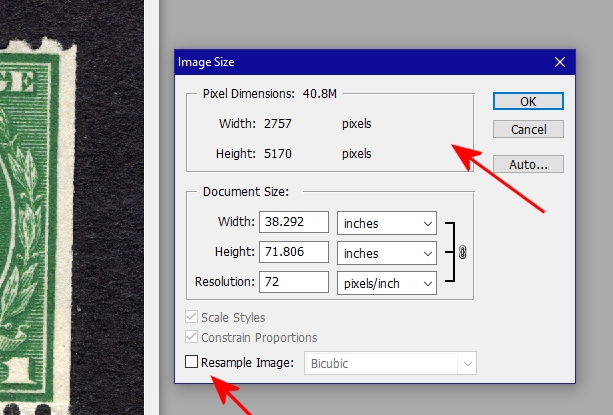 If you now uncheck the 'Resample Image' option and change the dpi resolution to 300 the document size changes but the 'Pixel Dimensions' stay exact the same (shown below). This is not lying to Photoshop, it is changing the 'resolution' from 72 to 300. Also note that the Photoshop dialog correctly describes 'resolution' as 'pixel/inch'. 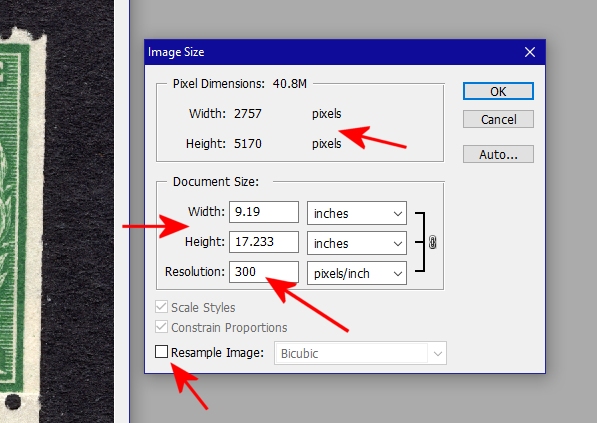 The muddied waters here is the confusion with the term 'resolution' and that graphics apps (and developers) often use it to mean 'ppi' (print resolution or pixel density) while many users assume it only means 'dpi' (screen resolution or image dimensions). Apps also add to the confusion, note how the Epson scanning app uses the term 'resolution' to mean dpi while the Photoshop uses 'resolution' to mean ppi. These two parameters (ppi/dpi) can or cannot be connected, my posts were an attempt to demonstrate this delta and why people end up on different pages. Don |
|
Send note to Staff
|
|
|
Pillar Of The Community
United States
4182 Posts |
|
|
I understand what you are saying about what happens whether the Resample box is checked or not.
To me, resolution applies to scanning, while I would prefer a term like display density for monitors or print. I take real issue with your example of taking a 2257x5170 image and changing it from 72 pixels/inch to 300 pixels/inch and saying the resolution went up. The image is still 2257x5170, thus contains no more info - all you have done is crowd the pixels closer together and you can not resolve (see) any more features than before. |
|
Send note to Staff
|
|
|
Bedrock Of The Community
12749 Posts |
|
|
I am a technical dunce when it comes to images (and many other things) but when is enough enough. What will you see with all of the resolution, DPI's or other "stuff" that is necessary. At some point the need for more must become moot. |
|
Send note to Staff
|
|
|
Moderator
United States
12330 Posts |
|
|
Quote:
...the need for more... Enough is never enough...like this Samsung 49" curved monitor. 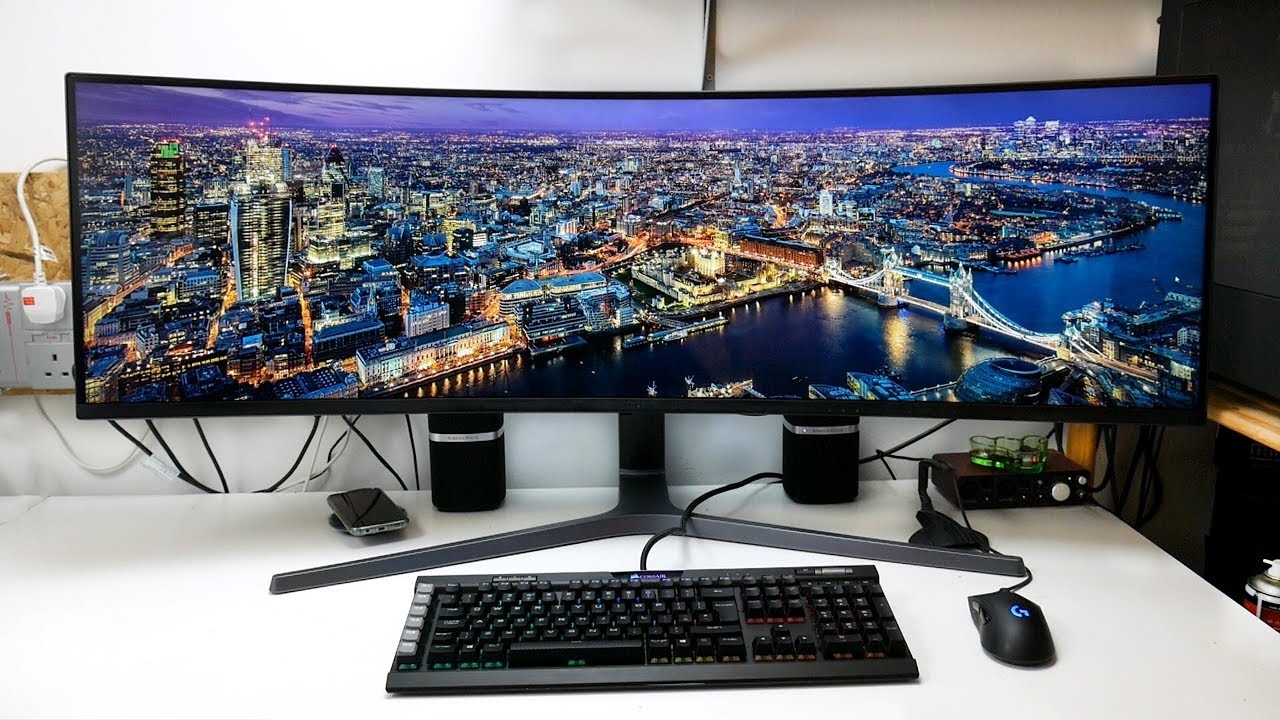 Don |
|
Send note to Staff
|
|
|
Bedrock Of The Community
12749 Posts |
|
|
Pillar Of The Community
United States
6668 Posts |
|
|
Pillar Of The Community
United States
1873 Posts |
|
|
For better images do I need to edit the CONFIG.SYS file or AUTOEXEC.BAT file? |
|
Send note to Staff
|
|
|
Pillar Of The Community
United States
4182 Posts |
|
|
"when is enough enough. What will you see with all of the resolution, DPI's or other "stuff" that is necessary. At some point the need for more must become moot."
It all depends on what you are trying to examine, but yes at some point more is not helpful |
|
Send note to Staff
|
|
|
Pillar Of The Community
United States
1414 Posts |
|
|
No. The size of the image (number of pixels) is determined by scanning software. If you are using the Command Prompt window to run scanner software on Windows XT, the answer could be "it depends". Where this discussion went south was confusing displaying images for the web with scanning with a higher dpi to enable displaying magnified stamp images. I suppose that it would be more politically correct to use terms like "resolution" or "ppi" for pixel density. However, most scanner software uses "dpi" as a substitute to conflate pixel density with image size as seen on a monitor. Software that attempts to set pixel density from the size of the final product, like a 5x7 print, throw yet another red herring, something like confusing the Scott catalog (a report) with a database (used to produce reports). I have no interest in printing scans, but it is necessary to be able to see images clearly enough to measure features within the nearest 0.001" (1200 dpi in scanner software language) or 2400 dpi to insure more accurate measurements. While ebay requires a minimum number of pixels on the long side, they have no idea whether the item is small like a stamp or large like an automobile. Software like Canon's ScanGear program distributed free with their scanners sizes scans by specifying the resolution in units of "dpi". Since a monitor will display at somewhere between 72 and 96 dpi, I can estimate the approximate amount of image enlargement by dividing by 100. Professional software like VueScan uses terms like "input dpi" and "printed dpi". |
|
Send note to Staff
|
| Edited by cfrphoto - 06/10/2019 11:05 pm |
|
|
Moderator
United States
12330 Posts |
|
|
Clark, VueScan also couples scan resolution to printing resolution by default. But you can scan in one resolution and set the printing resolution to a different resolution. 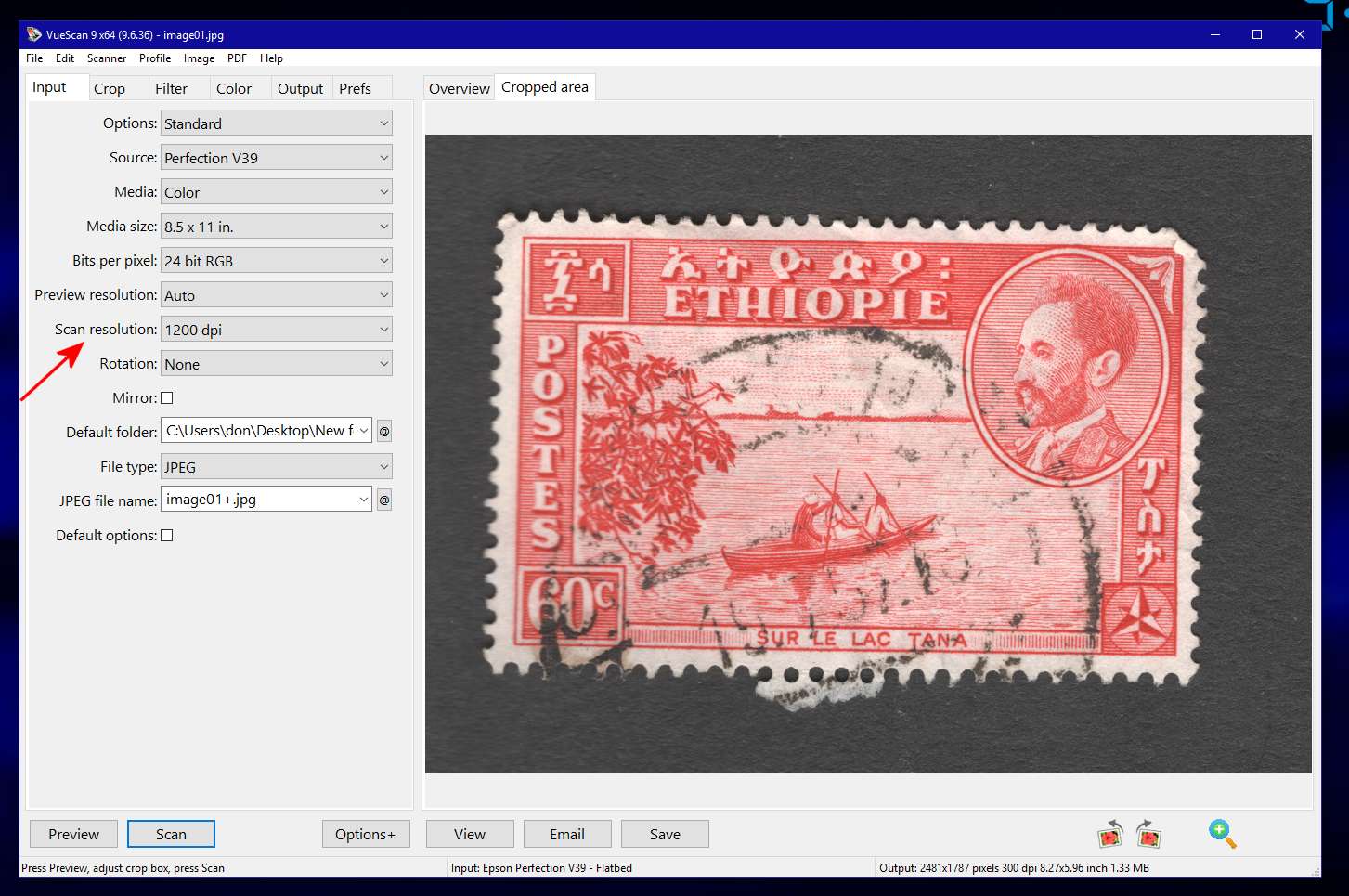 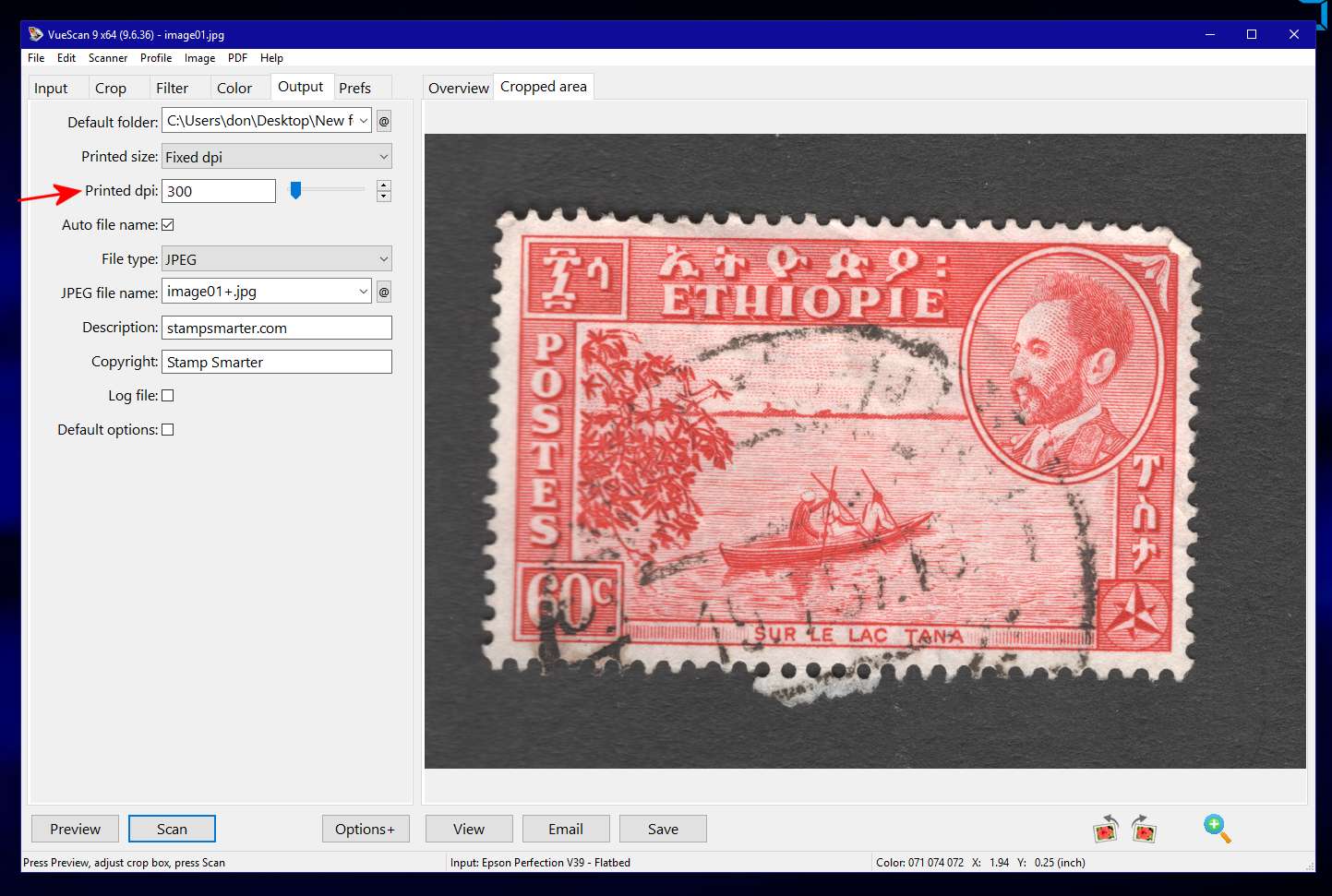 When you save the file, the operating system file meta data shows the printing resolution under file properties. 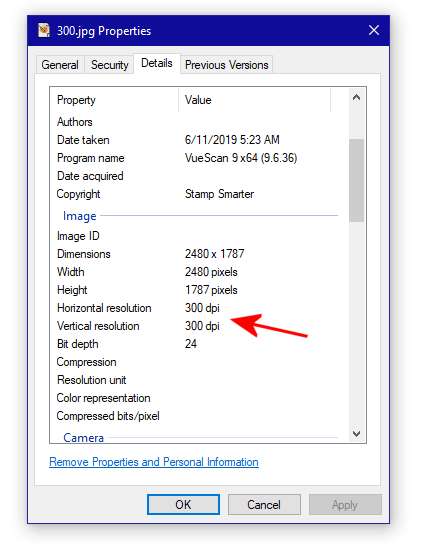 Unless we are all on the same page misunderstandings are likely to occur. The large diversity of this community, including those for whom English is not their first language, adds to the possibility of additional confusion. In my opinion clarifying how we are using ambivalent nomenclature like 'resolution' (or the color term 'shade') has value. Don |
|
Send note to Staff
|
|
|
Pillar Of The Community
United States
1414 Posts |
|
|
Don,
VueScan has a number of poorly chosen defaults. This isn't the only one.
Clark |
|
Send note to Staff
|
| Edited by cfrphoto - 06/11/2019 08:30 am |
|
|
Valued Member
United States
55 Posts |
|
|
Pillar Of The Community
United States
1873 Posts |
|
|
When the certificate comes back, please return to this thread and describe the opinion. It's important that threads like this include all possible evidence. |
|
Send note to Staff
|
|
|
Replies: 31 / Views: 3,696 |
|



 Posted 06/08/2019 10:04 pm


