Quote:
Just downloaded the latest version 4.1.0, but I am still not able to get multi-line text working with the STAMP_ADD command.
Hi
BrentAbba,
The original STAMP_ADD command required
6 text parameters. Three lines of text inside the stamp box and the three text items underneath.
As a way of simplifying the command, while at the same time adding functionality, the new STAMP_ADD command only requires
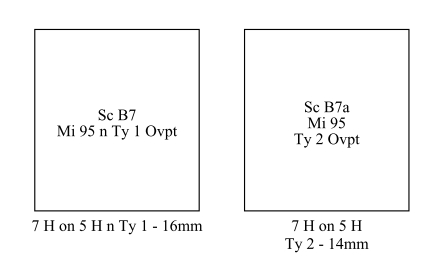
4 text items: one for inside the stamp and three for below the stamp. It also now processes "\n" new line indicators inside text items to generate multiple lines of text inside or under the stamp.
In order to maintain backwards compatibility with older albums, if a STAMP_ADD command has
6 text items, it is processed in exactly the same way that an older version of AlbumEasy would have processed it. If it has
4 text items, it is treated as the new command which accepts new line indicators.
So, to cut a long story short, changing:
STAMP_ADD (29.0 32.0 "Sc B7" "Mi 95 \n Ty 1 Ovpt" "" "" "7 H on 5 H \n Ty 1 - 16mm" "")
to:
STAMP_ADD (29.0 32.0 "Sc B7 \n Mi 95 \n Ty 1 Ovpt" "" "7 H on 5 H \n Ty 1 - 16mm" "")
I hope that is clearer now.
Quote:
Tried downloading the Mac version again. This time everything worked quickly and I was able to open the program without any problems. Now I will try to see if I can manage this rather unconventional software (to me) and see if I can produce the results I am looking for.
Good news
dbuss, please feel free to contact me either via the forum or my website it you have any questions.
Many people who have tried AlbumEasy find it an effective and productive way of generating album pages once they have gotten over the initial learning curve. Unfortunately however, there are others who don't like the program at all. Hopefully you will fall into the former group.
Clive





 Posted 10/16/2019 12:52 pm