|
This page may contain links that result in small commissions to keep this free site up and running.

Welcome Guest! Registering and/or logging in will remove the anchor (bottom) ads. It's Free!
To participate in the forum you must log in or register.
| Author |
 Replies: 44 / Views: 2,848 Replies: 44 / Views: 2,848 |
|
|
|
Moderator

United States
5107 Posts |
|
|
Nice, but a question. Why are there categories with a space/blank in them? For example, "123 A"? I've never seen this, so one suggestion would be to ignore the space/blank and sort as if there were none.
Also, I believe the correct sort would be to have upper case appear before lower case. Example:
123A
123b
and
123B
123a
Just my thoughts |
Send note to Staff 
|
|
|
Pillar Of The Community
United States
2941 Posts |
|
|
I thought Scott used a space before the capital suffixes. If not, that's an easy fix.
WRT the order, if Scott had the following:
11
11b
11c
11A
Would not the 11 minor varieties (b, c) come before the major number 11A? |
|
Send note to Staff
|
|
|
|
Moderator
United States
5107 Posts |
|
|
After reviewing further, I believe that your last sorting method is most correct. There may be an exception somewhere, but I'm good with your last iteration. |
|
Send note to Staff
|
|
|
Pillar Of The Community
United States
2941 Posts |
|
|
Pillar Of The Community

United States
1159 Posts |
|
|
Wow, I step away from this thread for a couple of days and look at all the new activity and great suggestions. It sounds like the consensus is that proper sorting cannot be done in Excel without a helper column of some kind. That shocks me, certainly philately cannot be the only place where this type of alphanumeric sorting is needed. If someone had their DVD catalog in Excel, it would be sorted like:
300
1984
1,000,000 Ways to Die
12 Angry Men
7 Samurai
...
While I can see some logic to it, it is not what I would expect.
I think I will start with the decimal number helper column, putting 1520b at 1520.02 for example. It's a little tedious, but definitely better than how it works now.
This also lets me put sets where I want, so "756-765" can go before the 756 single stamp instead of after (and not at "-9").
Yes, PostmasterGS I'd love to see a copy of your script. Is it short enough it can be posted here in the thread? (I'm still new here so I don't know if you are able to email it to me).
Great discussion, thanks. |
|
Send note to Staff
|
|
|
Pillar Of The Community
United States
2941 Posts |
|
|
The script as it currently stands doesn't support characters other than numbers and letters in the catalog number. Dashes, whether as part of the catalog number or as a set entry, will generate some odd sorting results and possible an error message. I'll see what I can do to make it work with dashes, but trying to get dashed entries to sort in the proper order isn't easy. Installation Instructions1. Download this zip file. 2. Unzip it. You should get a single file named mcrSortCat.bas. 3. Go into Excel 4. Go into the Visual Basic Editor. On my copy of Excel (on a Mac), it's under Tools/Macro/Visual Basic Editor. Look for it in a similar location on PC. Or, if you have the Developr tab enabled on the Ribbon Bar, it'll be there labeled Visual Basic. 5. Go to File/Import File and import the mcrSortCat.bas file. Running the Macro1. To run the macro, go to Tools/Macro/Macros, select mcrSortCat and click Run. If you want to run it often, I recommend customizing the Ribbon Bar to add a button there. Things to Know Before Running It1. By default, it's set to sort Column A, beginning at Row 2. If you need to change those values, there are two lines near the beginning of the script that are labeled so you can change them. 2. The script uses cheater columns, then deletes them once the sort is done. These columns are created 15-20 columns to the right of the last filled cell in Row 1. If, for some reason, you have content in Rows 2 and up that is 15 columns beyond the last used cell in Row 1, I'll need to edit that value. |
|
Send note to Staff
|
|
| Edited by PostmasterGS - 01/12/2023 1:40 pm |
|
|
Pillar Of The Community
United States
4465 Posts |
|
|
Quote:
300 A (B, C, etc.) Quote:
Number / Letter (ex. 304 b or 304 A) Scott's formatting of of postscript letters, regardless of case, is no space between the number and letter. 300A, 300B, 300C, etc and 304b 0r 304A is the correction to the quoted Scott numbers. No similar posting error has occurred for the prefix letter which also have no space between the prefix and number, e.g. C3 or C3a. Quote:
Also, I believe the correct sort would be to have upper case appear before lower case. Example:
123A
123b
and
123B
123a
Just my thoughts Wrong, (postmasterGS has it correct)! Scott lists the number *** first and all related lower case letter and non-lettered sub-listings listing before listing ***Capital Letter. Within one unique *** a letter of any case, upper or lower, will not be repeated for any ***. The proper sort order for the examples shown would be: 123a 123b 123A can't be used due to existing "a" thus would be correctly 123C 123B Can't be used due to existing "b' thus would be correctly 123D 123C 123D The application of aA, bB, cC,dD etc. is based upon when the sub (***a) or full (***B) variety is determined. NORMALLY first is assigned "a" or "A" next is assigned "b" or "B" onward through the alphabet as needed.such as 279Bk followed by 279Bl. Just to be complete, any *** followed by any letter, lower or upper case, will precede ***+1, the next whole number after ***. When a prefix letter "@" is added to "***" to become @*** (C123) then the entire unit is considered as a new listing number and aA, bB, cC etc can restart anew for the @*** as @*** (C123) is different from just *** (123). However, Scott does reserve the right to renumber an entry or entries be it to clean up a listing series or order of dating error. Such an example is the US QE(Special Handling) series of QE1-QE4 where after decades QE4a and QE4 were swapped as the original QE4a was issued in 1925 and QE4 was issued in 1928 with the ink color used the differentiating factor. Now correctly the 1925 issue is QE4 and the 1928 issue is QE4a. All the sub-varieties for QE4/4a were swapped to follow the underlying stamp Also added were "a" to the QE1-3 (1928) listing for the later 1955ish dry printing as well as non-lettered varieties for special booklet paper as well as the QE4 Dot-in-T plate variety. However as Scott does with a series of stamps listed over a period or weeks, months or years, they still listed the issued 1928 QE1-3 (10, 15 and 20 cent) before the issued 1925 QE4 (1925 25 cent) as a normal listing series is done in ascending order of denomination. Of course there are other inconsistencies such as US Scott #1341 which was first issued as restricted to just pay the "airlift" additional fee (read airmail) of otherwise fully prepaid parcel post packages to Servicemen in Vietnam. However after just two weeks the stamps were allowed to be used for any purpose to pay postage and fees as if a normally issued regular or commemorative stamp. Thus it was not given an airmail designation of C***. In comparison, the parcel post stamps of 1913, Q1-12 and JQ1-5 were restricted to just parcel post usage for six month before being re-designated as stamps which could be used in the manner of any normal stamp (Q1-12) or normal postage due stamp (JQ1-5). So two weeks does not achieve a "C" prefix but 26 weeks does achieve a prefix letter? The Q and JQ are unusual in as much as they do not follow the normal prefix letter listing manner. JQ1-5 are list immediately after Q1-12 and not after the J listing of all other postage due stamps. To be consistent, the dues should be QJ1-5 in their current listing order or listed after the J listing as currently numbered. Edit: Other anomalies exist. |
|
Send note to Staff
|
| Edited by Parcelpostguy - 01/12/2023 3:55 pm |
|
|
Pillar Of The Community
United States
1159 Posts |
|
|
Hi PostmasterGS, I started using your sorting macro today. Brilliant. It does (almost) exactly what I need. It merged all the letter-suffixed numbers into their proper place, and even correctly placed 320b before 320A.
A few things it doesn't handle right, like dashes, as you mentioned, produce odd results. Some are grouped at the very top of the list, the rest are in a group after the regular numbers and before the A/B/C etc prefixes. To workaround this, instead of giving the catalog number as "756-765", I can just say "756" for the catalog number and put "full set 756-765" in the description field. Then it will sort in the correct place.
Similarly slashes "859//893" or commas "820,807" aren't handled well. No biggie, I don't have many of those.
I found it interesting that Proofs, for example "40P3" were sorted in a whole group under "P", between the "O" officials and "Q" Parcel Post. I expected these to appear numerically interspersed with the regular catalog numbers, but actually I keep my proofs in a completely different collection so I like how they are separated out under P.
Except for one -- it sorted an OX1P3, post office seals india proof, in the middle of the random hyphenated block at the very top of the spreadsheet. I guess the letter-number-letter-number combination is out-of-scope. Good thing I don't have an OX1P3a :-)
Only one comment on the instructions, how do I know when it is done? What do I do when it is done?
It looks like it runs pretty quick, and I can just close the VB window after running the macro, but it wasn't clear.
Edit: maybe the Installation Instructions just need a Step 6: Close the Visual Basic window. I kept returning to the VB window to run the macro again, but I just realized I can run the macro straight from the spreadsheet and Tools menu without the VB window open. Silly me.
Also, when saving, I was prompted with two options, Save As an Excel macro-enabled worksheet, so that the macro is available again next time, or save as a clean macro-free spreadsheet. Might be worth mentioning in the instructions, so as to not be surprised by this alert that I've never seen before.
Thanks for taking on this challenge. Hopefully others will be able to benefit from this as well.
I am happy with the script as-is, but if you update it to work with hyphens or other things I'll be glad to test it out for you.
|
|
Send note to Staff
|
|
|
Moderator
United States
12330 Posts |
|
|
Note that macro-enabled spread sheets are considered security issue. For example, sending the spreadsheet to someone with the VBA script in it will cause many email servers to reject the attachment. Excel will also issue warnings when opening the spreadsheet. Obviously, the code that Postmaster was kind enough to invest his time in is safe. But be aware that downloading and using VBA scripts from unknown sources is very risk.
I would save his .zip file and use it when needed. And I would save the spreadsheet as a normal Excel file without the VBA.
You should not need to re-sort often; adding a few new catalog entries can easily be done by inserting a new row. I would also add a new 'sort' column and 'fill down' sequential numbers. This makes re-sorting them to the original sort order easy.
Don |
|
Send note to Staff
|
|
|
Pillar Of The Community
United States
2941 Posts |
|
|
WRT the characters that aren't letters or numbers (ex. dashes, commas, slashes), I still have to find a way to make those sort in the correct place. Assuming they denote a set — by default, they sort after the individual catalog number that starts the set — i.e. 756-765 after 756, since the code gets to the dash and sees 756 then a non-number character, much like 756a would be. Making them sort after the last number in the set is very difficult. Making them sort before the first number in the set might be possible, but it's not easy.
WRT OX1P3, that's a letter/number combo I hadn't foreseen. When it breaks up the catalog number into its component parts (Numbers & Letters), the code looks for these combos of letters and numbers, with consecutive letters/numbers treated as a single.
N (ex. 123)
NL (ex. 123a)
LN (ex. B123)
LNL (ex. B123a)
NLN (ex. 2O123)
NLNL (ex. 2O123a)
I'll have to go back and add a provision for LNLN (ex. OX1P3) and LNLNL (ex. OX1P3a). |
|
Send note to Staff
|
|
|
|
Pillar Of The Community
United States
2941 Posts |
|
|
Quote:
And I would save the spreadsheet as a normal Excel file without the VBA. There no reason not to save your inventory spreadsheet as macro-enabled with the VBA intact. To do otherwise would mean re-importing the VBA every time you wanted to use it, and there's no real security risk if it's just your file on your computer. |
|
Send note to Staff
|
|
|
|
Moderator
United States
12330 Posts |
|
|
From Microsoft a few days ago Quote:
VBA macros are a common way for malicious actors to gain access to deploy malware and ransomware. Therefore, to help improve security in Office, we're changing the default behavior of Office applications to block macros in files from the internet. https://learn.microsoft.com/en-us/d...cros-blockedIf you are only ever going to use a macro-enabled Excel spreadsheet locally, and never store it on a cloud account, share the file with anyone else, send the file via email, or get tired of the 'Enable macros' warning that displays every time you open the file, then yes having the VBA sit in the Excel file is fine. Don |
|
Send note to Staff
|
|
|
Pillar Of The Community
6364 Posts |
|
|
Quote:
does anyone know an easy way to sort these listings properly in Excel? From two pages ago! This is exactly why I have an extra sorting column when I need one. So simple. |
|
Send note to Staff
|
|
|
Pillar Of The Community
United States
4516 Posts |
|
|
This is not a perfect sort but it works. In my US file, I add a sort column (1,2,3) so not much maintenance if you do not add a lot of entries. One disadvantage of macros is that LibreOffice or Google do not support macros but macros can really do some nice things. I have columns group to hide details. This format is for Machins. 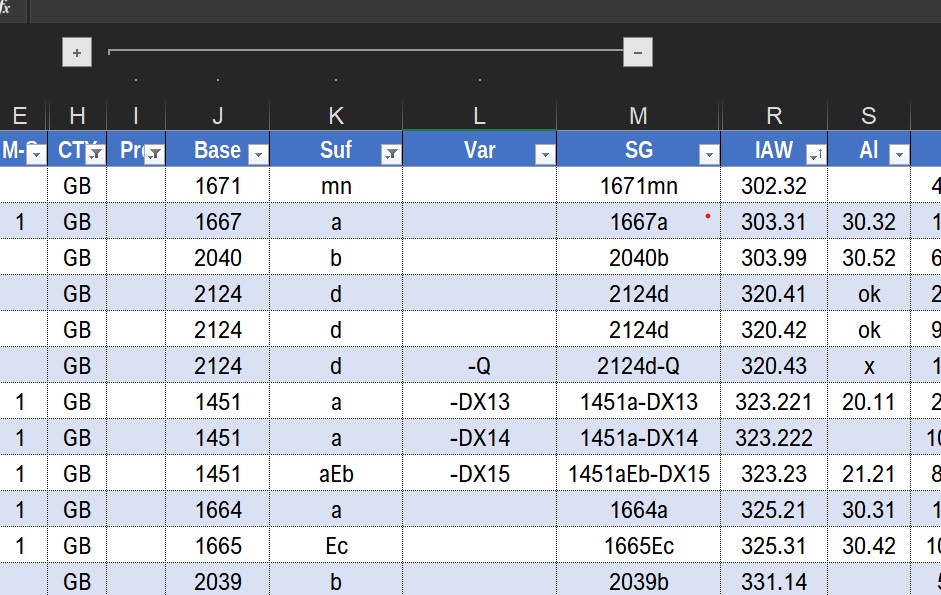 This is the correct sort. 11 11b 11c 11A 11Ab 11Ac |
|
Send note to Staff
|
Al |
| Edited by angore - 01/15/2023 07:28 am |
|
|
Replies: 44 / Views: 2,848 |
|
|
To participate in the forum you must log in or register. | |
 Earliest Stamp With In-Design Date? My First Stamps Help Newbie.help With Stamp Identification (J29) Inherited These Stamps, Are They Genuine? APS Membership Discount Metropex Stamp Show: Roseville, Minnesota October 23-24 Weird Covers, 1885,1886, And 1982 For Users Of Two-Post Blue International Albums What Is Your Experience With Binders. New Member Posting Image Of Avatar, Front And Back Of U2 Cut Square, Market Value Or References? Working On An Offline Collection George Washington 3 Cent 1861 With Print On The Back Hello From The Netherlands - New Member Then And Now, From Old Postcards New Member Wanting To Add An Avatar Sparks Auction Fees? 163 VF Nyfm Vertically Ribbed 163 XF Quartered Cork, Labeled Jumbo 136 VF Quadruple Split H Grill Nashville Philatelic Society-Your Invitation To Our Auction Night Meeting Monday, October 26, 2026 Nashville Philatelic Society-Your Invitation To Our Meeting Monday, October 19, 2026 Christmas Around The World 2026 C.e. In The Large Queen Cancel A More Condensed Album Page Experiment. US Scott #3 Postmarked Or Fake? Linn's Is Back - The Newspaper Is Back In Print Earliest Stamp With In-Design Date? My First Stamps Help Newbie.help With Stamp Identification (J29) Inherited These Stamps, Are They Genuine? APS Membership Discount Metropex Stamp Show: Roseville, Minnesota October 23-24 Weird Covers, 1885,1886, And 1982 For Users Of Two-Post Blue International Albums What Is Your Experience With Binders. New Member Posting Image Of Avatar, Front And Back Of U2 Cut Square, Market Value Or References? Working On An Offline Collection George Washington 3 Cent 1861 With Print On The Back Hello From The Netherlands - New Member Then And Now, From Old Postcards New Member Wanting To Add An Avatar Sparks Auction Fees? 163 VF Nyfm Vertically Ribbed 163 XF Quartered Cork, Labeled Jumbo 136 VF Quadruple Split H Grill Nashville Philatelic Society-Your Invitation To Our Auction Night Meeting Monday, October 26, 2026 Nashville Philatelic Society-Your Invitation To Our Meeting Monday, October 19, 2026 Christmas Around The World 2026 C.e. In The Large Queen Cancel A More Condensed Album Page Experiment. US Scott #3 Postmarked Or Fake? Linn's Is Back - The Newspaper Is Back In Print
Disclaimer: While a tremendous amount of effort goes into ensuring the accuracy of the information contained in this site, Stamp Community assumes no liability for errors. Copyright 2005 - 2026 Stamp Community Family - All rights reserved worldwide. Use of any images or content on this website without prior written permission of Stamp Community or the original lender is strictly prohibited.
Privacy Policy / Terms of Use Advertise Here |
| Stamp Community Forum |
© 2007 - 2026 Stamp Community Forums |
| It took 0.3 seconds to lick this stamp. |
 |
|
|
|


 Posted 01/11/2023 7:04 pm


