Stamp Community Family of Web Sites
Thousands of stamps, consistently graded, competitively priced and hundreds of in-depth blog posts to read


Stamp Community Forum
 
Username:
Password:
Save Password
Forgot your Password?

This page may contain links that result in small commissions to keep this free site up and running.

Welcome Guest! Registering and/or logging in will remove the anchor (bottom) ads. It's Free!

Edge Browser Comments

Previous Page | Next Page    
 
To participate in the forum you must log in or register.
Author Previous TopicReplies: 45 / Views: 1,750Next Topic
Page: of 3
Pillar Of The Community
United States
6430 Posts
Posted 02/17/2023   5:51 pm  Show Profile Check revenuecollector's eBay Listings Bookmark this reply Add revenuecollector to your friends list  Get a Link to this Reply

Quote:
You know it's happening with cars now right? BMW has a model that they put power seats in all of them, but if you want them to work, you have to pay a monthly fee.


Well yes and no.

1. It's not available in the U.S.

2. It's for those who don't want to pay for heated seats as an accessory option on the car. It allows buyers to pay the lower upfront price for the car and then if desired, try out the seats after the fact. You can still get heated seats the normal way, with the upfront price of the car. BMW has stated that if you purchase the accessory with the vehical as normal, there will never be subscription costs.

Depending on where you live and how many cold months there are per year, it might actually be more economical to subscribe to the feaure only for the coldest months.
Send note to Staff  Go to Top of Page
Bedrock Of The Community
Australia
38679 Posts
Posted 02/17/2023   5:56 pm  Show Profile Bookmark this reply Add rod222 to your friends list  Get a Link to this Reply

Quote:
Rod, In Windows 7 you can remove unwanted social media, just unlock task bar and then right click and delete anything you don't want. Similarly you dont need to use edge to read online PDF files. I don't have a windows 7 PC to check for actual commands but I know that windows and edge allow you to select an alternate PDF (offline and online) reader.


Sorry Chesham, my windows 7 is bulletproof.

Perhaps I failed to advise, its Windows10 that has all the crap.

I use 2 computers, Win7 for all my work (and it is Offline)

Win10 for surfing and streaming. (and SCF)
Win10 is 10/10 for apparent safety, I never seem to ever get viruses anymore
but, as I said the Edge and anti-social media prompting is a boor.

Win10 is also, a surprise, it handles my old 1980's software without a hiccup
Picasa, ACDSee and MSWorks (If I ever want it, on Win10)

Win 10 has a love / hate relationship.


Send note to Staff  Go to Top of Page
Pillar Of The Community
Learn More...
United States
878 Posts
Posted 02/17/2023   6:15 pm  Show Profile Check johnsim03's eBay Listings Bookmark this reply Add johnsim03 to your friends list  Get a Link to this Reply

Quote:
Edge is so annoying.


Yes, I'm on Edge, too.


John

p.s. I really don't have major problems with it - just thought that this was amusing for some reason...
Send note to Staff  Go to Top of Page
Valued Member
United States
190 Posts
Posted 02/17/2023   6:18 pm  Show Profile Bookmark this reply Add Chesham85 to your friends list  Get a Link to this Reply
Rod,

You can turn off or delete all of the stuff that you dislike in your surfing machine, just saying

I use Windows 11, have an empty desktop, a minimal task bar, only addition is the current temp, and it works 100% offline. After the last hurricane, our house in Florida did not have internet for 6 weeks, my PC continued to work without interruption. The only thing that it was lacking was streaming content. It also fully backed up the hard drive contents once the internet came back on.

Send note to Staff  Go to Top of Page
Moderator
Learn More...
United States
12330 Posts
Posted 02/17/2023   6:30 pm  Show Profile Bookmark this reply Add 51studebaker to your friends list  Get a Link to this Reply
I agree with Chesham, I have turned off all the social stuff and other 'extras' that come with Win10/11 and this makes the interface virtual the same as a Win 7 desktop. But it does take some digging around to get this done.
Don
Send note to Staff  Go to Top of Page
Bedrock Of The Community
12552 Posts
Posted 02/17/2023   6:31 pm  Show Profile Bookmark this reply Add rogdcam to your friends list  Get a Link to this Reply

Quote:
You know it's happening with cars now right? BMW has a model that they put heated seats in all of them, but if you want them to work, you have to pay a monthly fee.


Few people realize that their vehicles have heated seats, heated steering wheels, automatic high beams etc. but they are simply not activated. If you check the option box for the item, the automaker unblocks the function.

Ford is a great example. Many of their late model pickup trucks from the Lariat trim upwards have the equipment for these things installed but maybe not enabled. Some people wised up to this a few years back and used FORSCAN to enable the functions using code available on truck forums. You can even make your headlight s strobe or change the intensity of your DRL's. Ford has now wised up and starting with the new Mustang you will no longer be able to plug in to the module at all. The F150 has gone to OTA updates which also locks you out of tinkering yourself. Aftermarket customizers are livid because they can no longer change things up without Ford's direct involvement.
Send note to Staff  Go to Top of Page
Pillar Of The Community
United States
6430 Posts
Posted 02/17/2023   6:31 pm  Show Profile Check revenuecollector's eBay Listings Bookmark this reply Add revenuecollector to your friends list  Get a Link to this Reply
I run Windows 10 or 11 on everything. No incompatibility issues with anything, including Adobe FrameMaker versions going back about a decade.

The biggest problem I have are the [CENSORED] hardware security requirements for Windows 11, meaning that my primary workstation, an i7-6700k with 64GB of RAM, a PERFECTLY viable computer, cannot run Windows 11 without hacked/bootlegged contortions. I also have an older high-end gaming laptop that I cannot install Win 11 on.

I'll be able to continue using them until Windows 10 end of life in 2025, but it's [CENSORED] annoying.
Send note to Staff  Go to Top of Page
Bedrock Of The Community
Australia
38679 Posts
Posted 02/17/2023   6:41 pm  Show Profile Bookmark this reply Add rod222 to your friends list  Get a Link to this Reply

Quote:
You can turn off or delete all of the stuff that you dislike in your surfing machine, just saying


OK Perhaps I have been lazy,
IIRC one cannot remove Edge?

I'll Google "how to remove........"

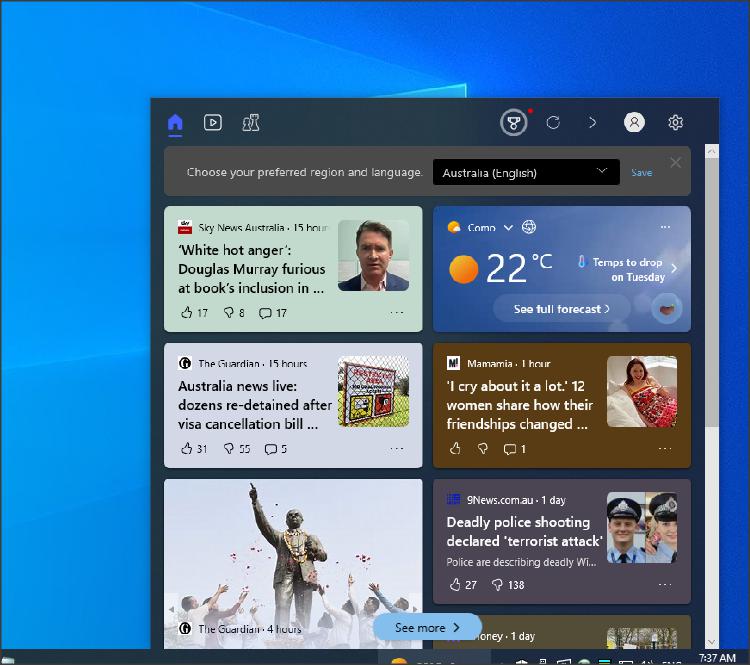
So what do I call this interfering Pop Up, so I can dump it in the garbage


All sorted
"how to remove newsfeeds" turned off that was easy.
Send note to Staff  Go to Top of Page
Edited by rod222 - 02/17/2023 6:46 pm
Pillar Of The Community
United States
1434 Posts
Posted 02/17/2023   6:47 pm  Show Profile Bookmark this reply Add classic_paper to your friends list  Get a Link to this Reply
So... don't use Edge, use Chrome or Firefox. Don't use Windows, get a Mac.
Send note to Staff  Go to Top of Page
Bedrock Of The Community
Australia
38679 Posts
Posted 02/17/2023   7:15 pm  Show Profile Bookmark this reply Add rod222 to your friends list  Get a Link to this Reply

Heresy !

Removing Edge failed, I tried..

You can uninstall or disable Microsoft Edge easily by going to Settings, Apps, Apps and Features and lastly tapping on Uninstall button. (not worked) In case the Uninstall button is unclickable on your PC, then you use the command prompt to uninstall or disable Microsoft Edge forcibly.16 Jan 2023

Follow the below steps to uninstall Microsoft Edge with a command prompt:

Step 1: Open Microsoft Edge on your Windows PC and tap on the three-dot menu icon from the top right corner. From the menu options, select Help and feedback.

Help and feedback.

Step 2: Under Help and Feedback, the last option will be About Microsoft Edge tap on it. In About you will find the version number of Edge running on your PC. Take a correct note of the version number as it will be needed in the upcoming steps.

version number

Step 3: In the next step, type cmd in the search box. Among the search results, click on Command Prompt app and then select Run as administrator.

Command Prompt

Step 4: Once Command Prompt gets opened on your PC copy, paste the below command, and hit enter. Replace xxx with the version of Microsoft Edge. Remember, you took a note of the version number in Step 2.

cd %PROGRAMFILES(X86)%\Microsoft\Edge\Application\110.0.1587.50\Installer

Administrator command prompt

Step 5: Running this command will take you to the Edge Installer folder. Once you are there, copy and paste the below command.

setup.exe –uninstall –system-level –verbose-logging –force-uninstall

Edge Installer

Step 6: You will get a prompt "Do you want to allow this app to make changes to your device". Tap on yes to give the final confirmation. Once done Microsoft Edge will be completely uninstalled from your PC.

The Microsoft Edge shortcut will disappear from the desktop and also the Taskbar. Some users still see the Microsoft Edge when they try to access it from the Start Menu, but clicking on it does nothing. You can get rid of the Microsoft Edge from there as well by restarting your PC. So, this is how you can uninstall Microsoft Edge with a command prompt.
Send note to Staff  Go to Top of Page
Pillar Of The Community
United States
2941 Posts
Posted 02/17/2023   7:48 pm  Show Profile Bookmark this reply Add PostmasterGS to your friends list  Get a Link to this Reply
If you're computer smart and want to de-bloat Win10 or Win11, search for ThisIsWin10 or ThisIsWin11. They allow you to remove a bunch of the pre-installed crap.

Or if you're feeling extra brave, Ghost Spectre's SuperLite versions of Windows that are very bare bones, removing pretty much everything but the core functions.
Send note to Staff  Go to Top of Page
Presenting the GermanStamps.net Collection - Germany, Colonies, & Occupied Territories, 1872-1945
Pillar Of The Community
Learn More...
United States
4414 Posts
Posted 02/18/2023   06:15 am  Show Profile Bookmark this reply Add angore to your friends list  Get a Link to this Reply
Out of the box it tries to get in your way with web content you do not want to see.

Send note to Staff  Go to Top of Page
Al
Bedrock Of The Community
Australia
38679 Posts
Posted 02/18/2023   4:41 pm  Show Profile Bookmark this reply Add rod222 to your friends list  Get a Link to this Reply
I am thinking of finally ending my association with
my beloved Win7
The old Seagate HDD has been whirring around for 10 years or so.

I emailed a local computer seller / builder recently,
and requested a certain build, Win 10, with all varieties of USB 3
to accomodate all my old software.

I gave him a max budget of $2000

His reponse, "Sorry, don't have time , and the old software wont work on
these machines" Seems he only wants to sell off shelf stuff.

I think I'll just buy a Major outlet off the shelf desktop (large type)
and play around with that before migrating all my
data across.

Any pros / cons, recomenations on Major Windows makes please? (Non Gaming) (and will be used offline)
HP? Dell ? or whatever?
Send note to Staff  Go to Top of Page
Edited by rod222 - 02/18/2023 4:42 pm
Pillar Of The Community
United States
6430 Posts
Posted 02/18/2023   4:56 pm  Show Profile Check revenuecollector's eBay Listings Bookmark this reply Add revenuecollector to your friends list  Get a Link to this Reply

Quote:
Any pros / cons, recomenations on Major Windows makes please? (Non Gaming) (and will be used offline)
HP? Dell ? or whatever?


Either should be fine, although I personally prefer Dell over HP for reliability. Others' opinions may differ.

If you're not gaming, you should actually be able to get a decently powered machine that will offer years of performance for about half the budget you proposed (excluding monitors, printers, and other accessories).

EDIT: I keep forgetting you're not in the U.S. No idea what configurations or pricepoints are available down under and I was referring to US$2000 not AU$2000.
Send note to Staff  Go to Top of Page
Edited by revenuecollector - 02/18/2023 4:58 pm
Moderator
Learn More...
United States
12330 Posts
Posted 02/18/2023   4:59 pm  Show Profile Bookmark this reply Add 51studebaker to your friends list  Get a Link to this Reply
Agree with Dan and would add; save money on the CPU, spend money on the SSD drive and RAM.
Don
Send note to Staff  Go to Top of Page
Page: of 3 Previous TopicReplies: 45 / Views: 1,750Next Topic  
Previous Page | Next Page
 
To participate in the forum you must log in or register.

Go to Top of Page

Disclaimer: While a tremendous amount of effort goes into ensuring the accuracy of the information contained in this site, Stamp Community assumes no liability for errors. Copyright 2005 - 2026 Stamp Community Family - All rights reserved worldwide. Use of any images or content on this website without prior written permission of Stamp Community or the original lender is strictly prohibited.
Privacy Policy / Terms of Use    Advertise Here
Stamp Community Forum © 2007 - 2026 Stamp Community Forums
It took 0.25 seconds to lick this stamp. Powered By: Snitz Forums 2000 Version 3.4.05