Quote:
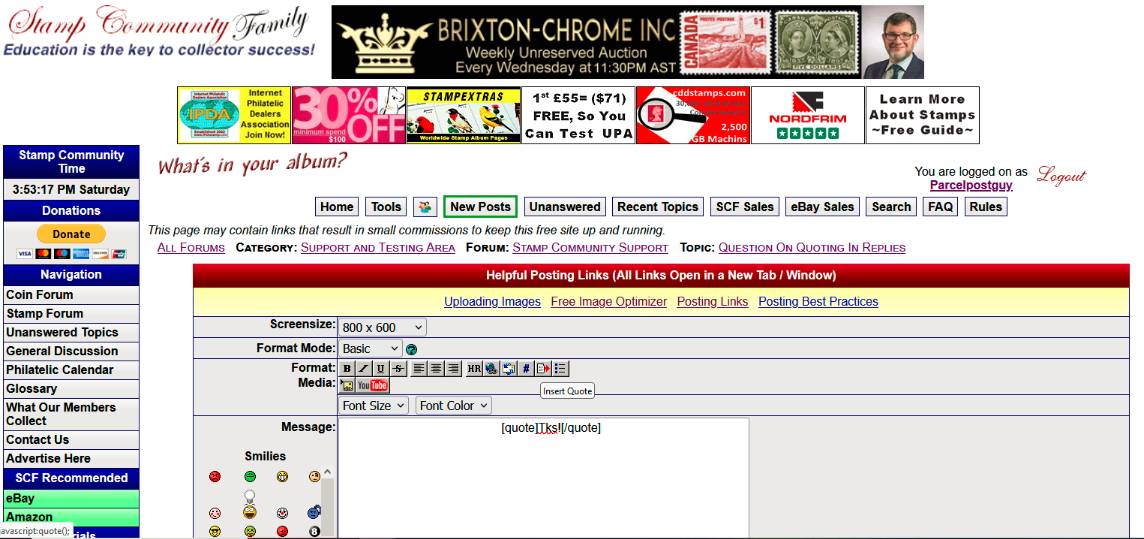
After the last post on current topic, there is a Quick Reply text box at the bottom of the page below the last post. Below the text box are three buttons, of which click "Switch To Full Reply" and you will go to the reply box as shown in the photo.
Click to see a Larger Image!
In the photo you will see a dialog box reading "Insert Quote" and slightly above that is an icon button with a page and red arrow pointing right. Click that button and what Don showed automatically populates in the reply text box. The place text between the central "][" by placing curser there and typing or doing "paste" from a copy paste. In the photo I have added "Tks" from your post above. which when I hit the "Post New Reply" button looks like this:
Quote:
Tks
Thank you. Thought id ask as from time to time ill see where someone has entered " @USERNAME" when using a quote in a reply. I didn't not know whether that was necessary in order for the user to get a notification if subscribed for when there name is mentioned, quoted, etc. Seems not. So now I can stop adding the "@USERNAME" when I quote

knowing that the user will get the notice by just having their text quoted.

I alway thought one had to add the "@USERNAME"





 Posted 05/20/2023 12:23 pm