Stamp Community Family of Web Sites
Thousands of stamps, consistently graded, competitively priced and hundreds of in-depth blog posts to read


Stamp Community Forum
 
Username:
Password:
Save Password
Forgot your Password?

This page may contain links that result in small commissions to keep this free site up and running.

Welcome Guest! Registering and/or logging in will remove the anchor (bottom) ads. It's Free!

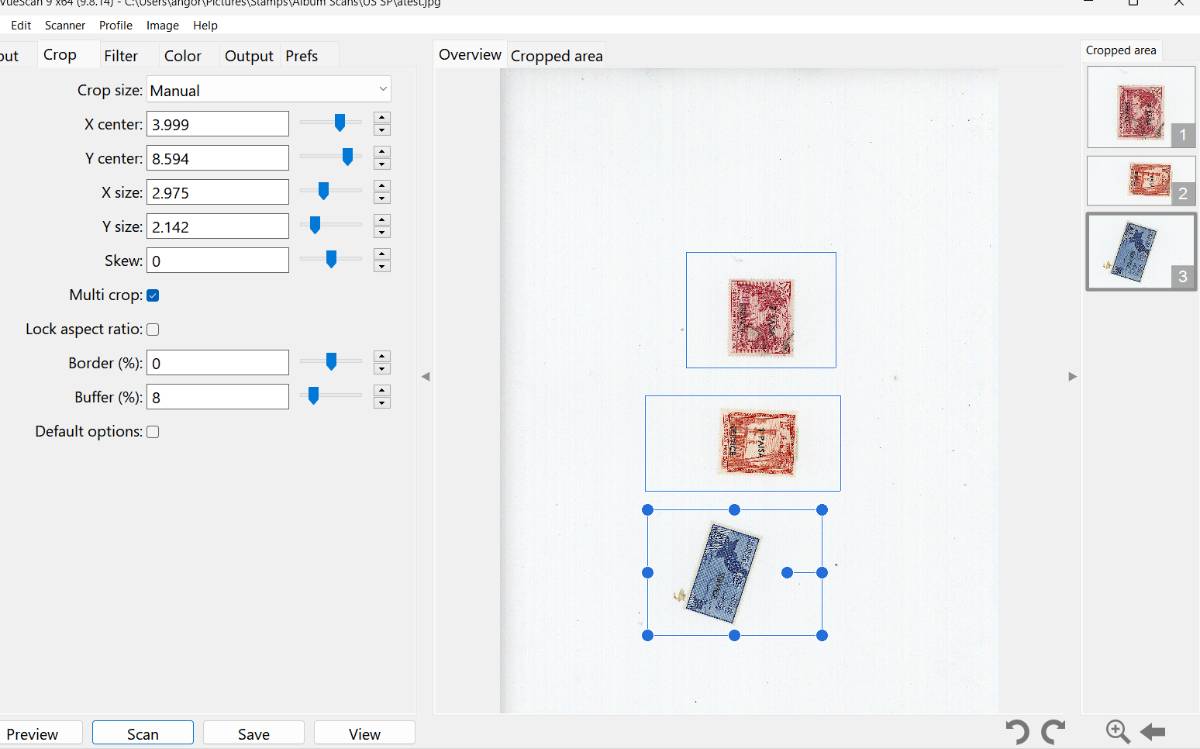
Vuescan Mutl-Crop Function

 
To participate in the forum you must log in or register.
Author Previous TopicReplies: 0 / Views: 266Next Topic  
Pillar Of The Community
Learn More...
United States
4415 Posts
Posted 08/16/2023   6:04 pm  Show Profile Bookmark this topic Add angore to your friends list Get a Link to this Message
I just noticed a multi-crop option and see you can take a scanner and crop multiples areas. The help says it can do automatically if it detects multiple images but never worked for me with stamps on black or no background. This feature was new to me. The auto crop had been buggy in past but now seems to work a lot better. The manual multiple select seems to work.

Has anyone used multi-crop?
Send note to Staff
Al
Edited by angore - 08/16/2023 6:07 pm

  Previous TopicReplies: 0 / Views: 266Next Topic  
 
To participate in the forum you must log in or register.

Go to Top of Page

Disclaimer: While a tremendous amount of effort goes into ensuring the accuracy of the information contained in this site, Stamp Community assumes no liability for errors. Copyright 2005 - 2026 Stamp Community Family - All rights reserved worldwide. Use of any images or content on this website without prior written permission of Stamp Community or the original lender is strictly prohibited.
Privacy Policy / Terms of Use    Advertise Here
Stamp Community Forum © 2007 - 2026 Stamp Community Forums
It took 0.12 seconds to lick this stamp. Powered By: Snitz Forums 2000 Version 3.4.05
