| Author |
 Replies: 28 / Views: 4,108 Replies: 28 / Views: 4,108 |
|
Valued Member
United Kingdom
277 Posts |
|
|
|
I'm thinking of getting a scanner to make posting pics here easier, and just wondering if anyone has any reccomendations?
I'm on Windows 7.
Thanks
|
|
Send note to Staff
|
|
|
|
|
Bedrock Of The Community
Australia
38679 Posts |
|
|
I'd recommend any scanner with epson /seiko software
you can make a carousel around every stamp on your platen
and scan at desired magnification.
I am on my second "Epson Perfection" the first did about
100,000 scans iirc.
I now have an epson V200 photo which is not bad,
but the software is what I really like.
|
Send note to Staff 
|
|
|
Rest in Peace
United States
1225 Posts |
|
|
Maiden,
I'm using the HP Officejet 4500 Wireless. I've had no problems with it and it wasn't that expensive. It's an all-in-one machine, printer, scanner (2400 dpi), FAX and copier. If I can figure out how to make it make a cup of coffee in the mornings, it'll be perfect.
There are a lot to choose from and most are pretty good. I would make sure that the scanner comes with software and that it can scan at least up to 1200 dpi.
Art |
|
Send note to Staff
|
A well regulated Militia, being necessary to the security of a free State, the right of the people to keep and bear Arms, shall not be infringed. (The exact & entire wording of the 2nd Amendment to the U.S. Constitution) |
|
|
Pillar Of The Community
United States
5894 Posts |
|
|
I use a cheapo Lexmark printer.scanner combo machine that came free with my computer, in combination with the image editing software Gimp ( http://www.gimp.org/) which is also free. I have had pretty good success thus far. 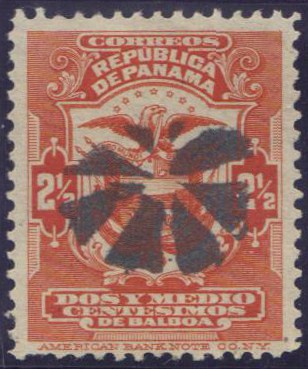 |
|
Send note to Staff
|
|
|
Pillar Of The Community
United Kingdom
1361 Posts |
|
|
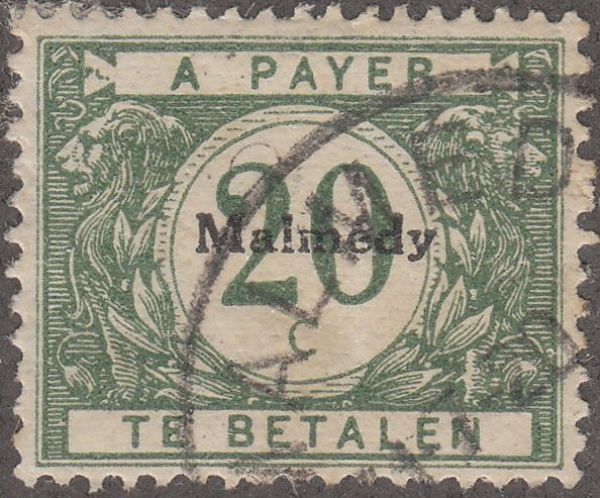
I would 2nd Rod with an Epson. For a low power alternative the Canon Lide are quite good. Look at optical resolution not intepolated or software enhanced resolution. I scan at 1200 dpi but my scanner will go upto 3200 dpi without enhancements but much higher with. 600dpi  1200dpi  2400dpi  I mainly scan Engraved so your requirements may differ but I am very happy with the Epson 3490.  |
|
Send note to Staff
|
| Edited by AnthonyUK - 09/28/2011 04:50 am |
|
|
Moderator

United States
4788 Posts |
|
|
Pillar Of The Community
Canada
2574 Posts |
|
|
Canon Canoscan Lide 200
It was not expensive and it's doing great scans. |
|
Send note to Staff
|
|
|
Pillar Of The Community
621 Posts |
|
|
Canon Canoscan Lide 500F also great. Fits in the carrying case right along with the laptop. Powered off the USB cable. Native 1200 DPI, though I believe the newer scanners give you even more. |
|
Send note to Staff
|
|
|
Bedrock Of The Community
Australia
38679 Posts |
|
|
Lovely scans Anthony  I'll keep in mind the Epson 3490 next purchase My scanner gets a hammering. I was hoping Nethryk would post, he does some beautiful work too. I am currently looking for a dedicated scanner to do magazines (duplex) feed style. There is nothing out there between $200 and $2000 it seems I have been searching on and off for 2 years now. |
|
Send note to Staff
|
|
|
Valued Member
United States
85 Posts |
|
|
Valued Member
United Kingdom
277 Posts |
|
|
Thanks for the replies, at least now I have some idea what to look for :) |
|
Send note to Staff
|
|
|
Pillar Of The Community
United Kingdom
1361 Posts |
|
|
Thanks Rod. It is an older model now but there are a few on ebay often new/boxed but I'd guess the newer equivalent Epsons would be as good too. |
|
Send note to Staff
|
|
|
Pillar Of The Community
1448 Posts |
|
|
Quote:
I'm using the HP Officejet 4500 Wireless. I've had no problems with it and it wasn't that expensive. It's an all-in-one machine, printer, scanner (2400 dpi), FAX and copier. If I can figure out how to make it make a cup of coffee in the mornings, it'll be perfect.
There are a lot to choose from and most are pretty good. I would make sure that the scanner comes with software and that it can scan at least up to 1200 dpi.
Art Same here- the HP 4500....  I usually scan at 1200dpi- because I can.  |
|
Send note to Staff
|
|
|
Pillar Of The Community
1448 Posts |
|
|
Pillar Of The Community
Australia
898 Posts |
|
|
Maiden, if you decide to buy a Scanner/Printer, find out the cost of replacement ink cartridges, can be dearer than the Scanner/Printer - as I found out. My Canon Scanner/Printer was $65 NEW, and the 2 ink cartridge packs (Black & Color) are between $68-$72 approx'.
If one limits the Printer use then it's still a good deal. |
|
Send note to Staff
|
|
|
Valued Member
United Kingdom
277 Posts |
|
|
I already have a good printer, so I've decided to get a stand alone scanner. |
|
Send note to Staff
|
|
|
Replies: 28 / Views: 4,108 |
|




 Posted 09/27/2011 10:13 am