| Author |
 Replies: 94 / Views: 11,842 Replies: 94 / Views: 11,842 |
|
|
|
Valued Member
United States
194 Posts |
|
|
Colors, Never thought of that.
But I had found a program that combined the doc and spreadsheet files for me for my Mac.
LignUp Multi Collector. There are so many, but what works for the individual is all right. I do thank all the advice that I have been given. I had thought long and hard and researched all other inputs and this is the direction that I have gone.
So rikdegraaff as I have said try different ways, check out programs, BUT most of all be happy with what you decide on.
Happy stamping your friend Tom |
Send note to Staff 
|
|
|
Valued Member
66 Posts |
|
|
I use StampManage 2010. It's a pretty comprehensive software database which includes sample pictures of each specimen. I print out a report of all of my stamps ( with images) and take it with me to the store or clubs so I know what I have, and what I need. There are a lot of canned reports (wish list, collection value, etc.) It separates my collection into Country, General Issue, Air Mail, etc. You can note each piece's attribute, such as Cancel ( light, heavy), Gum, Hinge ( none, light, very light, heavy), Single/Plate Block/Pair/etc., Perf, Grade ( VG, F, VF, etc.) Like I said, very comprehensive. It also updates regularly to evaluate the value of each piece.  Prices are a combination of the Scott book and actual selling prices in the philatelic community, so the prices are closer to what you would expect. Also important if you want to have the collection insured.  Here's a snapshot: 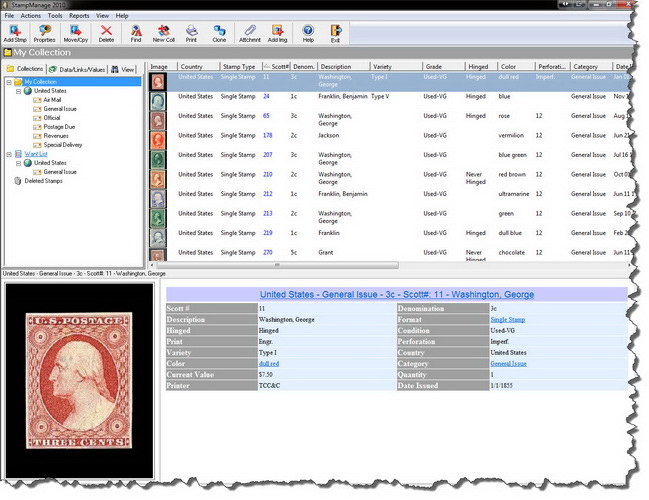 Cardinal Bass |
|
Send note to Staff
|
|
|
Valued Member
United States
93 Posts |
|
|
I have looked at some of the various "professional" stamp inventory programs, but they don't really work for me. I have highly specialized collections of Denmark and Sweden, and most software doesn't cover those countries, and doesn't support 40 copies of the same stamp with different values due to varieties, postmarks, watermarks and so forth.
I'm using my own MS excel based spreadsheet database. It's a little more work, I suppose, but I get the exact results I'm looking for.
Having just inherited my stepdad's stamps-- also known as "random chaos in a box"-- I'd suggest cataloguing your collection sooner, rather than later. Sorting out this mess-- without ANY guidance as to what is what-- is rather taxing.
Regards,
Peter |
|
Send note to Staff
|
|
|
Pillar Of The Community
United States
721 Posts |
|
|
Sorry to go off topic a little - question to Cardinal .. I also had StampManage hooked up, was using it and was happy - it covered my two big areas - US and Canada - but then my comp. crashed and I lost everything .. I have not had the nerve to go back and replicate that work yet. Plus I am thinking of getting a new comp as mine is starting to show some age. My question is, though, can you tell if the Stamp Manage program takes up a lot of space on your comp? Thanks. |
|
Send note to Staff
|
|
|
Pillar Of The Community
United States
978 Posts |
|
|
Hi centerstage98
That is the reason I tell everyone to do backups. I create 2 backups. One is the current backup and the other is the previous backup. I create backups at least once a week. This weeks backup becomes the previous and the previous is overwritten and becomes the current one.
I haven't done it yet but if one knows the old DOS commands, or using 3rd party software, you can backup only those files that have changed based on the backup date and a set number of days (the way we do it on Mainframe computers). You only have to backup your data.
This way if something goes bump in the night you haven't lost all that much. Today CD-RW or DVD-RW disks are cheap so no reason not to backup. In fact since I do some programming on my machine I also have a "little" backup that I do after a programming session.
Jerry B |
|
Send note to Staff
|
|
|
Valued Member
United States
396 Posts |
|
|
First and foremost. always backup you important data. Also
make two copies. if you can make copy.
StampCAT has Backup. I guess it backs up in Access format.
that file you can make other copy also.
I have not used that way but I think that backup file you can
open in stampCAT program.
Using Spreadsheet you can reduce manual data entry significantly
using VBA Macro with it.
tikithindi
|
|
Send note to Staff
|
|
|
Valued Member
United States
491 Posts |
|
|
I have never worked out how to back up my computer -- it seems it would be a huge job running to hundreds of disks???? Obviously I am missing something if you do it near-daily. Can you explain? Thanks. |
|
Send note to Staff
|
|
|
Pillar Of The Community
United States
978 Posts |
|
|
Valued Member
Canada
61 Posts |
|
|
Great Scanstamps,
I have started possible is setting up Excel as well, but still in the design stages.
Would it be possible to see your sheet?
Thanks |
|
Send note to Staff
|
|
|
Pillar Of The Community
United Kingdom
1361 Posts |
|
|
Quote:
I haven't done it yet but if one knows the old DOS commands, or using 3rd party software, If you are using Windows it would be a good idea to look at Robocopy (Robust file copy) which is free from Microsoft. Microsoft also have a Synctool which will keep two or more folders in synch with each other e.g. a local one on your PC and a second on a NAS device or second PC. |
|
Send note to Staff
|
|
|
Rest in Peace
United States
7097 Posts |
|
|
I keep it really simple. I just put them in chronological order by Scott number in my vario pages and just refer to my catalog. I even have an older catalog that I checked off what I have right in the catalog. Very very easy for me plus- it can never crash or get wiped out/deleted. |
|
Send note to Staff
|
|
|
Valued Member
United States
194 Posts |
|
|
Valued Member
Russian Federation
65 Posts |
|
|
Rest in Peace
United States
7097 Posts |
|
|
Quote:
On the vario pages which do you prefer single or double sided
Double sided and prefer the 5 6 way division for singles and the 2 way division for covers, 4 way division for blocks and line-pairs and oddly shaped stamps and glassine storage; Also the single "division" for documents and mint panes/sheets. That's how I do it anyway. It's pretty simple but very effective and super fast for reference as al I have to do is refer to the page in my catalog that looks like the page in my vario binder. |
|
Send note to Staff
|
| Edited by I_Love_Stamps - 02/15/2012 10:38 am |
|
|
Valued Member
United States
396 Posts |
|
|
I use Vario and Showgard both... 1,2,3,4,5,6 works fine. some for vertical I may go for other brand.
least expensive is Showgard. Also use both side. Binders at present am using Avery 1 1/2",2" and 3".
tikithindi |
|
Send note to Staff
|
|
|
Replies: 94 / Views: 11,842 |
|



 Posted 02/08/2012 08:25 am


