| Author |
 Replies: 87 / Views: 10,699 Replies: 87 / Views: 10,699 |
|
|
|
Pillar Of The Community
United States
2230 Posts |
|
|
Photo bomb away! I know I've hijacked one or more of your threads.
DEC comes across as more pale in the scan than red. |
Send note to Staff 
|
|
|
Pillar Of The Community
United States
2948 Posts |
|
|
Do you think it's still OB though. If so I'm going to keep this group together.
DNA, I have an HP Officejet 5740. The things you speak of, can they be applied to my scanner (actually, my wife's printer) |
|
Send note to Staff
|
|
|
Pillar Of The Community
United States
937 Posts |
|
|
No worries! We are a forum having a discussion about identifying stamps by color. Posting images seeking color identification is in the exact spirit of this thread's topic. All data is useful. It's difficult, but I'll hopefully endure having to see more and more beautiful stamps presented by everyone  |
|
Send note to Staff
|
Ryan = HDNAC = DNA = HDC = Hysterical DNA Collector = Historical DNA Collector = me who just loves stamps :) |
|
|
Pillar Of The Community
United States
2230 Posts |
|
|
Pillar Of The Community
United States
937 Posts |
|
|
stampcrow,
Your scanner and camera are producing pretty decent images already. Setting the levels would help. The biggest issue is that your scans don't have a set color profile. Your camera does produce them in the "universal" sRGB color profile already.
HP Officejet 5740 seems to be a printer without scanning capability. Send me a message with your scanner's model number. That way we won't clutter the thread. |
|
Send note to Staff
|
Ryan = HDNAC = DNA = HDC = Hysterical DNA Collector = Historical DNA Collector = me who just loves stamps :) |
|
|
Pillar Of The Community
United States
2230 Posts |
|
|
Stampcrow,
Your camera produces higher-resolution images, and your scanner seems to produce more accurate color but the resolution isn't so good. All six of your Jul-Dec stamps look OB to me. After seeing what happens when dittrich adjusts his scanner settings, and hearing what DNA has to say about image optimization, all I can say is your DEC stamp "looks" like pale OB in your scan. As I said in one of your threads, plating by image is much easier than colorizing by image.
I'll try to post a pale-to-deep OB set tonight applying some of DNA's guidance to that scan. |
|
Send note to Staff
|
|
|
Pillar Of The Community
United States
2948 Posts |
|
|
Quote:
Your camera produces higher-resolution images, and your scanner seems to produce more accurate color but the resolution isn't so good. That's proven to be true for sure. DNA, will do. Thanks. |
|
Send note to Staff
|
|
|
Pillar Of The Community
United States
2555 Posts |
|
|
Stampcrow, Thanks for working in the NYC cancels. They all look OB to me but I don't know what to think of the August 24 stamp. I don't think I have seen that CDS used in 1851. It would be interesting to see what the position of that stamp is. It's a more difficult one to plate being an A relief. |
|
Send note to Staff
|
|
|
Pillar Of The Community
United States
2230 Posts |
|
|
Stampcrow, In reference to your pale-looking DEC stamp, here is a scan of my pale/medium/deep orange brown reference set. I didn't make any adjustments to the scan as I mentioned above, because I didn't like the results.  |
|
Send note to Staff
|
|
|
Pillar Of The Community
United States
2948 Posts |
|
|
That works! Really nice step changes. I seem to rely on the medallion area. |
|
Send note to Staff
|
|
|
Valued Member
Germany
284 Posts |
|
|
@Classic Coins this sold a good setting for scanner 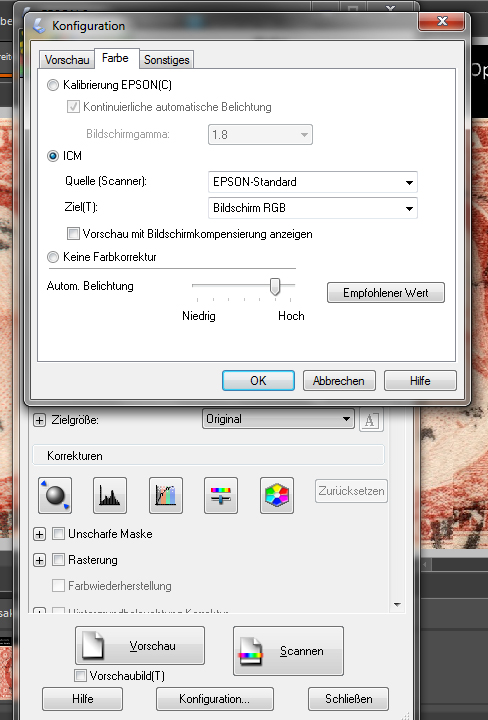 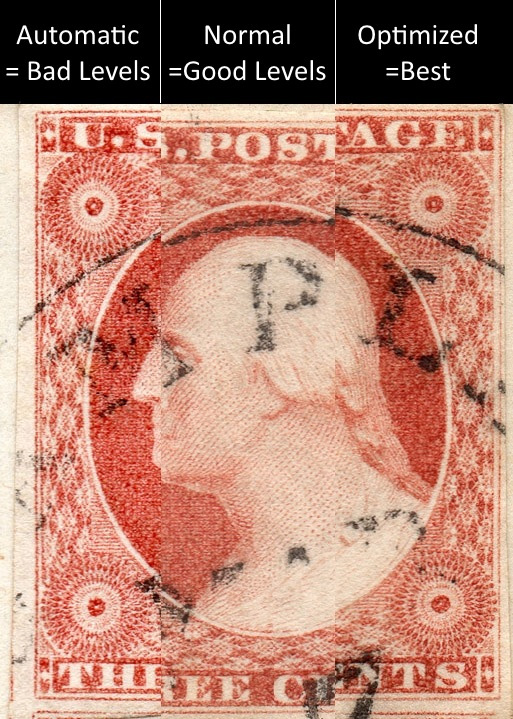 scannig "normal setting scan" 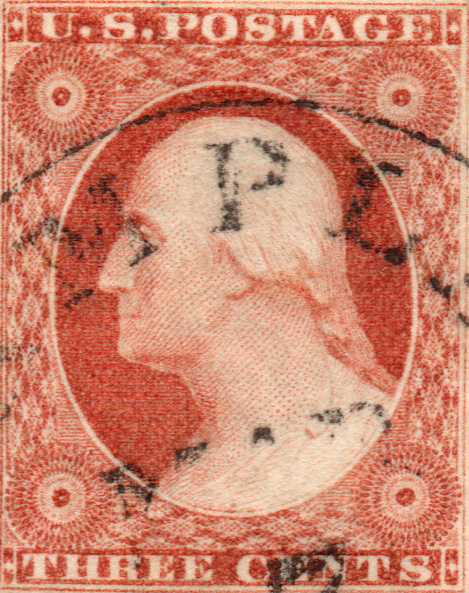 @Historical DNA Collector can you check this please |
|
Send note to Staff
|
| Edited by dittrich - 11/01/2015 5:11 pm |
|
|
Pillar Of The Community
United States
937 Posts |
|
|
dittrich, Your last image is sRGB. Very good. You could adjust the black level until you get a small peak. This would make the color slightly more saturated. 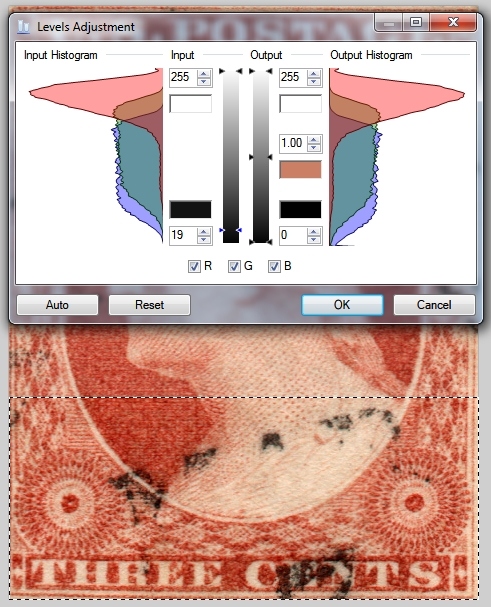 Where exactly to set the limits is not a science. Images cannot display exactly what one sees with their eyes. The best thing to do is to set the levels so that the image on your monitor looks like the stamp in your hand. If you want to show us two stamps next to each other for us to compare, then do not adjust them separately. |
|
Send note to Staff
|
Ryan = HDNAC = DNA = HDC = Hysterical DNA Collector = Historical DNA Collector = me who just loves stamps :) |
|
|
Pillar Of The Community
United States
2230 Posts |
|
|
Quote:
@Classic Coins this sold a good setting for scanner Thanks, dittrich, I'll try that tonight or tomorrow. |
|
Send note to Staff
|
|
|
Valued Member
Germany
284 Posts |
|
|
thanks for your help @Historical DNA Collector
I have sadly Adobe Photoshop Elements, the levels Adjustment is not existent.
You have right, to sees with their eyes is at best. But, I will here to present my stamps in good color quality. the identification from stamp is saver |
|
Send note to Staff
|
|
|
Pillar Of The Community
United States
2230 Posts |
|
|
DNA, Here is an image scanned with the target set to sRGB. I selected stamps with RGB-colored cancels. The scan comes through looking pale to me, but the colors seem close to true. The blue cancel is brighter than I usually see from this era. The one with the LARGE Boston PAID is a #10. dittrich appears to have his set to "Screen RGB, which is different than sRGB in my program:   |
|
Send note to Staff
|
| Edited by Classic Coins - 11/02/2015 5:08 pm |
|
|
Replies: 87 / Views: 10,699 |
|




 Posted 10/31/2015 9:27 pm


