Stamp Community Family of Web Sites
Thousands of stamps, consistently graded, competitively priced and hundreds of in-depth blog posts to read


Stamp Community Forum
 
Username:
Password:
Save Password
Forgot your Password?

This page may contain links that result in small commissions to keep this free site up and running.

Welcome Guest! Registering and/or logging in will remove the anchor (bottom) ads. It's Free!

Help Searching On Ebay

Next Page    
 
To participate in the forum you must log in or register.
Author Previous TopicReplies: 22 / Views: 2,910Next Topic
Page: of 2
Pillar Of The Community
United States
1947 Posts
Posted 05/05/2010   08:09 am  Show Profile Bookmark this topic Add rohumpy to your friends list Get a Link to this Message
I feel so dumb with this question. How do you specifically search for old covers on ebay.

If you just put in united states stamps, of course everything comes up and the covers are hit or miss. I tried the search for united states stamps on cover and got very little.

Send note to Staff

Bedrock Of The Community
Australia
38679 Posts
Posted 05/05/2010   09:43 am  Show Profile Bookmark this reply Add rod222 to your friends list  Get a Link to this Reply
If I may join with rohumpy, and ask a subsidiary,

Say with your text string, you receive a sample result from
google, with covers matching your text string,
You click on one example,
and you are met with a long list of ebay items, none of which
match the google result.
What exactly is happening there?
Can you navigate further to reach the original google item?

Often I just abort and try another text string.

Send note to Staff  Go to Top of Page
Pillar Of The Community
USA
1881 Posts
Posted 05/05/2010   10:57 am  Show Profile Bookmark this reply Add nr-notrare to your friends list  Get a Link to this Reply
Hi.....


Here's one of the lists I watch.......I've tried narrowing the search to older items but it never shows more that a dozen or so items......but there are hundreds on this list.

http://stamps.shop.ebay.com/i.html?...d=1&_ipg=200


Are you searching for something specific ?
Send note to Staff  Go to Top of Page
Edited by nr-notrare - 05/05/2010 11:26 am
Rest in Peace
Canada
6750 Posts
Posted 05/05/2010   11:08 am  Show Profile Bookmark this reply Add Puzzler to your friends list  Get a Link to this Reply
There are no dumb questions! (Just answers, ha)

Hi rohumpy! If you are searching by using the categories listed along the side you will get most of the results listed but not always.

(This will be a partial rant to sellers also, I want to find your stuff and buy too!)

I don't usually search for US stamps but just by looking around trying to figure out how to list my items from time to time I noticed that a lot (seemingly to me) of ebay users are listing US (if they live in the US) or other countries stuff (while living in that country) without putting in the country name.

That works OK when you just are selling to folks in your own country, and if you list the item in the most likely proper category (doesn't always happen, humans make mistakes) and you use words instead of just catalog numbers (not everyone has a catalog) to describe the stamp / item. Sigh.

Of course the world is not perfect, so we buyers and searchers have to do the best we can.

Covers Should use the word cover or envelope or some such word to describe the item. The country (US, Canada, Germany, etc) should use the country name in the title also. It is not a waste of space! Especially now when all the items from stores are dumped into the main search also. Overwhelms you it does. Just clicking on 'see auctions only' does remove all the buy it now but I then miss out on sellers who have listed items using the buy it now that are not in stores.

So, using words and numbers to search is almost necessary. (to find specific items), hoping that the seller has used some words and numbers that are common to that object to describe the item. Of course when they don't, and you find the item by chance looking for something else, you have no competition on bidding and get it for a good price. I do like that. Makes me feel smart when I do find something (rarely) like that but it also makes me feel dumb when I realize too late that I have done the same thing in describing one of my own items.

Search strings (words typed into a search separated by parentheses and commas so logically joined into a string of words used to search for specific things) (described correctly hopefully) can be used to return a more specific list of items more relevant to your search.

Example:
You want to see US covers!! Then first (after going to a screen where the search bar is present and not just searching in someone's store) change the category to just Stamps.

Then in the first box of search type (in lowercase small letters only, ebay will find uppercase large) ' (covers,envelopes) ' that is type the characters within the quote marks including the parentheses. This will find all results in Stamps that contain either the word cover or covers or envelope or envelopes,

To just find covers without also finding cover then enclose the word in double quotation marks thus "covers" .

You can use the plus and minus )+ / -) signs to narrow your search also.

' cover +US ' will find all the reults that have the word cover or covers and also the word US. Without the plus sign you would get covers and lots of others, some of which would include US as a word somewhere.

The minus sign excludes specific words / terms from the search. So covers -US will return all results that have covers but none that include the term US.

If you just search in your country's category (US) then you will miss the covers listed under other country's categories and the covers listed in other countries who do not use the same categories as we do in North America.

Example in Germany you must look under stamps/ North America / US and Canada to find US stuff. France is similar. Asia is unknown to me (language barrier, working on it). The UK (United Kingdom, Great Briton, England) is it's own case again with Commonwealth/British Colonial, ahem. So search for the words first then narrow down by clicking categories.

Also look at how sellers describe their items. The one's who've learned up on different languages and ways to describe the same item will use different extra words than you do. Try to include some of those words in your searches sometimes and see what comes up.

Try (covers,envelopes,letters,lettre) (French for letter perhaps? I don't 'know' French. Of course this will return results with actual letters but also some people do call covers or envelopes 'letters'. The word Lettre by itself will return Letter also.

A lot of this is experimenting with different words and plurals and arrangements. Computers are dumb, they do exactly what you tell them to do and nothing more. They don't intuitively grasp your contextual meaning and make those great leaps of understanding that we humans are capable of. (at times0

Another note other sites search engines (read programs) use slightly different methods of logic to find items searched for and you will have to learn the idiosyncrasies of those sites.

The US is a hard one to search for I think. You can use US or USA or U.S.A. (don't use that one, ebay search ignores periods! (unless you put quotes around the whole term)) or United States or America and then other languages' version of how to say those things also. Cheesh. The UK is similar. Cheesh again.

Experiment, try a word, then the plural of it ( ebay does help in this regard with Some words, not all).

More detailed searching strings available free, just ask.
Doug
Send note to Staff  Go to Top of Page
Rest in Peace
Canada
6750 Posts
Posted 05/05/2010   11:13 am  Show Profile Bookmark this reply Add Puzzler to your friends list  Get a Link to this Reply
Rod, I think perhaps what is happening in Google is that you are getting results that include words in the item's description and not just in the title. The whole page is searched by Google.

You might try enclosing your terms within double quotes and using the plus and minus signs.

Google does use an advanced search engine and has an explanation for how to use it somewhere also.

http://www.google.ca/support/websea...36861&&hl=en
Send note to Staff  Go to Top of Page
Pillar Of The Community
2664 Posts
Posted 05/05/2010   11:19 am  Show Profile Bookmark this reply Add spock1k to your friends list  Get a Link to this Reply
i found doug
Send note to Staff  Go to Top of Page
Rest in Peace
Canada
6750 Posts
Posted 05/05/2010   11:24 am  Show Profile Bookmark this reply Add Puzzler to your friends list  Get a Link to this Reply
eBay, a note about clicking the 'Include item and description' box in search.

When you click that little, seemingly harmless little box you are including the shipping terms also. So, since most parts of the world ship to the US that or a similar term will be included in the search results.

If you really need to find a specific item and sometimes it is described in the description and not the title (it happens) then use quotation marks around the specific phrase or term and also use the plus and minus signs.
Send note to Staff  Go to Top of Page
Rest in Peace
Canada
6750 Posts
Posted 05/05/2010   11:26 am  Show Profile Bookmark this reply Add Puzzler to your friends list  Get a Link to this Reply
Send note to Staff  Go to Top of Page
Rest in Peace
Canada
5701 Posts
Posted 05/05/2010   11:29 am  Show Profile Bookmark this reply Add BeeSee to your friends list  Get a Link to this Reply
Rohumpy, For old covers I assume you mean 19th century.

Try this: http://stamps.shop.ebay.com/

Then click on 19th century used

Then in the search box type in cover, -replica

You will get some nice examples. I added -replica because there were a whole bunch of junky replicas someone put up. You can use the ( - ) to filter out anything you don't want to see.

When you are happy with the results, save the search to "My ebay", and you can use it over and over, and even receive email alerts when new items are for sale.

I have over 20 different boolean searches save to filter in and filter out stuff.
Send note to Staff  Go to Top of Page
BeeSee in BC
"The Postmark is Mightier than the Stamp"
http://brcstamps.com ---- BNAPS, RPSC, APS
Pillar Of The Community
Canada
737 Posts
Posted 05/05/2010   11:32 am  Show Profile Bookmark this reply Add Ryan to your friends list  Get a Link to this Reply
For Rod's question, that sounds like it has something to do with the "cached snapshot" Google uses for searching. There is no time-efficient way of searching live pages - Google looks at a page once and then stores that and searches their stored copies, because it's far quicker to look at the copy on your own server than it is to connect through the internet to get the current copy. Very popular sites will be updated frequently so Google's spider will look at those pages often, and not very busy sites only get looked at by Google once in a while. But no matter how often they look on ebay's site, by the time you do your search and Google checks its stored page copies, the ebay page has probably been updated and Google's copy is already obsolete.

This rarely happens for individual listings, but it will happen quite often for pages of listings. Sometimes you can get around that by looking at the cached copy (most Google results give you the option of clicking on the word "Cached" to look at their snapshot). But that often doesn't work with ebay pages for some reason - their cached copy is often different than the copy that shows up on their search results, so when you try to look at the cached copy, it ends up being different than what you were hoping to find. I find that with ebay, you need to do your searching using the ebay search engine, not with Google.

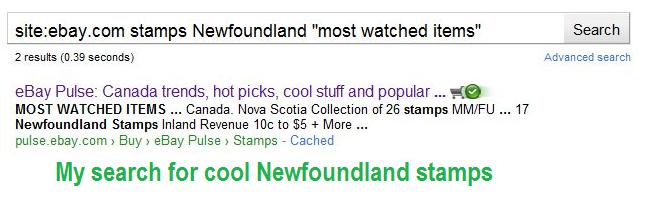
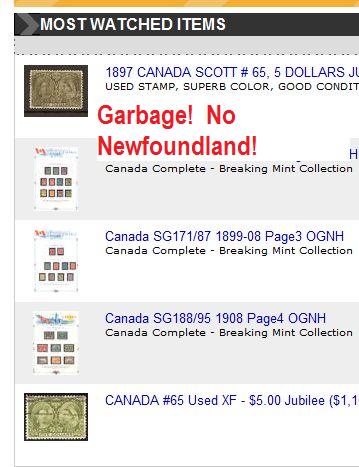
I've attached a couple of brief screen shots, just random words that I could use to make my point about the caching problems. Let's say I wanted to see what all the cool kids wanted to buy for their Newfoundland stamp collection. I did a Google search for (stamps Newfoundland "most watched items"), restricted to ebay.com. Hey, there's something very interesting to me, "17 Newfoundland Stamps Inland Revenue". I'm gonna buy that one for sure! So, I click on the search result. I'm very annoyed, there's a bunch of other junk on that list and no Newfoundland stamps at all.


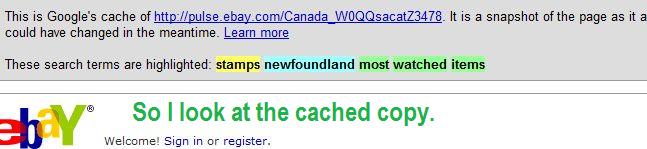
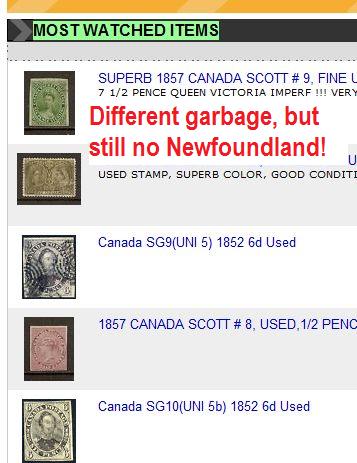
So I'm a wise guy and I click on the word "Cached" (in light blue text, at the end of the bottom line on that Google search result). This header pops up, telling me I'm looking at Google's snapshot taken however many days ago, and my search terms are highlighted in colour, and a whole different pile of junk now shows up. But I'm still annoyed because my 17 Newfoundland stamps still aren't anywhere on that list!


However Google works it, the cached copy they search isn't the same as the cached copy they call up if you specifically ask to look at it.

Ryan
Send note to Staff  Go to Top of Page
Rest in Peace
Canada
5701 Posts
Posted 05/05/2010   11:53 am  Show Profile Bookmark this reply Add BeeSee to your friends list  Get a Link to this Reply
Here is an example of a boolean search I have for the Canadian high value mammals:

(1695*, 1696*, 1697*, 1698*, 1699*, 1700*, 1701*, 1702*,"$1 loon", "$2 polar", "$5 moose", "$8 grizzly", "$1 deer", "$1 walrus", "$2 falcon", "$2 horse") -flag -flags -"maple leaf" -atm

Try cutting and pasting it in the ebay search box.

Everything in brackets is what I want included in the search. The brackets mean to search for any of those items and show what is found. The numbers are catalog numbers. The wild card (*) indicates I want to include sub numbers such as 1695a, or 1695i. Some sellers don't use numbers, just descriptions like "$5 moose" so I include those.

The ( - ) should be outside the brackets without commas. I have -flag, because Scott catalog recently change some of the numbers and the old numbers were flag, maple leaf and ATM stamps, so I try to weed them out. That only works if those words are in the sellers description.

The search is not perfect, as it brings up some items where sellers include there own lot number in their description on an unrelated item which happens to be the same as the catalog number of the stamp(s) you are looking for. I hate it when sellers do that, it interferes with numerical searching.
Send note to Staff  Go to Top of Page
BeeSee in BC
"The Postmark is Mightier than the Stamp"
http://brcstamps.com ---- BNAPS, RPSC, APS
Rest in Peace
Canada
5701 Posts
Posted 05/05/2010   12:00 pm  Show Profile Bookmark this reply Add BeeSee to your friends list  Get a Link to this Reply
Ryan, why even use Google?

Just go to http://pulse.ebay.com/Provinces_W0QQsacatZ3485

Only Newfie stuff there. You can get there with Sell/What's Hot/stamps/Canada/Provinces in the menu in the top right of ebay.
Send note to Staff  Go to Top of Page
BeeSee in BC
"The Postmark is Mightier than the Stamp"
http://brcstamps.com ---- BNAPS, RPSC, APS
Pillar Of The Community
Canada
737 Posts
Posted 05/05/2010   12:26 pm  Show Profile Bookmark this reply Add Ryan to your friends list  Get a Link to this Reply

Quote:
Ryan, why even use Google?

Yes, that's my point. I don't use Google when looking for stuff on ebay. I find ebay's search engine good enough to get what I want. I've bookmarked a basic search where I filter out everybody that doesn't accept PayPal and I can go from there with any search term I want. I have another bookmark that restricts things to Canadian sellers if I don't feel like fussing with cross-border sales. Again, that sets the basic terms and I can search for anything I like. And then I have a whole boatload of searches I repeat all the time - precancels, literature, Canada MNH, etc. A number of very uncommon items are stored as automatic searches in which I get notified by ebay if one of them happens to pop up (still waiting to get my own copy of "Multi-Epicycloidal and Other Geometric Curves" ....). There are favourite seller lists and I get e-mail updates on those items too.

No need for Google, ebay's search routines do a good enough job for me.

Ryan
Send note to Staff  Go to Top of Page
Rest in Peace
Canada
6750 Posts
Posted 05/05/2010   12:26 pm  Show Profile Bookmark this reply Add Puzzler to your friends list  Get a Link to this Reply
Bee See, your search string is fantastic!

But it doesn't find those stamps when people use a different catalogue othe than Scott or when they do not have a catalog and just describe the stamps as animal or wildlife or suchlike, in general terms.

The same problem seems to be in the ebay Pulse search.

I find that you get more items (with some items not wanted) when you start more generally in just Stamps category and also click on the Worldwide link instead of just North America or US Only.

I agree that a string search does return a lot of items more specific to what one actually wants but you are losing out on other more generally described items or items in different categories than where you are searching for them.

There doesn't seem to be one good right correct answer to all searches. You might have to do a couple searches.

I think, start generally and as you go narrow down the search while still keeping an eye out for possible new terms to include in searches and different ways that people use to describe the same item.
Send note to Staff  Go to Top of Page
Rest in Peace
Canada
5701 Posts
Posted 05/05/2010   12:41 pm  Show Profile Bookmark this reply Add BeeSee to your friends list  Get a Link to this Reply

Quote:
But it doesn't find those stamps when people use a different catalogue othe than Scott


Puzzler, it actually does in many cases, that is why I use "$5 moose" in the description, as those in the brackets are "or" searches. It does not need to find the catalog number AND description, just or.

Most Canadian stamp sellers will use Scott or Unitrade anyway.

That is why all good sellers use a good description of the item instead of their own useless wasted space lot number.

You are right, there is no sure way of finding catalog numbers due to the many different. Maybe if the philatelic world could set ebay standards and smart sellers would put the catalog name before the numbers in the description.
Send note to Staff  Go to Top of Page
BeeSee in BC
"The Postmark is Mightier than the Stamp"
http://brcstamps.com ---- BNAPS, RPSC, APS
Forum Dad
Learn More...
USA
2055 Posts
Posted 05/05/2010   12:44 pm  Show Profile Bookmark this reply Add bobby131313 to your friends list  Get a Link to this Reply
You can consolidate the negs too, it's quicker on the backend.

-(flag,flags,"maple leaf",atm)
Send note to Staff  Go to Top of Page
Page: of 2 Previous TopicReplies: 22 / Views: 2,910Next Topic  
Next Page
 
To participate in the forum you must log in or register.

Go to Top of Page

Disclaimer: While a tremendous amount of effort goes into ensuring the accuracy of the information contained in this site, Stamp Community assumes no liability for errors. Copyright 2005 - 2026 Stamp Community Family - All rights reserved worldwide. Use of any images or content on this website without prior written permission of Stamp Community or the original lender is strictly prohibited.
Privacy Policy / Terms of Use    Advertise Here
Stamp Community Forum © 2007 - 2026 Stamp Community Forums
It took 0.38 seconds to lick this stamp. Powered By: Snitz Forums 2000 Version 3.4.05