I don't use album pages, as I have far too many examples of various types, not to mention multiples and documents. Vario stockpages are a good alternative.
In my case, it's a bit toughter, since I have thousands of cancels, I want to be able to access them quickly based on inventory numbers on my website.
I tried dealer sales binders, but that gets cumbersome too quickly. Also, how do I organize them? By Scott catalog number? By company name or industry (too many that are unknown)? By cancel type (circle vs. oval vs. boxed vs. single-line, etc.)? It's a daunting task, both to be able to browse through things and find a stamp without too much difficulty.
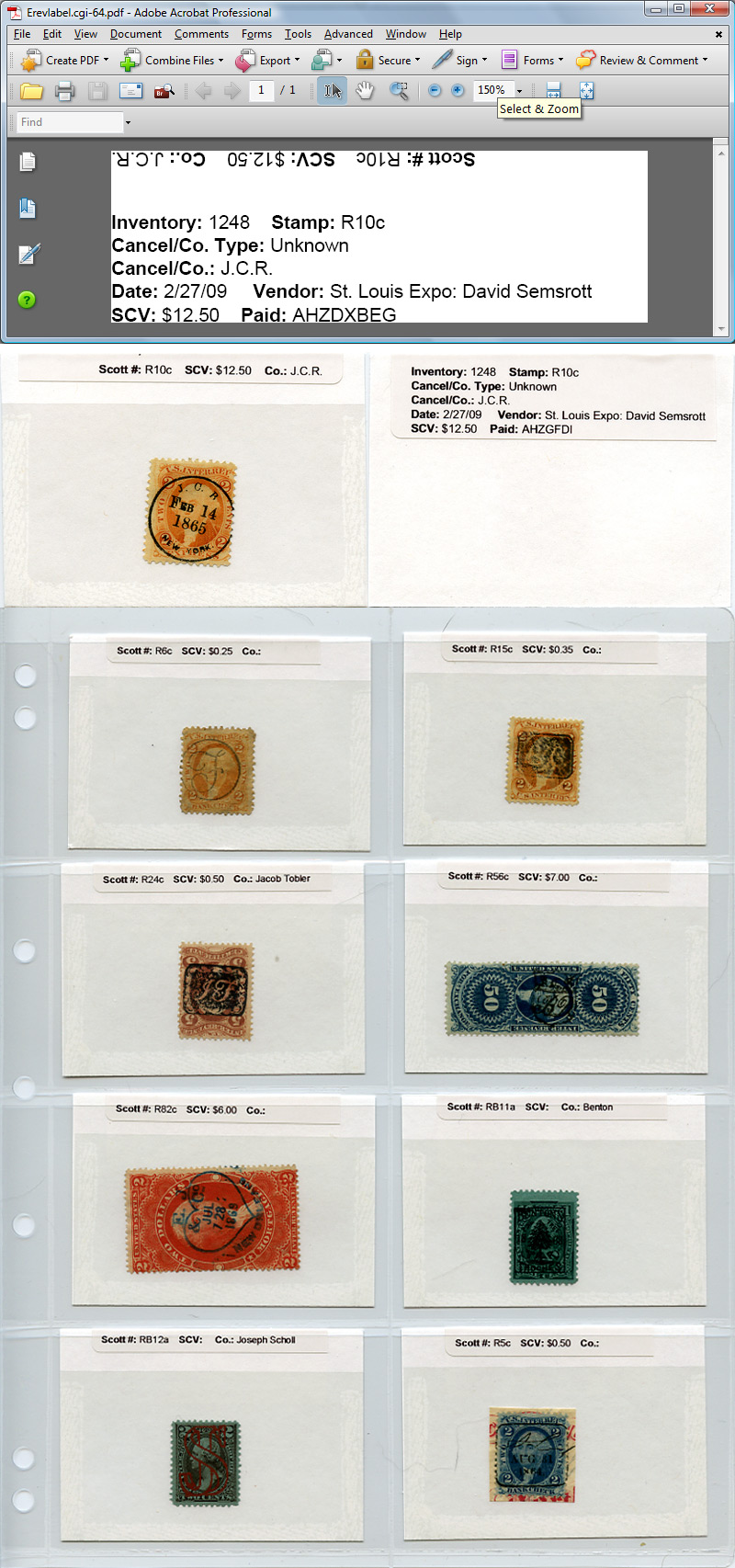
My latest iteration, which may actually work, is to use blank 101 sales cards, with labels printed out from my web site. I wrote a script that creates a PDF file from a selected record. I then print that label on a Brother QL-500 printer (thermal, no ink to mess with, and the labels are relatively cheap: $8 for a roll of 400 from
http://www.superwarehouse.com).See the picture at the bottom of this post.
The top section is one of the PDFs; you can see that I've set it up so that one of the lines prints upside down, so when the label is folded over the edge of the card, you get printed information on both sides of a card from a single label.
The second section is the front and back of a card showing the label applied.
The last image shows these cards in G&K Centurion sheets from Subway. This is the 4VC size, which is intended for phone card collectors, but the size fits the 101 cards perfectly.
Subway sells these sheets for $3.96 per package of 5, buy 5 packages get 1 free. Each package will display 40 cards. After shipping that ends up being about 8 cents per stamp/card.
Binders can be a bit expensive, but I would keep an eye on
ebay. I found someone selling off a lot of 20 1.5-inch spine width white binders (they used them for a meeting/conference and then sold them). I ended up getting them for $35 shipped for the 20 binders, considerably cheaper than buying new.
I have them stored by inventory number (when I add a stamp to my web site, it assigns a new incremental inventory number). Yes, it makes the collection a bit haphazard as far as the display order, but I can find any stamp within moments just by getting the inventory number from the web site. And you can still browse through them relatively easily.
Anyway, sorry to ramble on. Thought I'd share my solution (for the moment any way...)





 Posted 06/24/2010 09:30 am


