| Author |
 Replies: 36 / Views: 7,102 Replies: 36 / Views: 7,102 |
|
|
|
Bedrock Of The Community
Australia
38679 Posts |
|
|
Thanks Russ,
I guessed that, nice to have confirmed.
Interesting data thus far:
An HP laserjet CP1215 in US =$258
same in Australia = $138
Genuine toner (colour) 3x$65 =$195
aftermarket toner 3X$42 =$126 saving $70
|
Send note to Staff 
|
|
|
Pillar Of The Community
United Kingdom
1356 Posts |
|
|
Other than what's been discussed already, the only advice I can think of is firstly to buy a printer with individual colour cartridges, rather than a single cartridge containing all the colours. I used to have one of these, and its very irritating to have to remove and discard a cartridge full of blue and yellow just because you've used up all the red  Secondly, every time you print think of the ink cost. OK, your album pages are your album pages and you're not going to compromise on those. But stop for a moment before printing colour drafts - could they be drafted in greyscale? I am especially guilty of finding info on a website and pressing PRINT without stopping to think - and ending up with my paragraph of info plus a page worth's of colour ads I didn't want. When I was looking for a new printer, I looked at the running cost comparison sites, and they are useful. As I recall, some printers print very good photos, which is fine if that's your main use for them, but they tended to have more expensive ink. If you're mainly using for documents, there are probably some printers designed more for bulk docs which may be cheaper to run. Isn't consumer choice a wonderfl thing??!  |
|
Send note to Staff
|
|
|
Pillar Of The Community
United Kingdom
1361 Posts |
|
|
Hi Rod, I'm using an Epson as I have been for the past 2 or 3 printers I've had and have never bought official ink carts. My current model is a 5 year old Stylus Photo 900. Black ink carts are £1.50 - Colour (single with 5 colour tanks) £2. The 'genuine' Epson ones are £25 and £30 respectively  I haven't noticed any difference in printing or clogging. If I do have to run the cleaning cycle which I know uses a ridiculous amount of ink I not concerned as the costs are negligible. I also do not subscribe to the thoughts of laser being more suitable for stamp pages than inkjet as I find laser more likely to transfer. Make sure good quality paper is used, the paper type is selected in the printer drivers and if you can use transparent mounts to protect valuable items. I should add I have a small laser for B+W documents etc. |
|
Send note to Staff
|
| Edited by AnthonyUK - 03/10/2011 05:18 am |
|
|
Pillar Of The Community
United States
6668 Posts |
|
|
Rod, also you might want to look into HP's all in one ink jets. The one I have has 1 Black and 5 color cartridges and the whole lot to replace is $35.00. HP also has found a way to recycle the Ink to make the cartridges last longer. Here in the States, when I buy the replacement Inks, it comes with 50 free 4x6 Photo sheets so all in all compared to the others, it's a pretty inexpensive way to go. Plus it has copy, scan, fax, too. |
|
Send note to Staff
|
|
|
Bedrock Of The Community
Australia
38679 Posts |
|
|
Stallzer, Stampgal, and Anthony,
Thanks. Lots of info to consider.
I am surprised that Anthony suggests the Laser
is more likely to transfer. I assumed the other way round.
That sort of effects my choice I was tending to.
Stampgals advice is pertinent, my neighbor has an Epson
with 3-4 tanks and he suggests he gets more mileage,
if/when I ran out of say red, I would use the bubble squeeze
ink to replenish (you have to drill 3 holes in the cartridge)
Anthony, that's very cheap ink, almost unbelievable 2 quid!?
|
|
Send note to Staff
|
|
|
Pillar Of The Community
United Kingdom
1356 Posts |
|
|
Am I right in thinking a laser printer uses a powder toner on the paper, as opposed to a liquid ink? Maybe that's why it may transfer more easily. And is the main argument for using laser with album pages about acidity rather than transfer? Have I got this all wrong?  |
|
Send note to Staff
|
|
|
Pillar Of The Community
United Kingdom
1361 Posts |
|
|
Quote:
Anthony, that's very cheap ink, almost unbelievable 2 quid!? The link below shows the official colour ink with the 'compatible' ones a little further down. I tend to buy 10 of each at a time. http://www.cartridgeshop.co.uk/Prod...PROD2345C472Stampgal Laser printers tranfer the powder toner to a page and it is then passed through the fuser which melts it to the page. This is perfectly fine 99% of the time and will never transfer much the same as inkjet. I don't know about acidity differences I'm afraid. Good quality paper probably makes the biggest difference. One additional point is that the paper path can be a bit more straightforward on an inkjet so you can print on thicker card. I can also print onto CD/DVD as well with the Epson for example. |
|
Send note to Staff
|
| Edited by AnthonyUK - 03/10/2011 06:53 am |
|
|
Bedrock Of The Community
Australia
38679 Posts |
|
|
This is getting <very> confusing, and challenging my understanding of printers Quote:
One additional point is that the paper path can be a bit more straightforward on an inkjet so you can print on thicker card.
I always took it that the laser had a straight path, hence why it is the choice of collectors printing album pages on stiff card. The inkjet bends the paper almost 90 degrees. Have I got this wrong? |
|
Send note to Staff
|
|
|
Valued Member
372 Posts |
|
|
I make my own album pages using a MS Word based macro Album Page Creator and then print the pages at a professional printer. I love the results.
Matt |
|
Send note to Staff
|
|
|
Bedrock Of The Community
Australia
38679 Posts |
|
|
Pillar Of The Community
United States
2547 Posts |
|
|
Matt, I also use word. I have created a template for the borders and have a library of pr-made frames. A new page is very easy. |
|
Send note to Staff
|
|
|
Pillar Of The Community
United States
978 Posts |
|
|
Hi Rodney,
A friend of mine makes his own pages and was using an inkjet printer. He had one stamp get damaged because it seems the printer ink migrated to one stamp. Haven't figured out how except maybe a lot of ink was applied and did not dry. He then 'bit the bullet' and bought an HP laser printer, not color. He says the toner lasts a long time and there is no ink issue. The toner cartridges are expensive but he says buying multiple ink cartridges comes to almost the same price for the amount printed. Today one can get a fairly decent laser printer relatively cheap, at least in the USA.
Side note. I do not know how it is in OZ but I pay about 5USD more for black ink than for color. I bought an EPSON printer with four ink cartridges. I have found that ink replacement is cheaper. If a color cartridge runs out I just replace that one. My other printer had only 2 cartridges (1 black, 1 three colors) and it was more expensive.
Jerry B |
|
Send note to Staff
|
|
|
Bedrock Of The Community
Australia
38679 Posts |
|
|
Cheers Jerry, I am leaning towards a laser. I'll probably opt for something of quality when these ink carts run out. Cheap inkjets are still around going by todays propaganda from aust post HP for $39 ink refills $51 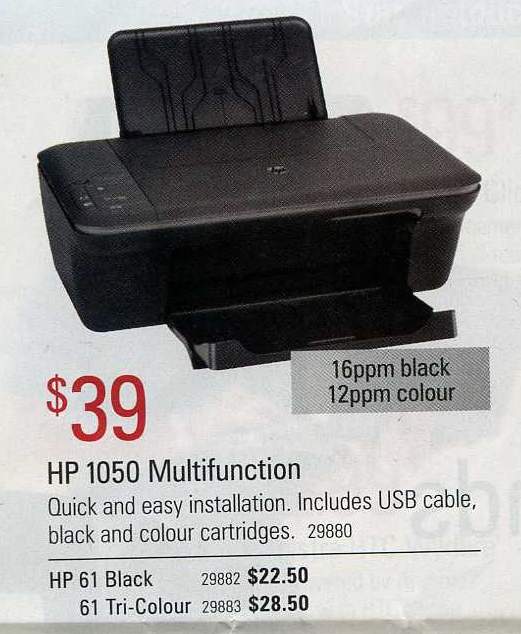 |
|
Send note to Staff
|
|
|
Pillar Of The Community
United States
4106 Posts |
|
|
Rod,
Go with a laser..
I have been using HP laserjets for more then 10 years.
I have one that I have used for the last 6 years.. IF I buy a HP brand toner, it costs around 100.00 If I buy a re-furbed hp toner it costs around 20.00.
Big difference in price, and the cost per page is much, much cheaper then ink jet. And it is a straight paper path, for the most part. |
|
Send note to Staff
|
|
|
Pillar Of The Community

Canada
3963 Posts |
|
|
I have to agree Rod. Lazer is the way to go. Dianne  |
|
Send note to Staff
|
Don't grumble that the roses have thorns, be thankful that the thorns have roses |
|
|
Replies: 36 / Views: 7,102 |
|




 Posted 03/10/2011 01:17 am


