| Author |
 Replies: 25 / Views: 7,978 Replies: 25 / Views: 7,978 |
|
Valued Member
Canada
211 Posts |
|
|
Is there is good program I could get to measure the perforations on stamps in scanned images? I would prefer not to go the old school route of actually handling the live article rather than merely manipulating jpgs (wouldnt't want to be using my tactile sense organs and micro-motor co-ordination skills would I, not be a true hobbyist--another topic for discussion?). I have a Canada #1175 that is almost certainly not the rare one (#1175a with a 14 perf?). Only the first of many that I will have to measure. Any quick rules of thumb for doing so? 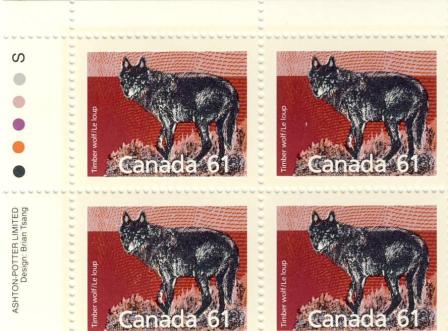 |
|
Send note to Staff
|
| Edited by Tom H - 07/28/2010 1:12 pm |
|
|
|
|
Pillar Of The Community
Canada
531 Posts |
|
|
As it is virtually impossible to determine scale on a computer screen I'm not sure how you could electronically do a perf measure. But maybe I'm missing something here. |
Send note to Staff 
|
|
|
Rest in Peace
Canada
5701 Posts |
|
|
Hi Tom - the rare one is actually perf. 13. Yours is the perf 14.5 x 14.
The first clue is that the rare perf does not exist with inscription blocks.
Secondly, if you count the full perforations across the top, you will get 23 (start and end each count as half a perf.) Perforations are measured per 2 cm. The actual stamp size from 1st perf to last perf is 3.2 cm if you measure it. So 23 holes divided by 3.2 cm = 7.1875 per 1 cm. Multiply that by 2, and presto, you have 14.375. Catalogues round that up to 14.5 or 14-1/2. |
|
Send note to Staff
|
|
|
|
Pillar Of The Community
Canada
2574 Posts |
|
|
Thank you BeeSee I just learn something. "Perforations are measured per 2 cm".
I use the gauge and when it fits it fits. So far there is no device that scan the stamp and tell the perf but we never know in the future. |
|
Send note to Staff
|
|
|
Pillar Of The Community
United States
7103 Posts |
|
|
There are handheld devices that claim to measure perfs, and I'm pretty sure there are software programs that claim to measure perfs, but lets see if there is a simple solution for you.
If you use stockpages for scanning, then the width of the clear strip will be a known measurement, and you can do the math. (Same with a 102 card.) Or, you could cut a few pieces of paper 2cm long and slip them into rows here and there. One per page would be enough, if you kept the entire page as one big jpeg file. If you prefer to split up the scans, then you'd have to do the calculation before cropping/separating.
If you don't care to have a black background, then you could tape/tack a piece of graph paper to the inside of your scanner lid. Presto. Instant background grid.
So you may have a few options. I prefer tongs and a gauge, but I see the attraction to what you're thinking... |
|
Send note to Staff
|
|
|
Rest in Peace
Canada
5701 Posts |
|
|
Someone should invent a device like those hand held bar code readers that does perforations. Or maybe Spock's Tricorder can be calibrated to do such! |
|
Send note to Staff
|
|
|
|
Pillar Of The Community
Canada
737 Posts |
|
|
Quote:
Is there is good program I could get to measure the perforations on stamps in scanned images? EzGrader can do that - it's a bit expensive, however. Much more expensive than a good perforation gauge, but it can also measure stamp centering. http://www.ezstamp.com/ezgrader/Rodney popped up once upon a time with a Word document template that served as a perforation gauge somehow or other - either I didn't save it, or I can't find where I put it on my computer. Either way, he'll probably dig it up for us when he wakes up this morning. OK, after snooping a little bit, I found this. I don't recall this one in detail, so maybe Rod had come up with something different, but it is similar. http://www.eperforationgauge.com/indexe.htmlRyan |
|
Send note to Staff
|
|
|
Bedrock Of The Community
Australia
38679 Posts |
|
|
I use a variation of BeeSee's, All you have to do is measure the printed portion of the stamp, then count the number of teeth (sticky up bits) that exist IN the printed portion (NOT the whole width of the stamp) Then use this formula: 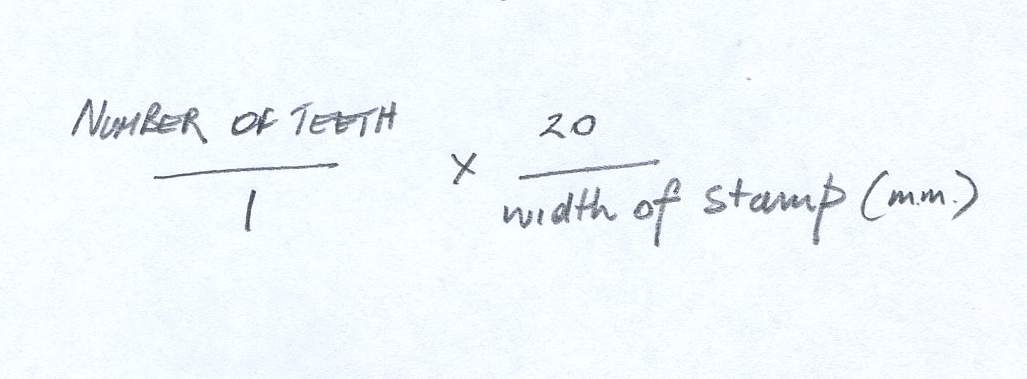 |
|
Send note to Staff
|
|
|
Valued Member
Canada
211 Posts |
|
|
Ryan I am playing around with the egauge you provided the link for and it seems to work just fine. It brings up a grid on the monitor and you just drag and drop until the lines match the perfs. Very Cool! Thanks. I tired EZ stamp version but it didn't load properly or something. Rod222 that is what I call a rule of thumb alright...now I can almost say I understand the mathematical principle behind all those funky peaks and valleys--not to mention those weird looking hand-held gauges that look like something from science fiction. And thanks BeeSee and Cjd for tips on measuring, scanning, etc.  |
|
Send note to Staff
|
| Edited by Tom H - 07/28/2010 9:48 pm |
|
|
Rest in Peace
Canada
5701 Posts |
|
|
Bedrock Of The Community
Australia
38679 Posts |
|
|
Tom,
be vigilant with EZ stamp version,
the problem I see with that, is establishing the dpi resolution of the image,
if you get that wrong, you could be up the creek without a paddle.
If you constantly scan your stamps at a given resoultion
you will be OK,
but forget, and/or read another persons image and it will go awry.
|
|
Send note to Staff
|
|
|
Rest in Peace
Canada
6750 Posts |
|
|
This program was mentioned by a user from India in a previous thread I believe. I downloaded it but have not registered nor used it as of yet. It is free but you have to register and provide your name and address. Not sure if anyone here tried it or not? Called Perfomaster, note perfo not perf. http://www.buxsoft.com/ |
|
Send note to Staff
|
|
|
Bedrock Of The Community
Australia
38679 Posts |
|
|
Comments:
free for 1 year after which you have to pay to register
(fair enough)
2. seems mainly adapted to scan and perf in the one operation,
which is not suitable for me, I prefer to use my dedicated scanner.
It automatically aligns and cuts the image, I am a bit skeptical about that.
One needs to know the resolution of pre scanned images,
how does one establish that their scans retain their
resolution figures ?
Does this change if you zoom and crop the image?
|
|
Send note to Staff
|
|
|
Pillar Of The Community
Australia
3547 Posts |
|
|
I tried the Perfomaster once only, and gave up in disgust. Too fiddly, and the scans have to be precisely life-sized, which is useless as far as I'm concerned. Can't see the point: it's far quicker and easier to whip out the perf gauge, and physically check the stamp. |
|
Send note to Staff
|
|
|
Pillar Of The Community
United States
1947 Posts |
|
|
I guess I am old-fashioned. What could be simpler than using a perforation gauge. All this talk of counting teeth and applying formulas, hand held scanners, computer programs, electronic devices---whew, it boggles the mind. By the time one has done all this, using a perf gauge could have done a boatload of actual stamps.
As far as measuring perfs in an image on the computer screen, aren't there so many variables as to make it an exercise in aggravation if not futility? |
|
Send note to Staff
|
| Edited by rohumpy - 07/29/2010 06:27 am |
|
|
Valued Member
Canada
211 Posts |
|
|
I am using the eperf. tool Ryan gave a link for because in the instructions it says even if you do not know the dpi the program has a menu where you try each dpi setting until one matches your stamps (really, there are only so many different perf. styles). It seems easy enough, much easier for me than actually handling stamps which I find frustrating--as if it were brain surgery--because I dare not touch, or drop, or fold, or in any way violate the integrity of that minute scrap of cellulose, gum and ink! Besides, ain't it easier to click and view rather than dig out binders, open folders, get tongs, etc? The quicker I get to see the likeness of the Queen or the Canadian beaver the better. For me the pictures are what it is all about, although I can appreciate there are those who relish handling the real thing...maybe it is like I still prefer to read a book in my hand rather than on a screen. |
|
Send note to Staff
|
| Edited by Tom H - 07/29/2010 2:41 pm |
|
|
Replies: 25 / Views: 7,978 |
|




 Posted 07/28/2010 1:07 pm


