Stamp Community Family of Web Sites
Thousands of stamps, consistently graded, competitively priced and hundreds of in-depth blog posts to read


Stamp Community Forum
 
Username:
Password:
Save Password
Forgot your Password?

This page may contain links that result in small commissions to keep this free site up and running.

Welcome Guest! Registering and/or logging in will remove the anchor (bottom) ads. It's Free!

Tutorial: Picasa And Other Image-Sharing Sites

Next Page    
 
To participate in the forum you must log in or register.
Author Previous TopicReplies: 18 / Views: 4,302Next Topic
Page: of 2
Moderator
Learn More...
United States
4788 Posts
Posted 01/15/2011   11:51 am  Show Profile Bookmark this topic Add kirks to your friends list Get a Link to this Message
As someone who posts images here, I realize it is sometimes problematic to upload a large or highly-detailed scan to SCF. As we've all seen, a few posters regularly use other websites for storing their images and post links from here.

On the other hand, as someone who reads SCF, I confess that I want to see the images in the post. I don't want to have to leave SCF, go to another website for viewing, then come back here to comment.

So, in the spirit of helpfulness, and with no implied criticism of other people's methods, I humbly submit a simple tutorial:

PICASA:



The key to posting Picasa images it to find the link that ends with JPG, not the link to your album page.

Select the image you want to share. Then on the right side of the screen, click "Link to this Photo." Select a size from the dropdown list, then check the box for "Image Only". Finally, copy the link provided in the "Embed Image" box.

Jump over to your SCF posting and paste that link between a pair of [img ] [/img ] tags. When you paste your copied link, you'll notice it starts with http... and ends with ...jpg.


Photobucket:



Photobucket might be the simplest. By hovering your mouse over an image, it will generate several types of links. You want the IMG code for SCF. Just click the text and it is automatically copied to your clipboard; jump over to SCF and paste.

Flickr & Other Sites:

Every photo hosting site has some sort of mechanism for sharing a photo. Just remember that you want to link to the actual JPG, not just a web page. For example, at FLICKR, use the link for "Grab the BB Code"
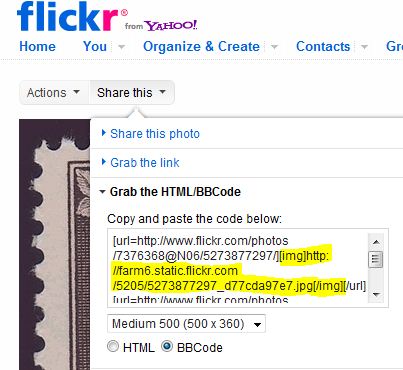


Notice I've selected a size and indicated that I want BB (bulletin board) or Forum code. Even then, Flickr gives me too much information. I only want to copy the the JPG link (yellow highlight added by me). Flickr does automatically include the [img ] [/img ] tags, but if it didn't I would just type them into my SCF post.

One last comment.... I like to share the largest available version of my scans. SCF will automatically "thumbnail" your image so it's about 500 pixels wide. The only caveat would be that if you share a VERY large image, it might be frustrating for members with slow Internet connections.

I hope this helps someone.
KirkS

Send note to Staff

Pillar Of The Community
United States
1518 Posts
Posted 01/15/2011   11:58 am  Show Profile Bookmark this reply Add bfranton to your friends list  Get a Link to this Reply
So why do I keep seeing PhotoBucket postings where the caption in SCF is image deleted or removed. I'll look at it within hour of initial post and I still do not get the image... so it should not be something like a stale date.
Send note to Staff  Go to Top of Page
Rest in Peace
Canada
5701 Posts
Posted 01/15/2011   12:04 pm  Show Profile Bookmark this reply Add BeeSee to your friends list  Get a Link to this Reply
bfranton, you see that because the one who posted the images either deleted them or moved them to another directory on PhotoBucket. That is another caveat of using such services - the posting could become useless if the images are gone. SCF has no control over this.

KirkS, nice tutorial.
Send note to Staff  Go to Top of Page
BeeSee in BC
"The Postmark is Mightier than the Stamp"
http://brcstamps.com ---- BNAPS, RPSC, APS
Moderator
Learn More...
United States
4788 Posts
Posted 01/15/2011   12:05 pm  Show Profile Bookmark this reply Add kirks to your friends list  Get a Link to this Reply
bfranton: That's a great point that I failed to address.

What you're seeing is not an SCF problem, it's a user issue. Any time the owner of the image file deletes, renames, or reorganizes his/her images, the links are broken. Also, some of the free hosting sites automatically delete images after X days/months. Others only allow so many images to be stores, deleting extra ones on a first-in, first-out basis.

I don't use PhotoBucket, so I'm not familiar with the specifics of their free accounts. Maybe someone else can weigh in on that part.

Bottom line -- images that disappear can ruin a discussion for folks who go back and read older threads.

KirkS

[edit: Thanks BeeSee -- you got it while I was typing
Send note to Staff  Go to Top of Page
Edited by kirks - 01/15/2011 12:06 pm
Pillar Of The Community
United Kingdom
1361 Posts
Posted 01/15/2011   12:54 pm  Show Profile Bookmark this reply Add AnthonyUK to your friends list  Get a Link to this Reply
Excellent. Anything that helps people post some lovely high resolution images is most welcome.
Send note to Staff  Go to Top of Page
Rest in Peace
Canada
6750 Posts
Posted 01/15/2011   1:28 pm  Show Profile Bookmark this reply Add Puzzler to your friends list  Get a Link to this Reply
Excellent Kirk (and Bee See). Thank You.

This is great to save or print out as a reference.

I do become saddened when I cannot, with my slow connection and, as time goes by, slow computer too, see all of the image. Sometimes looking at the posting at a different time of day, when the internet is not so busy with traffic for example, will help and I can then load the picture.

It is nice to have an online resource to search and find help. Even that was posted years ago. The questions remain the same year after year for new users / collectors, but sometimes the posts are no longer relevant due to missing the scans / photos.

However, when there are missing pictures and the question still is not answered completely for the collector, it is quite OK to ask again and give the current forum members a chance to flex their collective muscle and try to answer the question. Good practice and aid to remembering.

Even though I am sad at certain hiccups in the system and user's choices it is still a great site and great members. Hiccups and seeming mistakes are the stuff of life and are great opportunities to learn and share and communicate and that's why we are all here at Stamp Community anyway, isn't it?

Send note to Staff  Go to Top of Page
Pillar Of The Community
Canada
5821 Posts
Posted 01/15/2011   9:15 pm  Show Profile Bookmark this reply Add lithograving to your friends list  Get a Link to this Reply
Thanks for a great post Kirk, lots of useful info.

Myself I have been using Photobucket for a couple of
years now and I'm quite happy with it.

But after seeing Anthony's superb extra large scans via FLICKR
I signed up there to give it a try.
Here are some scans for comparison, first scan from FLICKR, second
PHOTOBUCKET.


FLICKR


PHOTOBUCKET


I notice only minor differences but they are there.
Flickr has more contrast and is sharper, actually too sharp IMO.

There is also a slight difference in the colours most noticable
in the red where Photobucket is much more true to the original.

I also believe Photobucket is easier to use but that's perhaps
only because I'm used to it.

I still can't figure out how Anthony by using Flickr is able
to post those huge images as for example his last one on the Engraved thread.
Send note to Staff  Go to Top of Page
Pillar Of The Community
United Kingdom
1361 Posts
Posted 01/16/2011   05:08 am  Show Profile Bookmark this reply Add AnthonyUK to your friends list  Get a Link to this Reply
Hi Litho,
Hope you are well and had an enjoyable Christmas and New Year.
BTW - That winter sports set is lovely.

Here's how to link to a very large image from a smaller one.
Where you normally just use the BBcode between the IMG tags, grab the code starting at the very beginning e.g.
Start with a Medium image.
Paste the code from the very start to the first /url (I have changed some square brackets to curly to show the code)

{url=http://www.flickr.com/photos/s/5357344467/]{img]http://farm6.static.flickr.com/5210...22e0d872.jpg[/img}[/url}


Change the image size to Large or Original

Copy the image path only starting http to the .jpg

Replace the code after URL in your first selection with the code for the large image, put in 'double apostophes' so you end up with

{url="http://farm6.static.flickr.com/5210...9c888_o.jpg"]{img]http://farm6.static.flickr.com/5210...22e0d872.jpg[/img][/url}

What we are doing is 'nesting' commands.
In simple terms it is URL "link to large image" IMG link to small image for display /IMG /URL

As you have probably guessed the Tags are closed with the /URL or /IMG

The reason I don this is to avoid slowing down loading of the thread too much but giving people the option of seeing a very hi-res image if they want.
Send note to Staff  Go to Top of Page
Edited by AnthonyUK - 01/16/2011 05:12 am
Pillar Of The Community
United States
1947 Posts
Posted 01/16/2011   06:11 am  Show Profile Bookmark this reply Add rohumpy to your friends list  Get a Link to this Reply
It is enough to make your head spin. I have sparingly used the upload feature here on SCF and have no complaints. By the time I would go through all the jumping through the hoops described, I would have forgotten why I was posting.

I in no way am criticizing those who use other means of posting images---just it isn't for me. I want something simple and quick.
Send note to Staff  Go to Top of Page
Pillar Of The Community
United Kingdom
1361 Posts
Posted 01/16/2011   07:02 am  Show Profile Bookmark this reply Add AnthonyUK to your friends list  Get a Link to this Reply
Once you have done it a couple of times it is very quick and easy. It is really only two cut and pastes
The results are definitely worth it as the forum limit is too small which I appreciate is required to keep space requirements down etc.
Send note to Staff  Go to Top of Page
Pillar Of The Community
Canada
5821 Posts
Posted 01/16/2011   3:39 pm  Show Profile Bookmark this reply Add lithograving to your friends list  Get a Link to this Reply
Thanks for the help Anthony but I think I'll stick with Photobucket.
Send note to Staff  Go to Top of Page
Moderator
Learn More...
United States
4788 Posts
Posted 01/16/2011   4:03 pm  Show Profile Bookmark this reply Add kirks to your friends list  Get a Link to this Reply
I think the more obvious answer is to post your large image at Picasa, then follow my instructions to embed it in your SCF post.

If you want it larger, scan at higher resolution and larger dimensions - Picasa won't care and SCF will thumbnail it for you.

KirkS
Send note to Staff  Go to Top of Page
Pillar Of The Community
United Kingdom
1361 Posts
Posted 01/17/2011   07:56 am  Show Profile Bookmark this reply Add AnthonyUK to your friends list  Get a Link to this Reply
KirkS,
That doesn't solve the issue for really large images. The board still needs to load the images each time and then scale them to view.
The example I used is from a coil strip Swedish booklet which is approx. 2100x6500 pixels and 5mb in size.
If I were to post that on the board some people on dial-up or slower connections wouldn't be happy so I came up with this compromise to show a relatively large image which opens a very large one when clicked.
I'm lucky enough to have a 20mb internet connection so I have no problems loading very large images.
Send note to Staff  Go to Top of Page
Moderator
Learn More...
United States
4788 Posts
Posted 01/17/2011   10:14 am  Show Profile Bookmark this reply Add kirks to your friends list  Get a Link to this Reply
Point taken, Anthony. I was just hoping to offer a simple method for those who are struggling with images.
Send note to Staff  Go to Top of Page
Pillar Of The Community
United Kingdom
1361 Posts
Posted 01/17/2011   10:45 am  Show Profile Bookmark this reply Add AnthonyUK to your friends list  Get a Link to this Reply
Agreed Kirk. For general image posting the simplest solution should be the recommended one as this topic is difficult for some people.

I did write a similar tutorial a while back too that was maybe a little complicated.

https://goscf.com/t/10675
Send note to Staff  Go to Top of Page
Edited by AnthonyUK - 01/17/2011 10:53 am
Bedrock Of The Community
Australia
38679 Posts
Posted 01/15/2017   04:15 am  Show Profile Bookmark this reply Add rod222 to your friends list  Get a Link to this Reply

PICASA

Any members very conversant with Picasa here?

Problem:
I employ Picasa to show year stamp sets, when sorting country stamps.

Say Poland
I order all stamps issued in 2009

The result comes with stamps with a camera date of 2009
So I get say stamps scanned in 2009, of issue date 1923

Is there a way to search only for stamps using the file name?

Thanks


Send note to Staff  Go to Top of Page
Page: of 2 Previous TopicReplies: 18 / Views: 4,302Next Topic  
Next Page
 
To participate in the forum you must log in or register.

Go to Top of Page

Disclaimer: While a tremendous amount of effort goes into ensuring the accuracy of the information contained in this site, Stamp Community assumes no liability for errors. Copyright 2005 - 2026 Stamp Community Family - All rights reserved worldwide. Use of any images or content on this website without prior written permission of Stamp Community or the original lender is strictly prohibited.
Privacy Policy / Terms of Use    Advertise Here
Stamp Community Forum © 2007 - 2026 Stamp Community Forums
It took 0.22 seconds to lick this stamp. Powered By: Snitz Forums 2000 Version 3.4.05
