Stamp Community Family of Web Sites
Thousands of stamps, consistently graded, competitively priced and hundreds of in-depth blog posts to read


Stamp Community Forum
 
Username:
Password:
Save Password
Forgot your Password?

This page may contain links that result in small commissions to keep this free site up and running.

Welcome Guest! Registering and/or logging in will remove the anchor (bottom) ads. It's Free!

Photoshop Trick For Isolating Cancels

 
To participate in the forum you must log in or register.
Author Previous TopicReplies: 0 / Views: 2,513Next Topic  
Pillar Of The Community
United States
6430 Posts
Posted 06/20/2011   12:04 am  Show Profile Check revenuecollector's eBay Listings Bookmark this topic Add revenuecollector to your friends list Get a Link to this Message
I'm frequently asked how I create the greyscale images on my site, that I have for many stamps that give a clearer rendering of the cancel itself.

In most cases I simply convert the image mode from RGB to CMYK and then isolate the channel that has the most cancel information. I then delete the remaining channels and convert to greyscale. Then I adjust the levels, brightness, and contrast, in order to arrive at the most stark representation of the cancel I can find.

However, that doesn't always work, especially if the cancel ink and the stamp ink have channels in common. For example, look at the stamp below.
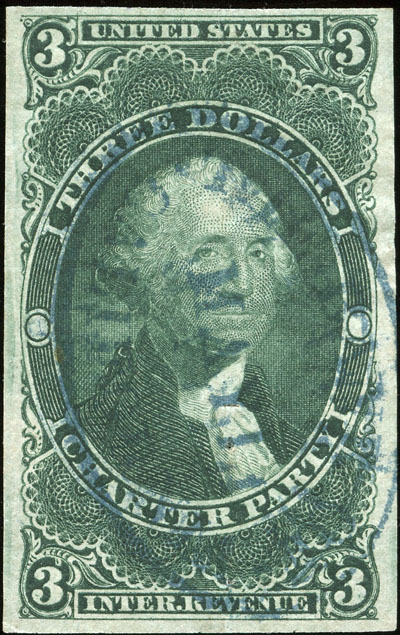


Both the green and blue have heavy cyan and yellow components. Neither CMYK nor RGB channels, or combinations of channels, really do any good. What to do?

Try converting to LAB color. Sometimes the LAB channels will pull out different information. Isolating the b channel, converting it to greyscale, and adjusting the brightness and contrast resulted in the following image:
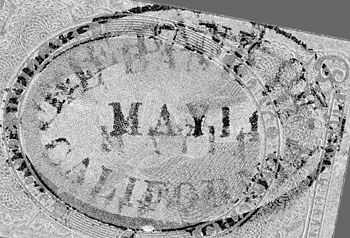


Not perfect, as the cancel was somewhat muddy to begin with, but sufficient to glean two separate strikes of "THE BANK OF CALIFORNIA".
Send note to Staff
Edited by revenuecollector - 06/20/2011 12:12 am

  Previous TopicReplies: 0 / Views: 2,513Next Topic  
 
To participate in the forum you must log in or register.

Go to Top of Page

Disclaimer: While a tremendous amount of effort goes into ensuring the accuracy of the information contained in this site, Stamp Community assumes no liability for errors. Copyright 2005 - 2026 Stamp Community Family - All rights reserved worldwide. Use of any images or content on this website without prior written permission of Stamp Community or the original lender is strictly prohibited.
Privacy Policy / Terms of Use    Advertise Here
Stamp Community Forum © 2007 - 2026 Stamp Community Forums
It took 0.11 seconds to lick this stamp. Powered By: Snitz Forums 2000 Version 3.4.05

