| Author |
 Replies: 26 / Views: 5,396 Replies: 26 / Views: 5,396 |
|
Pillar Of The Community
Canada
1084 Posts |
|
|
|
Irfanview was recommended to me here as a great program to incrementally rotate crooked stamp images and having used it a few times I can concur. However, I noticed that my "save as" images are a barely detectable smaller size and a tad less crisp or sharper than the original. I'm using the default settings when I save. When this happened I tried Gimp and everything came out fine. Same characteristics as the original image. I would like to give Irfanview a fair shake so would appreciate it if someone could give me a few hints as to what I may be doing wrong.
|
|
Send note to Staff
|
|
|
|
|
Moderator

United States
4788 Posts |
|
|
There are two kinds of compression when dealing with images: lossy and lossless. As you might guess, loss LESS is the one you want, because it doesn't discard any of your pixels during save. Make sure you're not reducing quality when you save... http://www.irfanview.com/faq.htm#Q6KirkS |
Send note to Staff 
|
| Edited by kirks - 12/03/2011 5:02 pm |
|
|
Pillar Of The Community
United States
2480 Posts |
|
|
Quote:
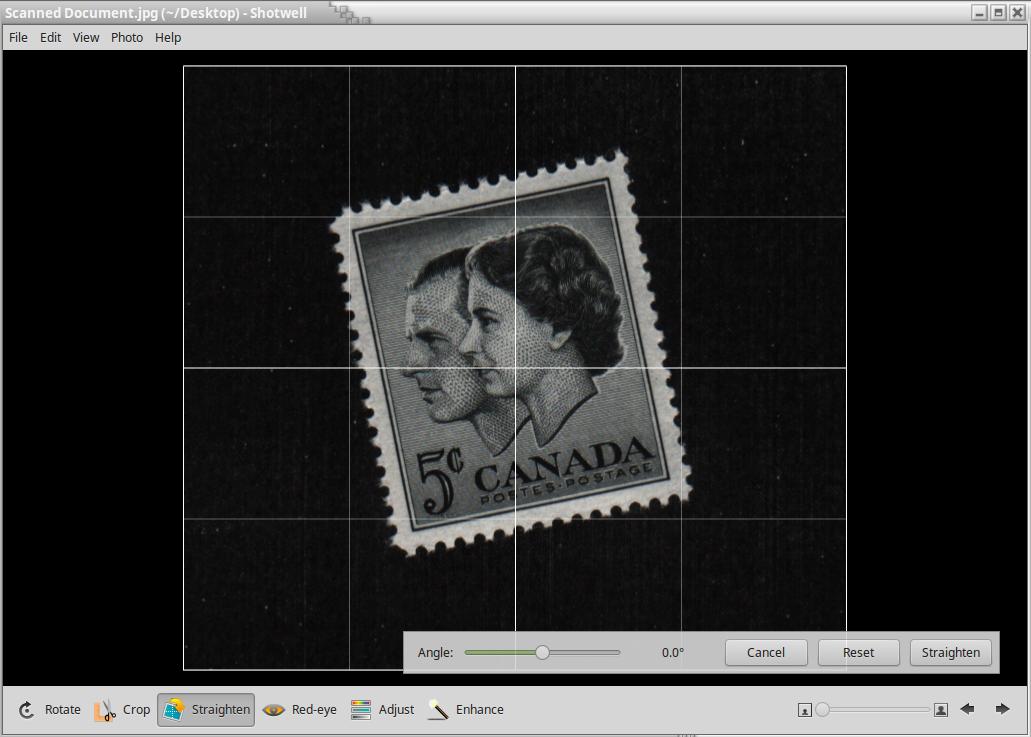
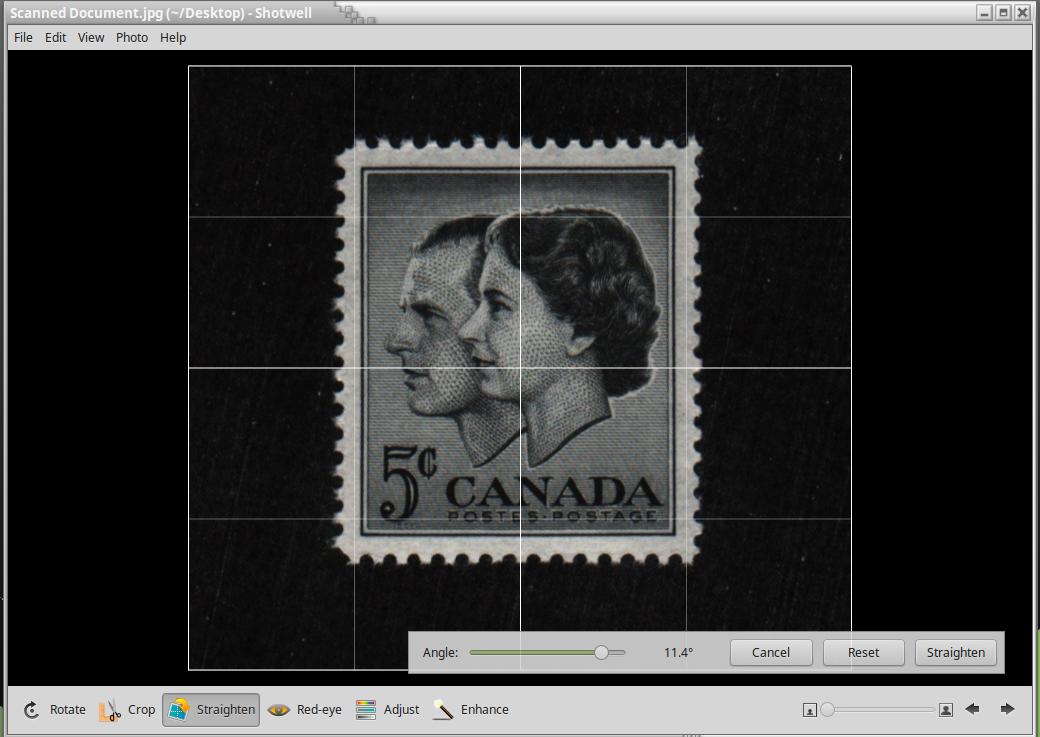
Irfanview was recommended to me here as a great program to incrementally rotate crooked stamp images and having used it a few times I can concur I agree and was very happy using that functionality, although sometimes it seemed like it took forever before I got the image straight. Then I stumbled across the "straighten/rotate image tool" and have been even more impressed. If you're not already familiar with it, follow these simple steps: - Open the Edit menu and select "Show Paint dialog." - Whn the paint dialog bar appears, select the "straighten/rotate image tool" button (highlighted in image below). - Place the cursor over a reference point you've selected (I typically use the stamp's frame line), left click/hold/drag along the line that you want to appear parallel to the top/bottom of your screen, then release. - If needed, either repeat the previous step or use the custom fine rotation function to complete the process. 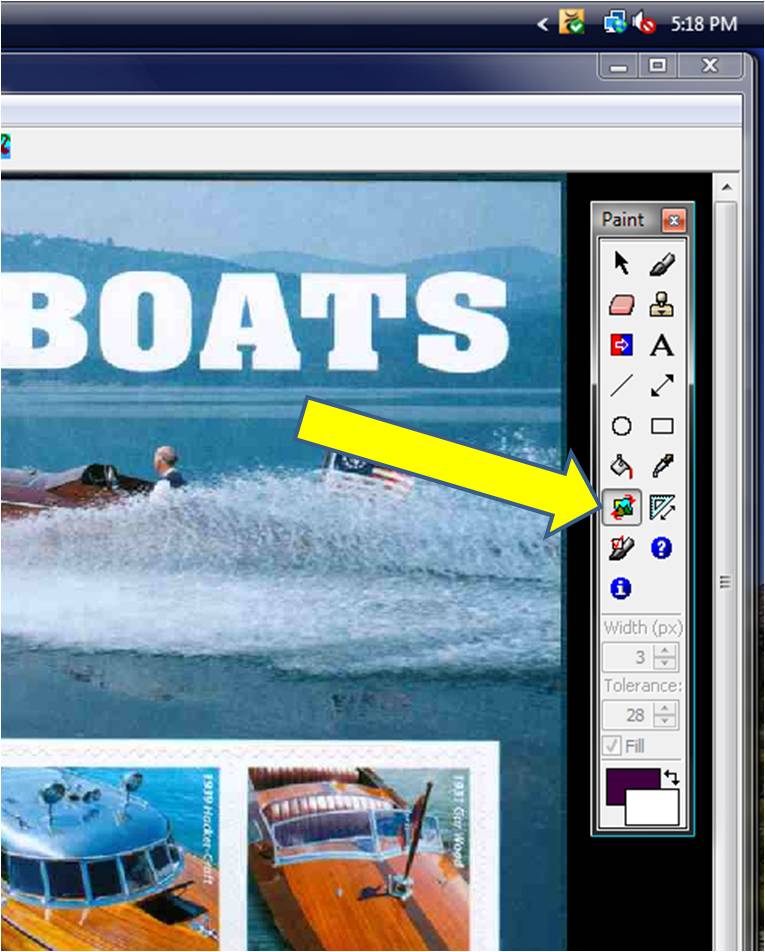 Quote:
However, I noticed that my "save as" images are a barely detectable smaller size and a tad less crisp or sharper than the original. I'm using the default settings when I save. Make sure that you've got the "Save quality" set at 100 and that the "Set file size" box isn't checked. 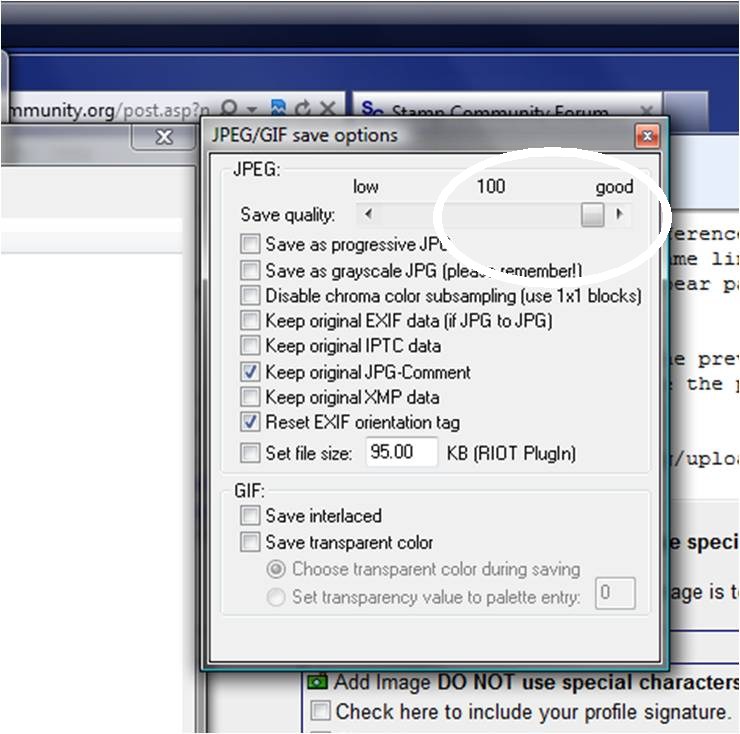 |
|
Send note to Staff
|
|
|
Pillar Of The Community
Canada
5821 Posts |
|
|
I use the straightening feature that comes with Picasa 3 which
seems have a minimal affect if any on the quality of the scan.
But usually I try to place the stamps soldier straight on
the Hagner prior to scanning so I wont have to do any
editing. |
|
Send note to Staff
|
|
|
Pillar Of The Community
Canada
1084 Posts |
|
|
Tomiscksj: thanks for taking the time to put those step-by-step directions and illustrations on here. I struggled all afternoon before throwing in the towel and asking here. They worked like a charm, including the shortcut regarding alignment. Much appreciated! |
|
Send note to Staff
|
|
|
Pillar Of The Community
United States
2480 Posts |
|
|
Glad I was able to be of help.
Let me just add that using that "Set file size" is extremely useful in getting an image ready for upload.
Once I've gotten the image straightened and cropped, I resize/resample to either 800X600 or 1024X768 and then go through the "Save As" procedure with the "set file size" block checked and set at 95kb.
As long as my file name meets the forum naming criteria, uploading images has become problem free.
If you don't go through the resize process before saving at the 95kb file size you risk either getting a "file too large" error message or a very splotchy 95kb image. |
|
Send note to Staff
|
| Edited by tomiseksj - 12/03/2011 9:23 pm |
|
|
Moderator
United States
4788 Posts |
|
|
Good Tutorial, Steve.
Cynical, when you reduce the size for posting here, be sure to remember SAVE AS and give it a new file name, so you still have your 'original' large version.
KirkS |
|
Send note to Staff
|
|
|
Pillar Of The Community
Canada
1084 Posts |
|
|
Lithograving: I tried Picasa when it first came out and it swamped my computer at the time. When I switched on the computer it would jump in to gear and re-index, or whatever, every photo I had on the machine and it took some time doing it so I took it off. I learnt much later (from SCF in fact) that there was a box that I should have un-ticked and that problem wouldn't have happened. I also had ACDSee on my machine and it suited my needs (except for incremental rotation) and Rod introduced me to the fantastic file management function of this little program and I have been cooking with gas ever since.
The irony to this is that since coming to SCF my scanner no longer is gathering dust so I need to straighten more images, which led me to Irfanview just for that one function that ACDSee lacked. So here I am using my old ACDSee version for everything except straightening. I see the day down the road when I will probably gravitate to Picasa given its evolution over the years and the fact that I'm a fan of many of Google's products. |
|
Send note to Staff
|
|
|
Rest in Peace
Australia
631 Posts |
|
|
I use the Microsoft Office Picture Manager tool and have found it easy to use to "slight" rotate images etc |
|
Send note to Staff
|
|
|
Pillar Of The Community
Canada
1084 Posts |
|
|
Kirk: I'm actually guilty of reducing the size of the original to fit here and then going back into my files and deleting the larger image that I worked from. I have since learnt that it is easier to reduce than to move up in size. |
|
Send note to Staff
|
|
|
Pillar Of The Community
United States
7113 Posts |
|
|
You just get an eye for slight rotation using Irfanview. The instant-preview pane is great. For instance, if it is close, but not quite there, I type in ".75" and if that doesn't look quite right I backspace and try a new number. It might not be intuitively obvious, but if you type in "-.5" it will rotate half a degree in the other direction.
I assume (but don't know) that you don't want to be layering incremental rotations. If I rotate and don't like the result, I use "undo" and try again. I think you might lose detail with sequential slight rotations. |
|
Send note to Staff
|
|
|
Bedrock Of The Community
Australia
38679 Posts |
|
|
Informative post,
Using Picasa you can straighten an image in a fraction of a second,
but as Cynical suggests, be careful when you load Picasa
it will try to log every image on your computer,
I nearly laid an egg when that happened to me, and I
panicked and hit the computer on/off button.
Once you overcome that problem and only log say "my documents"
or wherever you send your scans, then it's a breeze.
It uses a toggle switch which enable you to carousel odd stamp shapes
or cut pieces.
Remember to use SCF built-in image resizer for posting large scans.
|
|
Send note to Staff
|
|
|
Rest in Peace
United States
4052 Posts |
|
|
I am not able to crop in IrfanView (4v38).
I can [Select] using the [Paint] tools - in the sense that I can see the box drawn - but the cut/crop choices [Ctrl-X] [Ctrl-Y] under [Edit] are disabled and, in fact, [Ctrl-C] copies the whole image, not just the selection.
The same problem occurs with scanner output, and with images that I have saved & re-opened.
Anybody got any thoughts on what I might be missing?
Cheers,
/s/ ikeyPikey |
|
Send note to Staff
|
|
|
Rest in Peace
7742 Posts |
|
|
Valued Member
United States
396 Posts |
|
|
Also there is PhotoScape free program you can do all that too.
tikithindi. |
|
Send note to Staff
|
|
|
Pillar Of The Community
Australia
554 Posts |
|
|
I always 'sharpen' before I rotate. I've found that images get a little softer after a rotate so sharpening before retains the crispness. I generally don't sharpen after, I don't care for what it does to the pic. |
|
Send note to Staff
|
|
|
Replies: 26 / Views: 5,396 |
|




 Posted 12/03/2011 4:18 pm