| Author |
 Replies: 24 / Views: 3,650 Replies: 24 / Views: 3,650 |
|
Rest in Peace
7742 Posts |
|
|
Hi guy If you have ever had a stamp with a heavy cancellation on it and ever wondered what was behind it...??? Here is a trick for those who are interested and for those who are not, I understand. It is not the best for colour control, but it works...It is one I use and is FREE, and is available for Windows users also. See picture below 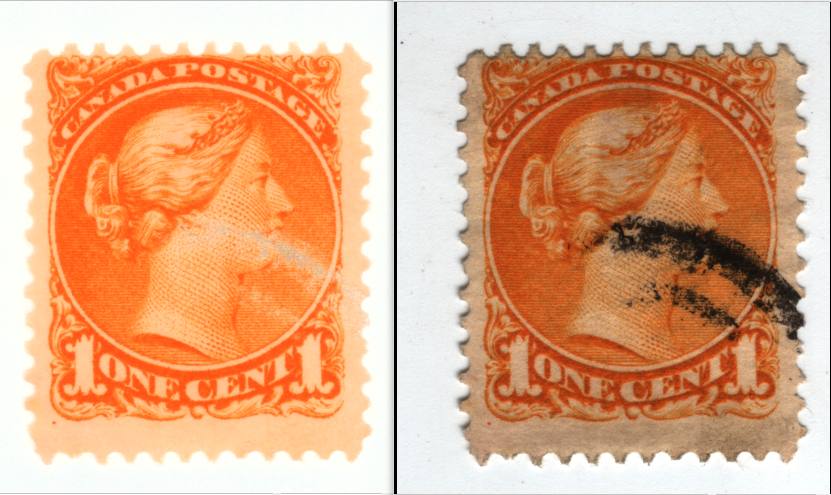 |
|
Send note to Staff
|
|
|
|
|
Valued Member
Canada
379 Posts |
|
|
OK Wert, you have erased the mark but you have also erased what was behind, no? |
Send note to Staff 
|
|
|
Rest in Peace
7742 Posts |
|
|
koala...It is not perfect, but I removed the black and as you can see, probably 90% of what is behind is still in tact. Like I said..Some will like it and others won't..Just an idea I use. Here is the same affect on an American stamp..You tell me if it looks like a lot of detail is lost...??? 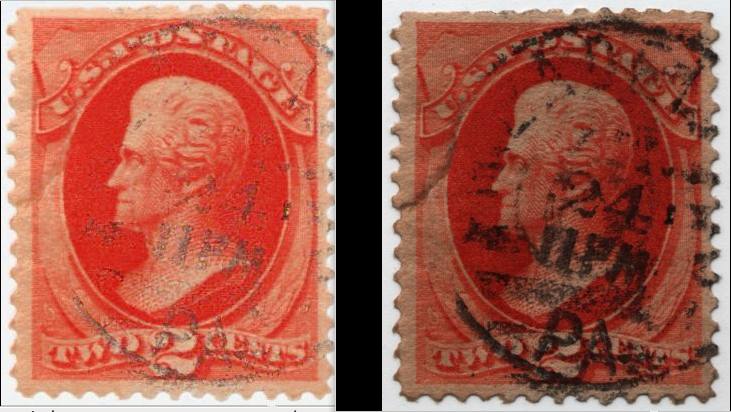 |
|
Send note to Staff
|
| Edited by wert - 02/24/2012 7:41 pm |
|
|
Valued Member
Canada
379 Posts |
|
|
You are not using a some kind of per-lin-pin-pin magical powder do you??
How do you do that??? Peroxide bath? |
|
Send note to Staff
|
|
|
Pillar Of The Community
United States
6756 Posts |
|
|
No, it's being changed through software.
It's actually a useful tool. More than once I've run into the problem of a cancel partially obscuring an important identifying feature for stamp/plate variety. The human eye tends to do "smoothing", so even partially obscured things can seem hopelessly lost. So removing as much of the black helps your eye/mind to focus (i.e., not get distracted or bleed the black cancel into something wider).
Likewise, by doing the opposite, sometimes you can spot a faded/removed cancel. |
|
Send note to Staff
|
|
|
Valued Member
Australia
69 Posts |
|
|
Pillar Of The Community

Canada
3963 Posts |
|
|
That is a very cool trick wert. I came across a stamp that I had a hard time Identifying because of the heavy cancellation. Dianne  |
|
Send note to Staff
|
Don't grumble that the roses have thorns, be thankful that the thorns have roses |
|
|
Valued Member
Canada
379 Posts |
|
|
Pillar Of The Community
Canada
2277 Posts |
|
|
 Please explain - which program and how to. Consider a good % of us are windows users. |
|
Send note to Staff
|
|
|
Rest in Peace
7742 Posts |
|
|
Hi guys I guess I have to give up my secrets (ha,ha)...The program is called " Shotwell Photo Manager" I would right click on a picture (stamp) and say open with the above program...There is a menu called " Adjust"...Open that and have fun...Nice thing about Open Source software...It's FREE. Another picture minipulation program I use that equals " PhotoShop" is a program called " GIMP"...Also FREE HERE is the first screen... 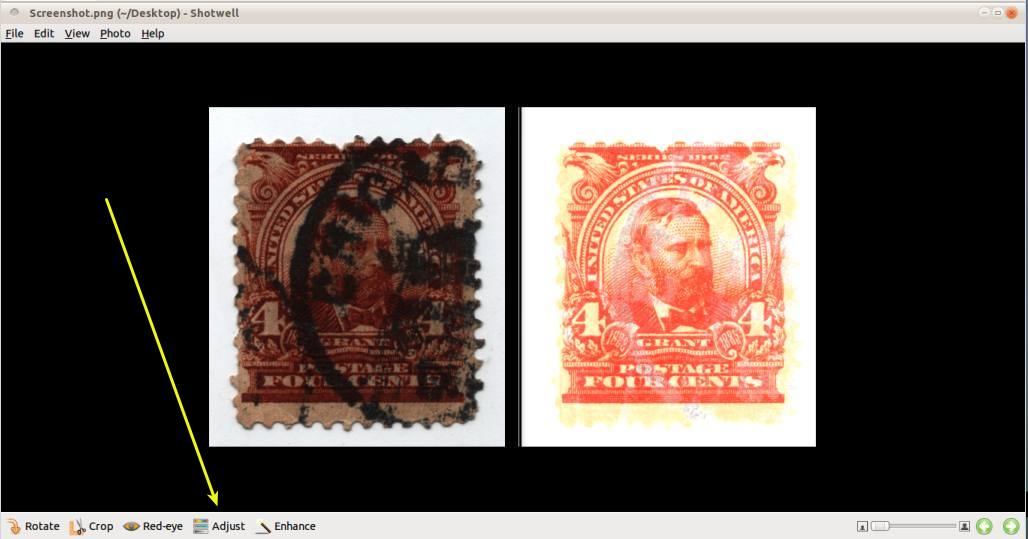 HERE is the adjust menu 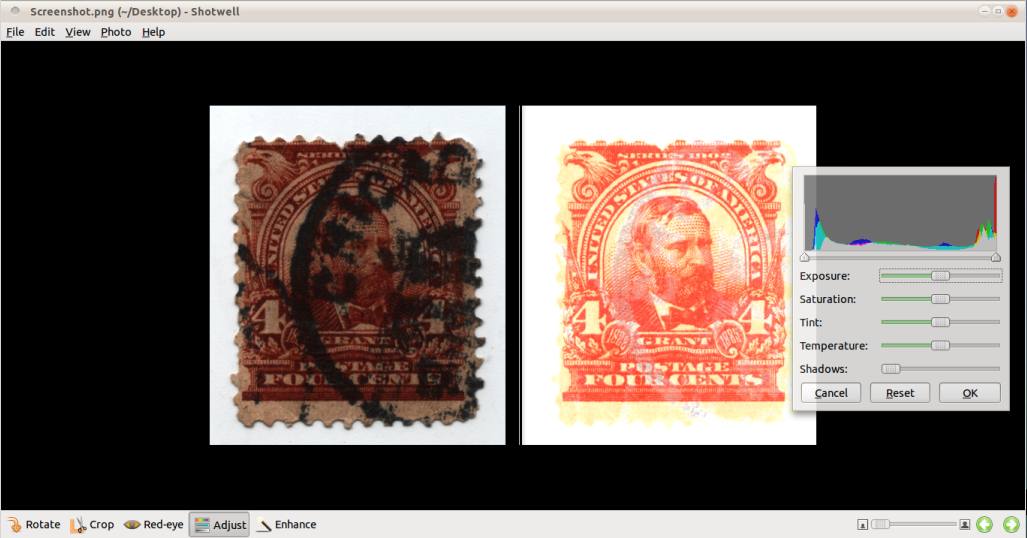 |
|
Send note to Staff
|
| Edited by wert - 02/25/2012 3:50 pm |
|
|
Pillar Of The Community
United States
6756 Posts |
|
|
And I thought you were going to make us answer this first, what is 9+7? Thanks, Wert! I was aware of Gimp, but hadn't seen Shotwell before.  k |
|
Send note to Staff
|
|
|
Pillar Of The Community
United States
2480 Posts |
|
|
Quote:
And I thought you were going to make us answer this first, what is 9+7? He made me do it! Thanks Robert. |
|
Send note to Staff
|
|
|
Rest in Peace
7742 Posts |
|
|
khj...I should have done it as a quiz (9+7)...ha,ha
Hope it helps (everyone).
I also use a program called "Shutter"...It is what I use to bring a picture down to below 100kb and it has other uses to...FREE,FREE,FREE (open source)..I believe it has a Windows version.
Sorry..Forgot to mention that "GIMP" also has a measuring part of it that is something like "BeeSee" uses with AutoCad...But maybe not as good...You be the judge. |
|
Send note to Staff
|
| Edited by wert - 02/25/2012 5:04 pm |
|
|
Rest in Peace
7742 Posts |
|
|
Just an update guys Not only does it remove 95%+, but make the stamp look like it might have been when it was first printed..Look at this Unitrade # 15 stamp. Just for your enjoyment. 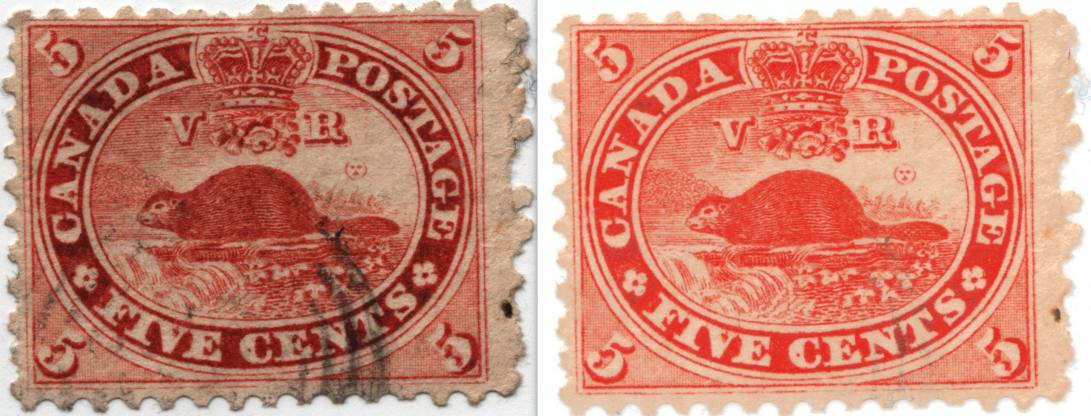 |
|
Send note to Staff
|
|
|
Pillar Of The Community
Canada
1416 Posts |
|
|
Wert, this is one of the most interesting topic I have seen here...thanks |
|
Send note to Staff
|
|
|
Rest in Peace
7742 Posts |
|
|
thanks Gilles le timbre
This could open up a better way to work with stamps that could not be worked with before...i.e. - Heavy cancellation, pen marks, etc.
Hope there are smarter people out there than me that could imagine even more uses for it. |
|
Send note to Staff
|
|
|
Replies: 24 / Views: 3,650 |
|




 Posted 02/24/2012 7:10 pm


 ??
??


