Stamp Community Family of Web Sites
Thousands of stamps, consistently graded, competitively priced and hundreds of in-depth blog posts to read


Stamp Community Forum
 
Username:
Password:
Save Password
Forgot your Password?

This page may contain links that result in small commissions to keep this free site up and running.

Welcome Guest! Registering and/or logging in will remove the anchor (bottom) ads. It's Free!

Having "Fun" With The New Scanner

Next Page    
 
To participate in the forum you must log in or register.
Author Previous TopicReplies: 16 / Views: 3,061Next Topic
Page: of 2
Pillar Of The Community
United States
2952 Posts
Posted 02/22/2013   9:01 pm  Show Profile Check Rileysan's eBay Listings Bookmark this topic Add Rileysan to your friends list Get a Link to this Message
I was given a scanner and am trying to work out the bugs. It is a Canon MP480. I am using the Canon software package called "MP Navigator".

My first image has considerable glare on it. How can I correct this?

Forgive what may sound like rookie questions. I am color blind and I have a history of just giving up on anything to do with photography and light. What's obvious to most, is foreign to me :)

Brian

Send note to Staff

Pillar Of The Community
1448 Posts
Posted 02/22/2013   9:08 pm  Show Profile Bookmark this reply Add Jkjblue to your friends list  Get a Link to this Reply
Is the stamp scanned while in a mount? ( can't quite tell) The glare seems to be coming off the mount?
Send note to Staff  Go to Top of Page
Classical era collecting with the Blues
http://bigblue1840-1940.blogspot.com/
Pillar Of The Community
United States
2952 Posts
Posted 02/22/2013   9:13 pm  Show Profile Check Rileysan's eBay Listings Bookmark this reply Add Rileysan to your friends list  Get a Link to this Reply

Quote:
Is the stamp scanned while in a mount?


Correct. I have serious reservations about placing this stamp by itself on the scanner.
Send note to Staff  Go to Top of Page
Pillar Of The Community
United States
2480 Posts
Posted 02/22/2013   9:30 pm  Show Profile Bookmark this reply Add tomiseksj to your friends list  Get a Link to this Reply

Quote:
My first image has considerable glare on it. How can I correct this?


The glare is caused by the curvature of the mount near the seam. If you don't want to scan the stamp outside of a mount then you'll need to use a larger mount so that the scanned portion lays flat against the scanner bed. You might be able to eliminate the glare by turning the stamp sideways in the mount that you originally scanned it in.
Send note to Staff  Go to Top of Page
Pillar Of The Community
1448 Posts
Posted 02/22/2013   9:31 pm  Show Profile Bookmark this reply Add Jkjblue to your friends list  Get a Link to this Reply
Fair enough. The glare though looks like it is scanner light reflected off the mount.

BTW, the color is in the ballpark for "brown lilac", although some examples may have a bit more brown.
Send note to Staff  Go to Top of Page
Classical era collecting with the Blues
http://bigblue1840-1940.blogspot.com/
Pillar Of The Community
2361 Posts
Posted 02/22/2013   9:46 pm  Show Profile Bookmark this reply Add doug2222 to your friends list  Get a Link to this Reply
"I have serious reservations about placing this stamp by itself on the scanner."

Why?? That's all I've ever done. Images through mounts, glassines, and stock cards are third-rate at best. It defeats the whole purpose of buying a good scanner.
Send note to Staff  Go to Top of Page
Pillar Of The Community
United States
6433 Posts
Posted 02/22/2013   10:09 pm  Show Profile Check revenuecollector's eBay Listings Bookmark this reply Add revenuecollector to your friends list  Get a Link to this Reply
I agree. The more layers of glass/plastic between the optics and the target, the greater the distortion, aberrations, etc.

Everything I scan for my website goes right on the glass.

It's the only way to fly.
Send note to Staff  Go to Top of Page
Pillar Of The Community
United States
2952 Posts
Posted 02/22/2013   10:31 pm  Show Profile Check Rileysan's eBay Listings Bookmark this reply Add Rileysan to your friends list  Get a Link to this Reply

Quote:
Everything I scan for my website goes right on the glass.

It's the only way to fly.


*sigh* Talk about peer pressure.

I don't know why, but it just feels wrong. But I put on my big-boy pants and did the job. Here's the result. Not exactly what I had in mind ...

Brian



Send note to Staff  Go to Top of Page
Rest in Peace
Canada
5701 Posts
Posted 02/22/2013   10:33 pm  Show Profile Bookmark this reply Add BeeSee to your friends list  Get a Link to this Reply
Put a piece of black card stock over the back of the stamp, then scan.
Send note to Staff  Go to Top of Page
BeeSee in BC
"The Postmark is Mightier than the Stamp"
http://brcstamps.com ---- BNAPS, RPSC, APS
Pillar Of The Community
United States
2952 Posts
Posted 02/22/2013   10:43 pm  Show Profile Check Rileysan's eBay Listings Bookmark this reply Add Rileysan to your friends list  Get a Link to this Reply
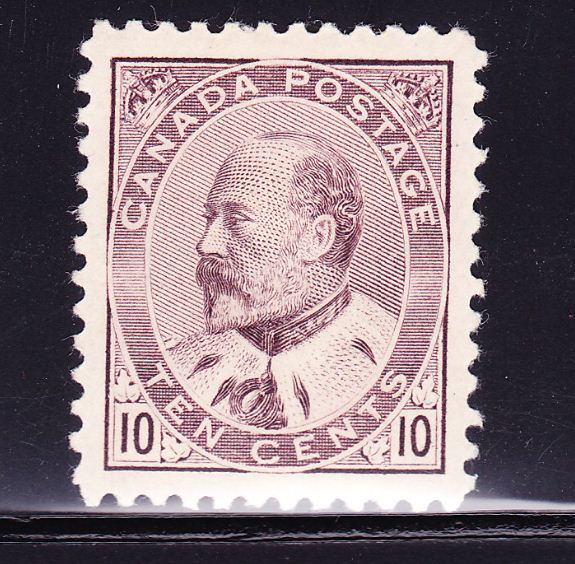
How's this?

It seems overly-bright to me. I'd also like to square up the image.



Send note to Staff  Go to Top of Page
Pillar Of The Community
United States
2941 Posts
Posted 02/22/2013   10:44 pm  Show Profile Bookmark this reply Add PostmasterGS to your friends list  Get a Link to this Reply
I always place mine directly on the glass.

And as to the black background, I went to Hobby Lobby and bought a large sheet of semi-gloss black paper, then attached it to the inside of my scanner lid so I don't have to fool with manually placing a piece of card stock over the stamp each time.
Send note to Staff  Go to Top of Page
Presenting the GermanStamps.net Collection - Germany, Colonies, & Occupied Territories, 1872-1945
Pillar Of The Community
669 Posts
Posted 02/23/2013   08:40 am  Show Profile Bookmark this reply Add graphis to your friends list  Get a Link to this Reply
In my experience some stamps don't scan that well...which I think is the situation in this case..why not try to scan another stamp and see if you notice a difference. BTW...what DPI setting are you using?
Send note to Staff  Go to Top of Page
Rest in Peace
United States
7097 Posts
Posted 02/23/2013   09:42 am  Show Profile Bookmark this reply Add I_Love_Stamps to your friends list  Get a Link to this Reply
Here you go Brian-
Send note to Staff  Go to Top of Page
Pillar Of The Community
United States
2952 Posts
Posted 02/23/2013   9:28 pm  Show Profile Check Rileysan's eBay Listings Bookmark this reply Add Rileysan to your friends list  Get a Link to this Reply
Well done, Jeff! How did you square it up?
Send note to Staff  Go to Top of Page
Pillar Of The Community
Canada
5821 Posts
Posted 02/23/2013   9:36 pm  Show Profile Bookmark this reply Add lithograving to your friends list  Get a Link to this Reply
Picasa has a straightening tool which is very easy to use.
Send note to Staff  Go to Top of Page
Pillar Of The Community
United States
6433 Posts
Posted 02/23/2013   10:18 pm  Show Profile Check revenuecollector's eBay Listings Bookmark this reply Add revenuecollector to your friends list  Get a Link to this Reply
I'm guessing that there is autobrightness/autocontrast enabled in the scanning software, which is why the image appears too bright. Try disabling thT option.
Send note to Staff  Go to Top of Page
Page: of 2 Previous TopicReplies: 16 / Views: 3,061Next Topic  
Next Page
 
To participate in the forum you must log in or register.

Go to Top of Page

Disclaimer: While a tremendous amount of effort goes into ensuring the accuracy of the information contained in this site, Stamp Community assumes no liability for errors. Copyright 2005 - 2026 Stamp Community Family - All rights reserved worldwide. Use of any images or content on this website without prior written permission of Stamp Community or the original lender is strictly prohibited.
Privacy Policy / Terms of Use    Advertise Here
Stamp Community Forum © 2007 - 2026 Stamp Community Forums
It took 0.25 seconds to lick this stamp. Powered By: Snitz Forums 2000 Version 3.4.05

