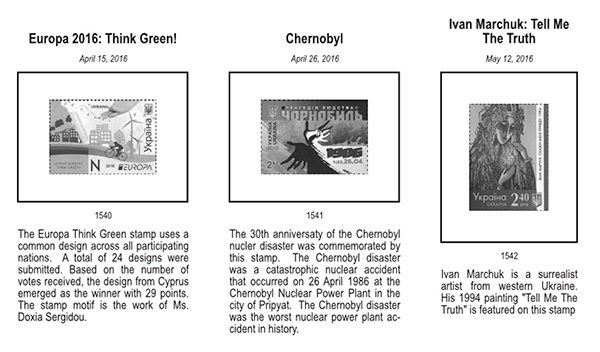
This started out as a simple update to add one feature, but I ended up having to re-code the majority of the script. For this reason, some bugs or errors may have crept into it, so if you hit a problem, please let me know ASAP.
Changes from v1.2.7
1. Changed script to prevent need for end user to manually edit filepaths in the script upon installation 2. Added ability to generate sets with each stamp having its own frame
Installation
One additional step is necessary to make presets work. Due to the addition of new options on the Settings tab, old presets no longer align properly with the settings on the Settings tab. To fix this, before using presets, go to the Presets tab and click the first button on the SAPG toolbar. This will add the new blanks to the presets on your Presets tab, making the presets once again align properly with the Settings tab. See the video.
New Features
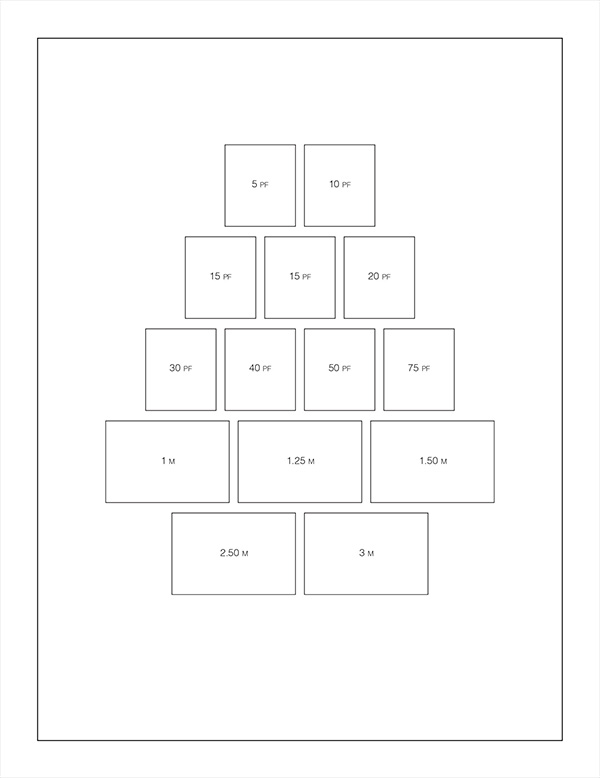
Watch the video linked below for details. The short version, it'll let you generate layouts like this all at once, instead of generating the separate boxes and then manually aligning them.
3yktL2tPjNs
As usual, the latest version can always be found at my website.
You're welcome. Do you feel like Steve Martin in The Jerk? The new SAPG is here! This is the kind of spontaneous publicity that makes people!
This was a large-scale rewrite of the code, and I'm pretty sure there are some bugs. There are just too many combinations and permutations of placement options to test them all. If you come across anything that's not behaving as it should, just let me know.
In the course of adding some additional features, I discovered that the newer developmental releases of Scribus have a lot of problems with the script. If you're going to use it, make sure to download the last stable version (1.4.6) of Scribus, not the developmental versions (1.5.1 or .2) until I can get the new issues resolved.
To give everyone an idea of what I'm working on next, this page was generated in a single run of the script -- 14 stamps in 5 rows, all centered, with face values inside the frames a la Steiner.
1.5x file format is NOT backward compatible and the release is still quite buggy. Hyphenator doesn't work yet. Shrink to fit text boxes don't work as expected.
LOTS of great new features, including a unified interface with docked tool windows. But def not ready for production yet.
I have created about 15 pages with 1.5.2. I did notice the shrink to fit has not working but not a showstopper for me.
I am sure this is common to all versions but as you add objects they are essentially on a different layer so over time if you reuse pages to make another one the older objects cannot be clicked when under the newer ones (like having polygon on layer 1 and polygon on layer 20 yet you only have 5 or 6 polygons. It would be nice to be able to reset all levels to compress them. It is seems you can click "back" objects if the layers are close.
The 1.5 branch is the dev branch. 1.6 will be the next stable branch. 1.5.3svn fixex the shrink to fit issue and introduces the dockable windows. A lot to love in that release. But I need the hyphenator working before I can switch to it, so I'll hang around and see what they have in 1.5.4.
Admittedly, I don't have a lot of experience using Scribus, so apastuszak can correct me if I'm wrong, but I don't believe there's currently the ability to flatten all layers into one.
That being said, the script always places the boxes on the current (selected) layer. If you use multiple layers, the trick is to make sure you're on the same layer as the other boxes on the page prior to generating new boxes. Or, once generated, right click on the new boxes, select "send to layer", then select the layer your other boxes are on.
There's a "layers" option in Scribus, but it does something completely different. Unless you specifically make a layer, I think everything is in the same layer, just at different heights in that layer, kind of like the old MacDraw used to to things, where you could lower and raise things, or bring it to the top or bottom.
I made some layers in Scribus before for catalog numbers, and then I just turned off the catalog number layer and all the catalog numbers were hidden.
Andy, on some Mystic pages I recall you changed the style of the catalog number so it would be transparent so it would not show. You just had to change the catalog number style to black and it showed up. Maybe you are saying the same thing.
There is a layer aspect but think it is not the same as some graphics. They are degrees since you can select an object under another object until they are too many layers apart. It is like being translucent to a certain depth.
As I understand it, the lowest layer is 1 (where you start) and then as you add stuff the layers build up.
Disclaimer: While a tremendous amount of effort goes into ensuring the accuracy of the information contained in this site, Stamp Community assumes no liability for errors. Copyright 2005 - 2026 Stamp Community Family - All rights reserved worldwide. Use of any images or content on this website without prior written permission of Stamp Community or the original lender is strictly prohibited. Privacy Policy / Terms of UseAdvertise Here





 Posted 02/13/2017 3:14 pm