I agree with 51studebaker. Why would anyone use imagining software when selling stamps. It. mite not be false advertising but is hanging on a thread. Not to sound mean or saying anyone is cheating, but it would be easy to hide imperfections. I like the " What you see is what you get". I see nothing wrong with what a black background and cropping and keeping things clean, but please nothing that alders the stamp. That's just me, but then I'm just a Newby Stamper.
Edit: Sorry forum but it seems I answered a question that really wasn't ask and I appoligize. The question was how do you make your stamp presentable without having a bunch of background clutter show up. With that I say whatever you can do to make it look presentable without all the background clutter. There were some good responses that I'm going to try.
Its not as simple as that. A scanner and computer will need calibrating to match their systems of scan colour so that the PC/Mac will display screen colour matching that of the the scanner (I use Adobe RGB 1998 for both). Once having done this the settings will still need recalibrating from time to time. I use Adobe Photoshop Suite for artwork and photographs and I find screen colour needs to be re-calibrated about once a month. (Are Macs subject to the Lunar cycle?).
And after all that you will be very lucky indeed if your first direct scan is a good match for the original, almost always there needs to be some small adjustment in colour density, tone and highlight. In reality it really depends on time available and what would be accepted as a reasonably accurate representation of the original. The standards required for image print reproduction would be unrealistic for the purposes here. But we can go some way to getting an honest image.
I usually scan with a black background from a removable crafting paper.
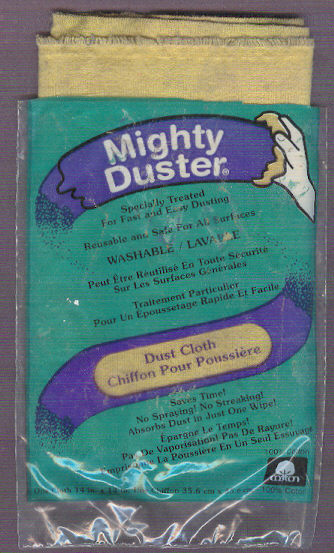
For dust removal I use a dust cloth called Mighty Duster I bought at Wal-Mart that does not require any water or spray to work. A quick swipe of the scanner glass and the Vario plastic page (if used) or even stamp itself (gently) does the job.
Not as good as the anti-static brush and others, but useable and workable.
Good advice puzzler . Also Hagner pages work well . The "photograph paper" used cuts down on the glare. ================================================== Also from reading page one of this topic I think people use the photo editing software to crop the image not enhance it.( make the scan smaller to the dimensions of the stamp).
It makes sense to limit the area of black in the scan to a narrow margin. If stamp scans to the site are limited in file size and page area then using a narrow black border will maximise the displayed stamp image area.
Many honest people use imaging software to clean up the black background, not to change the image of the stamp. There are various tools that allow one to do this. It's not very important for ebay, but for more permanent sites it can be a big improvement.
Disclaimer: While a tremendous amount of effort goes into ensuring the accuracy of the information contained in this site, Stamp Community assumes no liability for errors. Copyright 2005 - 2026 Stamp Community Family - All rights reserved worldwide. Use of any images or content on this website without prior written permission of Stamp Community or the original lender is strictly prohibited. Privacy Policy / Terms of UseAdvertise Here





 Posted 10/13/2013 09:49 am