| Author |
 Replies: 21 / Views: 8,212 Replies: 21 / Views: 8,212 |
|
Pillar Of The Community
Canada
1084 Posts |
|
|
|
Looking at most scans with black backgrounds there is often hair, dander, etc displayed and this is typically the case with my old scans although on a few occasions I have got lucky and this detritus was outside the image crop area. Also, I have tried numerous black backgrounds and some have a texture that I wasn't aware of or some come out with a slight purple hue.
Having said this I see some members have black backgrounds that are clean and shiny. Are the rest of us just slovenly or is there a way to provide a background that is part of the scanner software or a function of subsequent enhancements made with other image software such as Photoshop.
|
|
Send note to Staff
|
|
|
|
|
Pillar Of The Community
United States
6668 Posts |
|
|
I think the idea for me is to show as little of the black background as possible.  |
Send note to Staff 
|
|
|
Pillar Of The Community
United Kingdom
1187 Posts |
|
|
Hi cynical,
First, keep the scanner glass and backing sheet in the scanner lid clean. Second, If scanning stamps in black Vario, Hagner, or Lindner type stock pages then clean the clear strip and black bacground. An anti-static brush and lens cloth will work wonders for both tasks. Avoid fluids of any kind. Any small bits that are missed and that show on the scan can be blotted out with the clone and stamp tool in Photoshop, or similar image editing software, using a smallish, soft edged,circular brush selection tool. Avoid using the dust removal tool in Photoshop, it rarely works well and only increases the scan time
Terry |
|
Send note to Staff
|
|
|
Pillar Of The Community
United States
1121 Posts |
|
|
I've thought about getting an anti-static brush that record (LP) collectors use. Is it the same? |
|
Send note to Staff
|
|
|
Pillar Of The Community
United Kingdom
1187 Posts |
|
|
Yes, but the best type for this work is that used by photographers to clean film negatives. I use this one by Kenro, it is 3" x 2" and very soft. It must be kept in a small poly bag when not in use. Any similar will do though. Try Amazon or the bay. Terry 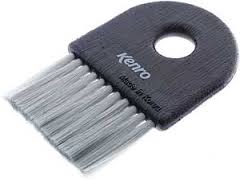 |
|
Send note to Staff
|
| Edited by Terence Collins - 10/06/2013 11:23 pm |
|
|
Valued Member
213 Posts |
|
|
Bedrock Of The Community
United States
10862 Posts |
|
|
I have scanned thousands of stamps; I always clean up the background using GIMP, a free open source image software. |
|
Send note to Staff
|
|
|
Rest in Peace
Australia
631 Posts |
|
|
When scanning for reference purposes etc I use a piece of black cardboard (you dont have to worry about static etc) and then crop the image (like stallzer) so that all you see is the stamp/cover with a small margin around it - |
|
Send note to Staff
|
|
|
Pillar Of The Community
United Kingdom
1187 Posts |
|
|
Yes, staltzer is spot on. That is the recommended way to crop any image for final scan as the extra unnecessary black and/or background areas just waste pixels and increase the scanning time.
Terry |
|
Send note to Staff
|
| Edited by Terence Collins - 10/09/2013 1:46 pm |
|
|
Pillar Of The Community
Canada
1084 Posts |
|
|
Forgive me for tip-toeing through the tulips (I've closely cropped my fair share of scans for detritus reasons) but there is something to be said for a nice shiny black surround that draws the eye in so that one can fully appreciate the artistry. |
|
Send note to Staff
|
|
|
Forum Dad

USA
2059 Posts |
|
|
Find a box roughly the same size as your scanner glass and spray the inside black. Set that over the glass instead of closing the lid. You will LOVE your black background. |
|
Send note to Staff
|
|
|
|
Pillar Of The Community
United States
4183 Posts |
|
|
It may vay with different scaner, but if I pace a stamp bare onto my scanner's glass and leave the lid up, it gives me a darker black than if I use one of those black stock cards (but one must use care getting the stamp off the glass as you don't want to damage the stamp or scratch the antireflection coating on the glass). |
|
Send note to Staff
|
|
|
Moderator
United States
12330 Posts |
|
|
Interesting subject raised in this thread, the use of image altering software when generating stamp images for resale.
Backgrounds to make a stamp stand out better certainly seem acceptable but concerns arise when any type of imaging filter or other imaging algorithm is being applied. A 'dust removal' algorithm can't discriminate between removing a dust spec on the glass or a flaw on the stamp.
I sometimes wonder how much some sellers rely upon imaging software to improve the appearance of their stamp images. My guess is that some use this to the point of deception and simply rely upon the 'every scanner, video card, and monitor may differ' as the justification. Frankly, even resizing an image runs an algorithm that can hide/reduce some flaws (and some who know this will resize images intentionally to do so).
IMO it is best to avoid the use of any imaging software algorithms when generating images for resale. If you are considering buying a higher priced stamp with an online image(s) as your primary guide, consider asking the seller questions about those images or asking them for an unmodified image(s). Note; a unmodified scanned image would also include being scanned at the scanners highest optical resolution; this is generally around 1200 dpi. (Most scanner manufacturers throw around 'maximum resolution' which is interpolated resolution achieved by using a software algorithm.)
|
|
Send note to Staff
|
|
|
Rest in Peace
United States
7097 Posts |
|
|
The only things I use in Picasa3 is the straighten and Crop. Once in awhile if the image is really washed out I can use the darken background slider to apply the smallest bit of tint if I need it.
edit:
I forgot to say what I use as a background- Simply a black Vario section divider. it's just a flat piece of black pvc that goes in between the binders front and back boards and I also use them between different sections in my binders. They work really well. |
|
Send note to Staff
|
| Edited by I_Love_Stamps - 10/13/2013 08:09 am |
|
|
Pillar Of The Community
United States
5894 Posts |
|
|
I usually use a black stock page, stock card or 102 card. And more recently, like Stallzer, prefer to crop the stamps rather tightly. 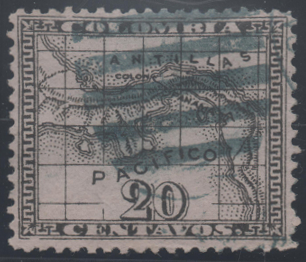 |
|
Send note to Staff
|
|
|
Pillar Of The Community
United Kingdom
1187 Posts |
|
|
51studebaker makes a good point. It is always best when scanning to not use dust removal, colour restoration, or other image enhancement tools so that as honest an image as possible is made. There is nothing wrong with using the clone/stamp tool to remove white spots from the background as this is not impacting on the stamp representation.
But even when a scan has been made, and the screen image density and colour is matched to the actual stamp in front of you, the image the viewer sees may differ somewhat from your view depending on how well his PC (or Mac) screen colour is calibrated. All we can do is make our scans as accurate as possible as viewed on our own screens. This applies to direct scans and photos taken and uploaded into Photoshop or whatever image editing and handling software is in use.
Any attempt to enhance colour, remove defects or otherwise improve the image beyond its reality is deliberate deception.
Terry |
|
Send note to Staff
|
|
|
Replies: 21 / Views: 8,212 |
|




 Posted 10/06/2013 4:59 pm


