Stamp Community Family of Web Sites
Thousands of stamps, consistently graded, competitively priced and hundreds of in-depth blog posts to read


Stamp Community Forum
 
Username:
Password:
Save Password
Forgot your Password?

This page may contain links that result in small commissions to keep this free site up and running.

Welcome Guest! Registering and/or logging in will remove the anchor (bottom) ads. It's Free!

Playing Around With Technology...

 
To participate in the forum you must log in or register.
Author Previous TopicReplies: 12 / Views: 2,024Next Topic  
Pillar Of The Community
United States
6433 Posts
Posted 10/19/2013   10:59 pm  Show Profile Check revenuecollector's eBay Listings Bookmark this topic Add revenuecollector to your friends list Get a Link to this Message
For the last 5 years or so, I've been using a Brother QL-500 to print various and sundry address and return labels, binder labels, and the dealer sales cards I store many items in.

http://www.brother-usa.com/LabelPri....UmNBahCkvuo

It's a great printer in that it's completely inkless. No cartridges to buy, no ink to dry, smudge, or smear. It's a thermal printer, similar to credit card receipt printers, but better quality. The label rolls are a bit on the expensive side, but there are plenty of generic equivalents (see ebay) that can cost less than half of the name-brand labels when purchased in quantity.

This weekend I decided to send out my wantlists for CHICAGOPEX, and when I started to stick on the plain return labels I normally use, I stopped and decided I wanted something a little more philatelic. Something that indicated my website or collecting focus on the outside of the envelope.

One of the problems with thermal printers is that unlike inkjet or laser printers, they are monochrome. No shades of gray, just pixels on or off. That doesn't lend itself well to graphic images like photos of stamps. Yes, you can convert images to bitmap using various dithering patterns, but they normally end up looking pretty horrific, especially at the size we're talking about.

What I didn't realize is that the software that comes with the printer takes care of all of that for you, and its built-in default conversion from color or grayscale images to the monochrome output is actually very good. The only thing I had to tweak was some of the contrast and channel settings in order to make the cancel on one of the stamps stick out from the stamp itself (the stamp in question is actually very dark blue, so the black cancel isn't very apparent when converted to bitmap).

It still uses dithering to simulate grayscale, so it's not perfect, but in my opinion perfectly acceptable.

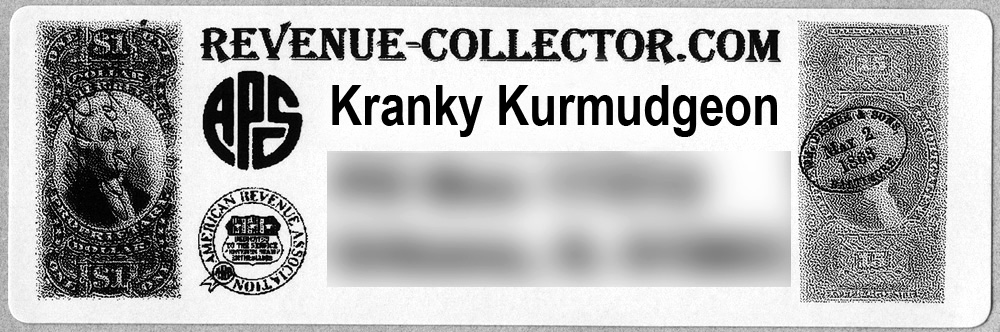
After some trial runs, repositioning, and more tweaking, I came up with an address label I'm quite pleased with... instant graphic label with no drying or smudging.

This is a scan of an actual printed label (address obfuscated).
Send note to Staff

Valued Member
33 Posts
Posted 10/20/2013   02:07 am  Show Profile Bookmark this reply Add Rjf to your friends list  Get a Link to this Reply
Just went to the site in link. I like it but it says it supports up to Windows XP. I have Windows 7, wonder if it would still work?
Send note to Staff  Go to Top of Page
Pillar Of The Community
United States
1614 Posts
Posted 10/20/2013   10:04 am  Show Profile Bookmark this reply Add Mike33 to your friends list  Get a Link to this Reply
very nice looking!
Send note to Staff  Go to Top of Page
Moderator
Learn More...
United States
12330 Posts
Posted 10/20/2013   10:55 am  Show Profile Bookmark this reply Add 51studebaker to your friends list  Get a Link to this Reply
Dan,
Hi. I have a lot of experience with thermal labels and they have a lot going for them if you do a lot of labeling and in terms of cost. But be aware that there are two types of thermal printing technologies; direct thermal labels and thermal transfer labels.

With direct thermal printing the print head applies heat to the label; the label itself has a chemically treated coating which blackens when exposed to the heating. I would offer caution on two things. First, be aware that the thermal label stock is key with this type printer. If you simply shop for the cheapest label, or get 'off brands', you may not be happy with the output. Second, direct thermal labels can fade significantly over a relatively short period of time (i.e. 6-8 months).

If you want a longer lasting thermal label then a thermal transfer label. A thermal transfer label has a separate roll of 'transfer' that meets with the label stock and is them thermally applied. These types of thermal labels will last many, many years.

The way to determine if the label stock you have is the short-lived direct thermal label vs. the long-lasting thermal transfer label is do the following test. Place a label face up on a hard surface and rub your fingernail or other hard object across the label; if it marks you have the short-lived direct thermal labels.
don
Send note to Staff  Go to Top of Page
Pillar Of The Community
United States
6433 Posts
Posted 10/20/2013   11:12 am  Show Profile Check revenuecollector's eBay Listings Bookmark this reply Add revenuecollector to your friends list  Get a Link to this Reply

Quote:
Just went to the site in link. I like it but it says it supports up to Windows XP. I have Windows 7, wonder if it would still work?


When I click on the "Specifications" tab, it reads "Windows® 2000, Windows® XP, Windows Vista®, Windows® 7; Windows® 8; Mac OS X 10.8.x".


Quote:
If you simply shop for the cheapest label, or get �off brands', you may not be happy with the output. Second, direct thermal labels can fade significantly over a relatively short period of time (i.e. 6-8 months).


I've gone through several different generic label rolls (as I originally wrote, I've been using this printer for 5+ years). Maybe I've just gotten lucky, but I've not seen any marked difference in print quality. The only major difference I've seen (which HAS been an issue) is that the adhesives used vary considerably in quality.

The items I've labeled for long-term storage have not faded, at least not over 3-5 years. Now, the items in question are stored in complete darkness, which may be contributing to their longevity.
Send note to Staff  Go to Top of Page
Moderator
Learn More...
United States
12330 Posts
Posted 10/21/2013   08:38 am  Show Profile Bookmark this reply Add 51studebaker to your friends list  Get a Link to this Reply
Dan,
Not sure why you have had good results but if you search online you can find many references which recommend to not use direct thermal technology for long-term labeling of items. Here are just a few.

"Not used for lifetime identification applications"
http://blog.rmsomega.com/bid/48126/...fer-Printers


"If you need a label to last longer than 6 months you should look into purchasing a thermal transfer printer."
http://internationalpointofsale.com...thermal.html

Again if you are having good luck than by all means stick with it. But I felt it important to post the possible issues that others might see if they invest in this kind of technology.
don
Send note to Staff  Go to Top of Page
Pillar Of The Community
United States
6433 Posts
Posted 10/21/2013   09:10 am  Show Profile Check revenuecollector's eBay Listings Bookmark this reply Add revenuecollector to your friends list  Get a Link to this Reply
I appreciate the information and will certainly keep an eye on label degradation, however we are talking apples and bowling balls when it comes to the costs associated with thermal transfer vs. direct thermal. Thermal transfer is prohibitively expensive... jaw-droppingly so.

First, the equipment starts at $250 and goes up from there, versus $50-60 for the unit I use.

More importantly though, the label media itself is more than an order of magnitude more expensive. Using the 3.5" x 1" label size I currently use:

Thermal transfer: 124 labels per roll @ ~$28 per roll = $0.23 per label (assuming no spoilage)

Direct thermal: 400 label rolls @ $3.00 = less than $0.01 per label

The media costs on thermal transfer will literally eat you alive. Just looking at the last mailing I sent out for Chicagopex (57 letters x 2 labels = 114 labels), if I had used thermal transfer the label media cost alone would have been almost $26, whereas the direct thermal cost was $1.14.

It's on a completely different scale that is simply not viable for nonindustrial applications.
Send note to Staff  Go to Top of Page
Rest in Peace
United States
7097 Posts
Posted 10/21/2013   09:20 am  Show Profile Bookmark this reply Add I_Love_Stamps to your friends list  Get a Link to this Reply
Hey revenue collector...1 more post and you're at 1K !!
Send note to Staff  Go to Top of Page
Pillar Of The Community
United States
6433 Posts
Posted 10/21/2013   09:47 am  Show Profile Check revenuecollector's eBay Listings Bookmark this reply Add revenuecollector to your friends list  Get a Link to this Reply
Woot.
Send note to Staff  Go to Top of Page
Moderator
Learn More...
United States
12330 Posts
Posted 10/21/2013   10:23 am  Show Profile Bookmark this reply Add 51studebaker to your friends list  Get a Link to this Reply
Dan
No question about it, thermal transfer technology is far more expensive AND complicated. I have purchased well over a dozen label printers over the last 20 years and literally hundreds and hundreds of rolls of label stock. And frankly after working with many thermal transfer printers (such as Zebras in the $1800- $2500 range) I am here to tell you that they are not for simple home labeling needs. They can be very difficult to configure and the transfer roll often can produce wrinkles and other printing issues on the label (believe it or not this is caused by bad label layout/designs!).

On the other hand cheap direct label printers are given away for free if you are willing to commit to buying the label stock. I still have several DHL/UPS/FedEx free label printers laying around unused. Speaking for myself, I wouldn't spend time using them to identify anything that needed a label long-term. If I was pressed for an opinion on a home labeling solution I would lean towards a solution using the person's existing home printer.
don
Send note to Staff  Go to Top of Page
Pillar Of The Community
United States
6433 Posts
Posted 10/21/2013   11:32 am  Show Profile Check revenuecollector's eBay Listings Bookmark this reply Add revenuecollector to your friends list  Get a Link to this Reply
Don,

I used to use inkjet, and then later color laser to produce labels, but the problem is that those solutions only work effectively if you're producing a full N labels at one time (where N is the number up on an 8.5x11 sheet depending on layout).

They are not conducive for just printing 1 or 2 labels. You would have to retain the printed sheet after you peel off the labels you use, remember to put that sheet back in the next time you want to print one, and remember what positions on the sheet were unused. Furthermore, many sheetfed label stocks will work once through a laser printer, but subsequent runs may produce varying results depending on (1) the temperature of the fuser in the printer, and (2) the quality and composition of the label sheet.

The thing with the direct thermal printers is that they are just so darned efficient and easy to use. They are perfect for "onesies".

I'll drop by my safety deposit box this week and pull the oldest binder I have that uses direct thermal labels and see how much degradation there is. Most of the references I've seen online to thermal print degradation refer to the impact of light. Since my application has the labels being stored in complete darkness long-term, the rate of degradation may be significantly retarded.
Send note to Staff  Go to Top of Page
Moderator
Learn More...
United States
12330 Posts
Posted 10/21/2013   12:44 pm  Show Profile Bookmark this reply Add 51studebaker to your friends list  Get a Link to this Reply
Dan,
Agreed, fussing with partially used label sheets is not only time consuming but as you mention can produce some poor results. In fact, I have seen it where a 'second run' of labels through a laser ended up distributing adhesive on printer rollers. Due to this I recommend that folks don't ever run a partially used label sheet in their printers a second or third time.

But note that you can find many ink jet/laser labels that are 'one across' and/or cheap enough to throw the remaining labels away even if you print just one. For example, there are one across labels formatted for labeling the spine of VHS tapes that make good labels for stamp album binders (1 across x 15 up labels per page). These can be had for as low as $79.95 for a case of 1000 pages/15,000 labels. That's 8 cents per page or 0.0053 cents per label; you can print a single label and not feel too bad about tossing the remaining labels in the page.

But labels do have a shelf life and most people aren't going to print that many labels.

All of this is what makes trying to figure out a good home labeling solution so difficult. It is also what keeps companies like Avery in business by selling label stock that costs them pennies to make for big bucks.
Folks should look carefully at the options outline in this thread vs. the number of labels they think they will need over 2-3 years. Then in the context of this math consider the pros and cons of the different technologies.
don
Send note to Staff  Go to Top of Page
Pillar Of The Community
United States
6433 Posts
Posted 10/24/2013   7:24 pm  Show Profile Check revenuecollector's eBay Listings Bookmark this reply Add revenuecollector to your friends list  Get a Link to this Reply
Ok, I stopped by the safety deposit box after work today and pulled out the oldest binder of all my revenue material and pulled a stamp to take home that I wanted to re-image.

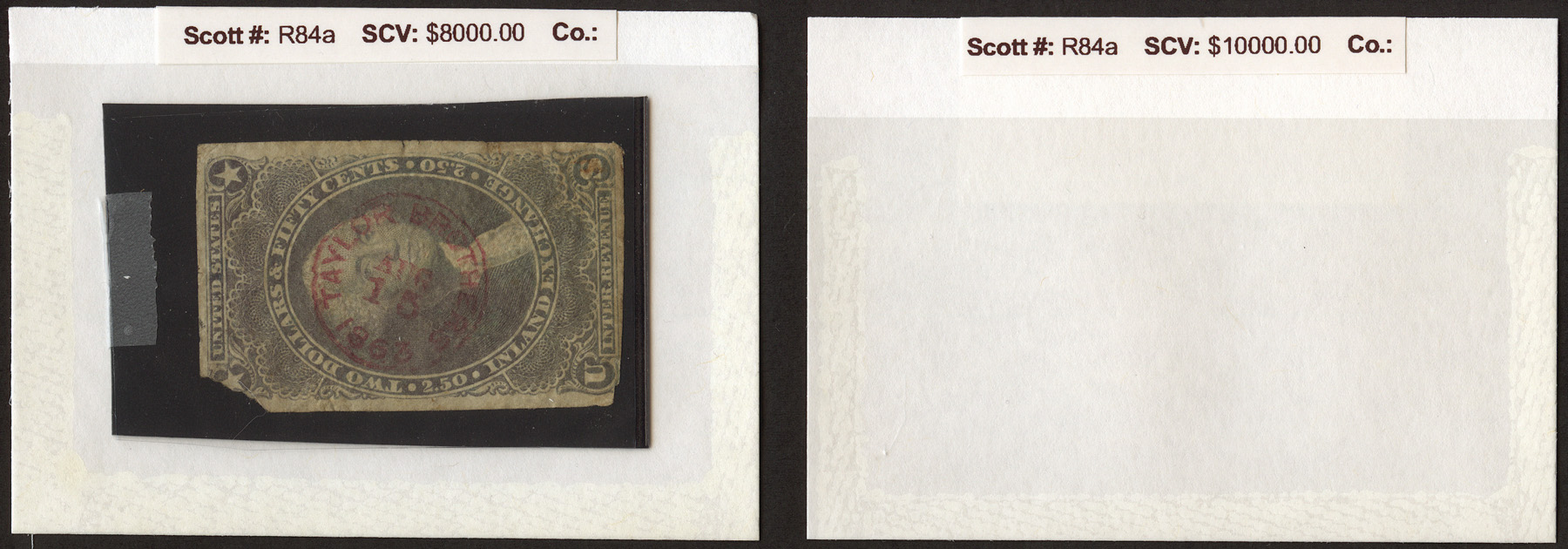
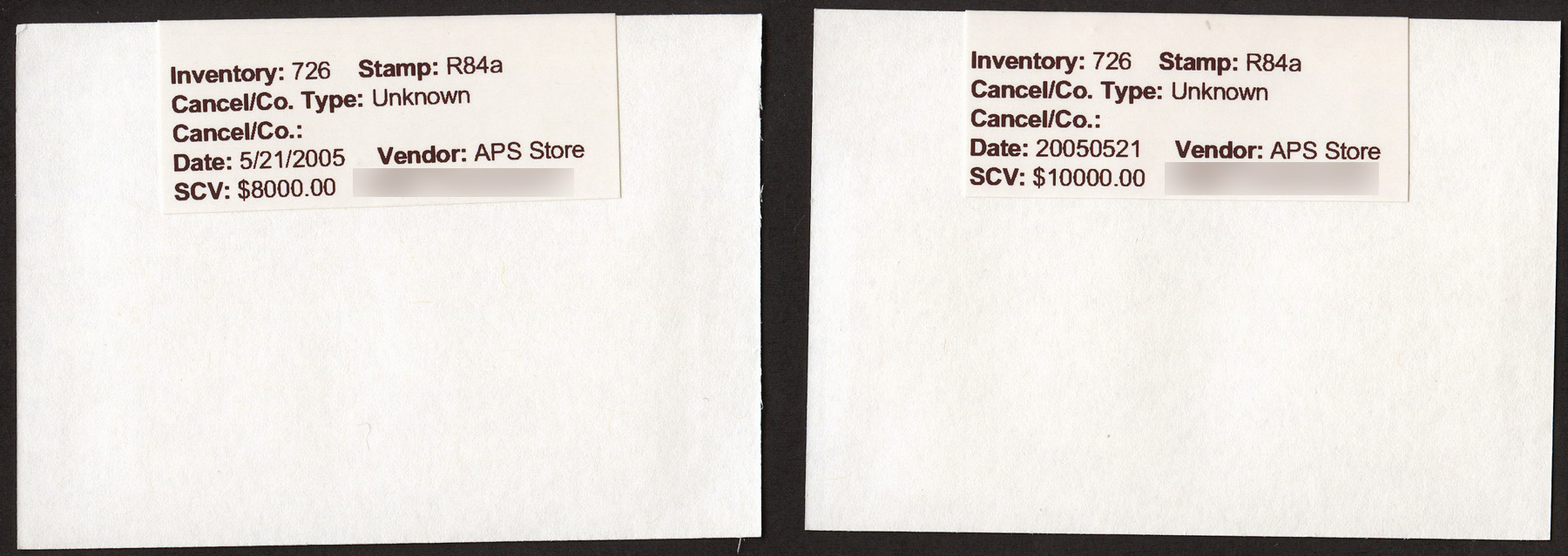
I reprinted the same stamp's label this evening and have scanned the fronts and backs of the two labels side by side on the same pass. I can see no visible difference in the shade of black. The older label is the one with the lower catalog value on it.

Now, I cannot pin down exactly when the older label was printed, only that based on the catalog value, it had to have been between October 2010 and October 2012. However, based on the inventory number I can state that it is closer to the beginning of that time period than the end. In all likelihood, the label was printed 2-3 years ago.

Looking through the rest of that binder, I saw no labels exhibiting any fading.


Send note to Staff  Go to Top of Page
  Previous TopicReplies: 12 / Views: 2,024Next Topic  
 
To participate in the forum you must log in or register.

Go to Top of Page

Disclaimer: While a tremendous amount of effort goes into ensuring the accuracy of the information contained in this site, Stamp Community assumes no liability for errors. Copyright 2005 - 2026 Stamp Community Family - All rights reserved worldwide. Use of any images or content on this website without prior written permission of Stamp Community or the original lender is strictly prohibited.
Privacy Policy / Terms of Use    Advertise Here
Stamp Community Forum © 2007 - 2026 Stamp Community Forums
It took 0.23 seconds to lick this stamp. Powered By: Snitz Forums 2000 Version 3.4.05