Stamp Community Family of Web Sites
Thousands of stamps, consistently graded, competitively priced and hundreds of in-depth blog posts to read


Stamp Community Forum
 
Username:
Password:
Save Password
Forgot your Password?

This page may contain links that result in small commissions to keep this free site up and running.

Welcome Guest! Registering and/or logging in will remove the anchor (bottom) ads. It's Free!

Removing Cancels On Stamps With No Chemicals.

 
To participate in the forum you must log in or register.
Author Previous TopicReplies: 5 / Views: 1,712Next Topic  
Rest in Peace
7742 Posts
Posted 11/01/2013   10:23 am  Show Profile Bookmark this topic Add wert to your friends list Get a Link to this Message
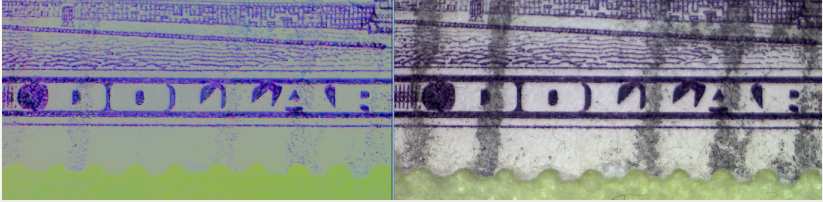
Hi..posted this a long time ago, but for the new people, there is a way to remove the cancel from a stamp to let you look at what is underneath..It is temporary and it is done with a FREE program you can down load..Left side is the after, and right side is the before.

Send note to Staff

Valued Member
213 Posts
Posted 11/01/2013   7:17 pm  Show Profile Bookmark this reply Add petrucellij to your friends list  Get a Link to this Reply
You are using a digital image of the stamp . The software allows you to edit a layer , in this case the cancel layer , to view a virtually un-cancelled stamp. Is this correct ? The software maybe GIMP ?
Send note to Staff  Go to Top of Page
Rest in Peace
7742 Posts
Posted 11/01/2013   7:27 pm  Show Profile Bookmark this reply Add wert to your friends list  Get a Link to this Reply
Close petrucellij..Ginp is a great FREE program..I use Shotwell Photo Viewer...And it can be downloaded FREE for you Windows users.

"""The software allows you to edit a layer"""..No layer editing either..very simple.
Send note to Staff  Go to Top of Page
Edited by wert - 11/01/2013 8:16 pm
Valued Member
187 Posts
Posted 11/19/2013   12:12 pm  Show Profile Bookmark this reply Add JR1960 to your friends list  Get a Link to this Reply
Is it actually "seeing underneath" or is it just extrapolating from the surrounding data what is "probably" there? ie. connecting the dots
Send note to Staff  Go to Top of Page
Valued Member
Canada
242 Posts
Posted 11/19/2013   12:51 pm  Show Profile Bookmark this reply Add Faken to your friends list  Get a Link to this Reply
I can do this in Corel Photopaint as well... you only get in trouble if the stamp itself is grey/black like the color of the postmark ;)
Send note to Staff  Go to Top of Page
Rest in Peace
7742 Posts
Posted 11/20/2013   10:46 am  Show Profile Bookmark this reply Add wert to your friends list  Get a Link to this Reply
Correct Faken....
Send note to Staff  Go to Top of Page
  Previous TopicReplies: 5 / Views: 1,712Next Topic  
 
To participate in the forum you must log in or register.

Go to Top of Page

Disclaimer: While a tremendous amount of effort goes into ensuring the accuracy of the information contained in this site, Stamp Community assumes no liability for errors. Copyright 2005 - 2026 Stamp Community Family - All rights reserved worldwide. Use of any images or content on this website without prior written permission of Stamp Community or the original lender is strictly prohibited.
Privacy Policy / Terms of Use    Advertise Here
Stamp Community Forum © 2007 - 2026 Stamp Community Forums
It took 0.11 seconds to lick this stamp. Powered By: Snitz Forums 2000 Version 3.4.05
