| Author |
 Replies: 30 / Views: 3,827 Replies: 30 / Views: 3,827 |
|
Valued Member
187 Posts |
|
|
|
I see some awesome scans from members here but I can't seem to accomplish it myself. I have a nice digital SLR and I can take a great high res photo that zooms in real nice, but as soon as I run it through the image optimizer it reduces the res and gets all pixelated.
You expert scanners, how do you do it? Anyone have a tutorial or sticky? Thx!
|
|
Send note to Staff
|
|
|
|
|
Pillar Of The Community
United States
5894 Posts |
|
|
I find it is best to use a scanner, rather than take photographs. Of course you can always store the image on a third party website (flickr, photobucket) and then link to it in your posts. |
Send note to Staff 
|
|
|
Pillar Of The Community
United States
1136 Posts |
|
|
Moderator

United States
5107 Posts |
|
|
Hi JR and Mobilman. I've never had a problem with images processed through the Image Optimizer program attached to this website: https://goscf.com/t/15889You just need to make sure that you start with an image of 5MB or less, then set it to about 600 pixels wide, 60% image quality, and I've never had a problem. The final picture size has to be less than 100kb. The image is not hosted anywhere ... just transferred with your message, so it never disappears. Go ahead and practice ... it's quite easy once you get the hand of it. |
|
Send note to Staff
|
|
|
Forum Dad

USA
2059 Posts |
|
|
Pillar Of The Community
United States
5894 Posts |
|
|
I usually scan items at 300-600 dpi. I then use Gnu Image Manipululation www.gimp.org a free image manipulation tool to scale the image to a reasonable size. I then export the image as a jpeg, and reduce image quality to a point where it is still quite visible, but is less than 98kb. I tend to go grand with my images Here is an example. This particular stamp was scanned at 1200 dpi. I then scaled the image with GIMP to about 1400x1400. I then exported the mage as a .jpg, reducing the image quality to about 50% with an image size of 95kb (within the allowable size). The only reason the image stays so crisp, I believe, is that I started out with an extremely high-quality scan. Make sure to click on the image to see it full-sized, and you will see what you can do. 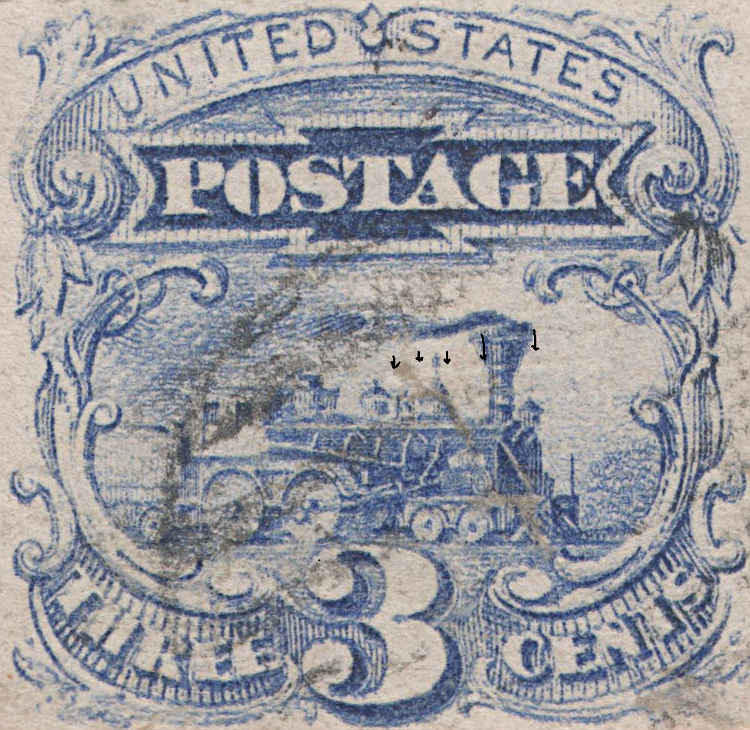 |
|
Send note to Staff
|
| Edited by smauggie - 05/13/2014 4:19 pm |
|
|
Valued Member
187 Posts |
|
|
Check out these photos from coinwatcher who just uses an old Canon Powershot point & shoot. I can take images like this, but when I optimize the quality goes to pot: https://goscf.com/t/36304Thx Smauggie, I will try your technique, it does seem tedious though! |
|
Send note to Staff
|
|
|
Pillar Of The Community
United States
2230 Posts |
|
|
JR, thanks for the link to coinwatcher's photos. They are excellent for a point-and-shoot. I suspect he uses a tripod and a delayed shutter release to minimize camera shake. |
|
Send note to Staff
|
|
|
Pillar Of The Community
United States
2230 Posts |
|
|
After teaching myself coin photography for about a year, I began photographing stamps a couple of months ago. I find the clarity of the images is slightly better with my DSLR camera with a macro lens. However, the color reproduction is much better with the camera compared to the scanner. This is a photo of US Scott #620 with my DSLR camera:  |
|
Send note to Staff
|
|
|
Pillar Of The Community
United States
1614 Posts |
|
|
Pillar Of The Community
United States
2230 Posts |
|
|
Mike, Nice stamp, and excellent scan! I would say the clarity of your scan is about equal to my photo. The color is probably true, also, but I can't tell without seeing your stamp in person. I can't seem to get that clarity with my Canoscan LIDE 200. Years ago I had an Epson scanner that I loved, especially for color reproduction. Then I bought a Windows 7 computer, and the scanner drivers were no longer supported.  |
|
Send note to Staff
|
| Edited by Classic Coins - 05/13/2014 6:49 pm |
|
|
Pillar Of The Community
United States
1614 Posts |
|
|
Thanks - your pic looks great too but is the paper really that white?
The V series of Epson scanners are CCD and scan in 3D. I'll post another scan in a few minutes of a stamp you can really see the 3D effect on. Thought I had it saved but can't find it so I'll just scan it again |
|
Send note to Staff
|
|
|
Pillar Of The Community
United States
2230 Posts |
|
|
Mike, My camera auto-adjusts tone, and could have lightened the paper against the black background. I know the paper is fresh though. I look forward to seeing your 3D scan. |
|
Send note to Staff
|
|
|
Pillar Of The Community
United States
1614 Posts |
|
|
hmm - I'm not getting the same effect anymore with the same stamp. I know I posted it before and you could really see the depth of the ridges and valleys but I'm not seeing it as much with this scan. I don't know what happened. I must have changed some setting along the way - kinda bummed now. It'll give me something to do tonight figuring it out LOL Here's what it looks like right now  |
|
Send note to Staff
|
|
|
Valued Member
187 Posts |
|
|
Great photos guys, but do you use the optimizer to get them to under 100k? In other words, what do you do with the image after you take the photo in order to post it here? |
|
Send note to Staff
|
|
|
Pillar Of The Community
United States
2230 Posts |
|
|
JR,
I crop and reduce the size in an image editor on my home computer. I don't alter or optimize the photos in any other way. I use Serif PhotoPlus Starter Edition. I think I got it free with a scanner. The free version can also be downloaded. |
|
Send note to Staff
|
|
|
Replies: 30 / Views: 3,827 |
|



 Posted 05/13/2014 3:11 pm


